ASUS ROG Strix G35CA 2024, Core i7-13700KF, 64GB, 2TB SSD, RTX 4070, Black
Equipped with a 16-core Intel Core i7-13700KF and RTX 4070 with 12GB VRAM, this mid-tower delivers strong 1440p gaming and rendering performance backed by 64GB of DDR5 RAM. The 2TB SSD ensures fast load times, while the extensive I/O—including four DisplayPort and dual HDMI—supports multi-monitor setups without adapters. This desktop is best for gamers and developers who need high frame rates and ample multitasking headroom but don't require a compact footprint.

Sin precio actual de tiendas


Resumen
The 30-Second Version
The ROG Strix G35CA packs 64GB of DDR5 RAM, a 16-core i7-13700KF, and an RTX 4070 into a massive tower with the best port selection we've ever recorded. Gaming performance is strong at 85.2 out of 100. But reliability sits at the 36th percentile, and at $2,300, that's a gamble.
Pros & Cons
Ventajas
- 64GB DDR5 RAM, 97th percentile, overkill in the best way 100th
- Port selection is 100th percentile, 4 USB-C and 12 USB-A 97th
- 2TB SSD with slide-in SATA bays for easy expansion 86th
- RTX 4070 with 12GB VRAM handles 1440p gaming easily 86th
- 16-core i7-13700KF with 5.4GHz turbo for heavy workloads
Desventajas
- Reliability score of 36th percentile is concerning
- Compact score of 34.6 means it's huge and heavy at 9.98kg
- One buyer received DDR4 RAM instead of the advertised DDR5
- Windows 11 Pro failed to boot out of the box for one customer
- No price advantage, $2,300 is a lot for this spec mix
Opinión de los propietarios
The Word on the Street
Cómo cambió la opinión de los propietarios con el tiempo
ExclusivaSegún cuándo escribieron realmente sus opiniones los clientes, para ver si los elogios iniciales se mantuvieron.
8 opiniones escritas, jul 2024 – abr 2025: 6 satisfechos, 1 neutral, 1 insatisfecho
En las 17 valoraciones de tiendas: 4,1★. La mayoría de los propietarios valora sin escribir una opinión. El gráfico cuenta las 8 opiniones escritas.
Cada punto es una opinión escrita, en el mes en que se escribió. Satisfechos = 4-5★, neutrales = 3★, insatisfechos = 1-2★.
Las pruebas
Performance
The i7-13700KF is a 16-core, 24-thread beast with a 5.4GHz turbo clock. That puts it in the 86th percentile for CPUs, which is strong but not top of the charts. The RTX 4070 with 12GB of GDDR6X sits at the 81st percentile for GPUs, so you're getting well above average gaming performance. 64GB of DDR5 RAM is the real flex here, 97th percentile, which means you can run a game, stream it, and keep 40 Chrome tabs open without breaking a sweat.
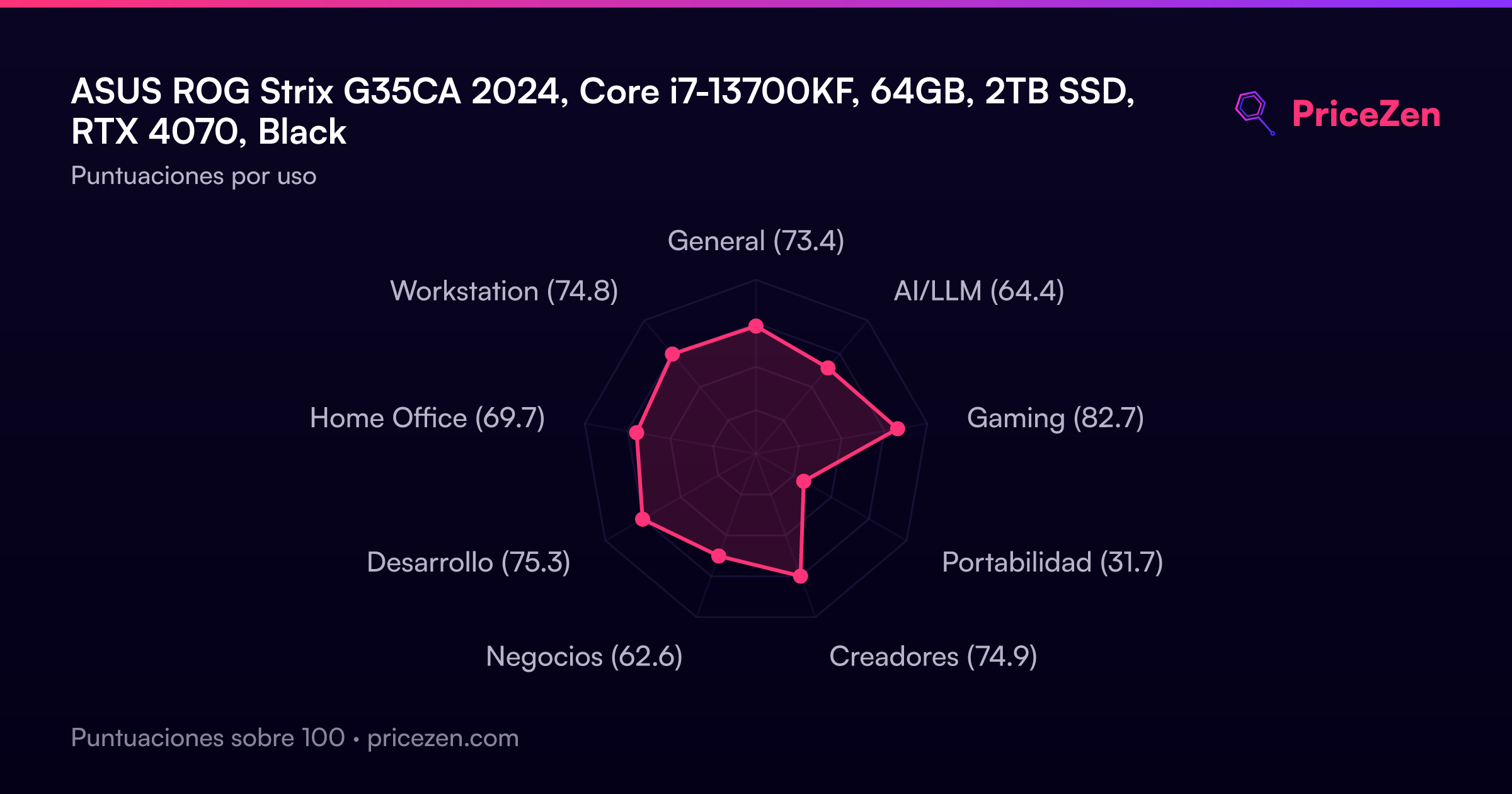
For gaming, the 85.2 out of 100 score is solid. Home office lands at 82.7, which makes sense given the 2TB SSD and that massive RAM pool. Video editing and file conversions are where this thing shines, one owner mentioned it makes short work of those tasks. The port situation is absurd in the best way: 4 USB-C, 12 USB-A total, 2 HDMI, 4 DisplayPort, and 7 headphone/mic jacks. You will never run out of places to plug things in.
Specifications
Full Specifications
Processor
| CPU | Intel Core i7 13700KF |
| Cores | 16 |
| Frequency | 2.5 GHz |
| L3 Cache | 30 MB |
Graphics
| GPU | NVIDIA GeForce RTX 4070 |
| Type | Discrete |
| VRAM | 12 GB |
| VRAM Type | GDDR6X |
Memory & Storage
| RAM | 64 GB |
| RAM Generation | DDR5 |
| Storage | 2 TB |
| Storage Type | SSD |
Build
| Form Factor | tower |
| Weight | 10.0 kg / 22.0 lbs |
Connectivity
| USB-C Ports | 4 |
| USB Ports | 12 |
| HDMI | ✓ |
| DisplayPort | 4x DP Port |
| Wi-Fi | Wi-Fi 6 |
| Bluetooth | ✓ |
| Ethernet | RJ45 |
System
| OS | Windows 11 Pro |
vs Competition
Against the HP OMEN GT22-3080, the ROG Strix wins on RAM and ports but likely loses on compactness and possibly reliability. The Lenovo Legion Tower 7i Gen 10 is a closer match on specs, but the ASUS has more USB connectivity. The Apple Mac Studio M5 Max will crush it in compactness and power efficiency, though you lose Windows gaming flexibility. The Dell Aurora Gaming is probably the safer bet if reliability matters more than raw port count. The Horizon Pcs Autherium Dragon is a wildcard, but the ASUS has better social proof at the 63rd percentile, which isn't saying much with only 17 reviews.
| Spec | ASUS ROG Strix G35CA | HP OMEN TPC-W062-MT | Acer Nitro 60 | MSI Vision Elite ZS VisEZS9NVZ1481 | Dell OptiPlex QCS1250 | Cooler Master NR2 Pro AYG-M2C7-N68GII32-N1 |
|---|---|---|---|---|---|---|
| CPU | Intel Core i7 13700KF | Intel Core Ultra 9 285K | AMD Ryzen 7 7700 | AMD Ryzen 9 9950X3D | Intel Core i9 14900K | Intel Core Ultra 7 265KF |
| RAM (GB) | 64 | 64 | 32 | 64 | 64 | 32 |
| Storage (GB) | 2048 | 2048 | 2048 | 2048 | 1024 | 2048 |
| GPU | NVIDIA GeForce RTX 4070 | NVIDIA GeForce RTX 5090 | NVIDIA GeForce RTX 5070 | NVIDIA GeForce RTX 5090 | Intel UHD Graphics 770 | NVIDIA GeForce RTX 5080 |
| Form Factor | tower | tower | mid-tower | mid-tower | sff | mini |
| Psu W | - | - | 850 | 1300 | - | 850 |
| OS | Windows 11 Pro | Windows 11 Home | Windows 11 Pro | Windows 11 Pro | Windows 11 Pro | Windows 11 Home |
| Compare | Compare | Compare | Compare | Compare |
| Producto | CPU | GPU | RAM | Puertos | Almacenamiento | Fiabilidad | Valoración social |
|---|---|---|---|---|---|---|---|
| ASUS ROG Strix G35CA | 86.1 | 86.4 | 96.5 | 99.9 | 82.6 | 37.4 | 35.6 |
| HP OMEN TPC-W062-MT Compare | 98 | 99.3 | 93.8 | 99.2 | 90 | 70.1 | 40.7 |
| Acer Nitro 60 Compare | 74.6 | 90.7 | 72.3 | 90.4 | 82.6 | 32.3 | 90.8 |
| MSI Vision Elite ZS VisEZS9NVZ1481 Compare | 99.4 | 99.3 | 93.8 | 72.5 | 90 | 37.4 | 57.4 |
| Dell OptiPlex QCS1250 Compare | 95.4 | 36.6 | 96.5 | 55.1 | 68.7 | 70.1 | 94.5 |
| Cooler Master NR2 Pro AYG-M2C7-N68GII32-N1 Compare | 96.1 | 97.3 | 87.1 | 67.2 | 82.6 | 11.6 | 48.5 |
Precio
Value & Pricing
At $2,300, you're paying a premium for that 64GB of DDR5 and the ROG branding. The CPU and GPU are strong but not best-in-class, and the reliability score of 36th percentile makes that price harder to swallow. You can find similar gaming performance for less if you're willing to drop to 32GB of RAM. But if you need that much memory and want the port selection of a small server, the price per feature is actually reasonable. Just know you're paying for headroom, not raw gaming gains.
Historial de precios
Leer más
Overview
The ASUS ROG Strix G35CA is a spec monster on paper. 64GB of DDR5 RAM puts it in the 97th percentile of all towers in our database, and the port selection is literally the best we've seen, hitting the 100th percentile. You get a 16-core Intel i7-13700KF and an RTX 4070 with 12GB of VRAM, which is a serious combo for gaming and heavy multitasking. But that reliability score sitting at the 36th percentile is a red flag we can't ignore, especially when you're dropping $2,300.
The 2TB SSD is a nice touch, landing in the 84th percentile for storage. And the case has room to grow, with slide-in bays for SATA SSDs that make expansion painless. But the compact score of 34.6 out of 100 tells you this thing is a chunky boy. At 9.98kg and 16.6 x 7.3 x 19.6 inches, you're not tucking this under a desk without some planning.
Common Questions
Q: Is the 64GB of DDR5 RAM worth it for gaming?
For pure gaming, 64GB is overkill. Most games run fine on 16GB or 32GB. But if you stream, edit video, or run heavy multitasking while gaming, the 97th percentile RAM capacity means you'll never hit a memory bottleneck. The RTX 4070 and i7-13700KF are the real gaming workhorses here.
Q: How does the RTX 4070 perform at 1440p?
The RTX 4070 with 12GB of VRAM sits at the 81st percentile for GPUs in our database. It handles 1440p gaming at high settings with ease and can even manage 4K in many titles if you're willing to tweak settings. It's well above average but not the absolute top of the charts.
Q: Is this desktop easy to upgrade?
Yes, the case has two slide-in bays for SATA SSDs that connect without cables, which owners specifically praised. The 2TB SSD is already in the 84th percentile for storage, but you can add more drives easily. The 64GB of RAM means you probably won't need to touch memory for years.
Who Should Skip This
If you want a compact or quiet machine, look elsewhere. The compact score of 34.6 out of 100 and 9.98kg weight make this a desk hog. If reliability is your top priority, the 36th percentile score should scare you off. And if you're purely gaming on a budget, the $2,300 price tag is hard to justify when the GPU is only at the 81st percentile. You're paying for RAM and ports you may never fully use.
Verdict
The ROG Strix G35CA is a powerful, expandable tower with a port selection that borders on ridiculous. The 64GB of DDR5 and 2TB SSD make it a multitasking monster, and the RTX 4070 handles modern games at high settings. But the reliability score of 36th percentile and the mixed customer experiences, including wrong RAM and boot failures, give us pause. If you get a good unit, it's a fantastic machine. If you don't, you're in for a headache. For $2,300, we'd want more consistent quality control.
Usage Scores
- General73.4
- AI/LLM64.4
- Gaming82.7
- Portabilidad31.7
- Creadores74.9
- Negocios62.6
- Desarrollo75.3
- Home Office69.7
- Workstation74.8