HP Z2 Tower Z2 G9 TWR 2024, Core i9-14900, 32GB, 1TB SSD, T1000, Black
Designed with Intel Core i9-14900 24-core processor and NVIDIA T1000 graphics, this workstation prioritizes zero-throttling for sustained rendering and simulation. Tool-less access simplifies upgrades, and ISV certification ensures smooth operation with professional applications. Best for developers and engineers needing a reliable, expandable tower for multithreaded builds and simulations.

Sin precio actual de tiendas


Resumen
The 30-Second Version
The HP Z2 Tower G9 pairs a beastly 24-core i9-14900 with an entry-level T1000 GPU. It's a CPU monster for developers and workstation users, but the graphics card holds it back for GPU-heavy work. At $2,615, it's worth it if your software is ISV certified and CPU-bound.
Pros & Cons
Ventajas
- 24-core i9-14900 is a rendering and compiling monster 86th
- Tool-less access makes upgrades genuinely easy 76th
- ISV certified for pro software peace of mind 73rd
- 32GB of DDR5 out of the box is a solid start 70th
Desventajas
- T1000 GPU is entry-level for a workstation at this price
- 450W PSU limits future GPU upgrades
- 7.2kg means you won't be moving it around much
- Only 4 reviews, so long-term reliability is still a question mark
Las pruebas
Performance
The i9-14900 is the star here, sitting in the 86th percentile for CPUs in our database. That's a serious chip for rendering, compiling, and simulation work. The 32GB of DDR5 lands at the 78th percentile, which is plenty for most pro workloads but not exactly future-proof if you're running multiple VMs. Storage is a 1TB NVMe at the 74th percentile, fast and adequate. The T1000 GPU is the weak link at the 61st percentile. It'll handle 3D modeling and CAD fine, but don't expect to do any serious real-time ray tracing or GPU rendering without waiting around.
Specifications
Full Specifications
Processor
| CPU | Intel Core i9-14900 |
| Cores | 24 |
| Frequency | 2.0 GHz |
| L3 Cache | 36 MB |
Graphics
| GPU | NVIDIA T1000 |
| Type | Discrete |
| VRAM | 8 GB |
Memory & Storage
| RAM | 32 GB |
| RAM Generation | DDR5 |
| Storage | 1 TB |
| Storage Type | NVMe SSD |
Build
| Form Factor | mid-tower |
| PSU | 450 |
| Weight | 7.2 kg / 15.9 lbs |
Connectivity
| USB-C Ports | 0 |
| USB Ports | 10 |
| DisplayPort | 2x DisplayPort 1.4 |
| Ethernet | Gigabit Ethernet |
System
| OS | Windows 11 Pro |
vs Competition
Stacked against the Lenovo Legion 90Y6003JUS, the HP wins on CPU but loses badly on GPU. The Legion is a gaming machine with a much beefier graphics card, so it'll crush the Z2 in anything GPU-heavy. The Apple Mac Studio M4 Max is in a different league for creative work and sips power, but you're locked into macOS and can't upgrade a thing. The Dell Tower ECT1250 is the closest direct competitor, and it's a coin flip depending on config. The MSI MEG Vision X AI and CLX SET are gaming-focused machines that trade workstation reliability for flashy specs. For pure CPU work with pro software certification, the HP holds its own.
| Spec | HP Z2 Tower Z2 G9 TWR | Apple Mac Studio M5 Max | Lenovo T Series Towers Legion Tower 5a Gen 10 | Dell Desktop ECT1250 | ASUS ROG GM700 | MSI Aegis ZS2 A9NVP-1407US |
|---|---|---|---|---|---|---|
| CPU | Intel Core i9-14900 | Apple M5 Max | AMD Ryzen 7 7800X3D | Intel Core Ultra 7 265 | AMD Ryzen 7 9800X3D | AMD Ryzen 9 9900X |
| RAM (GB) | 32 | 36 | 32 | 32 | 32 | 32 |
| Storage (GB) | 1024 | 1024 | 4096 | 2048 | 2048 | 2048 |
| GPU | NVIDIA T1000 | Apple (32-Core) | NVIDIA GeForce RTX 5070 Ti | Intel UHD Graphics | NVIDIA GeForce RTX 5070 Ti | NVIDIA GeForce RTX 5070 |
| Form Factor | mid-tower | mini | mid-tower | sff | mid-tower | mid-tower |
| Psu W | 450 | 480 | 850 | 180 | 850 | 750 |
| OS | Windows 11 Pro | macOS | Windows 11 Home | Windows 11 Home | Windows 11 Home | Windows 11 Home |
| Compare | Compare | Compare | Compare | Compare |
| Producto | CPU | GPU | RAM | Puertos | Almacenamiento | Fiabilidad |
|---|---|---|---|---|---|---|
| HP Z2 Tower Z2 G9 TWR | 85.8 | 66.8 | 76.3 | 72.5 | 68.7 | 70.2 |
| Apple Mac Studio M5 Max Compare | 95.7 | 85 | 92.4 | 89.1 | 68.7 | 99.3 |
| Lenovo T Series Towers Legion Tower 5a Gen 10 Compare | 73.2 | 94.6 | 77.9 | 88.5 | 98.1 | 70.2 |
| Dell Desktop ECT1250 Compare | 88.1 | 60.1 | 81.6 | 75 | 82.6 | 70.2 |
| ASUS ROG GM700 Compare | 80.4 | 94.6 | 81.6 | 96.1 | 90 | 37.6 |
| MSI Aegis ZS2 A9NVP-1407US Compare | 92.4 | 90.7 | 87 | 90.4 | 82.6 | 37.6 |
Precio
Value & Pricing
At $2,615 USD, this is a lot of money for a machine with an entry-level workstation GPU. You're paying for the i9-14900, the ISV certifications, and HP's build quality. If your work is CPU-bound, like code compilation or CPU rendering, the value is there. If you need GPU acceleration for 3D work or AI, you'll be spending more to upgrade the card, and that 450W PSU won't give you much headroom. It's a fair price for what it is, but not a steal.
Leer más
Overview
The HP Z2 Tower G9 is a proper workstation, not a gaming rig with a fancy badge. You get a 24-core i9-14900, 32GB of DDR5, and a 1TB NVMe drive in a mid-tower that's built to be opened up and messed with. HP's whole pitch here is zero throttling and ISV certification, which matters if you're running SolidWorks or AutoCAD for a living.
The catch is the GPU. An NVIDIA T1000 with 8GB is a solid entry-level workstation card, but it's not going to blow anyone's hair back. This machine is aimed at developers and workstation users who need CPU muscle and reliability more than raw graphics horsepower.
Common Questions
Q: Can I upgrade the GPU later?
Yes, the tool-less case makes swapping parts easy, but the 450W PSU will limit you to lower-power cards. You'd likely need a PSU upgrade for anything beyond a mid-range workstation GPU.
Q: Is this good for gaming?
Not really. The T1000 is a workstation card built for stability in pro apps, not frame rates. You could play older or lighter games, but this machine is not a gaming rig.
Q: Does it come with Windows 11 Pro?
Yes, it ships with Windows 11 Pro, which gives you BitLocker, Remote Desktop, and domain join support out of the box.
Who Should Skip This
Skip this if you do 3D rendering, video editing with heavy GPU effects, or any kind of AI/ML work. The T1000 will frustrate you, and the 450W PSU makes upgrading to a proper GPU a project. Also skip it if you want something quiet and compact, this is a 7.2kg mid-tower that scores terribly on compactness.
Verdict
Buy this if you're a developer, engineer, or CAD user who needs a reliable, ISV-certified machine with serious CPU power and doesn't mind the entry-level GPU. It's a workhorse, not a show pony. The tool-less design means you can drop in more RAM or storage later, which is a nice bonus. Just know that the T1000 is the bottleneck if your workflow leans on graphics.
Usage Scores
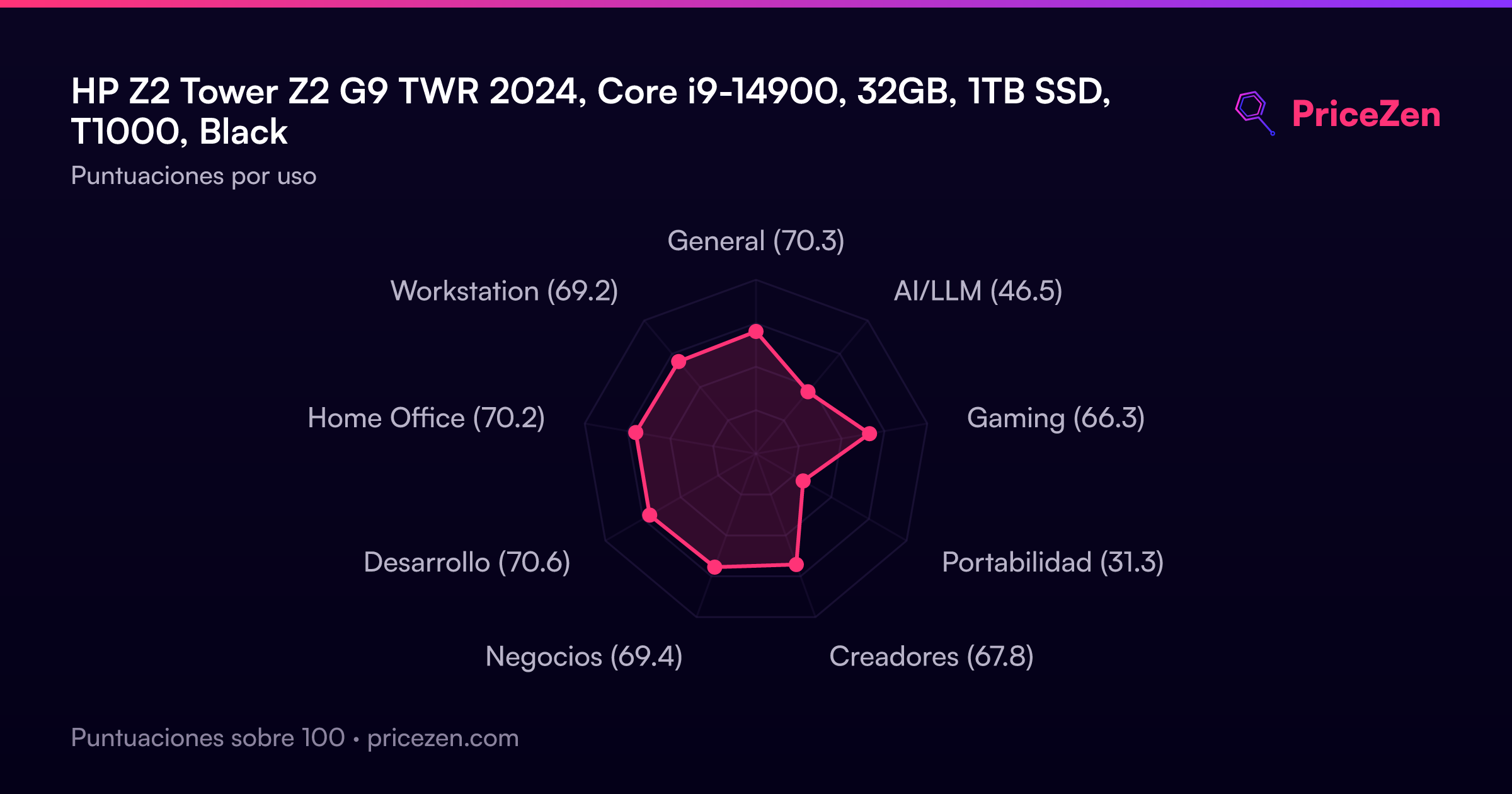
- General70.3
- AI/LLM46.5
- Gaming66.3
- Portabilidad31.3
- Creadores67.8
- Negocios69.4
- Desarrollo70.6
- Home Office70.2
- Workstation69.2