Lenovo ThinkCentre Neo 50s Gen 6 2026, Core Ultra 9 285, 32GB, 1TB SSD, Black
The Intel Core Ultra 9 285 with 18 cores and boost speeds up to 5.40 GHz powers this small form factor desktop, paired with 32 GB DDR5 RAM and a 1 TB NVMe SSD for fast multitasking. Its compact 13.4-inch chassis and 200W PSU make it a space-saving option, while Wi-Fi 6 and Bluetooth 5.4 keep connectivity current. Best for home office workers and developers who need a quiet, powerful machine for productivity tasks, though its integrated graphics limit gaming potential.

Sin precio actual de tiendas
Resumen
The 30-Second Version
The ThinkCentre Neo 50s Gen 6 packs a 94th percentile Core Ultra 9 285 CPU into a compact SFF chassis, making it a productivity monster for CPU-bound work. But the integrated graphics, 200W PSU, and limited ports mean it's a one-trick pony. At $1,480 USD, it's a fair deal for developers and business users who need raw processing power and don't care about gaming. If you need GPU muscle or more connectivity, look at the Dell Aurora or HP OMEN instead.
Pros & Cons
Ventajas
- Core Ultra 9 285 CPU is a 94th percentile performer, one of the best desktop processors we've tracked 94th
- 32GB DDR5 RAM gives plenty of headroom for heavy multitasking and virtual machines 72nd
- 1TB NVMe SSD at the 70th percentile means fast boot times and quick app launches 70th
- Compact SFF chassis at 13.4 x 3.64 x 11.5 inches fits in tight workspaces 69th
- Windows 11 Pro preloaded with Wi-Fi 6 and Bluetooth 5.4 for modern connectivity
Desventajas
- Integrated Intel Graphics lands at the 60th percentile and kills any gaming ambitions
- Port selection is a weak spot at the 16th percentile, which is disappointing for a business desktop
- 200W power supply limits future GPU upgrades significantly
- Social proof is thin at the 33rd percentile with only 4 reviews in our database
- No optical drive, which may annoy legacy software users in business environments
Las pruebas
Performance
The Core Ultra 9 285 is the star here, and it's not close. With 18 cores split between performance and efficiency clusters, plus a 5.40 GHz max turbo on the P-cores, this CPU lands in the 94th percentile for desktop processors in our database. That means it's one of the best on the market right now for multi-threaded workloads. Video encoding, code compilation, large dataset crunching, running local AI models, all of it will feel snappy. The 32GB of DDR5 RAM at the 73rd percentile is solid, giving you enough headroom for virtual machines or memory-hungry dev environments without breaking a sweat.
The integrated Intel Graphics is where things get real. It's fine for driving multiple 4K displays, watching video, and basic photo editing. But it's not a discrete GPU, and the 60th percentile ranking reflects that. Don't expect to game on this thing. The gaming score of 15.2 out of 100 is the weakest area by a mile, and that's being generous. The 200W power supply also means you can't just slap in a mid-range graphics card later. This machine is built for CPU-bound work, and the performance profile reflects that trade-off clearly.
Specifications
Full Specifications
Processor
| CPU | Intel Core Ultra 9 285 |
| Cores | 24 |
| Frequency | 2.5 GHz |
| L3 Cache | 36 MB |
Graphics
| GPU | Intel Graphics |
| Type | Integrated |
| VRAM Type | GDDR6 |
Memory & Storage
| RAM | 32 GB |
| RAM Generation | DDR5 |
| Storage | 1 TB |
| Storage Type | NVMe SSD |
Build
| Form Factor | sff |
| PSU | 200 |
Connectivity
| Wi-Fi | Wi-Fi 6 |
| Bluetooth | Bluetooth 5.4 |
System
| OS | Windows 11 Pro |
vs Competition
Stacked against the Apple Mac Studio M3 Ultra, the ThinkCentre gets embarrassed on GPU performance and port selection. The Mac Studio is a content creation beast with Apple's unified memory architecture and far more connectivity. But it also costs significantly more, and if you're locked into Windows or need x86 compatibility, the Lenovo is the practical choice. The Core Ultra 9 285 holds its own against Apple's silicon in multi-threaded x86 workloads, though it draws more power to do it.
The Dell Aurora ACT1250 and HP OMEN GT16-0364 are gaming desktops first. They'll crush the Lenovo in any GPU-bound task, but their CPUs don't match the Core Ultra 9 285 for raw multi-core productivity. The MSI Aegis ZS2 and CLX SET are similar stories, built for frame rates rather than compile times. If you're a developer or data analyst, the Lenovo makes more sense. If you want to game after work, any of those competitors will serve you better. The trade-off is stark: CPU dominance versus GPU capability.
| Spec | Lenovo ThinkCentre Neo 50s Gen 6 | Apple Mac Studio M5 Max | HP OMEN GT16-0364 | Dell Desktop ECT1250 | ASUS ROG GM700 | MSI Aegis ZS2 A9NVP-1407US |
|---|---|---|---|---|---|---|
| CPU | Intel Core Ultra 9 285 | Apple M5 Max | AMD Ryzen 7 8700F | Intel Core Ultra 7 265 | AMD Ryzen 7 9800X3D | AMD Ryzen 9 9900X |
| RAM (GB) | 32 | 48 | 32 | 32 | 32 | 32 |
| Storage (GB) | 1024 | 1024 | 1024 | 2048 | 2048 | 2048 |
| GPU | AMD Intel Graphics | Apple (40-Core) | NVIDIA GeForce RTX 5070 | Intel UHD Graphics | NVIDIA GeForce RTX 5070 Ti | NVIDIA GeForce RTX 5070 |
| Form Factor | sff | mini | mid-tower | sff | mid-tower | mid-tower |
| Psu W | 200 | 480 | 850 | 180 | 850 | 750 |
| OS | Windows 11 Pro | macOS | Windows 11 Home | Windows 11 Home | Windows 11 Home | Windows 11 Home |
| Compare | Compare | Compare | Compare | Compare |
| Producto | CPU | GPU | RAM | Puertos | Almacenamiento | Fiabilidad |
|---|---|---|---|---|---|---|
| Lenovo ThinkCentre Neo 50s Gen 6 | 93.9 | 60 | 72.2 | 15.6 | 68.6 | 70.3 |
| Apple Mac Studio M5 Max Compare | 95.7 | 84.9 | 95 | 89.1 | 68.6 | 99.3 |
| HP OMEN GT16-0364 Compare | 69.3 | 90.6 | 87 | 97.9 | 53.3 | 70.3 |
| Dell Desktop ECT1250 Compare | 88.1 | 60 | 81.6 | 75 | 82.5 | 70.3 |
| ASUS ROG GM700 Compare | 80.3 | 94.6 | 81.6 | 96.1 | 90 | 37.8 |
| MSI Aegis ZS2 A9NVP-1407US Compare | 92.3 | 90.6 | 87 | 90.4 | 82.5 | 37.8 |
Precio
Value & Pricing
At $1,480 USD, the ThinkCentre Neo 50s Gen 6 sits in an awkward spot. You're paying a premium for that Core Ultra 9 285, which is genuinely a top-tier CPU. But you're not getting a discrete GPU, the port selection is limited, and the 200W PSU means upgrades are constrained. For pure CPU performance per dollar, this is actually reasonable. That processor alone would cost a chunk of change if you built your own system.
But compare it to what else is out there. The Apple Mac Studio M3 Ultra is in a different league entirely, both in price and performance. The Dell Aurora ACT1250 and HP OMEN GT16-0364 are gaming-oriented machines that trade CPU ranking for GPU muscle. If you need a balanced system, this Lenovo feels lopsided. If you need a CPU monster in a small box, it's a fair deal. Just know you're paying for the processor and accepting compromises everywhere else.
Leer más
Overview
The ThinkCentre Neo 50s Gen 6 is Lenovo's small form factor workhorse for people who need serious CPU grunt without a tower the size of a mini fridge. At 13.4 inches deep and 9.54 pounds, it's compact enough to tuck under a desk or mount behind a monitor, but it packs an Intel Core Ultra 9 285 with 18 cores and a boost clock up to 5.40 GHz. That's a lot of silicon for a box this size.
Who's this for? Home office power users, developers, and business folks who run heavy spreadsheets, compile code, or juggle dozens of browser tabs while pretending they'll close some of them. The 32GB of DDR5 RAM and 1TB NVMe SSD mean you won't be waiting on memory swaps or slow disk reads. Windows 11 Pro comes preloaded, so it's ready for domain joins and BitLocker out of the box.
What makes it interesting is the mismatch between the CPU and everything else. The processor sits in the 94th percentile for this category, which is genuinely impressive. But the integrated Intel Graphics, 200W power supply, and limited port selection tell a different story. This is a productivity machine, not a jack-of-all-trades. And that's fine, as long as you know what you're getting into.
Common Questions
Q: Can I upgrade the graphics card in this system?
Realistically, no. The 200W power supply is the main constraint, as most discrete GPUs require 300W or more. The small form factor chassis also limits physical space for a full-size card. You could potentially fit a low-profile, low-power GPU, but even then the PSU would be tight. This machine is designed for integrated graphics, and that's how it should stay.
Q: Is this good for gaming?
No. The integrated Intel Graphics scores 15.2 out of 100 for gaming in our database, which is the weakest area for this system. You might get playable frame rates in older or less demanding titles at low settings, but anything modern will struggle. If gaming matters to you, look at the HP OMEN GT16-0364 or Dell Aurora ACT1250 instead.
Q: How many monitors can this support?
The integrated Intel Graphics can technically drive multiple displays, but the port selection is limited at the 16th percentile for this category. You'll likely need adapters or a docking station to run more than two monitors comfortably. For a business desktop, this is a disappointing limitation, especially if you're used to dedicated display outputs.
Q: Is the Core Ultra 9 285 worth the premium over a Core i7 or Ryzen 7?
For multi-threaded workloads like video encoding, code compilation, and data analysis, yes. The 18-core design and 5.40 GHz boost clock put it in the 94th percentile for desktop CPUs, which is genuinely top-tier. If your work is single-threaded or light, you won't notice the difference and could save money with a lower-tier chip. But for heavy productivity, the extra cores earn their keep.
Who Should Skip This
Gamers should absolutely skip this. The integrated graphics and 200W PSU make it a non-starter for anything beyond casual or retro gaming. You'd be far better served by the HP OMEN GT16-0364 or Dell Aurora ACT1250, both of which pair solid CPUs with discrete GPUs. The gaming score of 15.2 out of 100 tells you everything you need to know.
Also skip it if you need lots of ports. The 16th percentile port selection is a real letdown for a business desktop. If you're running multiple monitors, external storage arrays, and a pile of USB peripherals, you'll be fighting for connectivity. A machine with better I/O, or at least one with a more flexible upgrade path, would save you the headache of dongles and docks. Content creators who need GPU acceleration for rendering or video work should also look elsewhere, the Mac Studio M3 Ultra is the obvious alternative if budget allows.
Verdict
For home office and business users who live in spreadsheets, databases, and browser tabs, the ThinkCentre Neo 50s Gen 6 is a strong pick. The Core Ultra 9 285 will chew through anything you throw at it, and the 32GB of RAM means you won't hit memory limits anytime soon. The compact chassis is a bonus for desk real estate. If your work is CPU-bound and you don't care about gaming, this machine will serve you well for years.
For developers, it's a bit more nuanced. The CPU is fantastic for compilation and container workloads, and the 1TB NVMe SSD keeps things snappy. But the limited port selection at the 16th percentile is a real annoyance if you need multiple monitors, external drives, and peripherals. You'll likely need a USB hub or dock, which adds cost and clutter. If you can live with that, the raw processing power is hard to beat at this price. If you need more connectivity or any GPU acceleration, look elsewhere.
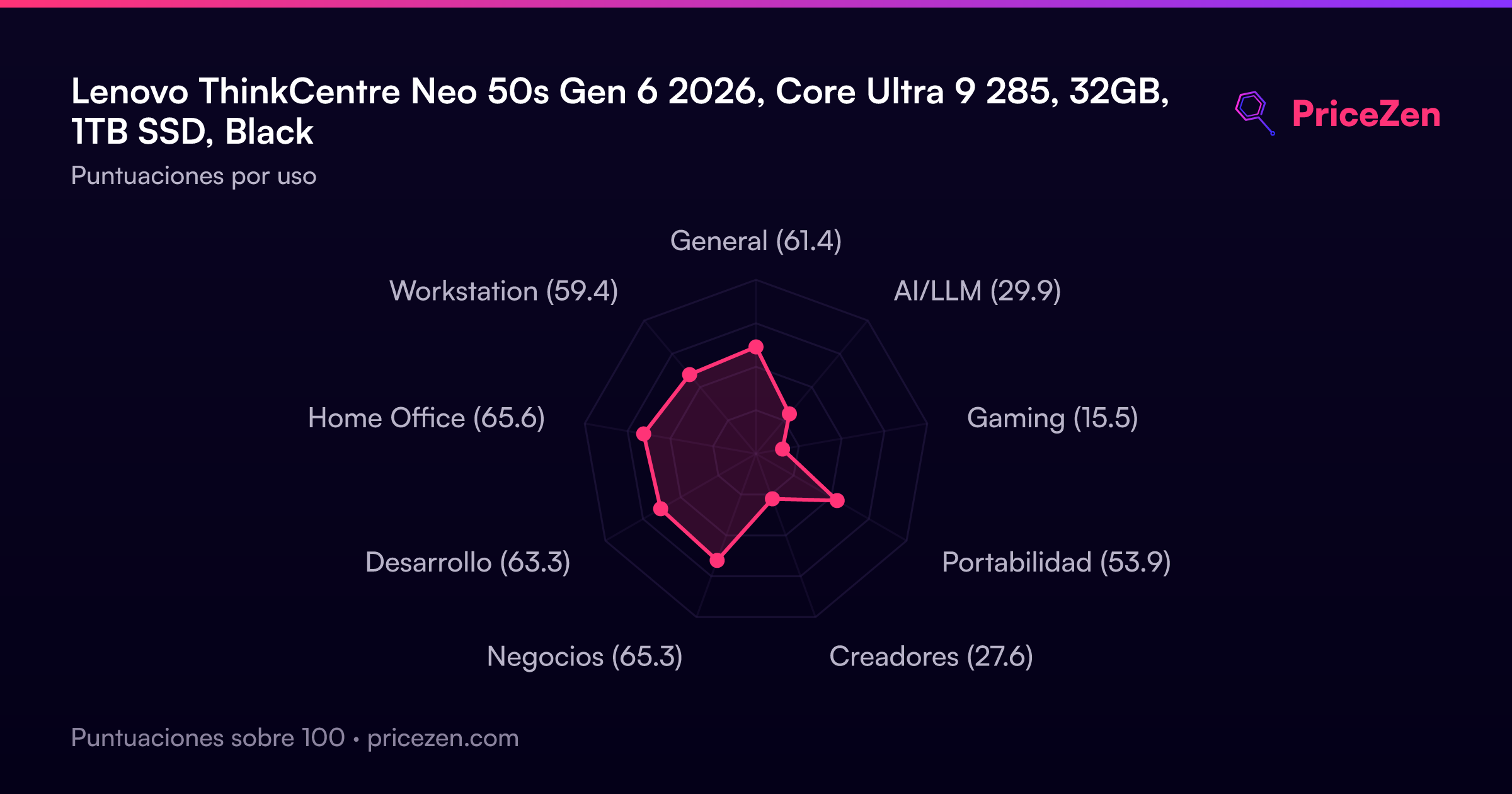
Usage Scores
- General61.4
- AI/LLM29.9
- Gaming15.5
- Portabilidad53.9
- Creadores27.6
- Negocios65.3
- Desarrollo63.3
- Home Office65.6
- Workstation59.4