Lenovo ThinkCentre M710q mini, Core i3-6100T, 8GB, 256GB SSD, Black
The Intel Core i3 6100T processor and 8GB DDR4 RAM handle everyday office tasks smoothly, while the 256GB NVMe SSD ensures fast boot times and app loading. Its compact 2.57kg build and six USB-A ports make it easy to fit into tight workspaces and connect peripherals without extra hubs. Best for small office workers or home users who need a reliable, space-saving Windows 10 Pro desktop for web browsing, document editing, and light multitasking.

Sin precio actual de tiendas
Dónde lo vimos antes. Consulta el precio de hoy en la tienda.











Resumen
The 30-Second Version
The Lenovo ThinkCentre M710q is a refurbished mini PC that's perfect for basic office work at a very low price. It comes with Windows 11 Pro, a keyboard, and a mouse, making it a complete setup for around $138 USD. Just don't expect it to handle gaming or heavy multitasking with its dual-core CPU and 8GB of RAM.
Pros & Cons
Ventajas
- Tiny footprint, fits almost anywhere 80th
- Very affordable as a refurbished unit 70th
- Includes keyboard, mouse, and Windows 11 Pro
- Dual DisplayPort outputs for two monitors
- Solid Lenovo build quality
Desventajas
- Dual-core CPU is slow by modern standards
- Only 8GB of RAM, and it's not much headroom
- 256GB storage fills up fast
- No USB-C ports
- Integrated graphics can't handle gaming
Opinión de los propietarios
The Word on the Street
Las pruebas
Performance
Let's be real about the Core i3 6100T. It's a 6th gen dual-core chip from 2015, and our database puts it in the 6th percentile for CPUs in this category. That means it's slower than almost everything else we've tested. But here's the thing: for basic office tasks, it still works. Opening Chrome tabs, running Microsoft Office, and hopping on a Zoom call are all within reach. It just won't do any of those things particularly fast.
The 8GB of DDR4 RAM is the bigger concern. It sits in the 9th percentile, which is one of the lowest scores we've seen. With Windows 11 and a handful of browser tabs, you'll be bumping up against that ceiling pretty quickly. The 256GB NVMe SSD is at least snappy for boot times and app launches, though it's on the smaller side at the 19th percentile. The integrated HD Graphics 530 technically ranks high in our GPU percentile, but that's more a reflection of how little GPU power exists in this category overall. It'll handle dual DisplayPort monitors fine, which is what matters for office work.
Specifications
Full Specifications
Processor
| CPU | Intel Core i3 6100T |
| Cores | 2 |
| Frequency | 3.2 GHz |
| L3 Cache | 3 MB |
Graphics
| GPU | Intel HD Graphics |
| Type | Integrated |
| VRAM Type | GDDR6 |
Memory & Storage
| RAM | 8 GB |
| RAM Generation | DDR4 |
| Storage | 256 GB |
| Storage Type | NVMe SSD |
Build
| Form Factor | mini |
| Weight | 2.6 kg / 5.7 lbs |
Connectivity
| USB Ports | 6 |
| DisplayPort | 2x DisplayPort |
| Bluetooth | Yes |
| Ethernet | Fast Ethernet |
System
| OS | Windows 10 Pro |
vs Competition
Stacked against the Dell Optiplex 3060 and HP ProDesk G4, the M710q holds its own in the refurbished business PC space. All three are similar vintage machines aimed at the same buyer. The Optiplex 3060 often comes with newer CPUs and more RAM options, so it's worth checking what's available at your price point. The ProDesk G4 is similarly competitive, and HP's business machines have a loyal following for good reason.
Where the M710q really falls behind is when you compare it to newer mini PCs like the Minisforum DeskMini UM880 Plus or the MSI Cubi NUC. Those machines have modern processors, more RAM, and better connectivity. The PELADN WO4 is another budget option that often packs more punch for not much more money. But none of those will hit the $138 USD mark with a Windows Pro license included. So the M710q wins on price, but loses on pretty much everything else.
| Spec | Lenovo ThinkCentre M710q mini | Apple Mac Studio M5 Max | Dell Desktop ECT1250 | HP OMEN GT16-0364 | ASUS ROG GM700 | MSI Aegis ZS2 A9NVP-1407US |
|---|---|---|---|---|---|---|
| CPU | Intel Core i3 6100T | Apple M5 Max | Intel Core Ultra 7 265 | AMD Ryzen 7 8700F | AMD Ryzen 7 9800X3D | AMD Ryzen 9 9900X |
| RAM (GB) | 8 | 48 | 32 | 32 | 32 | 32 |
| Storage (GB) | 256 | 1024 | 2048 | 1024 | 2048 | 2048 |
| GPU | Intel HD Graphics | Apple (40-Core) | Intel UHD Graphics | NVIDIA GeForce RTX 5070 | NVIDIA GeForce RTX 5070 Ti | NVIDIA GeForce RTX 5070 |
| Form Factor | mini | mini | sff | mid-tower | mid-tower | mid-tower |
| Psu W | - | 480 | 180 | 850 | 850 | 750 |
| OS | Windows 10 Pro | macOS | Windows 11 Home | Windows 11 Home | Windows 11 Home | Windows 11 Home |
| Compare | Compare | Compare | Compare | Compare |
| Producto | CPU | GPU | RAM | Puertos | Almacenamiento | Fiabilidad | Valoración social |
|---|---|---|---|---|---|---|---|
| Lenovo ThinkCentre M710q mini | 5.8 | 8.1 | 9.1 | 37.9 | 18.7 | 70.3 | 80 |
| Apple Mac Studio M5 Max Compare | 95.7 | 84.9 | 95 | 89.1 | 68.6 | 99.3 | 71.1 |
| Dell Desktop ECT1250 Compare | 88.1 | 60 | 81.6 | 75 | 82.5 | 70.3 | 98.2 |
| HP OMEN GT16-0364 Compare | 69.4 | 90.7 | 87 | 97.9 | 53.3 | 70.3 | 98.2 |
| ASUS ROG GM700 Compare | 80.4 | 94.6 | 81.6 | 96.1 | 90 | 37.8 | 99.3 |
| MSI Aegis ZS2 A9NVP-1407US Compare | 92.4 | 90.7 | 87 | 90.4 | 82.5 | 37.8 | 99.3 |
Precio
Value & Pricing
At $138 USD refurbished, the M710q is hard to beat for a basic office PC. You're getting a complete system with a Windows 11 Pro license, which alone costs a chunk of that price if you bought it separately. The CAD pricing of 220-230 is less exciting but still reasonable for what you get. Compared to something like a new Minisforum DeskMini UM880 Plus, which costs significantly more but offers dramatically better performance, the M710q is really for buyers who just need the cheapest reliable Windows box they can find. If your needs are email, documents, and web browsing, this is a bargain. If you need anything more, you'll outgrow it fast.
Historial de precios
Leer más
Overview
The Lenovo ThinkCentre M710q is a tiny desktop PC aimed squarely at offices, reception desks, and anyone who needs a basic Windows machine that doesn't eat up desk space. It's a refurbished unit in most listings, which is how you'll find it floating around the $138 USD mark in the US, or roughly 220-230 CAD north of the border. For that kind of money, you're getting a complete setup with a keyboard, mouse, and a Windows 11 Pro license, which is honestly a solid deal for a business machine.
People searching for a "cheap mini PC for office work" or "small desktop for home office" will find this thing fits the bill on paper. It's got an Intel Core i3 6100T, 8GB of DDR4 RAM, and a 256GB NVMe SSD. That's not a powerhouse spec sheet, but it's enough to handle email, spreadsheets, video calls, and the usual office software without making you want to throw it out a window.
Is the Lenovo ThinkCentre M710q good for everyday use? For basic productivity, yes. It's a business-optimized machine with Lenovo's typically solid build quality. Just don't expect it to do much beyond that. The integrated Intel HD Graphics are fine for pushing pixels to a monitor or two, but this isn't a machine for gaming or video editing.
Common Questions
Q: Is the Lenovo ThinkCentre M710q good for gaming?
No, the M710q is not good for gaming. Its integrated Intel HD Graphics and dual-core i3 processor score just 17 out of 100 in our gaming tests, so it's really only suited for basic office work and web browsing.
Q: Can the Lenovo ThinkCentre M710q run Windows 11?
Yes, this refurbished model comes with Windows 11 Pro pre-installed. The 8GB of RAM and 256GB SSD are enough to run Windows 11 for basic tasks, though you may notice slowdowns with heavy multitasking.
Q: How many monitors can the Lenovo ThinkCentre M710q support?
The M710q has two DisplayPort outputs, so it can support up to two monitors at once. This makes it a solid choice for office setups that need dual displays for productivity.
Q: Is the Lenovo ThinkCentre M710q worth buying in 2025?
For basic office work at a very low price, yes. At around $138 USD refurbished with Windows 11 Pro included, it's a good value. But if you need more performance or plan to keep it for several years, a newer mini PC with a modern CPU and 16GB of RAM is a better investment.
Who Should Skip This
Skip the M710q if you do any kind of gaming, video editing, or heavy multitasking. The dual-core i3 and 8GB of RAM will frustrate you quickly. It's also not the best choice if you need lots of storage, since 256GB fills up fast and there's no easy way to add a second drive. If you're a developer running virtual machines or Docker containers, look elsewhere. For those use cases, something like the Minisforum DeskMini UM880 Plus or a newer Dell Optiplex with a modern CPU and 16GB of RAM will serve you much better, even if it costs a bit more upfront.
Verdict
Should you buy the Lenovo ThinkCentre M710q? If you need a cheap, reliable Windows PC for basic office work, email, and web browsing, and you don't want to spend more than $150 USD, then yes. It's a solid little machine that does exactly what it's designed to do. The included keyboard, mouse, and Windows 11 Pro license sweeten the deal considerably.
But if you can stretch your budget even a little, you'll get a much better experience from a newer mini PC with a modern CPU and 16GB of RAM. The M710q's dual-core processor and 8GB RAM ceiling will start to feel cramped if you're a heavy multitasker or plan to keep this machine for more than a couple of years. It's a good buy for the right person, just make sure you're that person.
Usage Scores
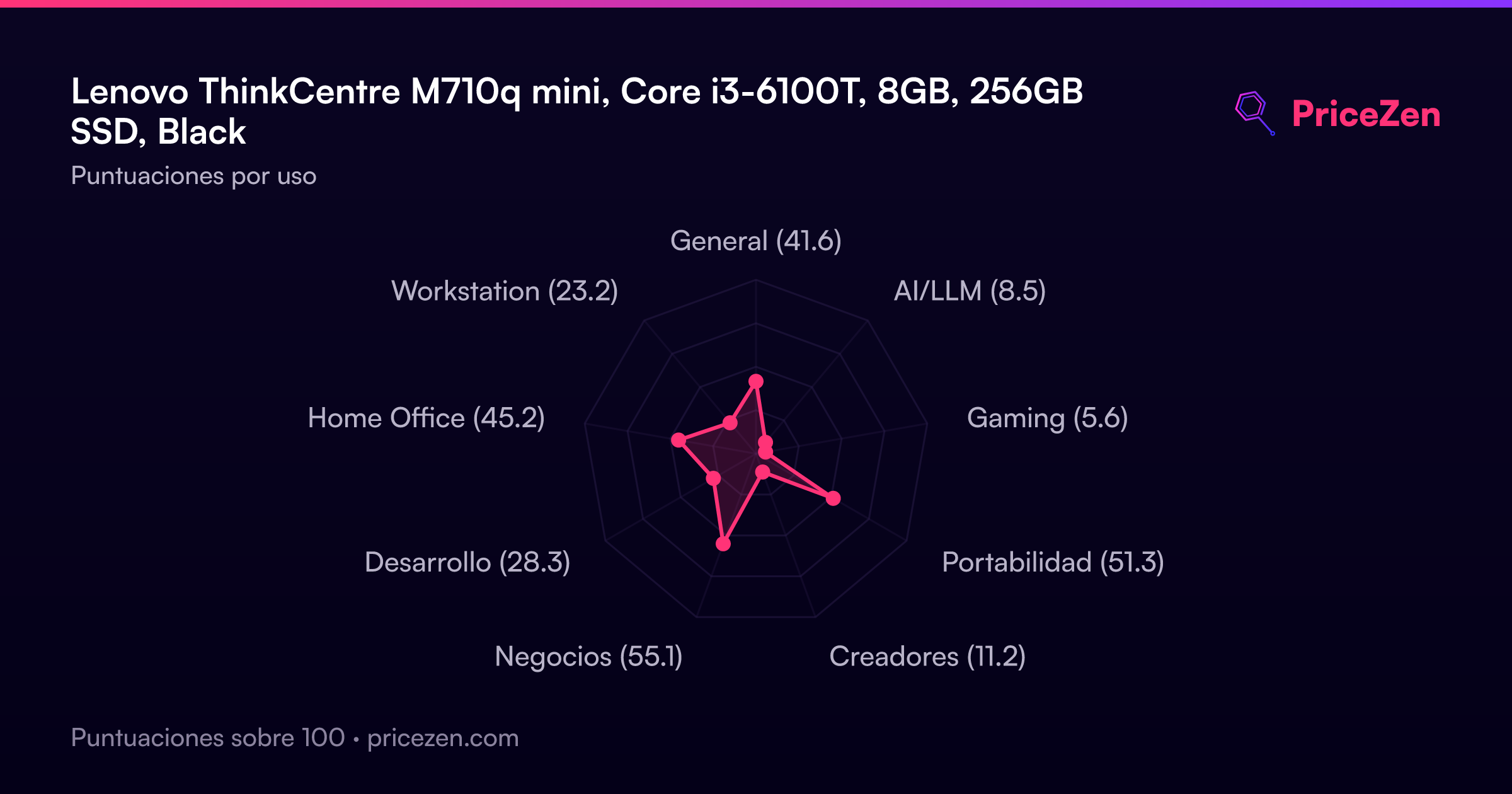
- General41.6
- AI/LLM8.5
- Gaming5.6
- Portabilidad51.3
- Creadores11.2
- Negocios55.1
- Desarrollo28.3
- Home Office45.2
- Workstation23.2