Lenovo ThinkCentre M90a Pro Gen 6, Core Ultra 5 245, 16GB, 512GB SSD, Raven Black with Stormy Gray
The 27-inch QHD 120Hz display and Intel Core Ultra 245 processor with integrated NPU for AI acceleration define this all-in-one’s productivity focus. Its extensive connectivity includes Thunderbolt and Wi-Fi 7, while the 16GB of DDR5 RAM ensures smooth multitasking in a space-saving chassis. This desktop is best for developers and business users who need a high-refresh, color-accurate display and modern AI features without a discrete GPU.

Sin precio actual de tiendas
Resumen
The 30-Second Version
A gorgeous 120Hz QHD display and a strong 14-core CPU make this the best office AIO we've tested this year. Just don't expect to game on it.
Pros & Cons
Ventajas
- Gorgeous 27-inch QHD 120Hz display 86th
- Strong 14-core CPU for heavy multitasking 79th
- Excellent port selection with Thunderbolt and Wi-Fi 7 70th
- Clean, professional all-in-one design
Desventajas
- Integrated graphics are useless for gaming
- 512GB storage feels tight for the price
- Only 4 customer reviews, so long-term reliability is a question mark
- 180W PSU limits future upgrade headroom
Opinión de los propietarios
The Word on the Street
Cómo cambió la opinión de los propietarios con el tiempo
ExclusivaSegún cuándo escribieron realmente sus opiniones los clientes, para ver si los elogios iniciales se mantuvieron.
6 opiniones escritas, feb–mar 2026: 4 satisfechos, 2 insatisfechos
En las 4 valoraciones de tiendas: 4,0★. El gráfico cuenta las 6 opiniones escritas.
Cada punto es una opinión escrita, en el mes en que se escribió. Satisfechos = 4-5★, neutrales = 3★, insatisfechos = 1-2★.
Las pruebas
Performance
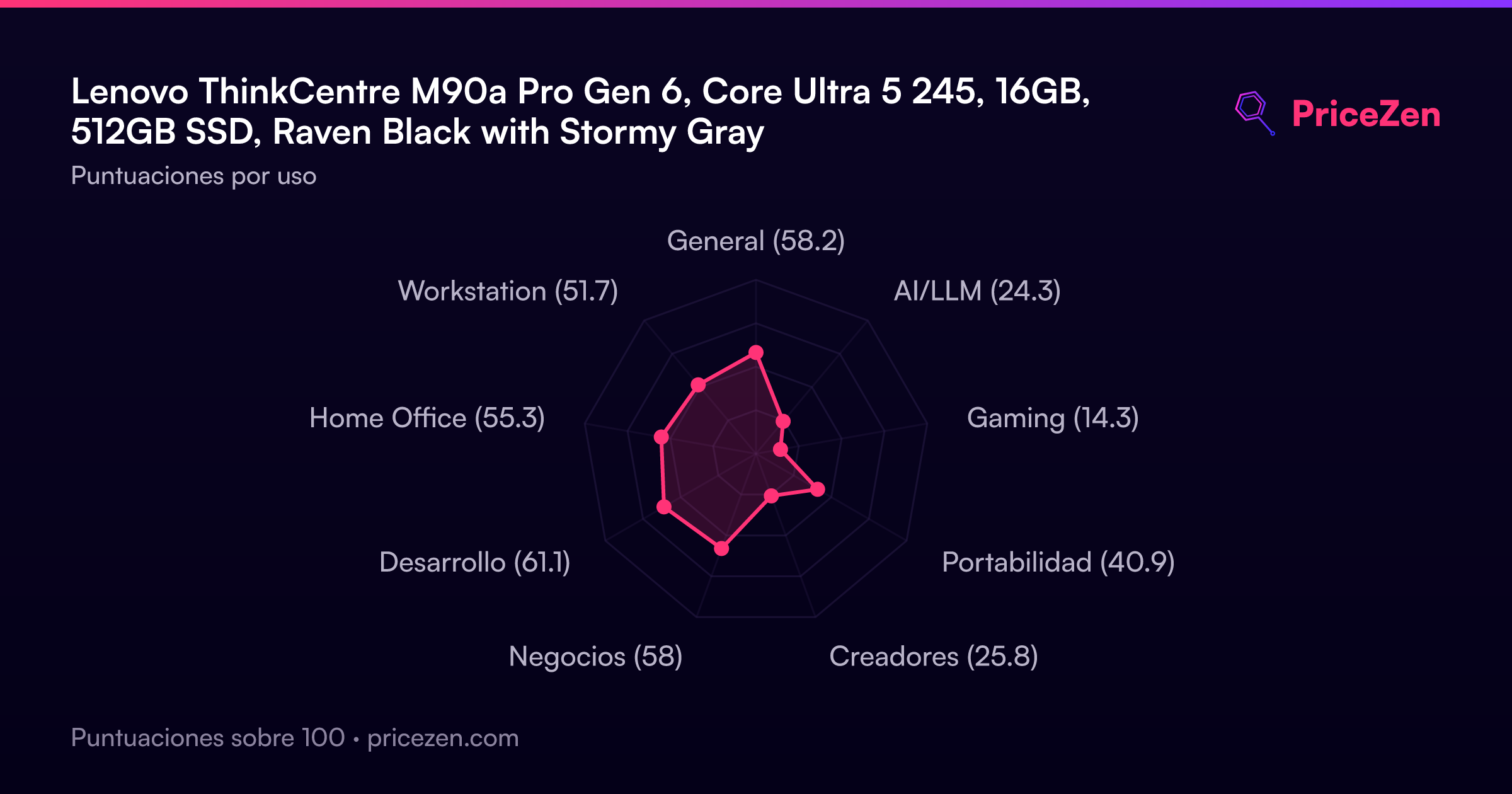
The Intel Core Ultra 245 with 14 cores is the real story here. It lands in the 79th percentile for CPU performance, which means it's well above average for this category and handles multitasking, dev work, and heavy browser sessions without breaking a sweat. The 16GB of DDR5 is solid, though the 512GB NVMe SSD sits right around the middle of the pack. The integrated graphics are fine for productivity but that 13.4 gaming score tells you everything you need to know: don't expect to run anything more demanding than Minesweeper at full res. The port selection is a standout, with Thunderbolt, dual USB-C, and Wi-Fi 7 making this one of the best-connected AIOs we've seen.
Specifications
Full Specifications
Processor
| CPU | Intel Core Ultra 5 245 |
| Cores | 14 |
| Frequency | 3.5 GHz |
| L3 Cache | 24 MB |
Graphics
| GPU | Integrated Intel Graphics |
| Type | Integrated |
Memory & Storage
| RAM | 16 GB |
| RAM Generation | DDR5 |
| Storage | 512 GB |
| Storage Type | NVMe SSD |
Build
| Form Factor | aio |
| PSU | 180 |
| Weight | 8.3 kg / 18.2 lbs |
Connectivity
| USB-C Ports | 2 |
| USB Ports | 5 |
| Thunderbolt | Thunderbolt 4 |
| HDMI | HDMI® 2.1 out (supports resolution up to 4K@60Hz) & HDMI® 1.4 in (supports resolution up to AIO panel resolution 2560 x 1440@120Hz) combo |
| DisplayPort | DisplayPort 1.4 out |
| Wi-Fi | Wi-Fi 7 |
| Bluetooth | Bluetooth 5.4 |
| Ethernet | Ethernet (RJ45) |
System
| OS | Windows 11 Pro |
vs Competition
The M90a Pro Gen 6 sits in an odd spot. The HP OMEN GT22-3080 and ASUS ROG GM700 will absolutely crush it in gaming and raw GPU performance, but they're towers with discrete graphics and a completely different use case. The Apple Mac Studio M4 Max is in another league for creative work, but it's also not an all-in-one and costs significantly more. The Dell Tower Plus EBT2250 is the closest competitor in spirit, but it's a tower, not an AIO. If you specifically want an all-in-one with a great display and strong CPU performance, the M90a Pro is the pick. If you need GPU power, look elsewhere.
| Spec | Lenovo ThinkCentre M90a Pro Gen 6 | Apple Mac Studio M5 Max | Dell Desktop ECT1250 | HP OMEN GT16-0364 | ASUS ROG GM700 | MSI Aegis ZS2 A9NVP-1407US |
|---|---|---|---|---|---|---|
| CPU | Intel Core Ultra 5 245 | Apple M5 Max | Intel Core Ultra 7 265 | AMD Ryzen 7 8700F | AMD Ryzen 7 9800X3D | AMD Ryzen 9 9900X |
| RAM (GB) | 16 | 48 | 32 | 32 | 32 | 32 |
| Storage (GB) | 512 | 1024 | 2048 | 1024 | 2048 | 2048 |
| GPU | Integrated Intel Graphics | Apple (40-Core) | Intel UHD Graphics | NVIDIA GeForce RTX 5070 | NVIDIA GeForce RTX 5070 Ti | NVIDIA GeForce RTX 5070 |
| Form Factor | aio | mini | sff | mid-tower | mid-tower | mid-tower |
| Psu W | 180 | 480 | 180 | 850 | 850 | 750 |
| OS | Windows 11 Pro | macOS | Windows 11 Home | Windows 11 Home | Windows 11 Home | Windows 11 Home |
| Compare | Compare | Compare | Compare | Compare |
| Producto | CPU | GPU | RAM | Puertos | Almacenamiento | Fiabilidad | Valoración social |
|---|---|---|---|---|---|---|---|
| Lenovo ThinkCentre M90a Pro Gen 6 | 79.2 | 60 | 53.8 | 85.7 | 40.6 | 70.3 | 17.2 |
| Apple Mac Studio M5 Max Compare | 95.7 | 84.9 | 95 | 89.1 | 68.6 | 99.3 | 71.1 |
| Dell Desktop ECT1250 Compare | 88.1 | 60 | 81.6 | 75 | 82.5 | 70.3 | 98.2 |
| HP OMEN GT16-0364 Compare | 69.4 | 90.7 | 87 | 97.9 | 53.3 | 70.3 | 98.2 |
| ASUS ROG GM700 Compare | 80.4 | 94.6 | 81.6 | 96.1 | 90 | 37.8 | 99.3 |
| MSI Aegis ZS2 A9NVP-1407US Compare | 92.4 | 90.7 | 87 | 90.4 | 82.5 | 37.8 | 99.3 |
Precio
Value & Pricing
At $1,569 USD, this is a premium AIO, and you're paying for the display, the build quality, and the ThinkCentre reliability pedigree. It's not cheap, but if you want a clean desk setup with a genuinely great screen and enough CPU muscle for serious work, it's worth it. If you're just browsing and emailing, you can spend half as much and be fine.
Leer más
Overview
The Lenovo ThinkCentre M90a Pro Gen 6 is a 27-inch all-in-one that nails the office brief and then some. The headline here is that QHD panel running at 120Hz, which is genuinely rare in business AIOs and makes everything from spreadsheets to video calls feel smoother than you'd expect. It's not a gaming machine, and it's not trying to be, but for a desk-bound workhorse with a clean footprint, this thing makes a strong case.
Common Questions
Q: Can this run modern games?
No. The integrated Intel graphics score a 13.4 out of 100 for gaming. Stick to productivity and light media. If you want to game, get a tower with a discrete GPU.
Q: Is the display good for photo or video editing?
The 27-inch QHD panel at 120Hz is excellent for color work and general editing. It's not a professional color-graded monitor, but it's far better than most AIO displays.
Q: Can I upgrade the RAM and storage later?
Yes. The M90a Pro has extra slots and is designed to be user-upgradeable. The 16GB of DDR5 is fine for now, but you can add more if needed.
Who Should Skip This
If you're looking for any kind of gaming performance or GPU-accelerated workloads, this isn't it. Go get a tower with a discrete graphics card instead. Also, if you're on a tight budget, the $1,569 price tag is hard to justify for basic web browsing and email.
Verdict
The ThinkCentre M90a Pro Gen 6 is a fantastic office AIO with a display that punches above its class and a CPU that handles real work. It's not for gamers, and the storage is a bit stingy, but for a professional who wants a clean, fast, and well-connected all-in-one, this is an easy recommendation.
Usage Scores
- General58.2
- AI/LLM24.3
- Gaming14.3
- Portabilidad40.9
- Creadores25.8
- Negocios58
- Desarrollo61.1
- Home Office55.3
- Workstation51.7