Corsair Vengeance i7500, Core i9-14900KF, 64GB, 2TB SSD, RTX 5090, Black

32 GB de memoria gráfica para IA y 3D verificado el 29 nov
59/100 puntuación global 2,6 media de 3 valoraciones de propietarios
- CPU
- Intel Core i9 14900KF
- RAM
- 64 GB
- Storage
- 2 TB
- GPU
- NVIDIA GeForce RTX 5090
- Form factor
- mid-tower
- OS
- Windows 11 Home


Resumen
The 30-Second Version
The Corsair Vengeance i7500 is a flagship gaming desktop with an RTX 5090, i9-14900KF, 64GB DDR5, and 2TB SSD. Performance is top-tier for gaming and AI workloads. But weak port selection, mediocre reliability scores, and rough early customer reviews make it a risky buy at this price.
Pros & Cons
Ventajas
- RTX 5090 with 32GB VRAM is best-in-class for gaming and AI 99th
- 64GB DDR5 and 2TB NVMe SSD leave little to upgrade 95th
- Liquid cooling and six fans keep thermals under control 94th
- Wraparound tempered glass case looks fantastic 90th
- Standard ATX form factor makes future upgrades easy
Desventajas
- Port selection is one of the worst we've seen in this category
- Reliability scores fall behind most competitors
- Very heavy at nearly 14kg
- Early customer ratings are concerning
- No compact option, this thing takes up real desk space
Las pruebas
Performance
The numbers here are about as good as it gets for a prebuilt. The RTX 5090 lands in the 98th percentile among GPUs in our database, which puts it at the absolute top of the charts. The i9-14900KF is right behind at the 95th percentile. That combo means 4K gaming at high refresh rates, smooth VR, and fast rendering times in Blender or Premiere. The 64GB of DDR5 is also a standout, and the 2TB NVMe SSD is well above average for load times and boot speed.
In practice, you won't find many games that challenge this rig. Cyberpunk 2077 with path tracing, Microsoft Flight Simulator, heavy modded Skyrim, all of it runs comfortably. For AI and LLM work, the 32GB of VRAM on the 5090 is a big deal. It's one of the best options for local model inference without dropping thousands more on a workstation card. The liquid cooler keeps the i9 in check during long sessions, though that CPU does run hot under full load.
Specifications
Full Specifications
Processor
| CPU | Intel Core i9 14900KF |
| Cores | 24 |
| Frequency | 3.2 GHz |
| L3 Cache | 36 MB |
Graphics
| GPU | NVIDIA GeForce RTX 5090 |
| Type | Discrete |
| VRAM | 32 GB |
| VRAM Type | GDDR7 |
Memory & Storage
| RAM | 64 GB |
| RAM Generation | DDR5 |
| Storage | 2 TB |
| Storage Type | NVMe SSD |
Build
| Form Factor | mid-tower |
| Weight | 14.0 kg / 30.8 lbs |
System
| OS | Windows 11 Home |
vs Competition
Against the Lenovo Legion 90YA003GUS, the Corsair holds a slight edge in raw GPU performance thanks to the 5090, but Lenovo's prebuilts tend to score better on reliability and port selection. The Dell Aurora ACT1250 and HP OMEN GT16-0364 are both strong mid-tower alternatives, often with better customer support and more USB ports. The MSI Aegis ZS2 A9NVP-1407US is probably the closest direct competitor, with similar internals and a more established track record in our database.
The Apple Mac Studio M3 Ultra is worth mentioning if you're a creator first and gamer second. It won't touch the 5090 in gaming, but for video editing, music production, and certain AI workflows, Apple's silicon is incredibly efficient and quiet. The Corsair wins on pure gaming and Windows flexibility, but the Mac Studio is smaller, cooler, and more reliable based on our data.
| Spec | Corsair Vengeance i7500 | Apple Mac Studio M5 Max | Lenovo T Series Towers Legion Tower 5a Gen 10 | HP OMEN GT16-0364 | Dell Desktop ECT1250 | ASUS ROG GM700 |
|---|---|---|---|---|---|---|
| CPU | Intel Core i9 14900KF | Apple M5 Max | AMD Ryzen 7 7800X3D | AMD Ryzen 7 8700F | Intel Core Ultra 7 265 | AMD Ryzen 7 9800X3D |
| RAM (GB) | 64 | 48 | 32 | 32 | 32 | 32 |
| Storage (GB) | 2048 | 1024 | 4096 | 1024 | 2048 | 2048 |
| GPU | NVIDIA GeForce RTX 5090 | Apple (40-Core) | NVIDIA GeForce RTX 5070 Ti | NVIDIA GeForce RTX 5070 | Intel UHD Graphics | NVIDIA GeForce RTX 5070 Ti |
| Form Factor | mid-tower | mini | mid-tower | mid-tower | sff | mid-tower |
| Psu W | - | 480 | 850 | 850 | 180 | 850 |
| OS | Windows 11 Home | macOS | Windows 11 Home | Windows 11 Home | Windows 11 Home | Windows 11 Home |
| Compare | Compare | Compare | Compare | Compare |
| Producto | CPU | GPU | RAM | Puertos | Almacenamiento | Fiabilidad | Valoración social |
|---|---|---|---|---|---|---|---|
| Corsair Vengeance i7500 | 94.8 | 99.3 | 93.8 | 5.4 | 90 | 32.5 | 3.8 |
| Apple Mac Studio M5 Max Compare | 95.7 | 85 | 95 | 89.1 | 68.6 | 99.3 | 71.4 |
| Lenovo T Series Towers Legion Tower 5a Gen 10 Compare | 73.2 | 94.6 | 78 | 88.5 | 98.1 | 70.2 | 99.9 |
| HP OMEN GT16-0364 Compare | 69.3 | 90.7 | 87 | 97.9 | 53.3 | 70.2 | 98.3 |
| Dell Desktop ECT1250 Compare | 88 | 60.1 | 81.6 | 75.1 | 82.5 | 70.2 | 98.3 |
| ASUS ROG GM700 Compare | 80.3 | 94.6 | 81.6 | 96.1 | 90 | 37.7 | 99.3 |
Precio
Value & Pricing
Corsair hasn't given us a firm price for this exact config, but a build with an RTX 5090 and i9-14900KF typically lands in the $4,000 to $5,000 range. At that level, you expect near perfection. The raw performance is there, but the weak reliability and port scores make the value proposition shakier than it should be. If you're spending this much, the Lenovo Legion 90YA003GUS or MSI Aegis ZS2 offer similar specs with better overall polish in some areas. The Apple Mac Studio M3 Ultra is a different beast entirely, but creators who don't need Windows gaming might find it more compelling.
Leer más
Overview
The Corsair Vengeance i7500 sits in that no-compromise flagship gaming desktop bracket. You're getting an Intel Core i9-14900KF, an NVIDIA GeForce RTX 5090 with 32GB of VRAM, 64GB of DDR5, and a 2TB NVMe SSD. This is a mid-tower built to crush 4K gaming, AI workloads, and heavy creator tasks without breaking a sweat. Corsair stuffs all of it into their 3500X ARGB case with a liquid cooler and six fans, so it looks as serious as the spec sheet reads.
People searching for a high-end gaming PC usually want to know one thing: can it run everything maxed out? The short answer is yes. The RTX 5090 is the fastest consumer GPU you can buy right now, and pairing it with a 24-core i9 means there's basically no game or app that'll make this thing stutter. DLSS 4 support also means you can push frame rates even higher in supported titles.
But there's a catch. Our data shows reliability and port selection are weak spots, and early customer feedback is rough. We'll dig into that below because a spec sheet this good deserves honest context.
Common Questions
Q: Is the Corsair Vengeance i7500 good for 4K gaming?
Yes, the RTX 5090 and i9-14900KF handle 4K gaming at high refresh rates easily. It's one of the best prebuilt gaming PCs for maxed-out settings in demanding titles.
Q: How much RAM does the Corsair Vengeance i7500 have?
This model comes with 64GB of Corsair Vengeance RGB DDR5 memory. That's more than enough for gaming, streaming, and heavy multitasking.
Q: Can the Corsair Vengeance i7500 run AI models locally?
Yes, the RTX 5090's 32GB of VRAM makes it excellent for local AI and LLM inference. It's one of the best consumer GPUs for running large models without cloud services.
Q: Is the Corsair Vengeance i7500 upgradeable?
Yes, it uses a standard ATX mid-tower case and standard components. You can swap the GPU, add more storage, or upgrade the RAM down the line.
Who Should Skip This
Skip this if you need lots of USB ports or external connectivity. The port selection is one of the worst in our database for this category, so creators with multiple peripherals, external drives, and capture cards will feel the squeeze immediately. It's also a bad fit for small spaces, the 3500X case is big and heavy at nearly 14kg. If reliability and customer support matter more than raw speed, look at the Lenovo Legion or Dell Aurora instead. And if you're a creator who doesn't need Windows gaming, the Apple Mac Studio M3 Ultra is smaller, quieter, and more dependable.
Verdict
Should you buy the Corsair Vengeance i7500? If you want the absolute fastest gaming and AI performance in a prebuilt and don't care about port selection or a spotty early reliability record, this is a monster. The RTX 5090 and i9-14900KF combo is hard to beat, and the 64GB of RAM means you won't need to open the case for years.
But we can't ignore the red flags. A 2.6 out of 5 customer rating from early buyers is rough, even with a small sample size. The port situation is genuinely bad for a desktop in this price class. If you're spending flagship money, you deserve flagship everything. We'd recommend checking the Lenovo Legion or MSI Aegis before pulling the trigger, unless raw GPU power is your only priority.
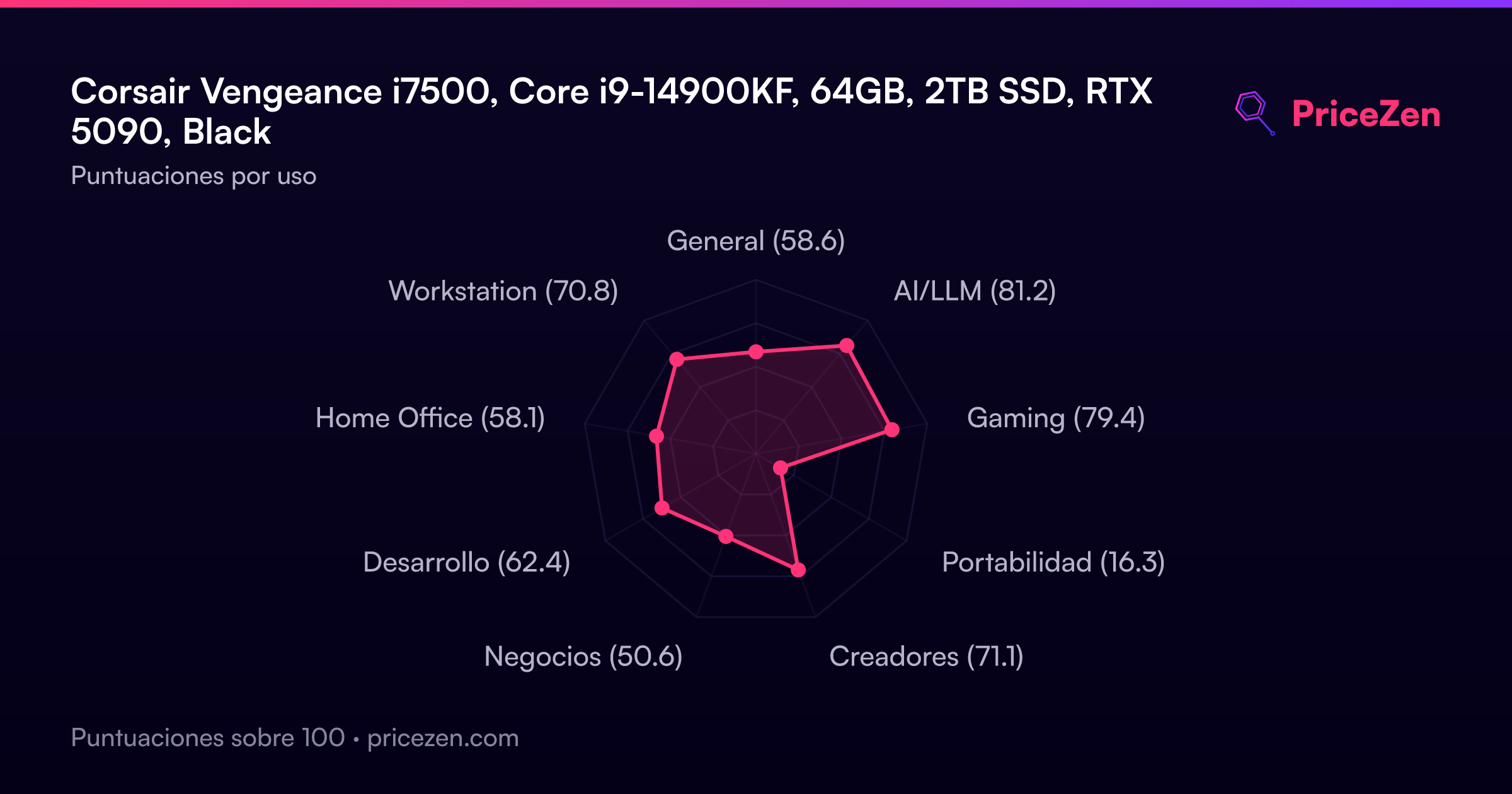
Usage Scores
- General58.6
- AI/LLM81.2
- Gaming79.4
- Portabilidad16.3
- Creadores71.1
- Negocios50.6
- Desarrollo62.4
- Home Office58.1
- Workstation70.8