Lenovo ThinkCentre neo 50q Gen 5
The Intel Core i3-1315U processor with 6 cores and 8 threads, paired with 8GB DDR5 RAM and a 512GB PCIe M.2 SSD, delivers responsive everyday computing and fast file access. Its dual 4K monitor support via HDMI and DisplayPort, plus Wi-Fi 6 and a 64GB USB flash drive, expands workspace and storage flexibility. Best for small business users and home office workers who need a compact, secure Windows 11 Pro desktop for spreadsheets, web browsing, and document management, not for gaming.

Sin precio actual de tiendas
Dónde lo vimos antes. Consulta el precio de hoy en la tienda.











Resumen
The 30-Second Version
The ThinkCentre neo 50q Gen 5 is a tiny, reliable office PC that handles everyday work fine but struggles with anything demanding. 8GB RAM and integrated graphics are the main limits. If you need a cheap, compact business desktop and don't multitask heavily, it's a solid pick.
Pros & Cons
Ventajas
- Tiny footprint at 1.11kg, easy to mount or hide away 70th
- 512GB PCIe SSD keeps boot and load times quick
- Windows 11 Pro with ThinkShield security out of the box
- Dual 4K monitor support via HDMI and DisplayPort
Desventajas
- 8GB RAM is the bare minimum and will bottleneck multitasking
- Integrated graphics can't handle anything beyond basic display
- Port selection is limited, only one USB-C
- Upgraded parts only carry a 1-year third-party warranty
Las pruebas
Performance
The i3-1315U handles office tasks without drama. Word docs, Chrome with a dozen tabs, video calls, all fine. The 512GB SSD keeps things snappy, and Windows 11 Pro boots fast. But the 8GB of RAM is a real ceiling. Open too many apps and you'll feel it. And the integrated graphics are strictly for pushing pixels to a monitor, not rendering anything demanding. In our database, this thing lands near the bottom for CPU, GPU, RAM, and storage. That sounds harsh, but it's just the reality of a budget business box. It's not built to compete with workstations, it's built to be cheap and reliable.
Specifications
Full Specifications
Build
| Weight | 1.1 kg / 2.4 lbs |
vs Competition
Stacked against the Apple Mac Studio M3 Ultra, this thing looks like a calculator next to a supercomputer, but that's not a fair fight. The Mac Studio costs several times more and targets a completely different user. Against other budget business desktops like the Dell Desktop ECT1250, the ThinkCentre holds its own on reliability but falls behind on expandability and raw performance. The HP OMEN and ASUS ROG machines are gaming rigs, totally different category. The real question is whether this beats a similarly priced mini PC from Dell or HP, and on paper it's competitive for basic office tasks, though the 8GB RAM ceiling is a genuine handicap compared to configs with 16GB standard.
| Spec | Lenovo ThinkCentre neo 50q Gen 5 | Apple Mac Studio M5 Max | HP OMEN GT16-0364 | Dell Desktop ECT1250 | ASUS ROG GM700 | MSI Aegis ZS2 A9NVP-1407US |
|---|---|---|---|---|---|---|
| CPU | - | Apple M5 Max | AMD Ryzen 7 8700F | Intel Core Ultra 7 265 | AMD Ryzen 7 9800X3D | AMD Ryzen 9 9900X |
| RAM (GB) | - | 48 | 32 | 32 | 32 | 32 |
| Storage (GB) | - | 1024 | 1024 | 2048 | 2048 | 2048 |
| GPU | - | Apple (40-Core) | NVIDIA GeForce RTX 5070 | Intel UHD Graphics | NVIDIA GeForce RTX 5070 Ti | NVIDIA GeForce RTX 5070 |
| Form Factor | - | mini | mid-tower | sff | mid-tower | mid-tower |
| Psu W | - | 480 | 850 | 180 | 850 | 750 |
| OS | - | macOS | Windows 11 Home | Windows 11 Home | Windows 11 Home | Windows 11 Home |
| Compare | Compare | Compare | Compare | Compare |
| Producto | CPU | GPU | RAM | Puertos | Almacenamiento | Fiabilidad |
|---|---|---|---|---|---|---|
| Lenovo ThinkCentre neo 50q Gen 5 | 3.9 | 8.1 | 9.1 | 5.4 | 1.8 | 70.3 |
| Apple Mac Studio M5 Max Compare | 95.7 | 84.9 | 95 | 89.1 | 68.6 | 99.3 |
| HP OMEN GT16-0364 Compare | 69.3 | 90.6 | 87 | 97.9 | 53.3 | 70.3 |
| Dell Desktop ECT1250 Compare | 88.1 | 60 | 81.6 | 75.1 | 82.5 | 70.3 |
| ASUS ROG GM700 Compare | 80.3 | 94.6 | 81.6 | 96.1 | 90 | 37.8 |
| MSI Aegis ZS2 A9NVP-1407US Compare | 92.3 | 90.6 | 87 | 90.4 | 82.5 | 37.8 |
Precio
Value & Pricing
There's no price listed, so we can't do the usual math on value. But this is clearly a budget machine aimed at offices that need lots of cheap, reliable endpoints. The bundle with a 64GB flash drive is a nice touch for IT departments deploying these in bulk. If the price lands under $400, it's a reasonable deal for basic office work. If it creeps toward $500 or beyond, you're better off looking at something with 16GB of RAM and a stronger CPU, because the upgrade path here is limited and the base config is already at the floor.
Leer más
Overview
The Lenovo ThinkCentre neo 50q Gen 5 is a tiny desktop that knows exactly what it is: a no-nonsense office machine. It's small enough to tuck behind a monitor, sips power, and handles spreadsheets, email, and web apps without breaking a sweat. The i3-1315U with 6 cores and 8 threads is plenty for everyday business work, and the 512GB PCIe SSD means boot times are quick and file transfers don't drag.
But let's be real about the specs. 8GB of RAM is the bare minimum for Windows 11 in 2025, and the integrated Intel UHD graphics won't do anything beyond basic display duty. This isn't a machine for creative work, gaming, or heavy multitasking. It's a focused tool for focused work, and it does that job fine.
Common Questions
Q: Can this run two 4K monitors smoothly?
Yes, the HDMI and DisplayPort outputs support dual 4K displays for productivity work. Just don't expect to game or render video across both screens, the integrated graphics are only meant for desktop and office apps.
Q: Is 8GB of RAM enough for Windows 11?
It's workable for light office use, but it's the minimum. If you keep lots of browser tabs open or run several business apps at once, you'll likely hit slowdowns. The system supports up to 32GB, so an upgrade is possible if you're willing to open it up.
Q: Does the opened seal and upgraded RAM/SSD affect the warranty?
The upgraded components carry a 1-year warranty from PCOnline US, while the rest of the machine keeps the original 1-year manufacturer warranty. It's a common setup for third-party upgraded systems, just be aware the coverage is split.
Who Should Skip This
Skip this if you need to run anything beyond basic office software. Video editors, designers, developers running virtual machines, or anyone who keeps 30 browser tabs open while streaming will hit the RAM and GPU limits fast. Also skip it if you want a machine you can grow into, the port selection is thin and the base config leaves little headroom. If you need real multitasking muscle, look for something with 16GB RAM and a stronger CPU, even if it costs a bit more.
Verdict
Buy this if you need a small, quiet, reliable desktop for basic office work and you're buying in bulk for a team. It's perfect for reception desks, call centers, or anyone who lives in a browser and Office apps. The ThinkShield security and Windows 11 Pro are genuinely useful for business environments. Just don't expect to push it hard, and don't plan on upgrading it much later.
Usage Scores
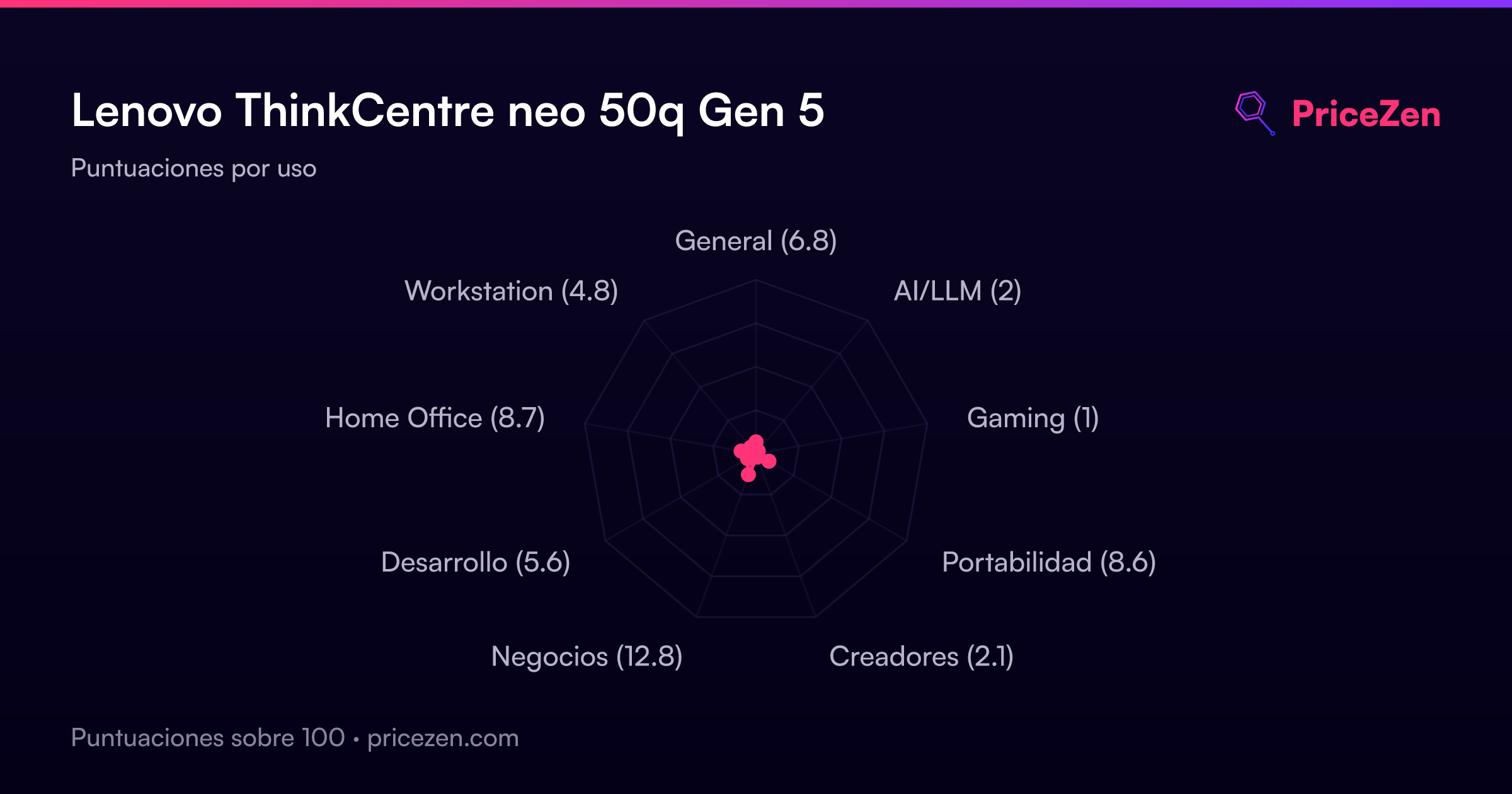
- General6.8
- AI/LLM2
- Gaming1
- Portabilidad8.6
- Creadores2.1
- Negocios12.8
- Desarrollo5.6
- Home Office8.7
- Workstation4.8