MSI Cubi NUC AI+ CuNUCAI3MG021 2026, Core Ultra 5 322, 16GB, 1TB SSD, Black
The 2.5 GHz Intel Core Ultra 5 322 6-core processor with integrated Intel AI Boost NPU delivers AI capabilities in a 0.50 kg chassis that mounts behind a monitor. Wi-Fi 7, Thunderbolt 4, and dual 2.5GbE LAN ports provide enterprise-ready connectivity, while 16GB DDR5 and a 1TB PCIe SSD handle multitasking. Best for business users needing a compact, AI-enabled desktop for office work and light productivity, not for gaming.

Sin precio actual de tiendas
Dónde lo vimos antes. Consulta el precio de hoy en la tienda.











Resumen
The 30-Second Version
The MSI Cubi NUC AI+ 3MG is a tiny, well-connected mini PC built for office work. The Intel Core Ultra 5 322 with NPU support and 16GB of DDR5 RAM handle everyday tasks fine, but gaming is a non-starter. US pricing ranges from USD 1,049 to USD 1,330, so shop around. It's a solid pick for compact business setups, just don't expect it to do anything flashy.
Pros & Cons
Ventajas
- Tiny footprint at 0.50kg, mounts behind a monitor
- Dual 2.5GbE Ethernet plus Wi-Fi 7 for serious networking
- Thunderbolt 4 and dual HDMI 2.1 give you display flexibility
- 1TB PCIe SSD is generous for a mini PC
- Windows 11 Pro and Copilot+ support out of the box
Desventajas
- Integrated graphics kill any gaming ambitions
- CPU performance is below average for the category
- Reliability sits at the 37th percentile, a weak spot
- No customer reviews yet, so real-world track record is unknown
- Price varies wildly depending on where you shop
Las pruebas
Performance
The Core Ultra 5 322 runs at 2.5GHz across 6 cores, and that puts it at the 44th percentile for CPUs in our database. Not a barn burner, but for office work, web browsing, video calls, and light multitasking, it's plenty. The integrated Intel Graphics land at the 51st percentile, which means it'll handle 4K displays and basic photo editing without breaking a sweat. Just don't ask it to render anything complex.
The 16GB of DDR5 RAM sits at the 46th percentile. That's enough for a dozen browser tabs, Slack, Outlook, and a spreadsheet or two running simultaneously. If you're the type who keeps 40 tabs open while editing video, you'll feel the ceiling. The 1TB SSD is at the 54th percentile, which is about average for this class. Plenty of room for documents, apps, and a reasonable media library. The port selection, though, is a standout at the 64th percentile. Dual 2.5GbE Ethernet and Wi-Fi 7 mean this thing will never be the bottleneck in your network.
Specifications
Full Specifications
Processor
| CPU | Intel Core Ultra 5 322 |
| Cores | 6 |
| Frequency | 2.5 GHz |
| L3 Cache | 12 MB |
Graphics
| GPU | Intel Graphics |
| Type | Integrated |
Memory & Storage
| RAM | 16 GB |
| RAM Generation | DDR5 |
| Storage | 1 TB |
| Storage Type | SSD |
Build
| Form Factor | mini |
| PSU | 120 |
| Weight | 0.5 kg / 1.1 lbs |
Connectivity
| USB-C Ports | 3 |
| USB Ports | 2 |
| Thunderbolt | Thunderbolt 4 x 2 |
| HDMI | 2x HDMI 2.1 |
| DisplayPort | 0 |
| Wi-Fi | Wi-Fi 7 |
| Bluetooth | No |
| Ethernet | 2.5GbE |
System
| OS | Windows 11 Pro |
vs Competition
The obvious comparison is the Apple Mac Studio M3 Ultra, but that's a very different animal. The Mac Studio costs significantly more and delivers workstation-class performance, while the Cubi NUC AI+ is a budget-friendly office box. If you need raw power for creative work, the Mac wins easily. If you need a cheap, tiny Windows machine for business apps, the MSI is the more sensible pick.
Against something like the Lenovo Legion Tower 5a Gen 10 or the HP OMEN GT16-0364, the Cubi NUC AI+ isn't even playing the same game. Those are gaming towers with discrete GPUs and big cooling solutions. The MSI trades all that performance for size and silence. The Dell Desktop ECT1250 is closer in spirit, but the MSI's port selection and Wi-Fi 7 give it an edge for modern office setups. The trade-off is clear: you're buying compactness and connectivity, not speed.
| Spec | MSI Cubi NUC AI+ CuNUCAI3MG021 | Apple Mac Studio M5 Ultra | Lenovo ThinkStation P3 Tower Gen 2 | HP ZGX Nano G1n | Skytech Legacy ST-LEGACY4-1788-B-AM | CLX Horus TGMHORRTU5109BM |
|---|---|---|---|---|---|---|
| CPU | Intel Core Ultra 5 322 | Apple M5 Ultra | Intel Core Ultra 9 285 | NVIDIA GB10 | AMD Ryzen 9 9950X3D | AMD Ryzen 9 9950X |
| RAM (GB) | 16 | 256 | 128 | 128 | 64 | 96 |
| Storage (GB) | 1024 | 1024 | 2048 | 4096 | 4096 | 10240 |
| GPU | Intel Graphics | Apple (64-Core) | NVIDIA RTX 4000 Ada Generation | NVIDIA Grace Blackwell | NVIDIA GeForce RTX 5090 | NVIDIA GeForce RTX 5090 |
| Form Factor | mini | mini | workstation | mini | mid-tower | mid-tower |
| Psu W | 120 | 480 | 750 | 240 | 1200 | 1000 |
| OS | Windows 11 Pro | macOS | Windows 11 Pro | NVIDIA DGX | Windows 11 Home | Windows 11 Home |
| Compare | Compare | Compare | Compare | Compare |
| Producto | CPU | GPU | RAM | Puertos | Almacenamiento | Fiabilidad |
|---|---|---|---|---|---|---|
| MSI Cubi NUC AI+ CuNUCAI3MG021 | 43 | 52.5 | 45.7 | 64.2 | 53.3 | 37.8 |
| Apple Mac Studio M5 Ultra Compare | 99.8 | 100 | 99.8 | 89.1 | 68.6 | 99.3 |
| Lenovo ThinkStation P3 Tower Gen 2 Compare | 94 | 85.7 | 99.2 | 69.1 | 90 | 70.3 |
| HP ZGX Nano G1n Compare | 66.7 | 85.5 | 99.7 | 99.7 | 98.1 | 70.3 |
| Skytech Legacy ST-LEGACY4-1788-B-AM Compare | 99.4 | 99.3 | 97.6 | 27.9 | 98.1 | 27.5 |
| CLX Horus TGMHORRTU5109BM Compare | 97.3 | 99.3 | 98.6 | 97.6 | 99.4 | 11.7 |
Precio
Value & Pricing
Pricing on this thing is all over the map. In the US, you'll see it listed anywhere from USD 1,049 to USD 1,330 across four listings. That's a USD 281 spread for the exact same hardware. If you're shopping in the US, do yourself a favor and hunt for the lower end of that range. Paying over USD 1,200 for this feels steep given the mid-pack performance.
Canadian buyers face a similar situation, with prices ranging from CAD 1,513 to CAD 1,749 across three listings. That CAD 236 gap is real money. The Best Buy listing appears to be the most competitive option in both markets, so start there. At the lower end of these ranges, the Cubi NUC AI+ makes sense as a compact business machine. At the top end, you're getting into territory where more powerful options start looking tempting.
Seguimos los precios de este producto desde el 16 nov 2026. El gráfico aparecerá cuando tengamos más datos.
Leer más
Overview
The MSI Cubi NUC AI+ 3MG is a tiny desktop that wants to be the quiet workhorse of your office setup. At half a kilogram and small enough to mount behind a monitor, it's clearly aimed at people who need a capable Windows machine without the tower footprint. The headline here is the Intel Core Ultra 5 322, a 6-core chip with a built-in NPU for AI workloads, which puts this in the Copilot+ PC category. That's a big deal for a box this small.
MSI is positioning this for business environments, and the spec sheet backs that up. You get 16GB of DDR5 RAM, a 1TB PCIe SSD, Windows 11 Pro, and connectivity that would make a docking station jealous. Two 2.5GbE Ethernet ports, Wi-Fi 7, Thunderbolt 4, dual HDMI 2.1, and a fingerprint reader. This is a machine built for desks where reliability and ports matter more than raw horsepower.
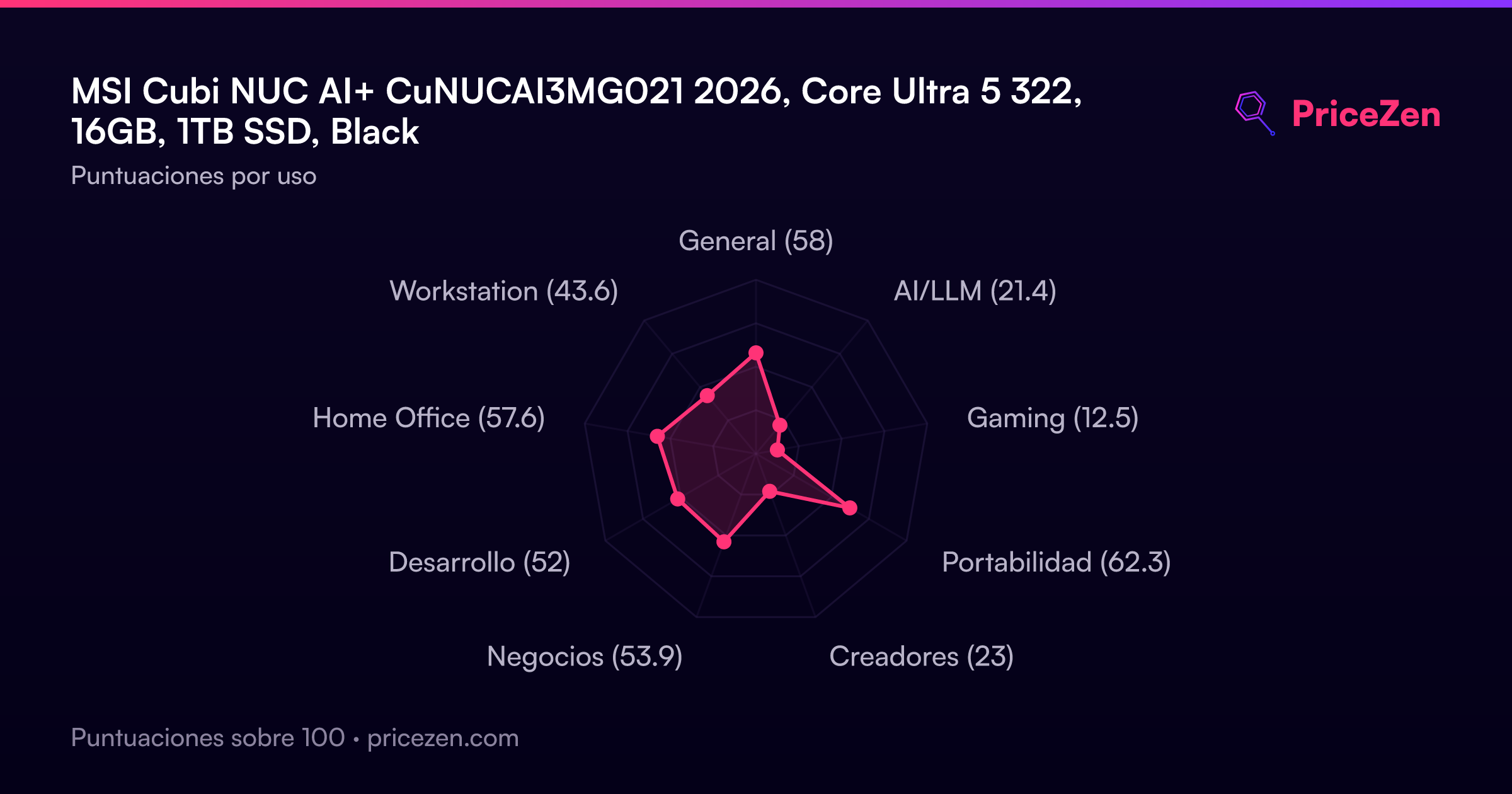
But here's the thing. Our database puts this at a 57.2 out of 100 overall, which is solidly middle of the pack for mini PCs. It's strongest for compact setups at 62.8 and home office use at 58.4. Gaming? A 12.5. Don't even think about it. This is a productivity box, not a play box.
Common Questions
Q: Can this run modern games?
No, not really. The integrated Intel Graphics sit at the 51st percentile in our database, which is fine for desktop use and 4K video playback, but modern games need a discrete GPU. The gaming score of 12.5 out of 100 tells the story. If you want to game, look at something like the Lenovo Legion Tower 5a or HP OMEN GT16-0364 instead.
Q: Is 16GB of RAM enough for my workload?
For typical office work, yes. 16GB of DDR5 handles email, web browsing, video calls, and productivity apps without issues. But if you run virtual machines, edit large media files, or keep dozens of browser tabs open while using memory-hungry apps, you'll hit the ceiling. The RAM is at the 46th percentile for this category, so it's about average, not generous.
Q: Can I mount this behind a monitor?
Yes, that's one of the main selling points. At 0.50kg and with a compact design, the Cubi NUC AI+ 3MG is designed to be VESA-mounted behind a display. That keeps your desk completely clear. Just make sure your monitor has a VESA mount and enough clearance for the cables.
Q: Does this support dual monitors?
Absolutely. You get two HDMI 2.1 ports, Thunderbolt 4, and multiple USB-C connections. That means you can easily run dual 4K displays, and with the right adapters, even more. The port selection is one of the strongest aspects of this machine, sitting at the 64th percentile in our database.
Who Should Skip This
Gamers should skip this without a second thought. The integrated graphics and 12.5 gaming score mean even older titles will struggle at anything beyond low settings. If you want to play games, put your money toward a machine with a discrete GPU like the Lenovo Legion Tower 5a or HP OMEN GT16-0364.
Creative professionals should also look elsewhere. Video editors, 3D artists, and anyone working with large media files will find the 6-core CPU and integrated graphics frustrating. The Apple Mac Studio M3 Ultra is the obvious upgrade path if you need real rendering power and can stomach the price. And if you're a heavy multitasker who runs multiple demanding applications simultaneously, the 16GB RAM ceiling will become a bottleneck sooner than you'd like.
Verdict
If you're outfitting a small office, a reception desk, or a home workspace where space is tight, the Cubi NUC AI+ 3MG is a solid choice. The dual Ethernet ports and Wi-Fi 7 make it great for network-heavy environments, and the fingerprint reader adds a nice security touch for shared spaces. Mount it behind a monitor and you've got a clean, capable setup.
But if you need any kind of graphical horsepower, look elsewhere. The integrated graphics are fine for spreadsheets and video calls, but they'll choke on anything more demanding. And if you're a power user who runs heavy multitasking workloads, the 6-core CPU and 16GB of RAM will feel limiting. This is a machine for getting work done, not for pushing boundaries.
Usage Scores
- General58
- AI/LLM21.4
- Gaming12.5
- Portabilidad62.3
- Creadores23
- Negocios53.9
- Desarrollo52
- Home Office57.6
- Workstation43.6