ASUS NUC 14 Pro+ RNUC14RVSU90000UI 2024, Core Ultra 9 185H, White

3 puertos USB-C para los dispositivos actuales verificado el 28 nov
51/100 puntuación global 4,3 media de 3 valoraciones de propietarios
- CPU
- Intel Core Ultra 9 185H
- GPU
- Intel Arc Graphics
- Form factor
- mini
- Psu
- 150 W
- OS
- Windows 11 Pro
Compara precios en 1 tienda
De la más barata a la más cara. Las ofertas nuevas, reacondicionadas y en pack se mantienen separadas para que compares lo comparable.
| Tienda | Vendido por | Color y estado | Precio | vs. el más bajo | Última comprobación | Enlace |
|---|---|---|---|---|---|---|
| Nuevo1 ofertaUnidad individual | ||||||
| No comprobados en los últimos 7 días, por lo que estos precios pueden haber cambiado | ||||||
| Amazon | Vendedor externo | No indicado | 23.499,00 MXN | 2 nov | Ir a la tienda | |
 Fuente: PriceZen, comprobado el 2 nov 2026
Un precio se considera vigente si lo comprobamos en los últimos 7 días. «Vendedor externo» significa un vendedor de terceros en esa tienda, no la propia tienda.
Historial de precios
Comprobado ese díaNo comprobado ese día, sigue en oferta
Fuente: PriceZen, checked 3 nov 2026











Resumen
The 30-Second Version
The ASUS NUC 14 Pro+ is a compact barebone mini PC with an Intel Core Ultra 9 185H and excellent connectivity, including dual Thunderbolt 4 ports. You'll need to add your own RAM and storage, which pushes the real cost higher than the USD 791 to USD 918 base price. It's great for productivity and AI workloads, but gaming performance is nearly nonexistent.
Pros & Cons
Ventajas
- Core Ultra 9 185H with NPU for local AI workloads 98th
- Dual Thunderbolt 4 ports and 2.5Gb Ethernet
- Compact 5 x 4-inch aluminum chassis, just 0.59kg
- Toolless chassis access for easy upgrades
- Wi-Fi 6E and Bluetooth 5.3 built in
Desventajas
- Barebone kit means no RAM or storage included
- Gaming performance is nearly nonexistent
- Audio delay when starting videos reported by users
- Occasional mouse jumping or freezing issues
- Setup can be complicated for less technical buyers
Opinión de los propietarios
The Word on the Street
- Buyers consistently praise the Core Ultra 9 processor's performance and the flexibility of the barebone design for custom memory and storage configurations.
- The dual Thunderbolt 4 ports and 2.5Gb Ethernet are frequently mentioned as standout features that make this mini PC feel more capable than its size suggests.
- Setup is a common pain point, with some owners finding the installation process more complicated than expected, especially for a barebone kit.
- A few users report minor but persistent annoyances like audio delay when starting videos and occasional mouse jumping or freezing.
Cómo cambió la opinión de los propietarios con el tiempo
ExclusivaSegún cuándo escribieron realmente sus opiniones los clientes, para ver si los elogios iniciales se mantuvieron.
5 opiniones escritas, ago 2024 – sept 2025: 5 satisfechos
En las 3 valoraciones de tiendas: 4,3★. El gráfico cuenta las 5 opiniones escritas.
Cada punto es una opinión escrita, en el mes en que se escribió. Satisfechos = 4-5★, neutrales = 3★, insatisfechos = 1-2★.
Las pruebas
Performance
The Core Ultra 9 185H is a solid performer for productivity and AI tasks. It's a 16-core chip with a 2.3GHz base clock, and while we don't have benchmark numbers for this exact config, the CPU ranks in the 64th percentile among mini PCs. That puts it solidly in the middle of the pack, which sounds underwhelming until you remember that most mini PCs are running much weaker mobile chips. For everyday office work, web browsing, and even some light video editing, this thing will feel snappy.
The integrated Arc Graphics are a mixed bag. The GPU ranks in the 58th percentile, which is about average for integrated solutions. You'll be fine with 4K video playback, photo editing, and basic creative work. But gaming? Forget it. The gaming score of 10.6 out of 100 tells you everything you need to know. This is not a gaming machine, and no amount of RAM or storage upgrades will change that.
One thing worth noting: the RAM situation is a bit odd. The board has two DDR5 SO-DIMM slots running at 5600 MHz, but since this is a barebone kit, the RAM score in our database sits at the 18th percentile. That's not a reflection of the board's capability, it's a reflection of the fact that you're starting from zero. Same story with storage, which ranks in the 2nd percentile. You'll need to factor in the cost of a decent DDR5 kit and an M.2 NVMe drive on top of the base price.
Specifications
Full Specifications
Processor
| CPU | Intel Core Ultra 9 185H |
| Cores | 16 |
| Frequency | 2.3 GHz |
| L3 Cache | 24 MB |
Graphics
| GPU | Intel Arc Graphics |
| Type | Integrated |
| VRAM Type | Shared |
Memory & Storage
| RAM Generation | DDR5 |
| Storage Type | NVMe SSD |
Build
| Form Factor | mini |
| PSU | 150 |
| Weight | 0.8 kg / 1.8 lbs |
Connectivity
| USB-C Ports | 3 |
| USB Ports | 7 |
| Thunderbolt | Thunderbolt 4 x 2 |
| HDMI | 2x HDMI 2.1 |
| DisplayPort | 0 |
| Wi-Fi | Wi-Fi 6E |
| Bluetooth | Bluetooth 5.3 |
| Ethernet | 2.5GbE |
System
| OS | Windows 11 Pro |
vs Competition
The ASUS NUC 14 Pro+ sits in a strange middle ground. Against the Lenovo Legion 90YA003GUS, you're giving up gaming performance in a big way. The Legion is a proper gaming machine, while this NUC is a productivity tool. If you want to play games, the Legion or the HP OMEN GT16-0364 are far better choices. The Acer Nitro N60-180-UB33 is another gaming-focused option that will run circles around the NUC in any GPU-bound task.
But if you're looking at the Apple Mac Studio M5 Max, the conversation changes. The Mac Studio is significantly more expensive but also significantly more powerful for creative work. The NUC 14 Pro+ is a budget-friendly alternative for people who want a compact desktop without dropping Mac Studio money. The Dell Tower Plus EBT2250 is a more traditional desktop that offers better expandability but takes up way more space. For pure desk footprint, the NUC wins easily.
| Spec | ASUS NUC 14 Pro+ RNUC14RVSU90000UI | Apple Mac Studio M5 Ultra | Lenovo ThinkStation P3 Tower Gen 2 | HP ZGX Nano G1n | Skytech Legacy ST-LEGACY4-1788-B-AM | CLX Horus TGMHORRTU5109BM |
|---|---|---|---|---|---|---|
| CPU | Intel Core Ultra 9 185H | Apple M5 Ultra | Intel Core Ultra 9 285 | NVIDIA GB10 | AMD Ryzen 9 9950X3D | AMD Ryzen 9 9950X |
| RAM (GB) | - | 256 | 128 | 128 | 64 | 96 |
| Storage (GB) | - | 1024 | 2048 | 4096 | 4096 | 10240 |
| GPU | Intel Arc Graphics | Apple (64-Core) | NVIDIA RTX 4000 Ada Generation | NVIDIA Grace Blackwell | NVIDIA GeForce RTX 5090 | NVIDIA GeForce RTX 5090 |
| Form Factor | mini | mini | workstation | mini | mid-tower | mid-tower |
| Psu W | 150 | 480 | 750 | 240 | 1200 | 1000 |
| OS | Windows 11 Pro | macOS | Windows 11 Pro | NVIDIA DGX | Windows 11 Home | Windows 11 Home |
| Compare | Compare | Compare | Compare | Compare |
| Producto | CPU | GPU | RAM | Puertos | Almacenamiento | User Sentiment | Fiabilidad | Valoración social |
|---|---|---|---|---|---|---|---|---|
| ASUS NUC 14 Pro+ RNUC14RVSU90000UI | 64.8 | 60 | 17.3 | 98.2 | 1.8 | 44.2 | 37.7 | 25.6 |
| Apple Mac Studio M5 Ultra Compare | 99.8 | 100 | 99.8 | 89.1 | 68.6 | 0 | 99.3 | 0 |
| Lenovo ThinkStation P3 Tower Gen 2 Compare | 93.9 | 85.7 | 99.2 | 69 | 90 | 76 | 70.2 | 92 |
| HP ZGX Nano G1n Compare | 66.6 | 85.5 | 99.7 | 99.7 | 98.1 | 0 | 70.2 | 0 |
| Skytech Legacy ST-LEGACY4-1788-B-AM Compare | 99.4 | 99.3 | 97.6 | 28 | 98.1 | 99.9 | 27.5 | 96.3 |
| CLX Horus TGMHORRTU5109BM Compare | 97.2 | 99.3 | 98.6 | 97.6 | 99.4 | 0 | 11.7 | 67.7 |
Precio
Value & Pricing
Value is tricky here because you're buying a foundation, not a finished product. The base price ranges from USD 791 to USD 918 in the US, and the best deal we've seen is at the lower end of that spread. But remember, you'll need to add at least USD 100 to USD 200 for a decent RAM kit and NVMe drive, maybe more if you want 32GB or 64GB of memory. In Europe, the spread is even wider, from EUR 1,039 to EUR 1,580, so shopping around matters a lot. Compared to something like a Beelink or Minisforum mini PC that comes fully loaded, the NUC 14 Pro+ looks expensive on paper. But you're paying for Intel's build quality, the Thunderbolt 4 ports, and the AI-ready NPU. If you don't need those things, there are cheaper ways to get a compact desktop.
Leer más
Overview
The ASUS NUC 14 Pro+ is a barebone mini PC that sits in a weird but interesting spot. You're getting Intel's Core Ultra 9 185H, a 16-core chip with integrated Arc Graphics, packed into a 5 x 4-inch anodized aluminum chassis that weighs just 0.59kg. But here's the catch: this is a barebone kit, so you'll need to bring your own RAM and storage. No memory, no SSD, just the board, chip, and a 150W power brick. Prices bounce around a lot depending on where you shop, from USD 791 to USD 918 in the US, and EUR 1,039 to EUR 1,580 across European vendors.
So who is this for? People who want a compact workstation for home office work, light creative tasks, or running local AI workloads without a massive tower taking over their desk. The Core Ultra 9 185H has a dedicated NPU for AI acceleration, which is genuinely useful if you're messing with local LLMs or image generation. But if you're hoping to game on this thing, you should probably look elsewhere. Our database puts gaming performance at 10.6 out of 100, which is rough.
Connectivity is where this little box shines. You get dual Thunderbolt 4 ports, 2.5Gb Ethernet, Wi-Fi 6E, Bluetooth 5.3, two HDMI 2.1 ports, and a healthy spread of USB-A and USB-C. For a machine this size, that's a lot of I/O. The port selection ranks in the 87th percentile among mini PCs, which means it's one of the best on the market for hooking up multiple displays and peripherals.
Common Questions
Q: Is the ASUS NUC 14 Pro+ good for gaming?
No, the NUC 14 Pro+ is not a gaming machine. The integrated Intel Arc Graphics score just 10.6 out of 100 for gaming in our database, so you'll struggle with anything beyond casual or older titles. If gaming matters, look at the Lenovo Legion or HP OMEN instead.
Q: Does the ASUS NUC 14 Pro+ come with RAM and storage?
No, this is a barebone kit, so you'll need to buy DDR5 SO-DIMM memory and an M.2 NVMe SSD separately. The board has two DDR5 slots running at 5600 MHz and supports M.2 2280 PCIe 4.0 drives.
Q: Can the ASUS NUC 14 Pro+ run Linux?
Yes, the manufacturer confirms support for various Linux distributions, including Ubuntu and RedHat. You can configure it without an OS, with Windows 11, or with Linux depending on your needs.
Q: How much does the ASUS NUC 14 Pro+ cost?
Prices vary by region and vendor. In the US, expect to pay between USD 791 and USD 918. European prices range from EUR 1,039 to EUR 1,580. Remember to budget extra for RAM and storage since this is a barebone kit.
Who Should Skip This
Skip the NUC 14 Pro+ if you want a gaming PC, a plug-and-play desktop, or a budget-friendly mini PC. Gamers should look at the Lenovo Legion or HP OMEN lines instead. If you're not comfortable installing RAM and an SSD, or if the idea of troubleshooting driver quirks sounds exhausting, a fully loaded Beelink or Minisforum mini PC will save you time and frustration. And if you're on a tight budget, the barebone nature of this kit means the real cost is higher than the sticker price once you factor in memory and storage.
Verdict
Should you buy the ASUS NUC 14 Pro+? If you're a tinkerer who wants a compact, AI-ready machine and doesn't mind sourcing your own RAM and storage, yes. The Core Ultra 9 185H is a capable chip, the connectivity is excellent, and the build quality feels premium. The toolless chassis makes upgrades painless, and the dual Thunderbolt 4 ports give you real flexibility for docks and external displays.
But if you want a plug-and-play experience, this isn't it. The barebone nature means you'll need to do some work before you even boot it up. And if gaming matters at all, look elsewhere. The user sentiment score of 75 out of 100 reflects a machine that owners generally like, but with some rough edges. Audio delay at video start and occasional mouse glitches are the kind of small annoyances that can drive you crazy over time. For the right person, this is a great little box. For everyone else, there are simpler options.
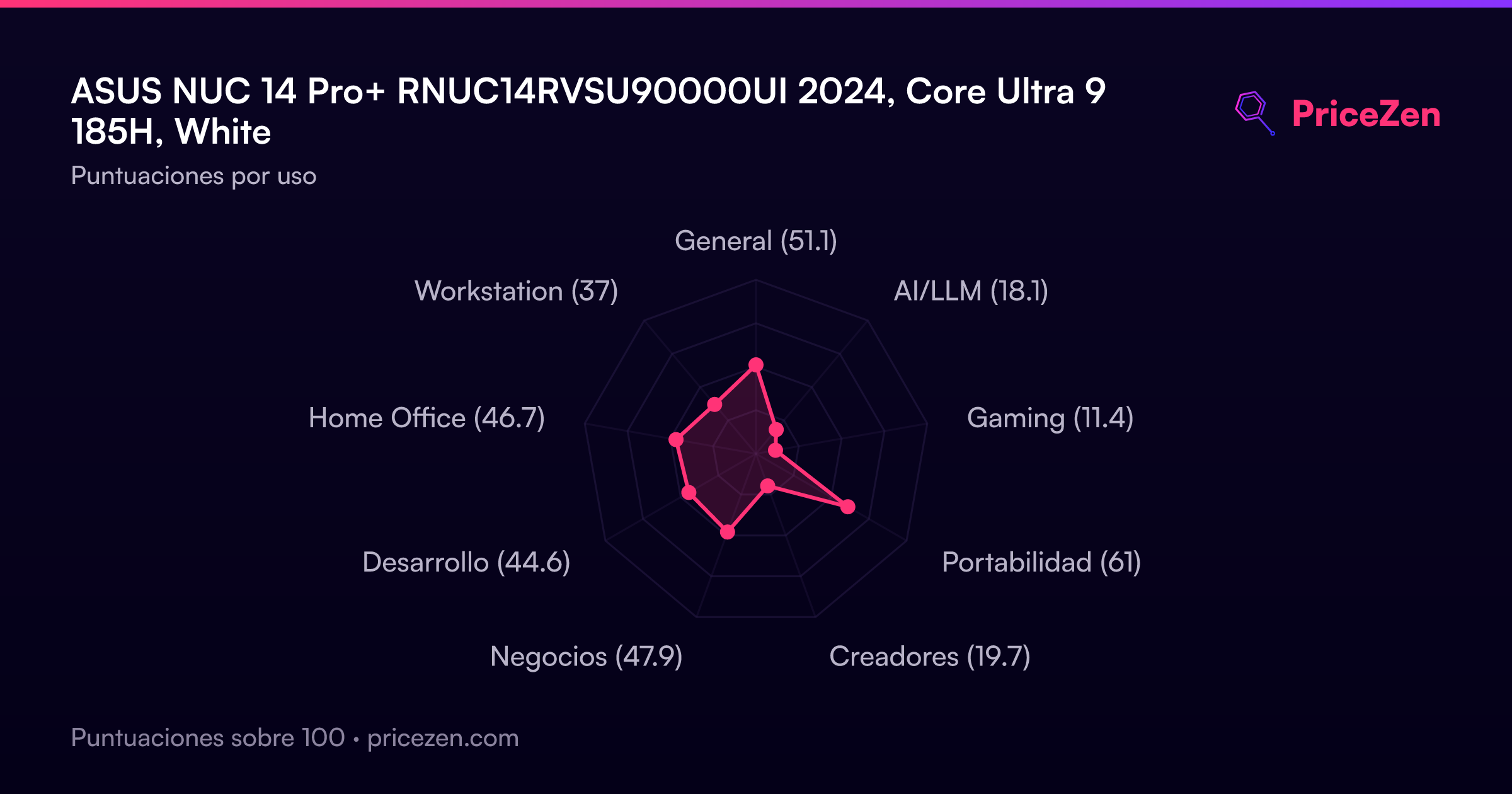
Usage Scores
- General51.1
- AI/LLM18.1
- Gaming11.4
- Portabilidad61
- Creadores19.7
- Negocios47.9
- Desarrollo44.6
- Home Office46.7
- Workstation37