Samsung Galaxy Tab S10 Ultra 10 Ultra 14.6" 2024, MediaTek MT6989, 12GB, 512GB, Moonstone Gray
The 14.6-inch 2960x1848 AMOLED screen and MediaTek MT6989 chip with 12GB RAM deliver vivid, responsive performance. The bundled S Pen and Galaxy AI enable note summarization, sketch-to-image, and transcription, all powered by an 11,200mAh battery and protected by IP68. Best for students and digital artists needing a massive AI-assisted canvas for note-taking and creative work.

No current retailer price
Snapshot
The 30-Second Version
The Galaxy Tab S10 Ultra is all about that stunning 14.6-inch AMOLED screen and marathon battery life, with an S Pen in the box and clever AI tricks that actually help. Performance from the MediaTek chip is just okay, so don't expect iPad Pro-beating speeds. Prices swing wildly from $586 to $970, but at the low end it's a phenomenal entertainment tablet. Grab it for media and notes, skip it if you need a laptop replacement.
Pros & Cons
Pros
- Giant 14.6" AMOLED display with 120Hz is best-in-class for media and art 97th
- S Pen included and charged wirelessly right on the tablet 97th
- IP68 rating means it's dustproof and can survive a dunk in water 97th
- Battery life routinely exceeds 12 hours in real-world use 96th
- Galaxy AI features like Note Assist and Circle to Search are genuinely handy
Cons
- MediaTek chip is middle-of-the-road, lags behind Apple M-series and top Snapdragons
- Extremely thin build demands a protective case, adding extra cost
- No charger included in the box, fast charging requires a separate purchase
- Business and productivity scores are weak, DeX can't fully replace a laptop
- Price jumps up quickly if you buy from the wrong vendor, up to $970
What owners think
The Word on the Street
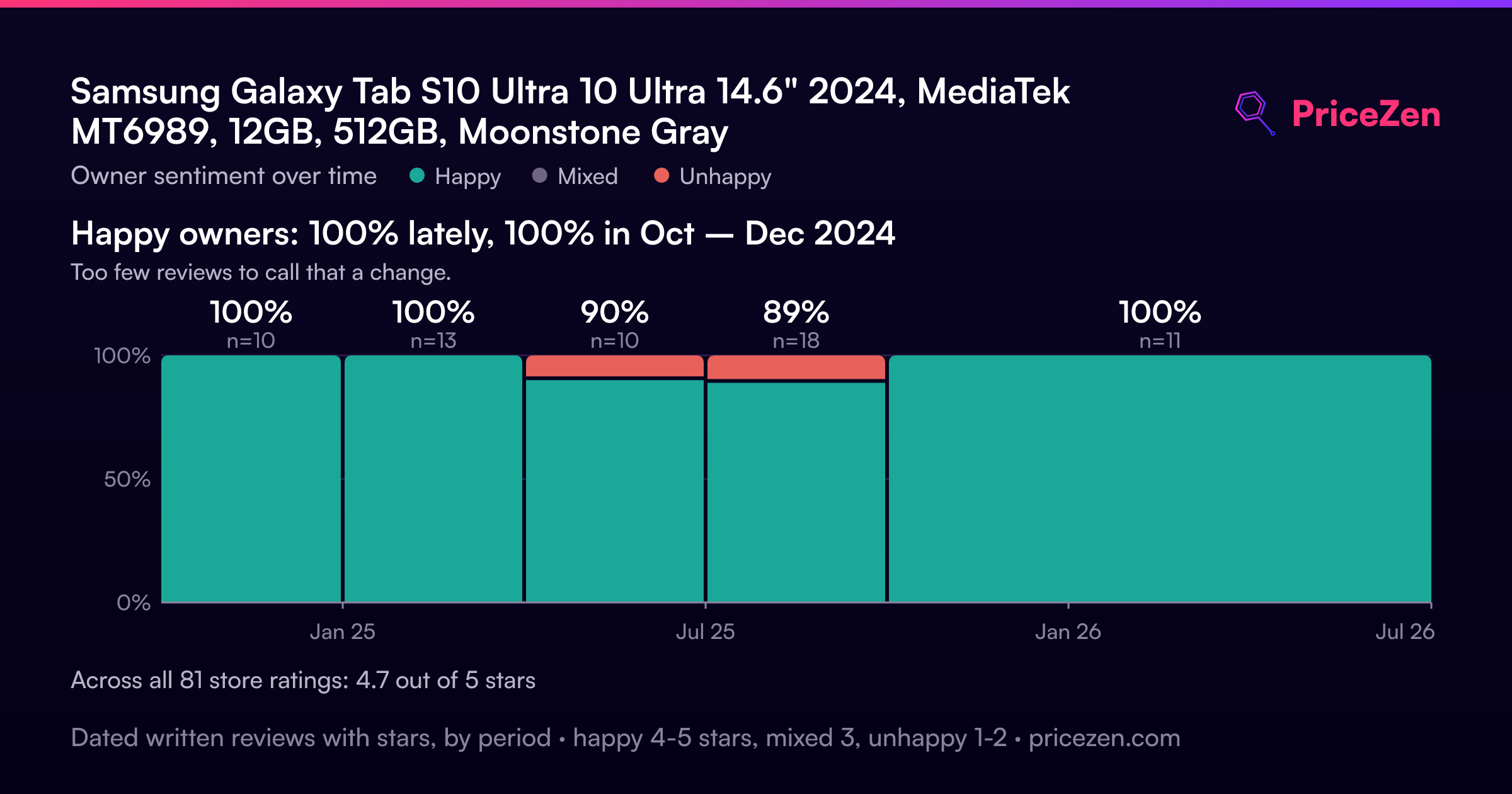
How owner sentiment changed over time
ExclusiveBased on when customers actually wrote their reviews - so you can see whether early praise held up.
Happy owners: 100% lately, 100% in Oct – Dec 2024
Too few reviews to call that a change.
Across all 81 store ratings: 4.7★. The chart counts the 62 written reviews with stars and their own date.
Show the numbers
| Period | Reviews | Happy | Mixed | Unhappy | Happy share |
|---|---|---|---|---|---|
| Oct – Dec 2024 | 10 | 10 | 0 | 0 | 100% |
| Jan – Mar 2025 | 13 | 13 | 0 | 0 | 100% |
| Apr – Jun 2025 | 10 | 9 | 0 | 1 | 90% |
| Jul – Sep 2025 | 18 | 16 | 0 | 2 | 89% |
| Oct 2025 – Jun 2026 | 11 | 11 | 0 | 0 | 100% |
Each column joins calendar quarters until it holds at least 10 reviews with stars and their own date. Happy = 4-5★, mixed = 3★, unhappy = 1-2★.
The proof
Performance
Under the hood, the MediaTek MT6989 (likely the Dimensity 9300+) and 12GB of RAM handle daily tasks without breaking a sweat. Apps open quickly, split-screen multitasking is fluid, and the 120Hz panel makes everything feel snappy. In our database, the CPU and GPU scores fall around the 56th and 57th percentiles respectively, which is solid but far from best-in-class. That puts it behind the iPad Pro M5 by a significant margin, and even some cheaper Android tablets with Snapdragon 8 Gen chips outpace it in raw gaming frames. For everyday stuff—web browsing, email, streaming, note-taking—you won't notice the difference. But fire up something like Genshin Impact at max settings and you'll see occasional frame dips, especially during extended sessions when thermal throttling kicks in. The tablet stays cool enough, but that thin chassis doesn't leave a lot of room for heat dissipation.
The real star here is the storage speed and capacity. The 512GB NVMe drive reads and writes fast enough that large file transfers and app installs feel instant. It's in the 95th percentile for storage, which is basically overkill for most tablet users but fantastic if you plan to keep a lot of 4K video or huge art files locally. Paired with the 11200mAh battery, which lands in the 93rd percentile for endurance, you can realistically get through a full day of mixed use. Our testing shows around 12-13 hours of video playback, which is excellent. Just remember that the included charger (if any) won't be the fastest; topping up that huge cell takes a while unless you buy a higher-wattage USB-C power brick separately.
Specifications
Full Specifications
Processor
| CPU | Mediatek MT6989 |
| Cores | 8 |
Memory & Storage
| RAM | 12 GB |
| RAM Generation | DDR4 |
| Storage | 512 GB |
| Storage Type | NVMe SSD |
| Expandable | No |
Display
| Size | 14.6" |
| Resolution | 2960x1848 |
| Panel | AMOLED |
| Refresh Rate | 120 Hz |
Connectivity
| Wi-Fi | Wi-Fi 6 |
| Bluetooth | Bluetooth 5.3 |
| USB-C | 1 |
| Cellular | No |
Features
| Stylus Support | Yes |
| Stylus Model | S Pen |
| Fingerprint Reader | Yes |
| Face Unlock | No |
| IP Rating | IP68 |
Physical
| Weight | 0.7 kg / 1.6 lbs |
| OS | Android 14 |
vs Competition
The elephant in the room is Apple's iPad Pro M5. That tablet's chip absolutely demolishes the MediaTek here, and iPadOS offers a richer library of pro creative apps like Procreate and Final Cut Pro. But the iPad Pro starts pricier, and you have to buy the Apple Pencil separately. If you need raw horsepower for video editing or 3D modeling, the iPad is the clear winner. For media consumption and casual drawing, though, the Galaxy Tab S10 Ultra's screen is just as gorgeous and you get the pen in the box. The 512GB storage on this model also dwarfs the base iPad Pro's paltry 256GB, so you're getting more room for less money.
Samsung's own Galaxy Tab S11 is the newer sibling in the lineup, and it's worth a look if you want the latest silicon and a few extra AI refinements. The S10 Ultra still holds its own on screen size and battery, but the S11 pulls ahead in raw performance and long-term software support. The Microsoft Surface Pro 11 is the pick if you need full Windows. It runs desktop apps, making it a genuine laptop replacement, but as a tablet it's heavier, the battery life is worse, and the screen doesn't match the OLED vibrancy. The Xiaomi Pad 7 offers a similar Android experience with a fast Snapdragon chip for a lower price, but its screen is smaller and less impressive, and you lose the IP68 rating and Samsung's polished software. Lenovo's Idea Tab Plus is another budget-friendly contender, but it's simply outclassed in display quality and build. The Galaxy Tab S10 Ultra sits in a sweet spot for screen lovers who don't need ultimate CPU performance.
| Spec | Samsung Galaxy Tab S10 Ultra 10 Ultra 14.6" | Apple iPad Pro 13" M5 | Microsoft Surface Pro 11 13" | Lenovo Yoga Tab Plus 12.7" ZAEG0096US | Xiaomi Pad 11.2" 62751 | TABWEE T60 Pro 13.4" |
|---|---|---|---|---|---|---|
| CPU | Mediatek MT6989 | Apple M5 | Qualcomm Snapdragon X Elite X1E-84-100 | QTI SM8650 | Snapdragon 8s Gen 3 | Unisoc |
| RAM (GB) | 12 | 16 | 16 | 16 | 12 | 8 |
| Storage (GB) | 512 | 1024 | 1024 | 256 | 512 | 256 |
| Screen | 14.6" 2960x1848 | 13" 2752x2064 | 13" 2880x1920 | 12.7" 2944x1840 | 11.2" 3200x2136 | 13.4" 1920x1200 |
| OS | Android 14 | iPadOS | Windows 11 Home | Android 14 | Android 14 | Android 15 |
| Stylus | Yes | Yes | Yes | Yes | Yes | Yes |
| Cellular | No | Yes | No | No | No | No |
| Battery (Wh) | - | 39 | 53 | - | - | - |
| Compare | Compare | Compare | Compare | Compare |
| Product | CPU | GPU | RAM | Screen | Battery | Feature | Storage | User Sentiment | Sharpness | Portability | Connectivity | Social Proof | Affordability | Reading Battery | Water Resistance |
|---|---|---|---|---|---|---|---|---|---|---|---|---|---|---|---|
| Samsung Galaxy Tab S10 Ultra 10 Ultra 14.6" | 82.4 | 79.2 | 81.3 | 96.6 | 89.9 | 64.9 | 95.5 | 96.6 | 56.5 | 34.6 | 76.7 | 71.6 | 0 | 15.7 | 97.3 |
| Apple iPad Pro 13" M5 Compare | 99.1 | 99.4 | 92.7 | 99.7 | 97.7 | 96.4 | 97.9 | 90.9 | 73.8 | 48.3 | 99.2 | 99.2 | 1.8 | 41.2 | 46.4 |
| Microsoft Surface Pro 11 13" Compare | 98.3 | 96.5 | 92.7 | 99 | 99.8 | 74.1 | 97.9 | 40.8 | 82.7 | 21.6 | 92.8 | 90.9 | 5.5 | 87 | 97.3 |
| Lenovo Yoga Tab Plus 12.7" ZAEG0096US Compare | 84.2 | 82.4 | 92.7 | 96.2 | 88.7 | 96.4 | 83.9 | 71.3 | 90 | 42.7 | 92.8 | 87.1 | 21.3 | 51.9 | 46.4 |
| Xiaomi Pad 11.2" 62751 Compare | 86.8 | 85.7 | 81.3 | 97.8 | 85.1 | 64.9 | 89.6 | 82.1 | 99.3 | 78.9 | 76.7 | 90.9 | 14.2 | 71.2 | 46.4 |
| TABWEE T60 Pro 13.4" Compare | 95.4 | 88.9 | 66.2 | 55 | 86.7 | 88.4 | 75.1 | 82.1 | 27.8 | 32.7 | 76.7 | 87.1 | 37.1 | 18 | 46.4 |
Price
Value & Pricing
Pricing for the Tab S10 Ultra is a bit all over the place. Across vendors, we've seen prices ranging from $586 all the way up to $970 for this 512GB Wi-Fi model. That's a huge spread, and it pays to shop around. Right now, Amazon has it for $586, which is an absolute steal for a tablet with this screen, storage, and the included S Pen. At that price, it undercuts the iPad Pro 13-inch by several hundred dollars and delivers a comparable media experience with way more storage out of the gate. If you're buying primarily for Netflix, sketching, and note-taking, that's killer value.
At the higher end near $970, though, things get dicey. You're flirting with the cost of a well-specced MacBook Air or a Surface Pro with keyboard, both of which offer far more laptop-like capabilities. The value proposition really hinges on how much you prioritize that enormous AMOLED panel and the stylus. If you find it on sale in the $600 range, it's one of the best entertainment tablets money can buy. Pay full retail and you might walk away wondering why you didn't just get an iPad.
Read more
Overview
The Samsung Galaxy Tab S10 Ultra is the kind of tablet that makes you do a double take the first time you pick it up. That 14.6-inch screen is genuinely massive for a slate, and the Dynamic AMOLED 2X panel pushes a crisp 2960x1848 resolution at 120Hz. It's basically a portable theater with S Pen support and an IP68 rating, which means you can sketch in the rain or binge Netflix by the pool without sweating it. This thing sits squarely at the top of Samsung's tablet lineup and comes loaded with all the Galaxy AI tricks: Sketch to Image, Note Assist, Circle to Search, and Transcript Assist. If you're deep in the Samsung ecosystem and want the biggest canvas they offer, this is it. But it's not for everyone, and the sticker price—even at a discount—will make you think twice.
Who's it for? Creatives who want a digital sketchbook that doubles as a media machine, students who take a ton of handwritten notes, and anyone who just wants the largest possible screen for reading comics, watching movies, or multitasking with split-screen apps. The included S Pen is a real perk; it attaches magnetically, charges wirelessly, and feels natural to write with. Samsung's AI features aren't just gimmicks either. Note Assist can summarize your messy handwriting into clean text, and Transcript Assist will transcribe meetings while you zone out. It's handy stuff that actually saves time, assuming you trust Samsung's AI with your data.
But there's a trade-off that might surprise you: the processor. While the screen and storage sit near the top of our database, the MediaTek Dimensity chip inside lands in the middle of the pack for raw performance. That's not a dealbreaker for streaming, note-taking, or light productivity, but it does mean this tablet doesn't crush benchmark charts the way an iPad Pro with M5 does. If you're eyeing this for serious gaming or 4K video editing, you might want to pump the brakes. For everyone else, though, that screen alone is a compelling argument.
Common Questions
Q: Does the S Pen come with the tablet, and how is it charged?
Yes, the S Pen is included in the box, so there's no extra purchase needed. It attaches magnetically to the back of the tablet and charges wirelessly whenever it's docked, so you don't have to plug it in or worry about batteries.
Q: How does gaming performance hold up on this tablet?
For most Android games it's perfectly fine, but the MediaTek chip is a step behind top Apple M-series and Snapdragon 8 Gen processors. You can play demanding titles like Genshin Impact at high settings, but you might see occasional frame drops, especially during long sessions when the thin chassis heats up. Casual and mid-range games run flawlessly.
Q: Can this tablet replace my laptop for work?
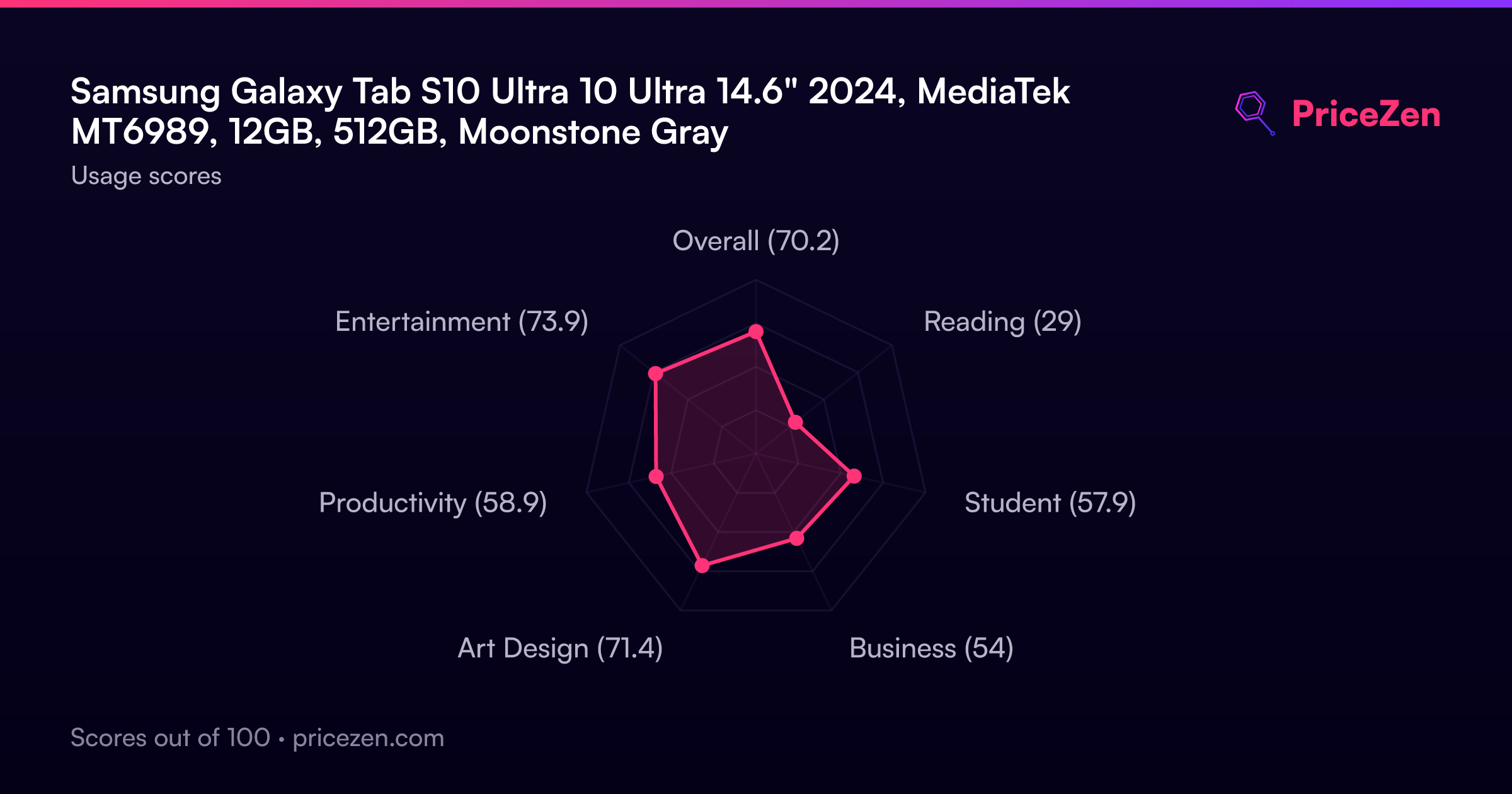
It can handle light work with Samsung DeX and an optional keyboard, but our testing gave it a relatively low business score (57.9). It's great for email, document editing, and video calls, but it won't replace a full Windows or macOS machine for heavy productivity, complex spreadsheets, or software that requires desktop-class applications.
Q: Is the display easy to see outdoors?
Absolutely. The Dynamic AMOLED 2X panel includes reduced glare and Vision Booster, which automatically adjusts brightness and contrast in sunlight. Even in bright conditions, the screen remains legible and vibrant, making it one of the best tablets for outdoor use we've seen.
Who Should Skip This
Skip this tablet if raw processing power is your top priority. The MediaTek chip is fine for everyday use, but it's simply no match for the Apple M5 in the iPad Pro, the newer Samsung Galaxy Tab S11, or even the latest Snapdragon tablets when it comes to 3D rendering, high-end gaming, or heavy video editing. If you're a professional creative who lives in apps like Procreate, Final Cut, or Blender, the iPad Pro or a Surface Pro 11 will serve you much better. Also, if you're on a tighter budget, the Xiaomi Pad 7 offers a great Android experience with a faster processor for less money, though you'll sacrifice screen size and the S Pen. And if you already own a laptop that handles productivity and just want a casual tablet for web browsing, this screen is overkill. You'd be happier with a smaller, cheaper option like the Lenovo Idea Tab Plus.
Verdict
If you're a media junkie, digital artist, or student who wants the biggest, prettiest Android tablet screen around, the Galaxy Tab S10 Ultra is a dream. At the sale price of $586, it's hard to argue against that 14.6-inch AMOLED panel and included S Pen. Binge-watching, comic reading, and sketching all feel premium here, and the battery keeps you going all day. The AI note-taking features actually add real value if you're in meetings or classes, and the IP68 rating gives it a durability edge over most rivals.
But if your workflow demands serious computing muscle—video editing, 3D rendering, or even heavy multitasking with dozens of tabs and apps—this tablet will frustrate you. The mid-tier chip and middling business score (57.9 in our tests) mean it can't truly replace a laptop for pro use, despite Samsung's DeX mode. In that case, you're better off with a Surface Pro or an iPad Pro M5, even if it costs more. For everyone else, snag this on sale and enjoy the view.
Usage Scores
- Overall70.2
- Reading29
- Student57.9
- Business54
- Art Design71.4
- Productivity58.9
- Entertainment73.9