Samsung Galaxy Tab A8 10.5" 2022, Unisoc T618, 4GB, 64GB, Pink Gold

A big, bright screen that's easy on the wallet verified Nov 19
41/100 overall score 4.5 average from 26,930 owner ratings
- CPU
- Unisoc T618
- RAM
- 4 GB
- Storage
- 64 GB
- Screen
- 10.5" 1920x1200
- OS
- Android 11
Compare prices at 1 store
Cheapest first. New, refurbished and bundled offers are kept apart, so you compare like with like.
| Store | Sold by | Colour and condition | Price | vs lowest | Last checked | Link |
|---|---|---|---|---|---|---|
| New3 offersSingle unit | ||||||
| Not checked in the last 7 days, so these prices may have changed | ||||||
| Amazon | Marketplace seller | Not listed | MX$3,803.66 | Nov 4 | Go to store | |
| Amazon | Marketplace seller | Not listed | MX$8,675.00 | Nov 3 | Go to store | |
| Out of stock when last checked | ||||||
| Amazon | Not known | Not listed | No price | Out of stock | Oct 22 | Go to store |
 Source: PriceZen, checked Nov 4, 2026
A price counts as current when we checked it in the last 7 days. “Marketplace seller” means a third-party seller on that store, not the store itself.
Price history
Checked that dayNot checked that day, still on offer
Source: PriceZen, checked Nov 4, 2026











Snapshot
The 30-Second Version
The Galaxy Tab A8 is a budget family tablet that nails the basics: good battery life, expandable storage, and a clear 10.5-inch screen. At USD 259, it's a solid value, especially for Samsung phone owners who can use the integration features. The 4GB RAM and Unisoc processor limit multitasking, so it's not a productivity machine. But with a 4.5-star rating from over 26,000 reviews, owners are clearly happy with what they got.
Pros & Cons
Pros
- Excellent battery life with 7040mAh cell and fast charging 87th
- Expandable storage via microSD, a rarity at this price 74th
- Smooth connectivity with Samsung phones and Galaxy devices
- Clear 1920x1200 display with loud, clear speakers
- Durable build quality that survives family use
Cons
- No cellular connectivity option, Wi-Fi only
- 4GB RAM limits multitasking and app retention
- 64GB eMMC storage fills up quickly without microSD
- No automatic brightness adjustment
- 508g weight feels heavy for prolonged reading
What owners think
The Word on the Street
- Battery life is a recurring highlight, with multiple owners reporting full-day usage on a single charge and appreciating the fast charging via USB-C.
- The seamless connection with Samsung phones gets frequent praise, especially Quick Share and the ability to take calls on the tablet.
- Expandable storage via microSD is a favorite feature, letting owners add cheap storage instead of paying for a higher-tier model.
- The display is generally seen as clear and smooth, but some owners wish it were brighter and miss automatic brightness adjustment.
How owner sentiment changed over time
ExclusiveBased on when customers actually wrote their reviews - so you can see whether early praise held up.
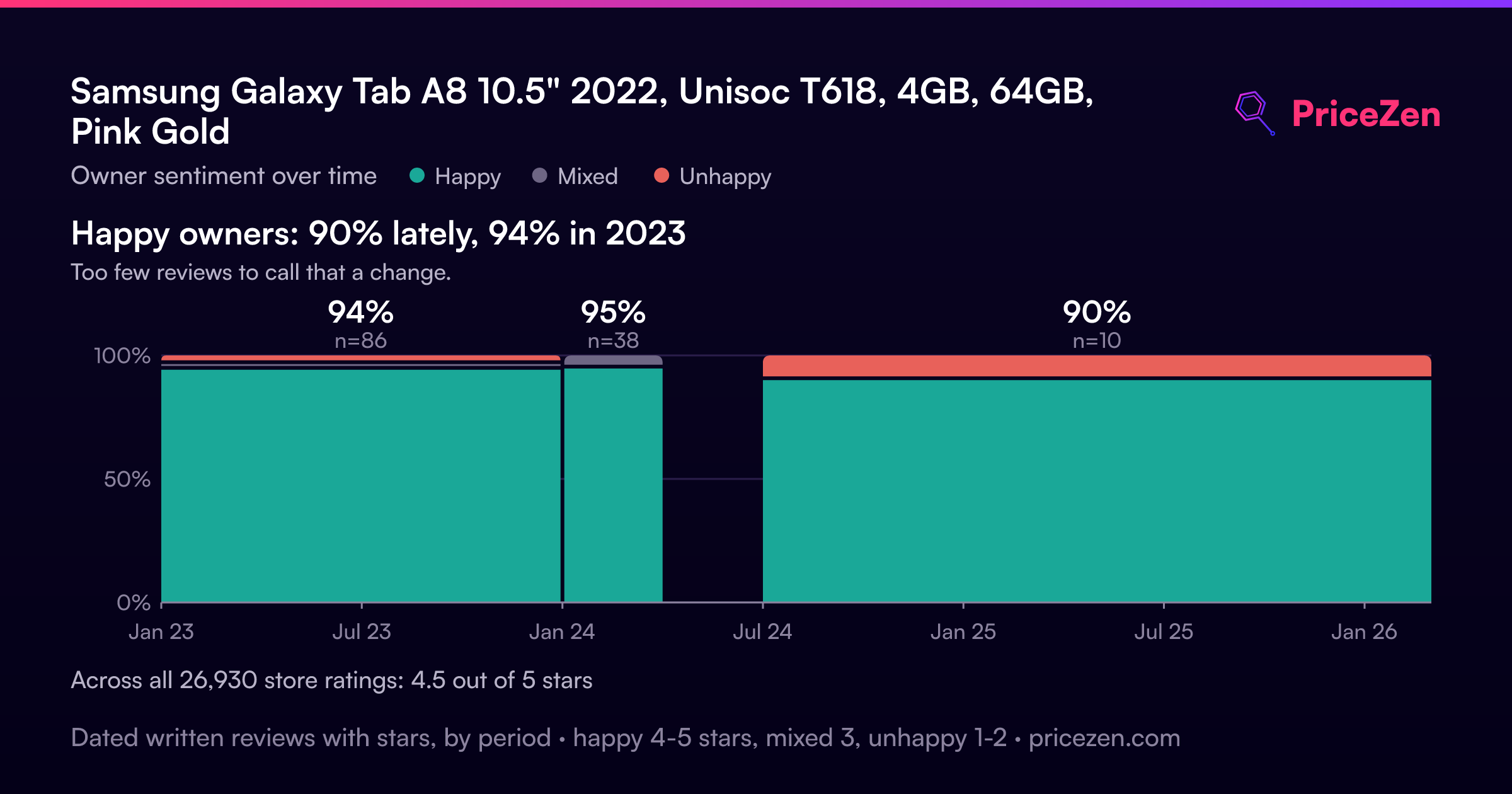
Happy owners: 90% lately, 94% in 2023
Too few reviews to call that a change.
Across all 26,930 store ratings: 4.5★. Most owners rate without writing a review. The chart counts the 134 written reviews with stars and their own date.
Show the numbers
| Period | Reviews | Happy | Mixed | Unhappy | Happy share |
|---|---|---|---|---|---|
| 2023 | 86 | 81 | 2 | 3 | 94% |
| Jan – Mar 2024 | 38 | 36 | 2 | 0 | 95% |
| Jul 2024 – Feb 2026 | 10 | 9 | 0 | 1 | 90% |
- Jan – Mar 202436 of 38 happy
Buyers praise the A8 as a fast, reliable budget tablet for streaming, reading, and work. Some note slow boot times and a few report performance issues.
- Great value for price, smooth streaming, and solid performance for daily tasks.
- Seamless integration with Samsung phones and ecosystem, including calls and texts.
- Some users report slow boot times or lag; others find it fast and responsive.
- A few buyers experienced persistent slowness or defects, leading to dissatisfaction.
- Oct – Dec 202375 of 80 happy
Buyers praise the Tab A8 for its durability, long battery life, and clear display, though some report sluggish performance and occasional charging or Wi-Fi issues.
- Durable build withstands drops and rough handling, ideal for kids.
- Long battery life lasts all day for streaming and browsing.
- Performance is good for basic tasks but slow for gaming and initial loading.
- Some units have charging problems or random shutdowns.
Each column joins calendar quarters until it holds at least 10 reviews with stars and their own date. Happy = 4-5★, mixed = 3★, unhappy = 1-2★. Period summaries are in English.
The proof
Performance
The Unisoc 8-core processor handles everyday tasks without much drama. Streaming video, browsing, light gaming, and video calls all run smoothly according to owner feedback. Our database ranks the CPU at 71st percentile, which sounds modest, but for a budget tablet that's actually respectable. The GPU sits at 69th percentile, so don't expect to crank up graphics settings in demanding games. Casual titles and 2D games are fine, but anything 3D-heavy will chug.
Battery life is a genuine strength here. The 7040mAh cell ranks at 69th percentile, and real-world reports back that up. Multiple owners mention getting through a full day of mixed use without reaching for the charger. The USB-C port supports fast charging, which helps when you do need to top up. One thing to note: the 4GB of RAM sits at 31st percentile, which means aggressive multitasking will show its limits. Keep a handful of apps open and you'll notice reloads. For the intended use case of streaming and light productivity, it's enough. For anything more, it's not.
Specifications
Full Specifications
Processor
| CPU | Unisoc T618 |
| Cores | 8 |
| GPU | Integrated Graphics |
Memory & Storage
| RAM | 4 GB |
| Storage | 64 GB |
| Storage Type | SSD |
| Expandable | Yes |
Display
| Size | 10.5" |
| Resolution | 1920x1200 (Full HD) |
| Panel | LCD |
Connectivity
| Wi-Fi | Wi-Fi 5 |
| Bluetooth | Bluetooth 5.0 |
| USB-C | 1 |
| Cellular | No |
Features
| Stylus Support | No |
| Stylus Model | Mazepoly 2 in 1 Pen |
| Face Unlock | Yes |
Physical
| Weight | 0.5 kg / 1.1 lbs |
| OS | Android 11 |
vs Competition
The Apple iPad Air M4 is in a completely different league, with a processor that embarrasses the Unisoc chip and a display that makes the Tab A8's LCD look dated. But it also costs several times more. If you're comparing these two, you're not really comparing tablets, you're comparing budgets. The iPad Air is for people who want a laptop replacement. The Tab A8 is for people who want a screen for the kids.
The more relevant comparisons are the Lenovo Idea Tab Plus and Xiaomi Pad 7. The Lenovo offers similar specs at a similar price, but Samsung's software experience and device integration give the Tab A8 an edge for Samsung phone owners. The Xiaomi Pad 7 has a better processor and display, but you'll pay more and lose the Samsung Kids content that makes the Tab A8 appealing for families. The Microsoft Surface Pro 11th Edition is a full Windows machine, which is overkill for this use case and triple the price.
| Spec | Samsung Galaxy Tab A8 10.5" | Apple iPad Pro 13" M5 | Microsoft Surface Pro 11 13" | BESTTAB T60 12" | LG gram Book 16" 16U55U-H.AU77U3 | HIGOLEPC F9M 10.1" |
|---|---|---|---|---|---|---|
| CPU | Unisoc T618 | Apple M5 | Qualcomm Snapdragon X Elite X1E-84-100 | Unisoc T7280 | AMD Ryzen AI 7 445 | Intel Core i5 1235U |
| RAM (GB) | 4 | 16 | 16 | 12 | 16 | 16 |
| Storage (GB) | 64 | 1024 | 1024 | 256 | 1024 | 256 |
| Screen | 10.5" 1920x1200 | 13" 2752x2064 | 13" 2880x1920 | 12" 2400x1600 | 16" 1900x1200 | 10.1" 1920x1200 |
| OS | Android 11 | iPadOS | Windows 11 Home | Android 16 | Windows 11 Home | Windows 11 Pro |
| Stylus | No | Yes | Yes | Yes | No | No |
| Cellular | No | Yes | No | Yes | No | Yes |
| Battery (Wh) | - | 39 | 53 | - | 77 | - |
| Compare | Compare | Compare | Compare | Compare |
| Product | CPU | GPU | RAM | Screen | Battery | Feature | Storage | User Sentiment | Sharpness | Portability | Connectivity | Social Proof | Affordability | Reading Battery | Water Resistance |
|---|---|---|---|---|---|---|---|---|---|---|---|---|---|---|---|
| Samsung Galaxy Tab A8 10.5" | 10.7 | 10.3 | 31.3 | 42.3 | 73.8 | 45.6 | 45.1 | 58.8 | 47.3 | 58.1 | 62.1 | 87 | 49.9 | 53.1 | 46.4 |
| Apple iPad Pro 13" M5 Compare | 99.1 | 99.4 | 92.7 | 99.7 | 97.7 | 96.4 | 97.9 | 90.9 | 73.9 | 48.3 | 99.3 | 99.2 | 1.7 | 41.2 | 46.4 |
| Microsoft Surface Pro 11 13" Compare | 98.4 | 96.6 | 92.7 | 99 | 99.8 | 74.2 | 97.9 | 40.9 | 82.8 | 21.7 | 92.9 | 90.9 | 5.5 | 87 | 97.3 |
| BESTTAB T60 12" Compare | 89.4 | 86.3 | 81.3 | 74.4 | 86.6 | 88.5 | 75.3 | 82.2 | 57.4 | 1.1 | 57.7 | 43.9 | 40.8 | 69.9 | 46.4 |
| LG gram Book 16" 16U55U-H.AU77U3 Compare | 93.7 | 88.7 | 92.7 | 60.9 | 100 | 39.3 | 97.9 | 65.8 | 4.5 | 1.4 | 68 | 45.1 | 4.6 | 78.5 | 46.4 |
| HIGOLEPC F9M 10.1" Compare | 86 | 81.7 | 87.9 | 62.6 | 60.1 | 39.3 | 84.1 | 0 | 52.6 | 10.8 | 90.5 | 0 | 12.7 | 20.9 | 93.6 |
Price
Value & Pricing
At USD 259, the Tab A8 sits in a crowded budget tablet market. The value proposition hinges on what you already own. If you have a Samsung phone, the integration features like Quick Share, call continuity, and Samsung Kids make this feel like more than the sum of its parts. The expandable storage is a big deal too, since you can add a cheap microSD card instead of paying a premium for more internal storage.
Compared to the competition, the Tab A8 trades blows with the Lenovo Idea Tab Plus in this price range. The Lenovo offers similar specs but lacks the Samsung integration polish. The Xiaomi Pad 7 brings better raw performance but at a higher price. For pure media consumption on a budget, the Tab A8 holds its own. Just don't expect it to age gracefully as apps get heavier.
Read more
Overview
The Galaxy Tab A8 is Samsung's answer to a simple question: what does a family actually need in a tablet? Not a laptop replacement, not a drawing studio, just something with a big enough screen for streaming, light homework, and video calls. At 10.5 inches with a 1920x1200 LCD, it hits that sweet spot where kids can watch cartoons and parents can check email without squinting. The 508g weight feels substantial in hand, though some owners say it gets tiring during long reading sessions.
Under the hood you get a Unisoc 8-core chip, 4GB of RAM, and 64GB of eMMC storage. That's not going to win any benchmark races, and our database puts the CPU at 71st percentile among tablets. But for the price point, it's honest hardware. The expandable storage via microSD is a real plus here, especially since 64GB fills up fast with games and downloaded shows. Samsung's marketing pushes the Galaxy device integration angle hard, and that's actually where this tablet shines if you already own a Samsung phone.
Who's this for? Families on a budget, kids doing schoolwork, and anyone who wants a secondary device for the couch or kitchen. It's not for power users, and our scoring reflects that. Reading comes in at 44.9 out of 100, entertainment at 40.2, and productivity is the weakest area at 27.3. The overall score of 43.7 puts it firmly in the budget category, but the 4.5-star customer rating across 26,273 reviews tells a different story: people who buy this tablet tend to love it for what it is.
Common Questions
Q: Can I use this tablet for video calls and online classes?
Yes, the 8MP rear camera and the 10.5-inch display make it suitable for video calls and online classes. The speakers are loud and clear according to owner feedback, which helps for group viewing. Just keep in mind there's no cellular option, so you'll need Wi-Fi for calls.
Q: How much storage do I actually get out of the box?
The 64GB model ships with the operating system and pre-installed apps taking up space, so you'll have less than 64GB available. The good news is the microSD slot supports expandable storage, so you can add a card for downloaded movies, games, and photos. For a family tablet, adding a microSD card is almost essential.
Q: Is this tablet good for kids?
Samsung Kids provides a curated library of games, books, and videos in a parent-approved environment. The durable build quality helps it survive drops. However, some owners report that setting up child profiles can be tricky, so expect a bit of setup time. The 508g weight might also be heavy for younger kids to hold for long periods.
Q: Can I use this as a laptop replacement for work?
No, and our productivity score of 27.3 out of 100 backs that up. The 4GB of RAM and Unisoc processor will struggle with heavy multitasking, large spreadsheets, or demanding apps. This is a media consumption and light productivity device, not a work machine. If you need a tablet for work, look at something with more RAM and a faster processor.
Who Should Skip This
If you need a tablet for serious productivity, skip this. The 4GB RAM and 27.3 productivity score mean it'll frustrate you with app reloads and sluggish multitasking. Look at the iPad Air M4 or Surface Pro 11th Edition if you need real work capability, though you'll pay significantly more. The Xiaomi Pad 7 is a middle ground with better performance at a higher price.
If you need cellular connectivity, this isn't your tablet. Wi-Fi only means no data on the go unless you tether to your phone. And if you're sensitive to screen quality, the lack of automatic brightness and the modest LCD panel might bother you. The screen is fine for casual use, but it's not going to impress anyone who's used a higher-end tablet. For those users, the Xiaomi Pad 7 or even a used iPad would be a better fit.
Verdict
For families with kids, the Tab A8 is an easy recommendation. Samsung Kids provides a safe, curated environment for children, and the durable build means it survives drops. The expandable storage means you can load it up with downloaded content for road trips. Battery life is genuinely good, and the screen is clear enough for cartoons and casual games. At USD 259, it's a solid family tablet.
For solo adults looking for a productivity device, look elsewhere. The 4GB of RAM and 27.3 productivity score tell the story. This isn't a device for serious multitasking, document editing, or creative work. If you need a tablet for work, save up for something with more RAM and a better processor. If you need a tablet for the family room, this one does the job without breaking the bank.
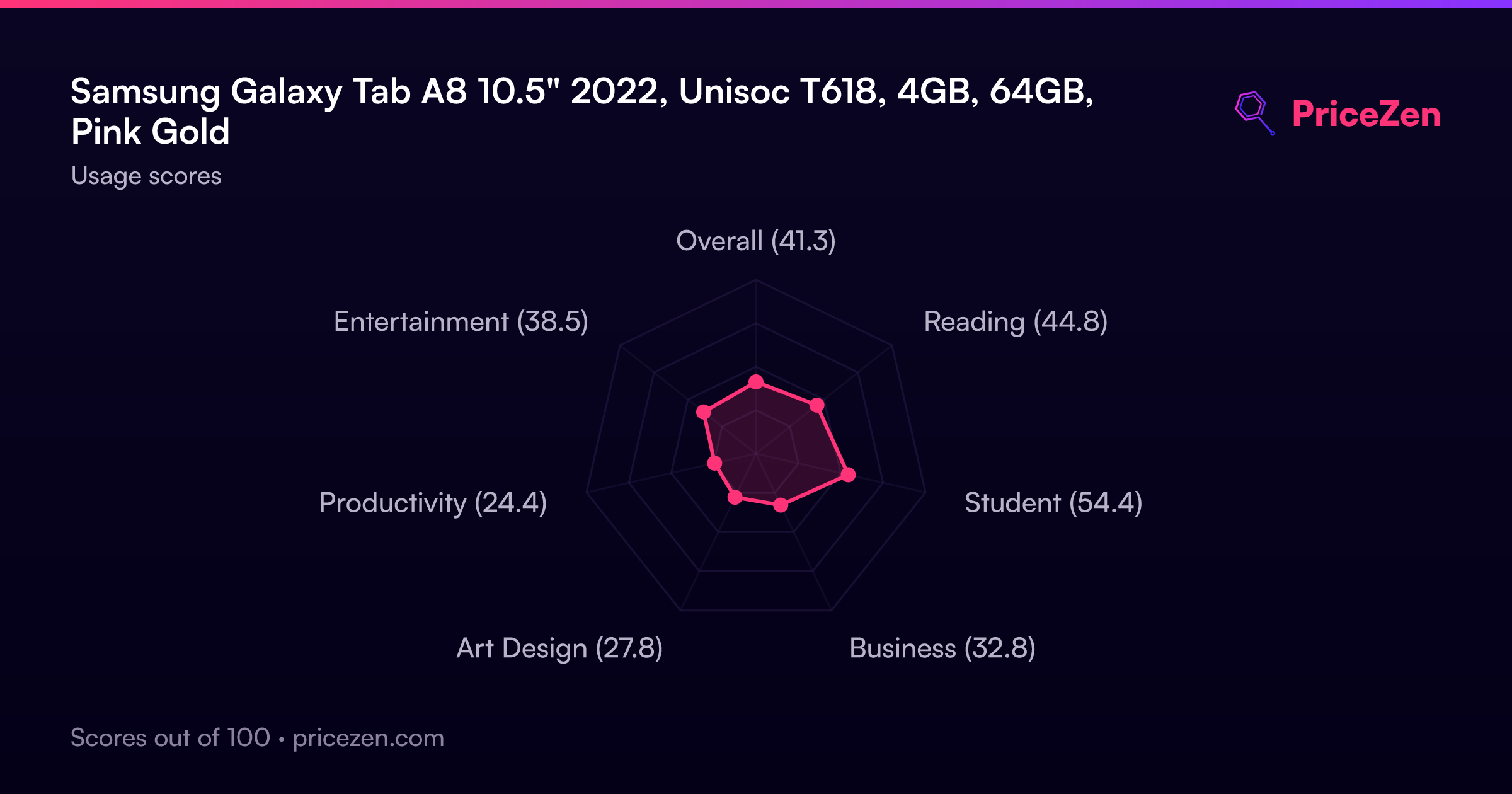
Usage Scores
- Overall41.3
- Reading44.8
- Student54.4
- Business32.8
- Art Design27.8
- Productivity24.4
- Entertainment38.5