CALLSKY-NOTE Cpad 8
The 8-inch IPS display with low blue light technology and the durable EVA protective case with an adjustable stand make this tablet purpose-built for a child's rough daily use. The Android 14 OS with pre-installed KIDOZ software provides robust parental controls and a secure, age-appropriate content ecosystem. This device is best for parents seeking a dedicated, drop-resistant first tablet for children aged 3-7 to access educational apps and supervised entertainment.

No current retailer price










Snapshot
The 30-Second Version
The CALLSKY-NOTE Cpad 8 is a budget kid tablet with solid parental controls and a durable case, but weak hardware across the board. Overall score is 26.4 out of 100, with battery and screen both landing in the 29th percentile. Worth it only at the low end of the price range, and only for very young kids.
Pros & Cons
Pros
- Durable EVA case with drop protection and a built-in strap 84th
- Google Kids Space and KIDOZ preinstalled for a safer kid experience
- 64GB storage expandable up to 2TB via microSD
- 30-day ABCmouse trial included, a real value add for learning
Cons
- Screen resolution and quality are weak, 29th percentile
- Battery life is rough at 4000mAh
- Connectivity is nearly dead last at 9th percentile
- Cameras are 2MP and 5MP, basically for video calls only
The proof
Performance
The octa-core processor is fine for basic apps and YouTube, but don't expect much headroom. CPU and GPU both sit around the 35th percentile, which means it handles simple games and educational apps okay, but anything heavier will chug. The 12GB RAM claim is a bit of marketing sleight of hand, it's 4GB physical plus 8GB of virtual RAM, which is not the same thing. Storage is 64GB, expandable to 2TB via microSD, which is genuinely useful for offline videos. The 4000mAh battery is on the small side, landing in the 29th percentile, so expect to charge this thing daily if your kid actually uses it.
Specifications
Full Specifications
Physical
| Weight | 0.8 kg / 1.7 lbs |
vs Competition
Stacked against the Apple iPad 9.7, this thing gets flattened. The iPad has a better screen, better performance, and better longevity, but it also costs more and isn't kid-proof out of the box. The Samsung Galaxy Tab S9 FE is in another league entirely, better display, better battery, better everything, but again, more money. The UMIDIGI Active T1 and HOTWAV R7 are rugged Android tablets that compete more directly on durability, and both outscore the Cpad 8 on most metrics. The MENTUME K30 K70 is another budget kid tablet that's similarly underwhelming. If you want a cheap, locked-down device for a young kid, this works. If you want anything more, spend up or buy used.
| Spec | CALLSKY-NOTE Cpad 8 | Apple iPad Pro 13" M5 | Microsoft Surface Pro 11 13" | Samsung Galaxy Tab 12.4" S10+ | Lenovo Yoga Tab Plus 12.7" ZAEG0096US | Xiaomi Pad 11.2" 62751 |
|---|---|---|---|---|---|---|
| CPU | - | Apple M5 | Qualcomm Snapdragon X Elite X1E-84-100 | MediaTek Dimensity 9300+ | QTI SM8650 | Snapdragon 8s Gen 3 |
| RAM (GB) | - | 16 | 16 | 12 | 16 | 12 |
| Storage (GB) | - | 1024 | 1024 | 512 | 256 | 512 |
| Screen | - | 13" 2752x2064 | 13" 2880x1920 | 12.4" 2800x1752 | 12.7" 2944x1840 | 11.2" 3200x2136 |
| OS | - | iPadOS | Windows 11 Home | Android 14 | Android 14 | Android 14 |
| Stylus | false | true | true | true | true | true |
| Cellular | false | true | false | false | false | false |
| Battery (Wh) | - | 39 | 53 | - | - | - |
| Compare | Compare | Compare | Compare | Compare |
| Product | CPU | GPU | RAM | Screen | Battery | Feature | Storage | Portability | Connectivity | Affordability | Water Resistance |
|---|---|---|---|---|---|---|---|---|---|---|---|
| CALLSKY-NOTE Cpad 8 | 37.9 | 36.4 | 31 | 41.9 | 32 | 7.4 | 30.1 | 30.3 | 8.6 | 83.9 | 46.4 |
| Apple iPad Pro 13" M5 Compare | 99.1 | 99.4 | 92.4 | 99.7 | 97.5 | 96.5 | 97.7 | 48.6 | 99.2 | 1.7 | 46.4 |
| Microsoft Surface Pro 11 13" Compare | 98.5 | 96.6 | 92.4 | 99.1 | 99.6 | 74.3 | 97.7 | 21.8 | 92.7 | 5.3 | 97.3 |
| Samsung Galaxy Tab 12.4" S10+ Compare | 82.1 | 79 | 80.9 | 95.3 | 87.9 | 96.5 | 92.9 | 50.1 | 76.9 | 5.8 | 97.3 |
| Lenovo Yoga Tab Plus 12.7" ZAEG0096US Compare | 84 | 82.1 | 92.4 | 96.4 | 88.7 | 96.5 | 83.7 | 43 | 92.7 | 21.7 | 46.4 |
| Xiaomi Pad 11.2" 62751 Compare | 86.6 | 85.4 | 80.9 | 98 | 85.2 | 65.2 | 89.5 | 79 | 76.9 | 13.8 | 46.4 |
Price
Value & Pricing
Pricing is all over the map depending on where you buy. In Europe you'll see EUR 155 to EUR 177 across two listings, with the lower end being the better deal if you can find it. In the UK it's GBP 72, and in Canada it's CAD 119. Those are wildly different price points for the same hardware. At the lower end, this is a budget tablet with a kid-proof case and decent parental software. At the higher end, you're paying too much for what you get. If you're in Europe, shop around and grab the EUR 155 listing if you can.
Price history
Read more
Overview
The CALLSKY-NOTE Cpad 8 is a kid-focused Android tablet that tries hard on the software side but stumbles on the hardware. You get a chunky EVA case, parental controls, Google Kids Space, and a 30-day ABCmouse trial. That's a solid pitch for parents who want a locked-down device for a 3 to 7 year old.
But the specs tell a rougher story. An 800 x 1280 IPS screen, 4GB of real RAM, a 4000mAh battery, and cameras that belong in 2015. Our database puts the overall score at 26.4 out of 100. That's not a typo. This thing lands near the bottom of the pack on almost every metric we track.
Common Questions
Q: Is the 12GB RAM real?
No. It's 4GB of physical RAM plus 8GB of virtual RAM, which uses storage as a slower substitute. Real-world performance will feel like a 4GB tablet.
Q: How long does the battery actually last?
The 4000mAh battery is on the small side for an 8-inch tablet. Expect roughly 4 to 6 hours of mixed use, less if your kid is streaming video or playing games.
Q: Can I expand the storage?
Yes. It has a microSD slot that supports cards up to 2TB, so you can load it up with offline videos and apps without worrying about the 64GB internal storage filling up.
Who Should Skip This
Skip this if you want a tablet that will last more than a couple of years or handle anything beyond basic apps. The screen is low-res, the battery is small, and the performance ceiling is low. If your kid is older than 7 or you plan to use it yourself, look at a used iPad or a mid-range Samsung instead. Also skip it if you're in Europe and can only find the EUR 177 listing, that's too much for this hardware.
Verdict
This is a tablet for parents who want a cheap, durable screen to hand a small child without worrying about it breaking or them wandering into the wrong corner of the internet. The parental controls and Kids Space are the real selling points. The hardware is mediocre, the screen is meh, and the battery won't last a full day of heavy use. But for a 3 to 7 year old watching YouTube Kids or playing ABCmouse, it gets the job done. Just don't expect it to grow with your kid.
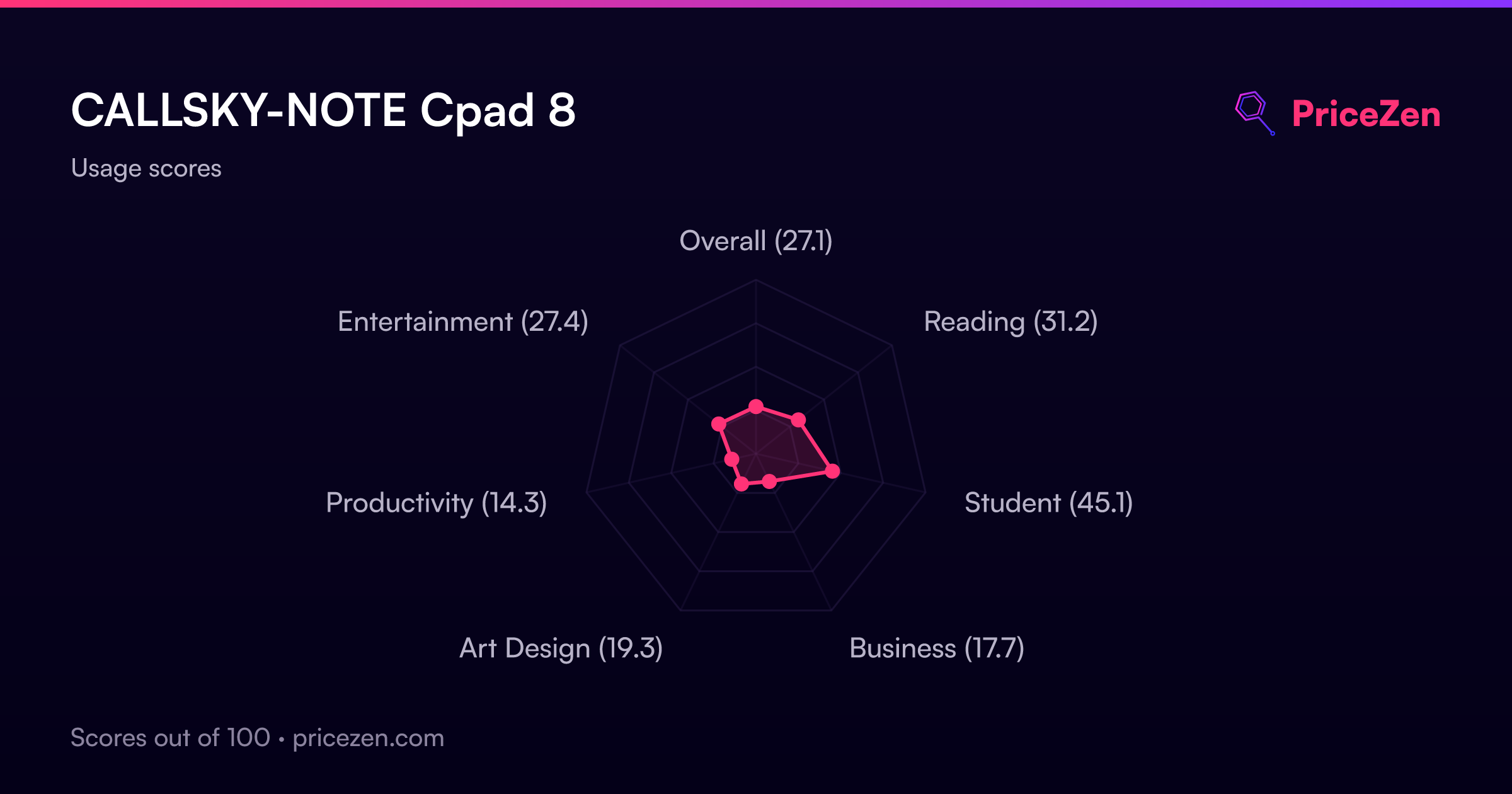
Usage Scores
- Overall27.1
- Reading31.2
- Student45.1
- Business17.7
- Art Design19.3
- Productivity14.3
- Entertainment27.4