BYYBUO 10.1" A70W, 8GB, 32GB, Light Blue

8GB RAM keeps tabs and apps humming verified Nov 29
32/100 overall score 3.9 average from 482 owner ratings
- CPU
- 1.8GHz quad-core
- RAM
- 8 GB
- Storage
- 32 GB
- Screen
- 10.1" 1280x800
- OS
- Android 14
Compare prices at 1 store
Cheapest first. New, refurbished and bundled offers are kept apart, so you compare like with like.
| Store | Sold by | Colour and condition | Price | vs lowest | Last checked | Link |
|---|---|---|---|---|---|---|
| New1 offerSingle unit | ||||||
| Out of stock when last checked | ||||||
| Amazon | Not known | Not listed | No price | Out of stock | Oct 30 | Go to store |
 Source: PriceZen, checked Oct 30, 2026
A price counts as current when we checked it in the last 7 days. “Marketplace seller” means a third-party seller on that store, not the store itself.
Price history
Checked that dayNot checked that day, still on offer
Source: PriceZen, checked Oct 7, 2026









Snapshot
The 30-Second Version
The BYYBUO A70W scores 35.8 out of 100, dragged down by 32GB of storage at the 9th percentile and a CPU at the 34th percentile. The 8GB of RAM at the 66th percentile is the one bright spot. At $79 USD, it's a cheap Android 14 tablet for very light use, but the battery and processor will frustrate anyone expecting more.
Pros & Cons
Pros
- 8GB of RAM at the 66th percentile is a genuine surprise for this price 85th
- Android 14 out of the box with GMS certification 66th
- Wi-Fi 6 and Bluetooth 5.4 are newer connectivity standards than most budget tablets offer
- 512GB expandable storage via microSD card helps offset the tiny internal storage
- The included shockproof silicone case with a kickstand is actually useful
Cons
- 32GB internal storage is at the 9th percentile, one of the worst in our database
- CPU performance at the 34th percentile will feel sluggish with multiple apps open
- 5000mAh battery at the 30th percentile means frequent charging
- 5MP rear camera is barely worth using for anything beyond document scans
- GPU at the 36th percentile limits you to very casual games
What owners think
The Word on the Street
- Several buyers appreciate the low price and the included shockproof case, but many mention the tablet feels sluggish when running multiple apps.
- A common complaint is that the 32GB of storage fills up almost immediately, forcing users to buy a microSD card right away.
- Some owners say it works fine as a basic media device for kids, especially for streaming video and reading e-books.
The proof
Performance
The 1.8GHz quad-core processor lands at the 34th percentile, which means it's slower than roughly two-thirds of the tablets in our database. That's not a disaster for reading e-books or streaming video, but don't expect snappy app switching. The 8GB of RAM is the real bright spot here, sitting at the 66th percentile and giving you more headroom than most budget slates. It's a weird pairing, honestly. Plenty of memory, but a processor that can't really take advantage of it.
The 5000mAh battery is a weak spot at the 30th percentile. You'll likely be reaching for the charger more often than you'd like, especially if you're streaming video on that 1280x800 IPS panel. The screen itself is about average at the 53rd percentile. It's fine for casual use, but it's not going to wow anyone. The GPU sits at the 36th percentile, so casual games like Minecraft will run, but anything more demanding will chug.
Specifications
Full Specifications
Processor
| CPU | 1.8GHz quad-core |
| Cores | 4 |
Memory & Storage
| RAM | 8 GB |
| Storage | 32 GB |
| Expandable | Yes |
Display
| Size | 10.1" |
| Resolution | 1280x800 |
| Panel | IPS |
Connectivity
| Wi-Fi | Wi-Fi 6 |
| Bluetooth | Bluetooth 5.4 |
Physical
| OS | Android 14 |
vs Competition
Stacked against the Apple iPad 9.7, the BYYBUO A70W is not even in the same conversation. The iPad's processor, screen, and app ecosystem blow this thing out of the water, though you'll pay several times more. The Xiaomi Redmi Pad is a much closer competitor in the budget Android space, and it generally offers better build quality and a sharper display. The UMIDIGI Active T1 is interesting because it's built for durability, similar to the BYYBUO's shockproof case angle, but with a more rugged design overall. The MENTUME K30 K70 and Lenovo Idea Tab Pro both offer better all-around specs, but at higher prices. The BYYBUO's only real advantage is that rock-bottom $79 USD price tag and the 8GB of RAM, which is genuinely competitive at this tier.
| Spec | BYYBUO 10.1" A70W | Apple iPad Pro 11" M5 | Microsoft Surface Pro 11 13" | Samsung Galaxy Tab S 12.4" S10+ | Lenovo Idea Tab Pro Gen 2 13" | Xiaomi Pad 11.2" 62751 |
|---|---|---|---|---|---|---|
| CPU | 1.8GHz quad-core | Apple M5 | Qualcomm Snapdragon X Elite X1E-84-100 | Mediatek MT6989 | Qualcomm® Snapdragon™ 8s Gen 4 Processor (3.20 GHz ) | Snapdragon 8s Gen 3 |
| RAM (GB) | 8 | 12 | 16 | 12 | 8 | 12 |
| Storage (GB) | 32 | 512 | 1024 | 512 | 128 | 512 |
| Screen | 10.1" 1280x800 | 11" 2420x1668 | 13" 2880x1920 | 12.4" 2800x1752 | 13" 3504x2190 | 11.2" 3200x2136 |
| OS | Android 14 | iPadOS | Windows 11 Home | Android 14 | Android 16 | Android 14 |
| Stylus | No | Yes | Yes | Yes | Yes | Yes |
| Cellular | No | Yes | No | No | No | No |
| Battery (Wh) | - | 31 | 53 | - | - | - |
| Compare | Compare | Compare | Compare | Compare |
| Product | CPU | GPU | RAM | Screen | Battery | Feature | Storage | Sharpness | Connectivity | Social Proof | Affordability | Reading Battery | Water Resistance |
|---|---|---|---|---|---|---|---|---|---|---|---|---|---|
| BYYBUO 10.1" A70W | 38.3 | 36.8 | 66.3 | 20.6 | 31.7 | 32 | 9.6 | 13.5 | 51.6 | 52.4 | 85.3 | 9.7 | 46.3 |
| Apple iPad Pro 11" M5 Compare | 99.1 | 99.4 | 84.5 | 98.8 | 95.1 | 96.2 | 93.1 | 87.6 | 98.1 | 99.3 | 6 | 64 | 46.3 |
| Microsoft Surface Pro 11 13" Compare | 98.4 | 96.7 | 92.7 | 99.1 | 99.8 | 74.4 | 97.9 | 82.7 | 92.9 | 91.2 | 5.5 | 87 | 97.2 |
| Samsung Galaxy Tab S 12.4" S10+ Compare | 82.6 | 79.4 | 81.4 | 95.2 | 87.7 | 96.2 | 93.1 | 82.7 | 76.9 | 91.2 | 5.7 | 56.8 | 97.2 |
| Lenovo Idea Tab Pro Gen 2 13" Compare | 85.1 | 83.1 | 78.2 | 98.1 | 88.5 | 97.8 | 67 | 96.4 | 92.9 | 91.2 | 31.1 | 44.6 | 46.3 |
| Xiaomi Pad 11.2" 62751 Compare | 87.1 | 85.9 | 81.4 | 97.9 | 85 | 65.2 | 89.8 | 99.3 | 76.9 | 91.2 | 14.9 | 71.2 | 46.3 |
Price
Value & Pricing
At $79 USD, the BYYBUO A70W is cheap. Like, really cheap. But the value proposition is tricky. You're getting 8GB of RAM and Android 14, which is a decent foundation. But the 32GB of storage is a constant annoyance, and you'll almost certainly need to buy a microSD card immediately, which eats into the savings. The battery life and processor performance are both below average, so you're trading long-term usability for a low upfront cost. For a kid's first tablet or a kitchen recipe reader, it might make sense. For anything more, you'll feel the compromises daily.
Read more
Overview
The BYYBUO A70W scores a 35.8 out of 100 in our database, which puts it firmly in the budget tablet category. The headline spec is 8GB of RAM, which lands at the 66th percentile, a genuinely solid number for a tablet at this price point. But that's where the good news mostly ends. The 32GB of storage sits at the 9th percentile, which is one of the worst we've seen, and the CPU and GPU both hover around the bottom third of the pack.
You're getting Android 14, a 10.1-inch IPS display, and Wi-Fi 6 for around $79 USD. That's a very low entry fee. The question is whether the compromises, especially that tiny storage pool and the weak processor, will drive you crazy before you've finished setting the thing up.
Common Questions
Q: Can I expand the storage on the BYYBUO A70W?
Yes. The tablet has 32GB of internal storage, which is at the 9th percentile in our database, but it supports up to 512GB of expandable storage via microSD card. You'll almost certainly want to add one, since 32GB fills up fast with apps and media.
Q: Is the BYYBUO A70W good for gaming?
Only for very casual games. The GPU sits at the 36th percentile in our database, so titles like Minecraft will run, but anything more demanding will struggle. The 1.8GHz quad-core processor at the 34th percentile also limits performance in more complex games.
Q: How long does the battery last on the BYYBUO A70W?
The 5000mAh battery is at the 30th percentile for tablets in our database, which is below average. Expect to charge it more frequently than you would with a higher-end tablet, especially if you're streaming video or using Wi-Fi 6 heavily.
Who Should Skip This
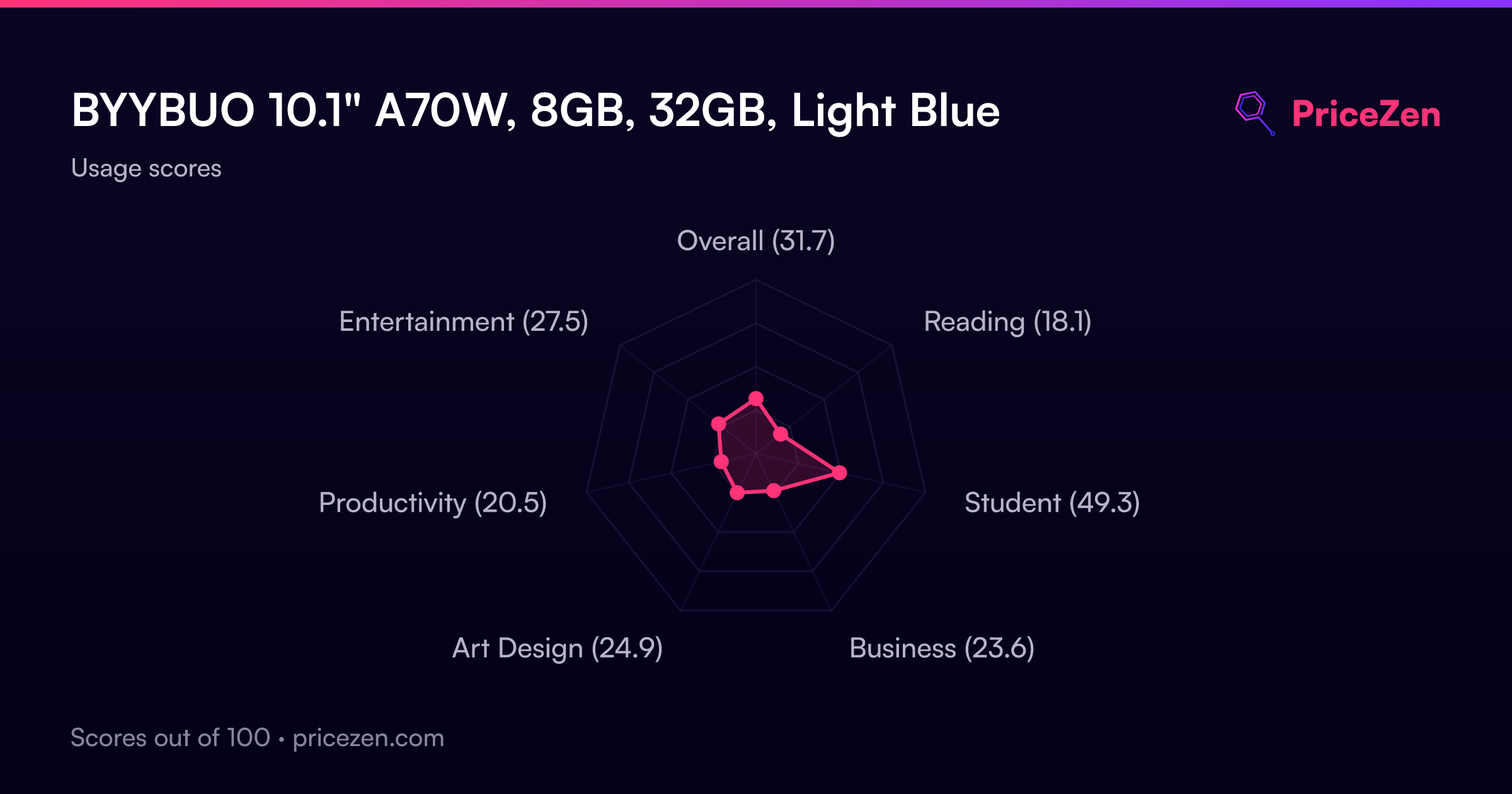
Skip this if you plan to install more than a few apps. The 32GB of storage at the 9th percentile is a constant headache, and even with a microSD card, many apps can't be moved to external storage. Also skip it if you need all-day battery life, since the 5000mAh cell at the 30th percentile will have you hunting for a charger by mid-afternoon. And if you want to do any real work, the productivity score of 23 out of 100 tells you everything you need to know. This is not a tablet for getting things done.
Verdict
The BYYBUO A70W is a budget tablet that makes one smart decision, 8GB of RAM, and then surrounds it with a lot of compromises. The 32GB storage at the 9th percentile is a dealbreaker for anyone who wants to install more than a handful of apps. The battery life and processor are both below average. If you need a cheap screen for light reading, casual video, or a kid's first device, and you're willing to add a microSD card, it's a defensible purchase at $79 USD. But most people will be happier saving up a bit more for something with a better balance of specs.
Usage Scores
- Overall31.7
- Reading18.1
- Student49.3
- Business23.6
- Art Design24.9
- Productivity20.5
- Entertainment27.5