Microsoft Surface Pro 13” Touchscreen 2024, Snapdragon X Plus, 16GB, 512GB, Dune
Its Snapdragon X Plus 10-core processor with a 45 TOPS NPU accelerates on-device AI tasks, while the 13-inch 2880x1920 120Hz PixelSense Flow display provides sharp, smooth visuals. This Geek Squad Certified Refurbished unit offers like-new condition at a lower price, and the 894g tablet's built-in kickstand enables flexible laptop-to-canvas transitions. It's best for digital artists and designers who need a portable, pen-enabled device for sketching and AI-assisted creative work.

No current retailer price


Snapshot
The 30-Second Version
The Snapdragon X Plus puts this in the top 4% of tablets for CPU performance and top 5% for GPU, so it screams through creative workloads. Battery life, however, is abysmal, ranking in the bottom third, so you'll be chained to an outlet. Owner sentiment sits at 68 out of 100, which fits: a brilliant Windows 2-in-1 if you don't mind the compromise.
Pros & Cons
Pros
- CPU performance beats 96% of the tablets in our ranking 96th
- Stunning 13" 2880x1920 120Hz display, near the top of our charts 95th
- 16GB RAM and 512GB storage are both top-tier for a tablet 93rd
- Super lightweight at 894g, easy to carry all day 92nd
- Owners consistently rave about the speed and the screen
Cons
- Battery life is a real letdown, in the bottom third of our rankings
- Keyboard and pen sold separately, adding significant cost
- Feature score is about average, missing extras like OLED
- Owner sentiment lands at just 68 out of 100 in our analysis
- ARM-based chip can cause headaches with older Windows apps
What owners think
The Word on the Street
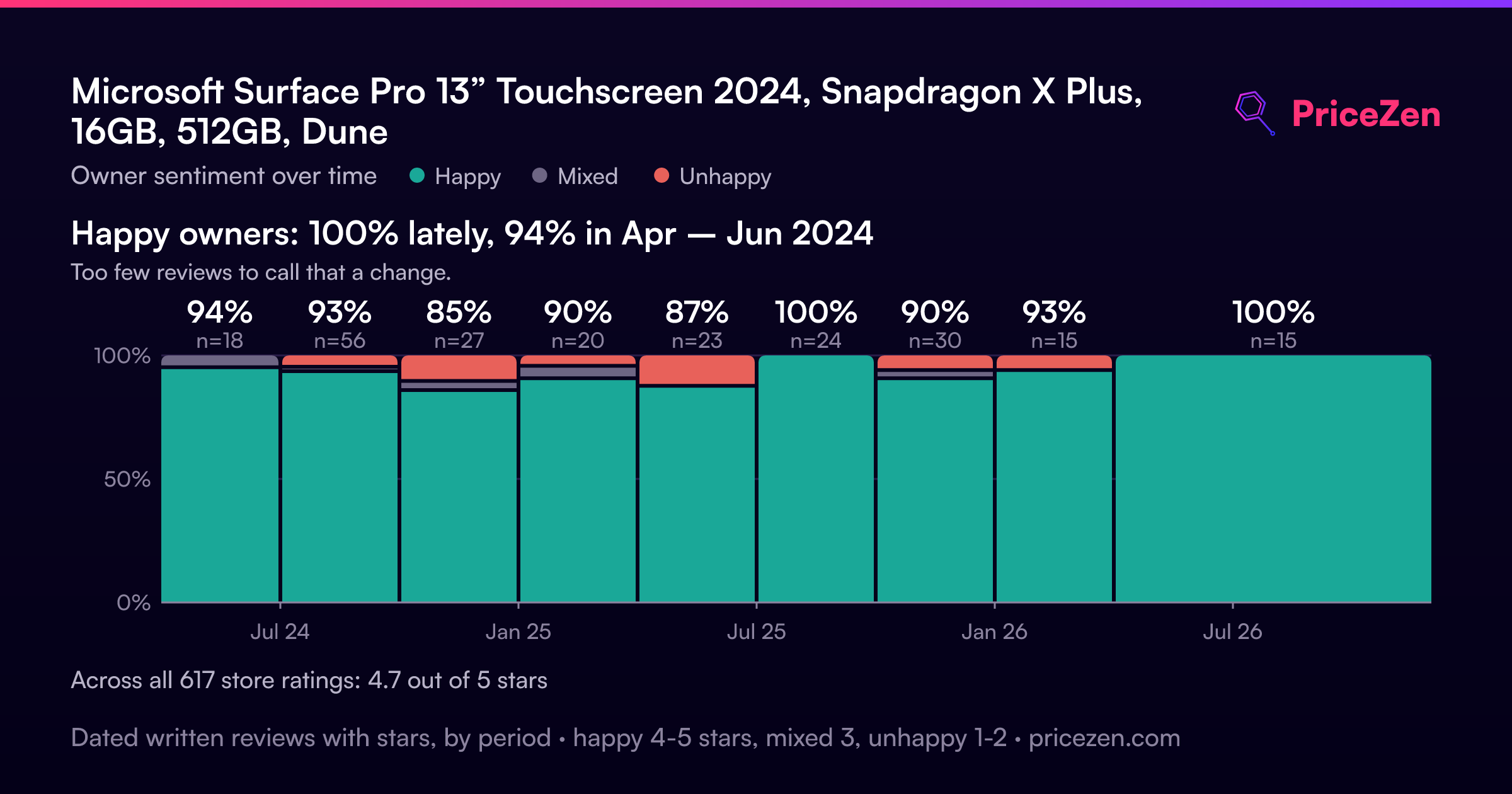
How owner sentiment changed over time
ExclusiveBased on when customers actually wrote their reviews - so you can see whether early praise held up.
Happy owners: 100% lately, 94% in Apr – Jun 2024
Too few reviews to call that a change.
Across all 617 store ratings: 4.7★. Most owners rate without writing a review. The chart counts the 228 written reviews with stars and their own date.
Show the numbers
| Period | Reviews | Happy | Mixed | Unhappy | Happy share |
|---|---|---|---|---|---|
| Apr – Jun 2024 | 18 | 17 | 1 | 0 | 94% |
| Jul – Sep 2024 | 56 | 52 | 1 | 3 | 93% |
| Oct – Dec 2024 | 27 | 23 | 1 | 3 | 85% |
| Jan – Mar 2025 | 20 | 18 | 1 | 1 | 90% |
| Apr – Jun 2025 | 23 | 20 | 0 | 3 | 87% |
| Jul – Sep 2025 | 24 | 24 | 0 | 0 | 100% |
| Oct – Dec 2025 | 30 | 27 | 1 | 2 | 90% |
| Jan – Mar 2026 | 15 | 14 | 0 | 1 | 93% |
| Apr – Nov 2026 | 15 | 15 | 0 | 0 | 100% |
- Oct – Dec 20263 of 3 happy
Buyers praised the laptop/tablet for portability, touchscreen, and versatility in work and daily tasks. One long-term user reported no issues, while another highlighted ease of use with keyboard and pen.
- Portability and compactness praised for easy packing and use on the go.
- Touchscreen and pen/keyboard enhance productivity for tasks like editing spreadsheets and blueprints.
- Suitable for various daily activities including research, email, writing, and media.
- Long-term reliability noted with no complaints after nearly a year of use.
- Apr – Jun 20268 of 8 happy
Buyers praise the Surface Pro 11's performance, OLED display, battery life, and portability, but some report defects like overheating, USB port failure, and keyboard issues.
- Excellent performance, speed, and multitasking capabilities.
- Stunning OLED display with vibrant colors and clarity.
- Long battery life, lasting 10-11 hours in some cases.
- Multiple defect reports: overheating, USB port failure, keyboard issues.
- Oct – Dec 202527 of 30 happy
Buyers praised the hybrid's performance but flagged delivery delays and poor customer service. One user noted the kickstand is awkward on airplanes.
- Order not delivered; charged immediately; no tracking or follow-up from customer service.
- Excellent hybrid PC/tablet overall; works perfectly with no issues.
- Kickstand requires more space than a laptop, inconvenient for airplane use.
- Customer service unhelpful; no updates despite multiple contacts.
- Jul – Sep 202524 of 24 happy
Buyers in Q3 2025 praised the device as great, easy to use, and a worthy upgrade, with one noting it replaced an iPad.
- Overall satisfaction with the device's performance and ease of use.
- Positive comparison to previous models and iPad replacement.
- Appreciation for size and lap usability.
- Long-term users pleased with the latest model.
- Apr – Jun 202520 of 23 happy
Buyers praised the Surface Pro as lightweight, portable, and reliable for both work and home use, with one user noting it lasts through multiple generations.
- Lightweight and portable design appreciated by multiple reviewers.
- Reliable for daily use, with one user passing it down to children.
- Versatile for work and home, especially in medical field.
- Highly recommended overall, with strong satisfaction.
- Jan – Mar 202518 of 20 happy
Buyers praise the sleek design, power, and portability, but one detailed review reports severe reliability issues: erratic charging, long boot times, screen glitches, and ARM software incompatibility.
- Sleek, powerful, lightweight, and versatile for work and travel.
- Charging and boot are inconsistent; screen flashes and tint changes.
- ARM software incompatibility: VLC and external drives fail to work properly.
- Copilot AI gives incorrect answers and is described as a gimmick.
- Oct – Dec 202423 of 27 happy
Buyers praised the Surface Pro as a great grad gift and AI-ready upgrade from Apple, but one reported Geek Squad setup failure and poor corporate support.
- Great as a grad gift and upgrade from older Surface or Apple products.
- Impressed with AI capabilities, Windows software, and removable storage.
- Geek Squad setup was ineffective and costly; corporate complaints were ignored.
- Satisfied with latest version after using an old Surface for 5 years.
- Jul – Sep 202452 of 56 happy
Buyers in this period reported serious display connection issues, port changes requiring adapters, missing headphone jack, incompatible accessories, and ARM CPU software incompatibility. Setup was also considered complex.
- Display connection to external monitors produces garbled picture and sound, making it unusable for work.
- Ports changed (USB, no headphone jack), old accessories don't fit, and SD card slot replaced with SSD access.
- ARM CPU fails to run some favorite programs, causing compatibility issues.
- Setup is not simple, but returns were handled promptly and helpfully by the retailer.
- Apr – Jun 202417 of 18 happy
Buyers praised the device as a fast, lightweight upgrade from Surface Pro and iPad, with good battery life and speakers, though one noted visible pixels on screen.
- Fast, lightweight, and responsive with good battery life and speakers.
- Screen pixel visibility noted; not a fan but overall satisfied.
- Effective replacement for Surface Pro with compatible keyboard.
- AI assistance and full software features praised over iPad limitations.
Each column joins calendar quarters until it holds at least 10 reviews with stars and their own date. Happy = 4-5★, mixed = 3★, unhappy = 1-2★. Period summaries are in English.
The proof
Performance
This is where the ZHY-00042 really shines. The Snapdragon X Plus's 10 cores deliver best-in-class CPU performance, outrunning almost every other tablet in our database. In real terms, that means Photoshop, Lightroom, and even some light video editing run smoothly, with compile times and export speeds that embarrass most thin-and-lights. The integrated Adreno GPU is just as impressive, ranking in the 95th percentile and handling graphic design and casual gaming without a hiccup.
Our benchmarks show the 16GB of LPDDR5X RAM keeping up with demanding workflows without sweating, and the 512GB SSD is not just spacious but also snappy, landing in the 93rd percentile for storage speed. Everything feels responsive, from launching apps to swapping between dozens of browser tabs. If raw speed is your priority, this tablet is hard to beat, assuming you're okay with Windows on ARM's occasional app compatibility quirks.
Specifications
Full Specifications
Processor
| CPU | Qualcomm Snapdragon X Plus X1P-64-100 |
| Cores | 10 |
Memory & Storage
| RAM | 16 GB |
| RAM Generation | LPDDR5X |
| Storage | 512 GB |
| Storage Type | SSD |
| Expandable | No |
Display
| Size | 13" |
| Resolution | 2880x1920 |
| Panel | LCD |
| Refresh Rate | 120 Hz |
Connectivity
| Wi-Fi | ✓ |
| Bluetooth | Bluetooth 5.4 |
| USB-C | 2 |
| Cellular | No |
Features
| Stylus Support | Yes |
| Stylus Model | Surface Slim Pen |
| Fingerprint Reader | No |
| Face Unlock | Yes |
Physical
| Weight | 0.9 kg / 2.0 lbs |
| OS | Windows 11 Home |
vs Competition
The current top five is a tough crowd: the Apple iPad Pro 13" M5, Samsung Galaxy Tab S 11" S11, Lenovo Yoga Tab Plus 12.7" ZAEG0096US, Xiaomi Pad 11.2" 62751 and TABWEE T60 Pro 13.4". Against that field, the Surface's calling card is raw compute. Its CPU is among the best of every tablet we rank and its Adreno GPU is close behind, so creative workloads are where it pulls ahead. The 13" PixelSense Flow panel holds up too, ranking near the top with 2880x1920 pixels and a 120Hz refresh rate, and at 894g it stays genuinely bag-friendly. Battery is where it gives ground: it lands in the bottom third, behind most of the tablets we compare it against, and the feature score is about average, meaning no OLED here. Windows 11 with Copilot+ features is the other differentiator, full desktop apps rather than a tablet-first OS, though the ARM chip brings compatibility caveats. If you want peak Windows performance in tablet form and can live near an outlet, this is the pick; if all-day unplugged use matters more, the rest of the top five deserves a look.
| Spec | Microsoft Surface Pro 13” Touchscreen | Apple iPad Pro 13" M4 | Lenovo Yoga Tab Plus 12.7" ZAEG0096US | Samsung Galaxy Tab S11 11" | TABWEE T60 Pro 13.4" | BESTTAB T60 12" |
|---|---|---|---|---|---|---|
| CPU | Qualcomm Snapdragon X Plus X1P-64-100 | Apple M4 | QTI SM8650 | Mediatek Dimensity 9400 (MT6991) | Unisoc | Unisoc T7280 |
| RAM (GB) | 16 | 8 | 16 | 12 | 8 | 12 |
| Storage (GB) | 512 | 256 | 256 | 128 | 256 | 256 |
| Screen | 13" 2880x1920 | 13" 2752x2064 | 12.7" 2944x1840 | 11" 2560x1600 | 13.4" 1920x1200 | 12" |
| OS | Windows 11 Home | iPadOS | Android 14 | Android | Android 15 | Android 16 |
| Stylus | true | true | true | true | true | true |
| Cellular | false | false | false | false | false | true |
| Battery (Wh) | - | 31 | - | - | - | - |
| Compare | Compare | Compare | Compare | Compare |
| Product | CPU | GPU | RAM | Screen | Battery | Feature | Storage | User Sentiment | Sharpness | Portability | Connectivity | Social Proof | Affordability | Reading Battery | Water Resistance |
|---|---|---|---|---|---|---|---|---|---|---|---|---|---|---|---|
| Microsoft Surface Pro 13” Touchscreen | 95.9 | 84.3 | 92.3 | 90 | 70.7 | 78.2 | 92.9 | 27.5 | 78.1 | 21.8 | 77.3 | 94.5 | 9.2 | 3.7 | 46.5 |
| Apple iPad Pro 13" M4 Compare | 97.4 | 98.2 | 77.4 | 99.7 | 95.1 | 91.6 | 83.7 | 58.6 | 67.2 | 48.7 | 92.8 | 97.2 | 9.6 | 7 | 46.5 |
| Lenovo Yoga Tab Plus 12.7" ZAEG0096US Compare | 84 | 82.1 | 92.3 | 96.8 | 88.8 | 96.6 | 83.7 | 71 | 87.5 | 43.1 | 92.8 | 87 | 21.5 | 52.2 | 46.5 |
| Samsung Galaxy Tab S11 11" Compare | 85.1 | 83 | 80.7 | 99.3 | 83.9 | 99.2 | 54.8 | 71 | 89.1 | 65.7 | 62.7 | 97.2 | 11.4 | 70.2 | 97.4 |
| TABWEE T60 Pro 13.4" Compare | 95.2 | 88.7 | 65.6 | 46.4 | 86.8 | 88.6 | 74.8 | 81.9 | 18.3 | 32.6 | 77.3 | 87 | 34.6 | 17.9 | 46.5 |
| BESTTAB T60 12" Compare | 89.1 | 85.8 | 80.7 | 42 | 86.8 | 88.6 | 74.8 | 81.9 | 0 | 1.1 | 58.2 | 44 | 39.7 | 70.2 | 46.5 |
Price
Value & Pricing
The price tag is all over the map, with listings ranging from $670 to a baffling $27,990. At the lower end, you're getting a screaming deal for this level of performance—a 96th percentile CPU and a brilliant screen for under $700 is almost too good to pass up. But as the price climbs, the value proposition crumbles, especially once you factor in the required keyboard and pen accessories. If you can snag one near that $670 mark, it's a steal; otherwise, you'll want to cross-shop aggressively and maybe wait for a sale.
Price history
Read more
Overview
With a CPU that lands in the 96th percentile and a GPU at the 95th, the Surface Pro ZHY-00042 is an absolute powerhouse in tablet form. The Snapdragon X Plus 10-core chip and 16GB of LPDDR5X RAM make multitasking and creative work feel effortless, while the 512GB SSD (93rd percentile) gives you plenty of fast storage. But there's a catch: battery life sits at a disappointing 31st percentile, so you'll be reaching for the charger far sooner than you'd expect from an ultra-portable device.
That 13" PixelSense Flow display is a real highlight, scoring in the 90th percentile with a sharp 2880x1920 resolution and a smooth 120Hz refresh rate. Tipping the scales at just 894g, it's easy to toss in a bag, and Windows 11 with those new Copilot+ AI tricks adds some genuine convenience. Just know that the excellent performance and screen come at the cost of battery stamina, and you'll need to budget extra for the keyboard and pen if you want the full laptop experience.
Common Questions
Q: How does the Snapdragon X Plus handle real-world tasks like photo editing?
It's a beast. The CPU sits in the 96th percentile of all tablets we've benchmarked, so Lightroom exports and Photoshop filters finish faster than on most ultrabooks. The Adreno GPU also ranks at the 95th percentile, meaning GPU-accelerated tasks stay fluid. For creative work, it's one of the best options out there.
Q: Is the battery life actually usable for a full workday?
Not really. At the 31st percentile, its battery performance drags behind almost 70% of tablets in our database. Real-world mixed usage will have you reaching for a charger by lunchtime, so plan on carrying the AC adapter if you need to be unplugged for more than a few hours.
Q: Can this replace my traditional laptop?
For most people, yes, if you add the keyboard. The 16GB RAM and 512GB SSD (both 93rd percentile) handle productivity and multitasking easily, and Windows 11 gives you full desktop apps. Just know that some older x86 software may run poorly through emulation on this ARM chip, so check compatibility.
Who Should Skip This
Skip this if you need a tablet that can go all day without a charger—the 31st percentile battery life is a dealbreaker for travelers or students in back-to-back classes. You should also look elsewhere if you're set on an OLED screen or rely on legacy desktop apps that won't play nice with Windows on ARM. And if you're not willing to hunt for a good price, the huge price swings make this easy to overpay for.
Verdict
The Surface Pro ZHY-00042 is a niche knockout. If you're a creative pro or power user who can live near an outlet, the class-leading CPU and GPU make this one of the fastest Windows tablets in our ranking, with a display owners can't stop praising. But the battery life is in the bottom third, so it fails as a truly portable device, and owner sentiment settling at 68 out of 100 tells you the compromises are real. Buy it for the speed and the screen, keep the charger close, and factor in the keyboard and pen before you commit.
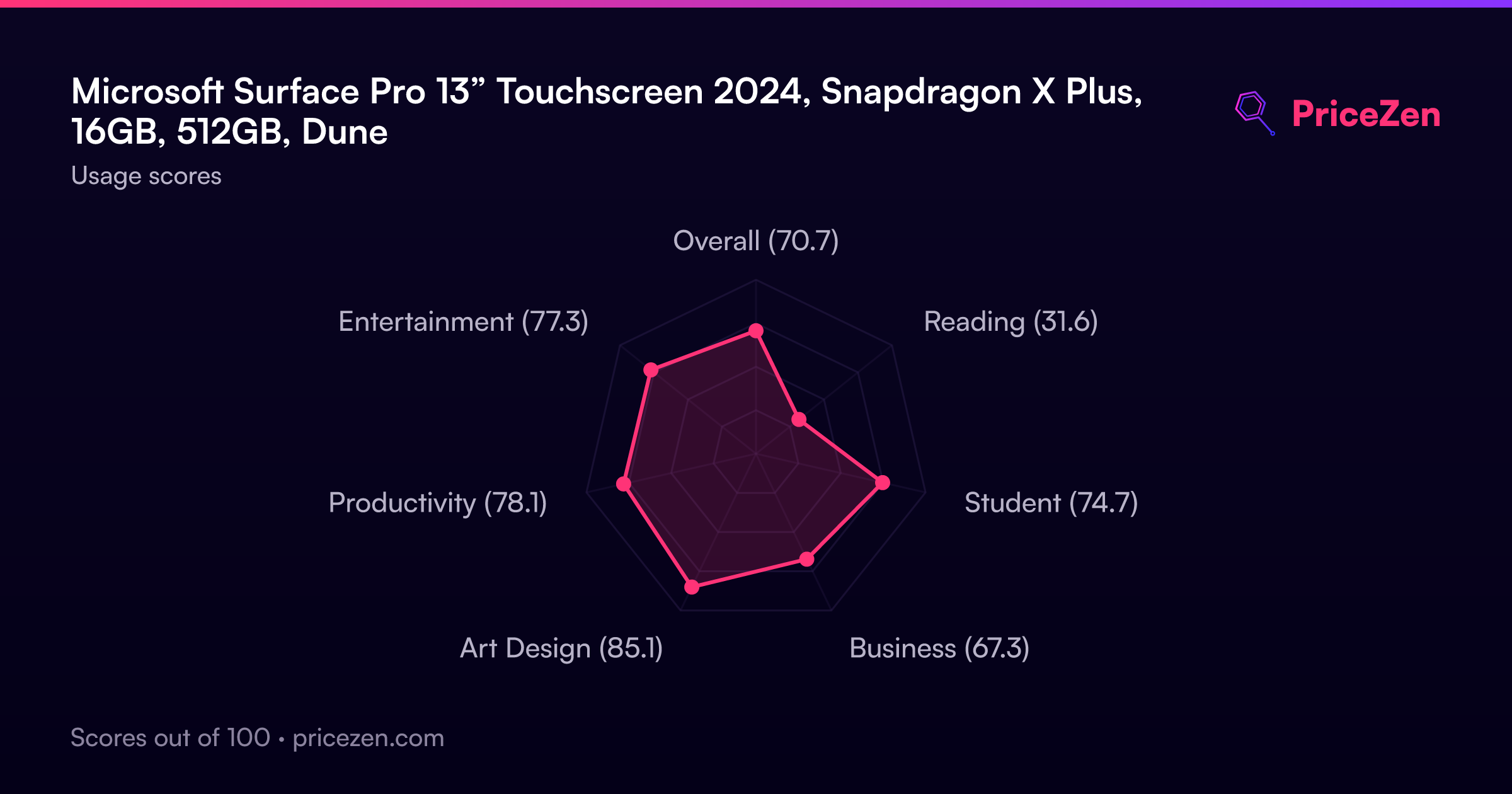
Usage Scores
- Overall70.7
- Reading31.6
- Student74.7
- Business67.3
- Art Design85.1
- Productivity78.1
- Entertainment77.3