SP Silicon Power 128GB SSD PCIe 3.0 x4 NVMe M.2 2280
The PCIe Gen 3x4 interface delivers read speeds up to 2,200MB/s and write speeds up to 1,600MB/s, with TLC NAND and SLC Cache for efficient performance. It supports NVMe 1.3, Host Memory Buffer, and LDPC ECC with a 5-year warranty, making it a reliable budget option for M.2 2280 slots. Best for users upgrading older laptops or desktops who need faster boot times and app loading without spending on premium Gen 4 drives.


Snapshot
The 30-Second Version
The Silicon Power P34A60 is a dirt-cheap 128GB NVMe SSD with TLC NAND and a 5-year warranty. It's fast enough to make an old laptop feel new again, with random performance that's actually above average for PCIe 3.0. The capacity is tiny and endurance is weak, so it's best as a boot drive or secondary disk. At this price, it's a solid buy for the right use case, but most people should step up to 256GB or more.
Pros & Cons
Pros
- Dirt cheap, with affordability in the 95th percentile of our database 96th
- TLC NAND instead of QLC, which is rare at this price point
- Random performance is above average for PCIe 3.0 drives
- Standard M.2 2280 form factor fits almost any modern laptop or desktop
- 5-year warranty is generous for a budget drive
Cons
- 128GB capacity is tiny, landing in the 7th percentile overall
- Endurance rating is weak, sitting at the 15th percentile
- Sequential speeds are mid-pack at best for PCIe 3.0
- No DRAM cache, relying on HMB which can be inconsistent on older systems
- Portable use case score is abysmal at 8.5 out of 100
The proof
Performance
Silicon Power rates the P34A60 at up to 2,200MB/s sequential reads and 1,600MB/s sequential writes. For context, that's roughly four to five times faster than a typical SATA SSD and about twenty times faster than a spinning hard drive. In our database, the speed score lands at the 53rd percentile, which puts it right in the middle of the pack for PCIe 3.0 drives. That's not going to blow anyone's hair back, but it's more than enough for booting Windows, launching apps, and general multitasking. The random performance score sits at the 62nd percentile, which is actually a bit better than the sequential numbers suggest. That's the metric that matters most for everyday responsiveness, so the drive feels snappier in real use than the spec sheet might imply.
The SLC cache is doing a lot of heavy lifting here. When you write files, the drive treats a portion of the TLC NAND as faster single-bit storage, so short bursts of writes hit those higher speeds. Once the cache fills up, writes drop to native TLC speeds, which on a 128GB drive with limited free space can happen sooner than you'd like. For typical use, like installing updates or copying a few gigabytes of photos, you'll rarely notice. But if you're moving large files around constantly, this drive will show its limits. The endurance score is where things get rough. At the 15th percentile, this drive is rated for far fewer write cycles than most of its peers. That's the trade-off for the rock-bottom price, and it's worth knowing before you buy.
Specifications
Full Specifications
Drive
| Capacity | 128 |
| Form Factor | M.2 2280 |
| Interface | PCIe 3.0 x4 |
| Protocol | NVMe |
| PCIe Generation | 3 |
| External | No |
Hardware
| NAND | TLC |
vs Competition
The budget NVMe space is crowded, and the P34A60 sits somewhere in the middle of it. The Kingston NV3 is a direct competitor that often sells for similar money, but it typically offers better sequential speeds and higher endurance ratings. If you can find the NV3 for a few bucks more, it's usually the smarter buy. The Team Group MP44L is another budget favorite, and it tends to outperform the P34A60 in sustained writes while staying in the same price bracket. Both of those drives make the Silicon Power look a little dated on paper.
On the other hand, the P34A60 undercuts drives like the Crucial T500 and Corsair MP600 Elite by a wide margin. Those are PCIe 4.0 drives with much higher performance ceilings, but they cost significantly more and are overkill for the kind of systems this drive targets. If you're upgrading an older laptop that only supports PCIe 3.0 anyway, spending extra on a Gen 4 drive is wasted money. The SanDisk Optimus GX 7100 is another step up in both price and performance. For a basic boot drive or a cheap capacity bump, the P34A60 holds its own against the budget crowd, but it's not the best option in its class.
| Spec | SP Silicon Power 128GB SSD | Samsung 9100 PRO | Kingston FURY Renegade | Western Digital WD_BLACK SN850X | Crucial T700 | SanDisk WD_BLACK |
|---|---|---|---|---|---|---|
| Capacity | 128GB | 8TB | 4TB | 8TB | 2TB | 8TB |
| Form Factor | M.2 2280 | M.2 2280 | M.2 2280 | M.2 2280 | M.2 2280 | M.2 2280 |
| Interface | PCIe 3.0 x4 | PCIe 5.0 x4 | PCIe 4.0 x4 | PCIe 4.0 x4 | PCIe 5.0 x4 | PCIe 5.0 x4 |
| Seq Read | - | 14,800 MB/s | 7,300 MB/s | 7,200 MB/s | 12,400 MB/s | 14,900 MB/s |
| Nand Type | TLC | TLC | TLC | TLC | TLC | TLC |
| Dram Cache | - | true | true | true | true | true |
| Endurance | - | 4800 TBW | 4000 TBW | 4800 TBW | 1200 TBW | 4800 TBW |
| Compare | Compare | Compare | Compare | Compare |
| Product | Speed | Random | Feature | Capacity | Endurance | Affordability |
|---|---|---|---|---|---|---|
| SP Silicon Power 128GB SSD | 53 | 61.8 | 52.4 | 7.2 | 14.6 | 95.5 |
| Samsung 9100 PRO Compare | 99.3 | 99.8 | 99.7 | 98.1 | 85.7 | 1.8 |
| Kingston FURY Renegade Compare | 93.4 | 94.4 | 93.8 | 92.6 | 93.9 | 10.5 |
| Western Digital WD_BLACK SN850X Compare | 87.7 | 96.4 | 93.8 | 98.1 | 88 | 3.8 |
| Crucial T700 Compare | 96.7 | 97.7 | 97.4 | 78.6 | 82.6 | 21.4 |
| SanDisk WD_BLACK Compare | 99.1 | 99.3 | 97.4 | 98.1 | 80.6 | 3.2 |
Price
Value & Pricing
This is where the P34A60 earns its keep. The affordability score puts it in the 95th percentile of all drives in our database, which means it's one of the cheapest NVMe SSDs you can buy, period. Prices we're seeing range from 51 to 54 EUR across European listings, 58 CAD in Canada, 7,591 INR in India, and 9,000 JPY in Japan. For that money, you're getting a genuine PCIe 3.0 NVMe drive with TLC NAND and a 5-year warranty. That's a genuinely good deal, even if the capacity is small.
The catch is that price per gigabyte isn't actually that impressive at 128GB. If you step up to the 256GB or 512GB version of this same drive, you'll typically pay less per gigabyte and get better endurance ratings to boot. So the 128GB model only makes sense if your budget is absolutely fixed or you genuinely don't need more space. For a boot drive in a basic office PC or a secondary drive for a specific purpose, it's hard to argue with the price. Just don't expect it to be a long-term workhorse.
Amazon 1 offer From MX$1,187
We started tracking prices for this product on Nov 14, 2026. The chart appears once we have more data.
Read more
Overview
The Silicon Power P34A60 is one of those drives that makes you do a double take when you see the price. We're talking about a 128GB NVMe SSD that costs less than a decent pizza dinner in most markets. It's a PCIe 3.0 x4 drive in the standard M.2 2280 form factor, which means it'll drop into just about any laptop or desktop from the last several years without a fuss. And for a lot of people, that's exactly the point. This isn't a drive for benchmark chasers or people who need to move 4K video files around all day. It's a cheap, functional upgrade for machines that are still spinning a mechanical hard drive or limping along on a tiny SATA SSD.
The drive uses TLC NAND, which is good to see at this price point. A lot of ultra-budget drives cut corners with QLC, but Silicon Power stuck with TLC here. That matters for sustained write performance and general longevity. The controller supports NVMe 1.3, Host Memory Buffer, and SLC caching, so the drive borrows a bit of system RAM to keep things snappy without needing its own DRAM chip. That's a smart cost-saving move that keeps the bill of materials down while still delivering decent everyday performance.
Who's this for? Honestly, it's for the person with an older laptop that takes forever to boot, or someone building a budget office PC who wants snappy app launches without spending real money. It's also a solid choice for a secondary drive in a desktop, maybe for a game library or as a scratch disk. The 128GB capacity is the smallest in the lineup, and that's the biggest limitation here. But if you know what you're getting into, this drive delivers a lot of value for very little cash.
Common Questions
Q: Is 128GB enough for a boot drive?
For a basic Windows or Linux install with a handful of applications, 128GB is workable but tight. Windows 11 alone can eat 30-40GB after updates, and you'll want to keep at least 10-15% of the drive free for the SLC cache to function properly. If you store photos, videos, or games locally, you'll run out of space quickly. Most people are better off with the 256GB or 512GB version of this drive.
Q: Will this drive work in my older laptop?
The P34A60 uses the standard M.2 2280 form factor with a PCIe 3.0 x4 interface, so it'll work in most laptops from the last several years that have an M.2 NVMe slot. It also supports NVMe 1.3 and Host Memory Buffer, which means it doesn't need its own DRAM chip. One thing to check is whether your laptop's M.2 slot supports NVMe or only SATA. If it's SATA-only, this drive won't work.
Q: How does the endurance rating affect real-world use?
The endurance score in our database puts this drive at the 15th percentile, which means it's rated for fewer total writes than most competing drives. For typical use like booting, browsing, and light productivity, you're unlikely to hit the write limit within the 5-year warranty period. But if you're constantly writing large files, running a database, or using it as a cache drive, the lower endurance could become a problem sooner than you'd like.
Q: Is this drive good for gaming?
It'll work for gaming, but the 128GB capacity is a serious limitation. Modern games routinely take up 50-100GB each, so you'll fit maybe one or two titles at most. Load times will be decent thanks to the solid random performance, but you won't see the kind of speed that PCIe 4.0 drives offer. If gaming is your main use case, look at a larger drive or one with better sustained write performance.
Who Should Skip This
If you're a gamer, content creator, or anyone who works with large files, this drive is not for you. The 128GB capacity will fill up almost immediately with modern games or video projects, and the endurance rating means heavy write workloads will wear it out faster than most alternatives. You'd be better off with a 512GB or 1TB drive from Kingston, Team Group, or even the larger versions of this same Silicon Power model.
Also skip this if you're building a new system with a PCIe 4.0 or 5.0 motherboard and want to take advantage of those speeds. The P34A60 is a PCIe 3.0 drive, so it'll work fine in a newer board but leave a lot of performance on the table. If you're spending money on a modern platform, spend a little more on a Gen 4 drive like the Crucial T500 or Corsair MP600 Elite. This drive is for breathing life into old hardware, not pushing new hardware to its limits.
Verdict
If you need a cheap, reliable boot drive for an older laptop or a basic desktop, the P34A60 does the job. The TLC NAND and 5-year warranty give it more credibility than the price tag suggests, and the random performance is good enough to make Windows feel responsive. For a machine that's currently running on a hard drive, this upgrade will feel transformative. Just keep your expectations in check on capacity and endurance.
For anyone who plans to store more than a handful of applications and files, the 128GB capacity is going to feel cramped fast. You'll be better off spending a little more on the 256GB or 512GB version of this same drive, or looking at the Kingston NV3 or Team Group MP44L if you want better endurance and speed for a similar price. The P34A60 128GB is a specific tool for a specific job, and it does that job well enough. Just don't ask it to be something it's not.
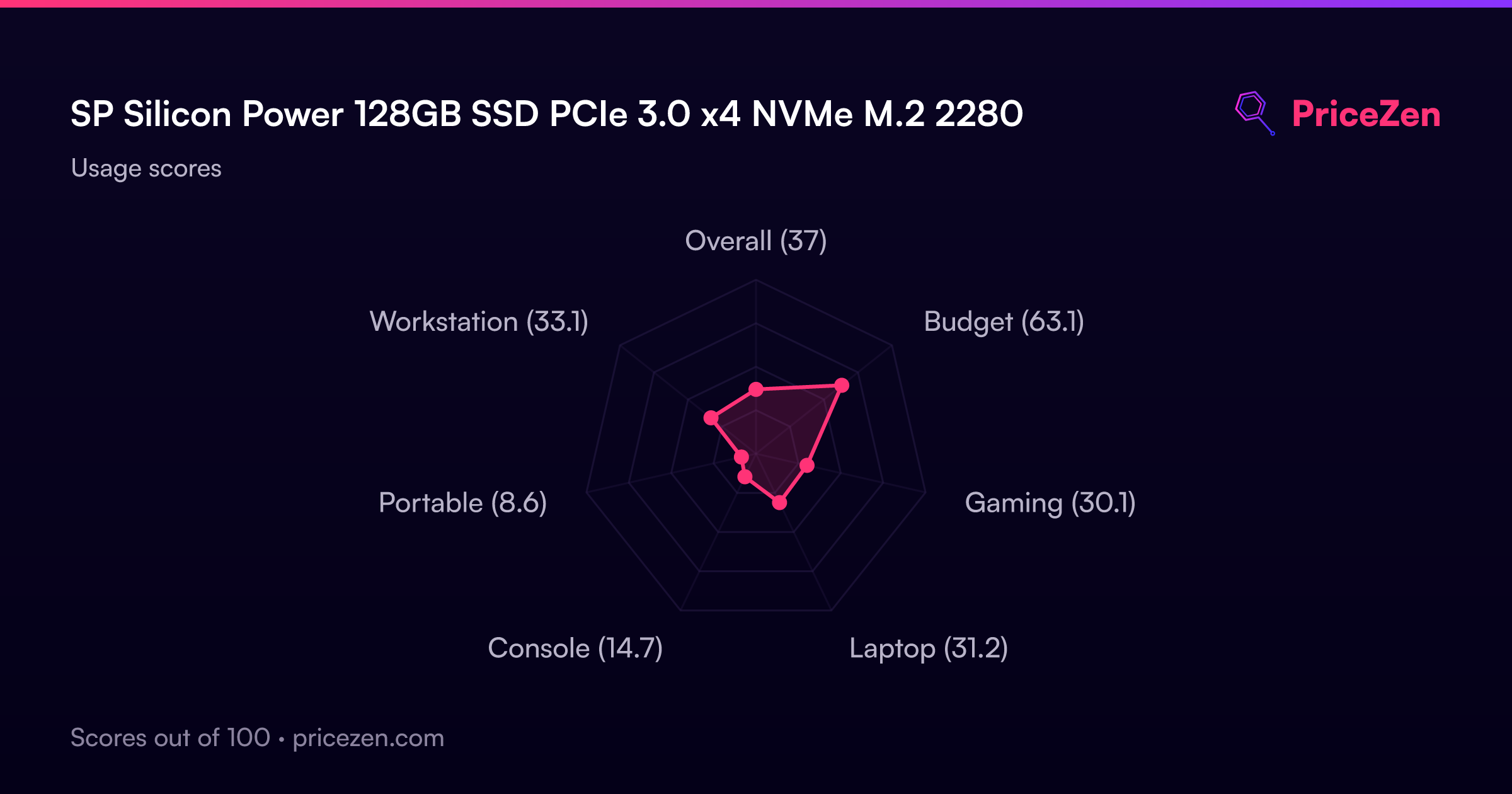
Usage Scores
- Overall37
- Budget63.1
- Gaming30.1
- Laptop31.2
- Console14.7
- Portable8.6
- Workstation33.1