Gigabyte M Series M27UA-SA 27" Black 2024
The 27-inch 4K SS IPS panel with 160Hz refresh rate and 1ms response time delivers sharp, fluid gaming visuals. The built-in USB-C KVM switch and 95% DCI-P3 color coverage with 10-bit depth make it a versatile hub for color-accurate work across multiple devices. This monitor is best for gamers and content creators who need a single display for both fast-paced 4K gaming and precision photo or video editing.

No current retailer price
Where we saw it before. Check the store for today's price.











Snapshot
The 30-Second Version
The Gigabyte M27UA-SA is a 27-inch 4K IPS monitor with 160Hz, a USB-C KVM, and top-tier color coverage. It's not an OLED killer and HDR is weak, but at $352 in the US it's a versatile single-monitor setup for gamers and professionals. Buy it if you want one screen for everything.
Pros & Cons
Pros
- Excellent color coverage with 95% DCI-P3 and 128% sRGB. 94th
- 160Hz refresh rate and 1ms MPRT keep gaming smooth. 87th
- USB-C KVM switch makes swapping between devices painless. 85th
- 4K resolution on a 27-inch panel looks razor sharp. 81st
Cons
- DisplayHDR 400 is weak sauce for HDR content.
- 400 nits peak brightness won't impress in bright rooms.
- IPS panel can't match OLED response times.
- No swivel adjustment, just height and tilt.
The proof
Performance
The 160Hz refresh rate and 1ms MPRT response time keep motion smooth, and FreeSync Premium handles tear-free gaming without drama. Performance sits in the 77th percentile, which is well above average but not top of the charts. The 4K resolution at 27 inches gives you a pixel density that makes text and fine details look crisp. The display itself ranks in the 90th percentile, and that's where this monitor earns its keep. Just don't expect the instant pixel response of an OLED. IPS panels still have a bit of ghosting in fast scenes, and the HDR 400 certification is more of a checkbox than a feature. The panel gets bright enough for a normal room, but HDR content will look flat compared to anything with real local dimming.
Specifications
Full Specifications
Display
| Size | 27" |
| Resolution | 3840x2160 (4K UHD) |
| Panel Type | IPS |
| Aspect Ratio | 16:9 |
| Curved | No |
| Screen Finish | matte |
Performance
| Refresh Rate | 160 Hz |
| Response Time | 1 |
| Adaptive Sync | FreeSync Premium |
Color & HDR
| Brightness | 400 nits |
| Color Gamut | 95% DCI-P3 / 128% sRGB |
| Color Depth | 10-bit |
| HDR | HDR400 |
| HDR Support | HDR400 |
Connectivity
| HDMI Ports | 2 |
| DisplayPort | 1 |
| USB-C | 1 |
| Speakers | No |
| Headphone Jack | Yes |
Ergonomics
| Height Adjustable | Yes |
| Tilt | Yes |
| Swivel | No |
| Pivot | No |
| VESA Mount | 100x100 |
Features
| Webcam | No |
| PIP/PBP | Yes |
vs Competition
Stacked against the ASUS ROG Strix XG27UCDMG, MSI MAG 271QPX QD-OLED E2, Samsung Odyssey G60SD, LG UltraGear 27GX790A-B, and Alienware AW2725D, the Gigabyte takes a different path. Most of those competitors are OLED panels with faster response times and better HDR, but they cost more and some have text clarity issues due to subpixel layouts. The M27UA-SA leans on IPS strengths: better text rendering, no burn-in risk, and a KVM switch that none of those OLEDs offer as cleanly. If you're a competitive gamer who wants the fastest possible panel, the OLEDs win. If you want one monitor for gaming, work, and occasional creative tasks, the Gigabyte makes a stronger case.
| Spec | Gigabyte M Series M27UA-SA 27" | LG UltraGear 45GX950A-B 45" | ASUS ROG Strix XG27UCDMG 27" | Dell UltraSharp U4025QW 39.7" | Alienware AW-Series AW3425DW 34" | MSI MAG 271QPX QD-OLED E2 27" |
|---|---|---|---|---|---|---|
| Screen Size | 27 | 45 | 27 | 39.7 | 34 | 27 |
| Resolution | 3840 x 2160 | 5120 x 2160 | 3840 x 2160 | 5120 x 2160 | 3440 x 1440 | 2560 x 1440 |
| Panel Type | IPS | OLED | QD-OLED | IPS | QD-OLED | QD-OLED |
| Refresh Rate | 160 | 330 | 240 | 120 | 240 | 240 |
| Response Time Ms | 1 | 0.03 | 0.03 | 5 | 0.03 | 0.03 |
| Adaptive Sync | FreeSync Premium | FreeSync Premium Pro | FreeSync Premium Pro | Adaptive-Sync | FreeSync Premium Pro | FreeSync Premium Pro |
| Hdr | HDR400 | DisplayHDR True Black 400 | DisplayHDR True Black 400 | HDR600 | HDR400 | DisplayHDR True Black 400 |
| Compare | Compare | Compare | Compare | Compare |
| Product | Color | Portability | Display | Feature | Ergonomic | Performance | Connectivity |
|---|---|---|---|---|---|---|---|
| Gigabyte M Series M27UA-SA 27" | 93.7 | 57.3 | 87 | 85 | 66.8 | 74.7 | 81 |
| LG UltraGear 45GX950A-B 45" Compare | 99.4 | 76.5 | 99.7 | 96.3 | 90.8 | 99.4 | 96.9 |
| ASUS ROG Strix XG27UCDMG 27" Compare | 96.5 | 57.3 | 97.7 | 85 | 90.8 | 97.9 | 81 |
| Dell UltraSharp U4025QW 39.7" Compare | 97.9 | 76.5 | 98.6 | 96.3 | 90.8 | 56.1 | 99.3 |
| Alienware AW-Series AW3425DW 34" Compare | 98.9 | 73.9 | 84.1 | 96.3 | 90.8 | 97.9 | 95.4 |
| MSI MAG 271QPX QD-OLED E2 27" Compare | 99.2 | 57.3 | 73.4 | 85 | 90.8 | 97.9 | 81 |
Price
Value & Pricing
Pricing is all over the map depending on where you look. The US listing sits at $352, which is a solid deal for a 4K 160Hz monitor with a KVM and this level of color accuracy. The CAD listing at $1,290 and the JPY listing at 334,637 are much harder to swallow, but those are single listings in different markets, so take them with a grain of salt. At the US price, you're getting a lot of monitor for the money. At the other prices, you'd be better off shopping around.
Read more
Overview
The Gigabyte M27UA-SA is a 27-inch 4K IPS panel that tries to do a little bit of everything. You get a 160Hz refresh rate, 1ms MPRT, and a USB-C KVM switch, which is a combo that makes a lot of sense if you split time between a gaming PC and a work laptop. The color coverage is the real headline here. 95% DCI-P3 and 128% sRGB put it in the 95th percentile for color in our database, so this thing can pull double duty for creative work without breaking a sweat.
It's not perfect. DisplayHDR 400 is basically a sticker, not real HDR, and 400 nits won't blow anyone away. But for a 4K high-refresh IPS monitor with this feature set, the M27UA-SA positions itself as a practical pick for people who want one monitor on the desk instead of two.
Common Questions
Q: Does the USB-C port charge my laptop while connected?
The USB-C port supports data and video, but the spec sheet doesn't list power delivery wattage. Check your laptop's charging requirements before assuming it'll top up the battery.
Q: Is this monitor good for console gaming?
Yes. The two HDMI 2.1 ports can handle 4K at 120Hz from a PS5 or Xbox Series X, and FreeSync Premium helps keep things smooth.
Q: How does the KVM switch actually work?
You connect your keyboard and mouse to the monitor's USB ports, then plug your PC and laptop into the monitor. One button swaps the display and peripherals between the two devices.
Who Should Skip This
Skip this if you're a competitive FPS player who wants the absolute fastest response times. OLED panels like the MSI MAG 271QPX or Alienware AW2725D will serve you better. Also skip it if you care about HDR, because DisplayHDR 400 is basically a participation trophy. And if you need swivel adjustment on your stand, this one only tilts and adjusts height.
Verdict
This is for the person who games at night and works during the day on the same desk. The KVM switch alone is a quality-of-life upgrade if you juggle a PC and a laptop. Color accuracy is genuinely impressive, and 4K at 160Hz is a sweet spot that doesn't require a monster GPU to push. If you're chasing HDR thrills or esports-level response times, look elsewhere. But for a do-it-all 4K IPS panel, the M27UA-SA is a practical, no-nonsense pick.
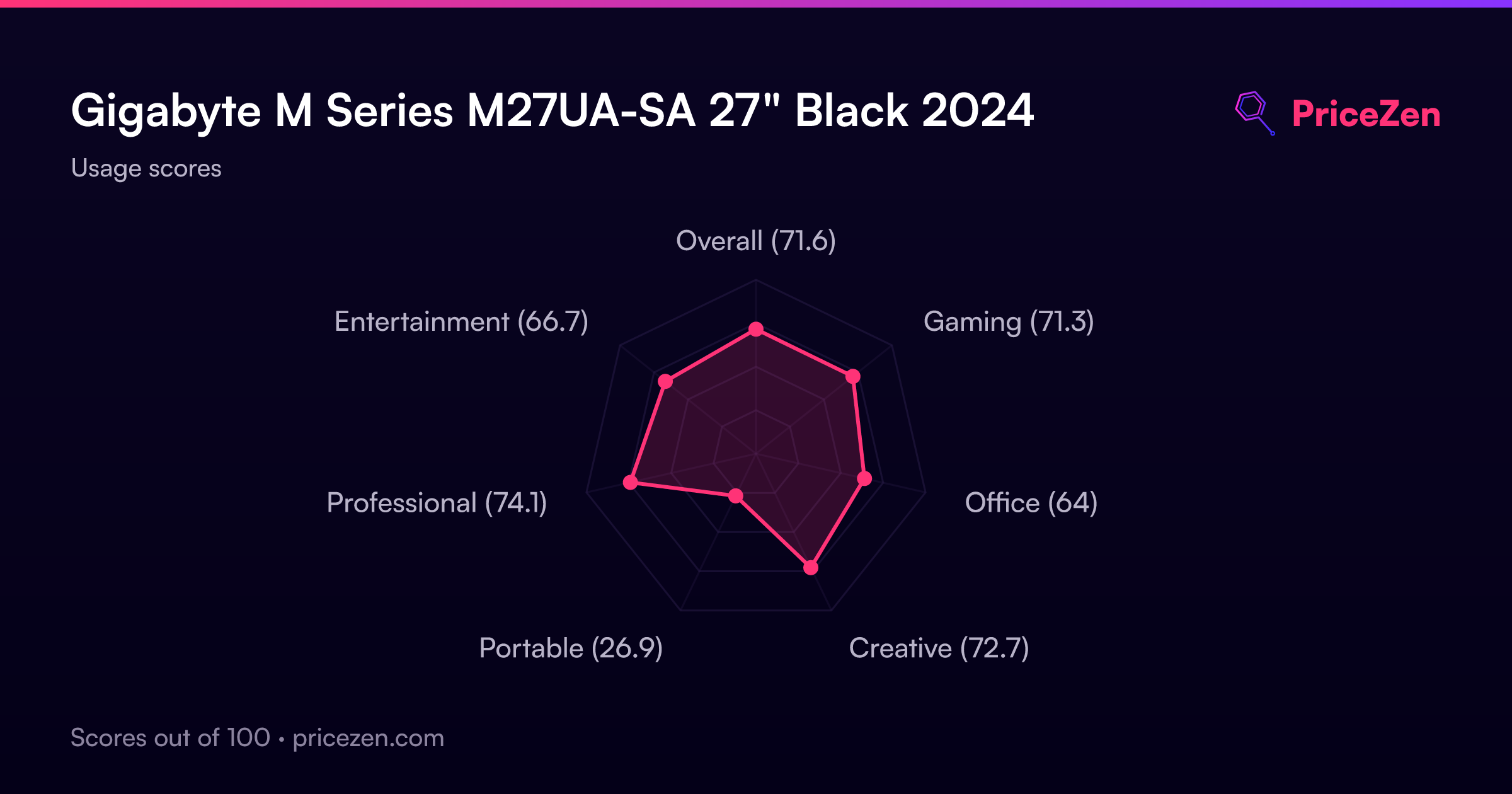
Usage Scores
- Overall71.6
- Gaming71.3
- Office64
- Creative72.7
- Portable26.9
- Professional74.1
- Entertainment66.7