Dell P Series P2319H 23" Black 2018

Stand that adjusts every way you work verified Nov 29
53/100 overall score 4.6 average from 470 owner ratings
- Screen
- 23"
- Resolution
- 1920 x 1080
- Panel
- IPS
- Refresh
- 60 Hz
- Response time
- 5 ms
Compare prices at 1 store
Cheapest first. New, refurbished and bundled offers are kept apart, so you compare like with like.
| Store | Sold by | Colour and condition | Price | vs lowest | Last checked | Link |
|---|---|---|---|---|---|---|
| New1 offerSingle unit | ||||||
| Not checked in the last 7 days, so these prices may have changed | ||||||
| Amazon | Not known | Not listed | MX$8,950.74 | Nov 3 | Go to store | |
 Source: PriceZen, checked Nov 3, 2026
A price counts as current when we checked it in the last 7 days. “Marketplace seller” means a third-party seller on that store, not the store itself.
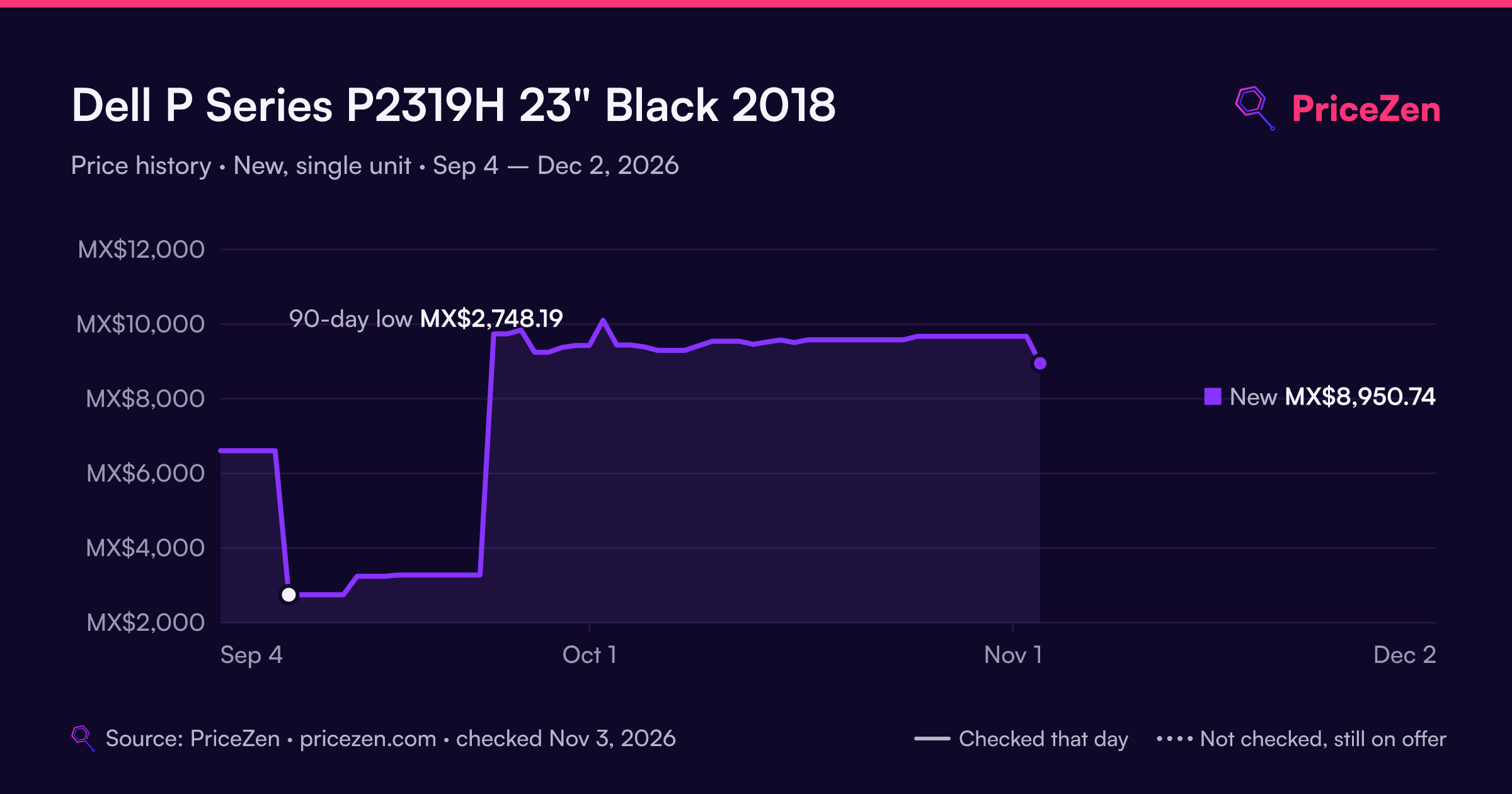
Price history
Checked that dayNot checked that day, still on offer
Source: PriceZen, checked Nov 3, 2026











Snapshot
The 30-Second Version
The Dell P2319H is an office monitor with a fantastic ergonomic stand but a dated panel. At $379 USD, you're paying for adjustability and reliability, not picture quality. The 23-inch 1080p IPS display is dim at 250 nits and covers only 72% of the color gamut. Buy it if you need pivot and height adjust for office work, but skip it if you care about color, brightness, or gaming.
Pros & Cons
Pros
- Ergonomic stand is top-tier with height, tilt, swivel, and pivot at the 91st percentile 92nd
- IPS panel gives solid viewing angles for shared screen moments 91st
- VESA 100x100 mount support for arm or wall mounting 79th
- Multiple inputs including HDMI, DisplayPort, and D-Sub for legacy devices 77th
- Slim bezels and lightweight 3130g build make multi-monitor setups easy
Cons
- 250 nits brightness struggles in bright rooms
- 72% CIE 1931 color coverage is weak for any creative work
- 60Hz refresh rate rules out smooth gaming
- No built-in USB hub despite the USB 3.0 mention in specs
- Display quality sits at the 22nd percentile overall
What owners think
The Word on the Street
- Buyers consistently praise the slim design and the quality of the packaging and shipping from the retailer, with several noting the monitors arrived in perfect condition and looked great out of the box.
- The ergonomic stand is a recurring highlight, with owners appreciating the height adjustment and pivot features that are rare at this price point.
- Some buyers are confused about the feature set, with questions about whether the monitor includes a webcam or USB hub, suggesting the spec sheet could be clearer about what's actually built in.
- The non-glare screen coating gets mentioned as a plus for office environments with overhead lighting, reducing reflections during long work sessions.
How owner sentiment changed over time
ExclusiveBased on when customers actually wrote their reviews - so you can see whether early praise held up.
Happy owners: 69% lately, 100% in Jan 2019 – Jun 2020
Too few reviews to call that a change.
Across all 470 store ratings: 4.6★. Most owners rate without writing a review. The chart counts the 26 written reviews with stars and their own date.
Show the numbers
| Period | Reviews | Happy | Mixed | Unhappy | Happy share |
|---|---|---|---|---|---|
| Jan 2019 – Jun 2020 | 10 | 10 | 0 | 0 | 100% |
| Jul 2020 – Jan 2026 | 16 | 11 | 1 | 4 | 69% |
Each column joins calendar quarters until it holds at least 10 reviews with stars and their own date. Happy = 4-5★, mixed = 3★, unhappy = 1-2★.
The proof
Performance
Let's talk numbers. The P2319H runs at 1920 x 1080 at 60Hz with a 5ms response time in fast mode. That's fine for email, documents, and web browsing. It's not fine for competitive gaming. Our database puts the performance at the 21st percentile, which means roughly four out of five monitors we've tested outperform it. The 60Hz ceiling means you're capped at 60 frames per second no matter what GPU you're running.
The 5ms response time is actually decent for an IPS panel of this era. You won't see much ghosting in everyday use, and fast mode helps with scrolling text. But the 250 nits brightness is the real limitation. In a bright office with overhead fluorescents, you'll be cranking this thing to max and wishing for more. The 1,000:1 contrast ratio is standard for IPS, so blacks look gray in a dark room. This is a daytime monitor, full stop.
For office work, none of this matters much. Text looks crisp enough at 23 inches and 1080p, and the IPS panel gives you decent viewing angles when you're showing a coworker something on your screen. But if you've ever used a 1440p or 4K display, the pixel density here will feel like a step backward.
Specifications
Full Specifications
Display
| Size | 23" |
| Resolution | 1920x1080 (Full HD) |
| Panel Type | IPS |
| Aspect Ratio | 16:9 |
| Curved | No |
| Screen Finish | matte |
Performance
| Refresh Rate | 60 Hz |
| Response Time | 5 |
Color & HDR
| Brightness | 250 nits |
| Color Gamut | 72% CIE 1931 |
| Color Depth | 16.7 Million |
Connectivity
| HDMI Ports | 1 |
| DisplayPort | 1 |
| USB-C | 1 |
| Speakers | No |
| Headphone Jack | No |
Ergonomics
| Height Adjustable | Yes |
| Tilt | Yes |
| Swivel | Yes |
| Pivot | Yes |
| VESA Mount | 100x100 |
Features
| Webcam | No |
| Touchscreen | No |
| PIP/PBP | No |
| Power | 16 |
| Weight | 3.1 kg / 6.9 lbs |
vs Competition
The competitors in our database tell an interesting story. The ASUS ROG Strix XG27UCDMG, LG UltraGear 27GX790A-B, MSI MPG 271QR QD-OLED X50, Samsung Odyssey OLED G6 G60SF, and Alienware AW2725D are all gaming-focused displays with high refresh rates and better panels. They're also all significantly more expensive and aimed at a completely different buyer. Comparing the P2319H to an OLED gaming monitor is like comparing a Toyota Corolla to a Porsche 911. Different jobs.
Where the P2319H actually competes is against other office monitors. Against a typical budget 24-inch IPS panel, the Dell wins on ergonomics but loses on price. Against something like a mid-range 27-inch 1440p office display, the Dell loses on resolution, brightness, and screen real estate. The only scenario where the P2319H makes sense is when you need the pivot feature for portrait mode document work or coding, and you want a proven reliable panel from a major brand.
If you're considering this monitor, also look at Dell's own U-series. The U2419H or similar UltraSharp models offer better color coverage and brightness for not much more money, and they keep the same ergonomic stand. The P-series is Dell's budget line, and it shows in the panel quality.
| Spec | Dell P Series P2319H 23" | Apple Studio Display XDR 27" | Acer Nitro UM.CX2AA.S01 34" | LG UltraGear 38GL950G-B 38" | ASUS ProArt Display PA32UCG-K 32" | Samsung Odyssey OLED G9 LS49DG954SNXGO 49" |
|---|---|---|---|---|---|---|
| Screen Size | 23 | 27 | 34 | 38 | 32 | 49 |
| Resolution | 1920 x 1080 | 5120 x 2880 | 3440 x 1440 | 3840 x 1600 | 3840 x 2160 | 5120 x 1440 |
| Panel Type | IPS | Mini-LED | VA | IPS | IPS | OLED |
| Refresh Rate | 60 | 120 | 165 | 144 | 120 | 240 |
| Response Time Ms | 5 | - | 1 | 1 | 5 | 0.03 |
| Adaptive Sync | - | Adaptive-Sync | FreeSync Premium | G-Sync | FreeSync | FreeSync Premium Pro |
| Hdr | - | HDR | HDR400 | HDR400 | Dolby Vision | HDR10+ |
| Compare | Compare | Compare | Compare | Compare |
| Product | Color | Portability | Display | Feature | User Sentiment | Ergonomic | Performance | Connectivity | Social Proof |
|---|---|---|---|---|---|---|---|---|---|
| Dell P Series P2319H 23" | 15.4 | 79.4 | 21.4 | 21.1 | 77 | 90.7 | 22.3 | 62.1 | 92.2 |
| Apple Studio Display XDR 27" Compare | 99.8 | 81.3 | 99.3 | 94.4 | 77 | 66.8 | 56 | 89.7 | 40.2 |
| Acer Nitro UM.CX2AA.S01 34" Compare | 84.6 | 20.7 | 76 | 90.8 | 77 | 66.8 | 77 | 83.8 | 84.3 |
| LG UltraGear 38GL950G-B 38" Compare | 89 | 27.7 | 81.1 | 90.8 | 62 | 66.8 | 72.6 | 70.1 | 64.5 |
| ASUS ProArt Display PA32UCG-K 32" Compare | 99.9 | 76.5 | 95.1 | 70 | 0 | 90.7 | 56 | 99.5 | 5.7 |
| Samsung Odyssey OLED G9 LS49DG954SNXGO 49" Compare | 72.6 | 62.8 | 98.3 | 90.8 | 0 | 66.8 | 97.9 | 96.9 | 0 |
Price
Value & Pricing
At $379 USD, the P2319H is a tough sell in today's market. That price puts it in competition with 27-inch 1440p displays and even some high-refresh 1080p gaming monitors. You're paying a premium for the Dell name and that excellent stand, but the panel itself is dated.
For context, you can find 24-inch 1080p IPS monitors with better brightness and color coverage for under $200 these days. What you won't get at that price is the full ergonomic stand. Dell is essentially charging you for the adjustability and the enterprise-grade build quality. If your company is footing the bill, fine. If it's your own money, you should think hard about whether that stand is worth the premium.
The value proposition only makes sense if you specifically need a height-adjustable, pivot-capable monitor for office work and you don't care about color accuracy or refresh rate. Even then, a monitor arm plus a cheaper panel might get you there for less.
Read more
Overview
The Dell P2319H is the office workhorse that refuses to die. It's a 23-inch 1080p IPS panel aimed squarely at desk jockeys, spreadsheet wranglers, and anyone whose IT department orders monitors by the pallet. No frills, no RGB, no 240Hz refresh rate. Just a screen that does its job without complaining.
What makes this thing interesting in 2025 is the ergonomics. Dell packed height adjust, tilt, swivel, and pivot into a budget office display, and our database puts that stand at the 91st percentile. That's genuinely rare at this price point. Most cheap monitors give you a fixed stand and a prayer. This one lets you actually position it like a human being.
The catch? The display itself is nothing special. 250 nits brightness, 72% CIE 1931 color coverage, and a 60Hz refresh rate put it in the bottom quarter of our database for display quality and color. This is a monitor you buy for the stand and the reliability, not for the picture.
Who's this for? Office workers, remote employees on a budget, and anyone building a multi-monitor setup where adjustability matters more than pixel density. If you're editing photos, gaming, or watching movies in a dark room, keep scrolling.
Common Questions
Q: Does this monitor have a built-in webcam?
No, the P2319H does not include a webcam. It's a display-only monitor with no integrated camera or microphone. If you need video calling, you'll need to add a separate USB webcam, which is actually a plus for privacy-conscious users who prefer to control when a camera is active.
Q: Is the screen matte or glossy?
The P2319H has a non-glare matte screen coating. This is ideal for office environments with overhead lighting or windows, as it reduces reflections and eye strain during long work sessions. The matte finish does slightly reduce perceived contrast compared to glossy panels, but for productivity work, it's the right choice.
Q: Can I mount this monitor on a monitor arm?
Yes, the P2319H has VESA 100x100 mounting holes, so it works with standard monitor arms and wall mounts. The included stand is already excellent with height, tilt, swivel, and pivot, but if you want to free up desk space or position the monitor in a specific way, a VESA arm is fully supported.
Q: Is this monitor good for gaming?
Not really. The 60Hz refresh rate and 5ms response time are fine for casual or older games, but competitive gamers will notice the lack of smoothness compared to 144Hz or higher displays. The 250 nits brightness also limits HDR potential. If gaming is a priority, look for a monitor with at least 120Hz and better brightness.
Who Should Skip This
Gamers should absolutely skip this. The 60Hz refresh rate and 5ms response time put it in the bottom fifth of our database for performance, and at $379 you're within striking distance of 144Hz or even 240Hz displays that will feel dramatically smoother. If you play anything faster than turn-based strategy games, this monitor will frustrate you.
Creative professionals should also look elsewhere. The 72% CIE 1931 color coverage means you're not seeing accurate colors, and the 250 nits brightness makes it hard to judge exposure or contrast. Photo editors, video editors, and graphic designers need at least 95% sRGB coverage and ideally higher brightness. Look at Dell's UltraSharp line or a color-calibrated display from BenQ or ASUS ProArt instead.
Anyone who wants a single monitor for both work and entertainment should also pass. The 1080p resolution at 23 inches is fine for text but underwhelming for movies and shows, and the lack of HDR support means streaming content looks flat. A 27-inch 1440p display with better brightness would serve both purposes much better for similar money.
Verdict
For a pure office setup where you're reading emails, writing documents, and maybe doing some light spreadsheet work, the P2319H gets the job done. The ergonomic stand is genuinely excellent, and the IPS panel means you won't hate yourself when you glance at it from an angle. If your employer is buying these in bulk, you could do a lot worse.
But for anyone spending their own money, I'd steer you elsewhere. The $379 price tag is hard to justify when the display quality sits in the bottom quarter of our database. You can get a better panel for less money, or spend the same amount on something with higher resolution and better brightness. The only reason to buy this specific monitor is if you absolutely need the pivot feature and you're getting it at a discount.
If you're a gamer, this is an easy pass. 60Hz and 5ms response time won't cut it for anything faster than Minesweeper. If you're a creative professional, the 72% color coverage is a dealbreaker. If you're a remote worker who wants a clean, adjustable monitor for productivity and you find this on sale for under $250, it's worth considering.
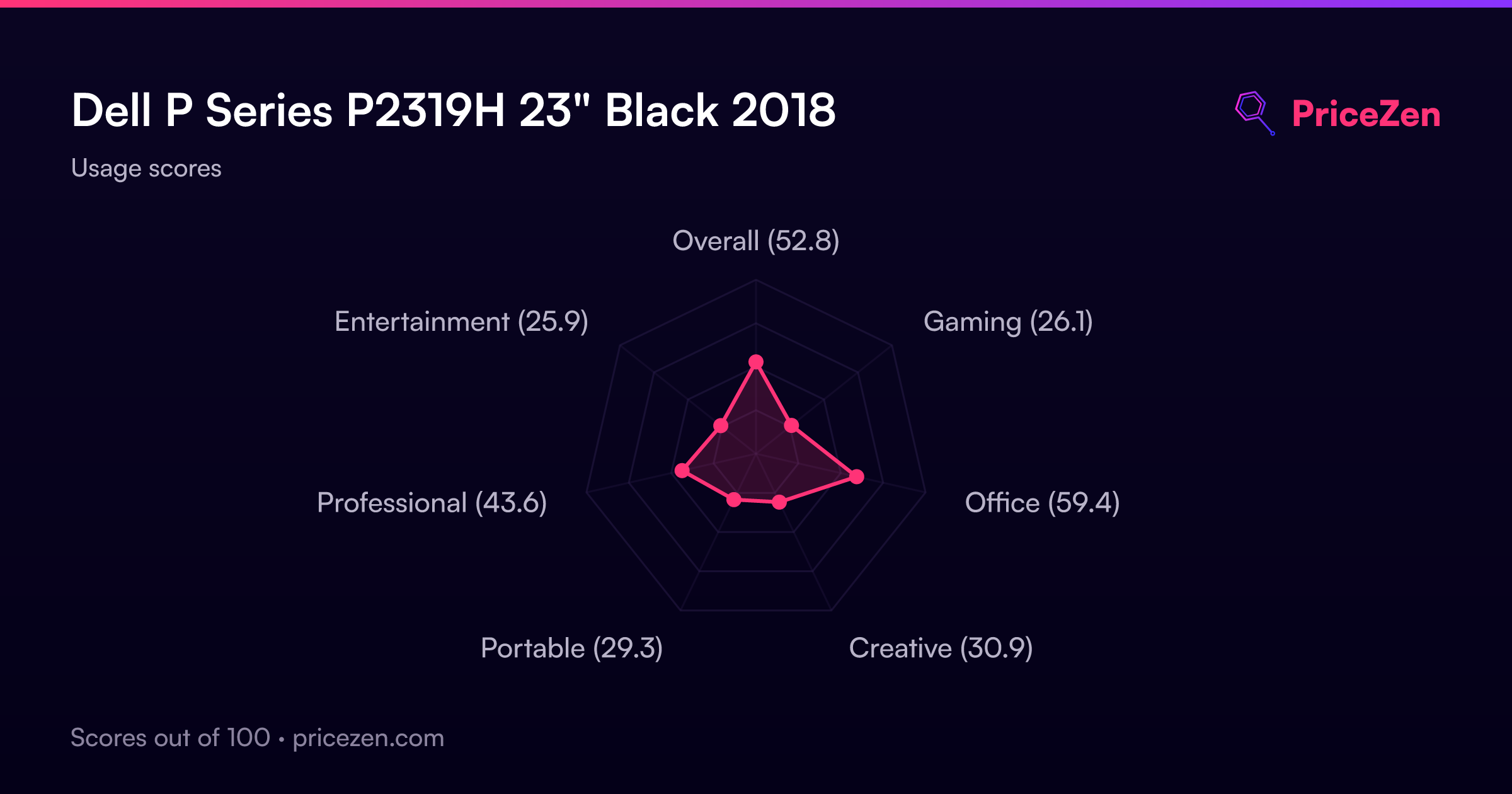
Usage Scores
- Overall52.8
- Gaming26.1
- Office59.4
- Creative30.9
- Portable29.3
- Professional43.6
- Entertainment25.9