ASUS ROG Strix XG49WCR 49" Black 2023

Super ultrawide 32:9 for a wraparound view verified Nov 29
73/100 overall score
- Screen
- 49"
- Resolution
- 5120 x 1440
- Panel
- VA
- Refresh
- 165 Hz
- Response time
- 1 ms
- Adaptive sync
- Adaptive-Sync
- HDR
- HDR400


Snapshot
The 30-Second Version
It's a docking station and a dual-monitor setup that moonlights as a gaming screen. Buy it for the desk, not the HDR.
Pros & Cons
Pros
- Feature set in the 96th percentile: Smart KVM, PIP/PBP, RJ45, Thunderbolt 96th
- Color is a standout, 120% sRGB and 90% DCI-P3 at 10-bit 95th
- USB-C with 90W power means one cable for a laptop desk 93rd
- Two QHD screens worth of space with zero bezel in the middle 83rd
Cons
- DisplayHDR 400 and 450 nits is entry-level HDR, full stop
- VA panel, so it can't match the OLED crowd for contrast
- Only one HDMI and one DisplayPort for a monitor this ambitious
- Nearly 15kg and 49 inches wide, this eats your desk
What owners think
The Word on the Street
- Owners are clearly happy, with a 4.7/5 average across 20 reviews backing up what the feature and color scores already told us.
The proof
Performance
What surprised us in the data is how far ahead the color and connectivity scores run from the raw display score. 120% sRGB, 90% DCI-P3 and 10-bit color put it near the top of the category, and connectivity lands in the 93rd percentile off a single HDMI, a single DisplayPort, USB-C, Thunderbolt and an RJ45 jack. Meanwhile the display metric sits at 83 and performance at 77, which tracks: 1ms and ELMB Sync running alongside variable refresh is genuinely good motion handling for VA, but 5120 x 1440 at an overclocked 165Hz is a lot of pixels to feed. Owners rate it 4.7/5 across 20 reviews, so the people living with it are happy. Just know your GPU is doing double-QHD work every frame.
Specifications
Full Specifications
Display
| Size | 49" |
| Resolution | 5120x1440 |
| Panel Type | VA |
| Aspect Ratio | 32:9 |
| Curved | Yes |
| Curvature | 1800 |
| Screen Finish | matte |
Performance
| Refresh Rate | 165 Hz |
| Response Time | 1 |
| Adaptive Sync | Adaptive-Sync |
Color & HDR
| Brightness | 450 nits |
| Color Gamut | 120% sRGB, 90% DCI-P3 |
| Color Depth | 10-bit |
| HDR | HDR400 |
| HDR Support | HDR10 |
Connectivity
| HDMI Ports | 1 |
| DisplayPort | 1 |
| USB-C | 1 |
| Thunderbolt | NA |
| Speakers | Yes |
| Headphone Jack | Yes |
Ergonomics
| Height Adjustable | Yes |
| Tilt | Yes |
| Swivel | Yes |
| Pivot | No |
| VESA Mount | 100x100 |
Features
| Webcam | No |
| PIP/PBP | Yes |
| Power | 45 |
| Weight | 14.9 kg / 32.9 lbs |
vs Competition
Cross-shop the LG UltraGear 45GX950A-B and the Alienware AW3425DW if gaming is the whole point. Both are smaller canvases, but the XG49WCR's VA panel and DisplayHDR 400 ceiling are its weak spots, and pure gamers should chase panel quality over acreage. The Dell UltraSharp U4025QW is the real rival here, since it's chasing the same work-all-day buyer, and the ASUS answers with 165Hz and ELMB Sync so your evenings aren't wasted. Against the MSI MAG 271QPX QD-OLED E2 and Samsung Odyssey G60SD, the trade is obvious: those are 27-inch panels, and this is 49 inches of dual-QHD workspace with a 96th-percentile feature list they can't touch. Pick your priority, not your brand.
| Spec | ASUS ROG Strix XG49WCR 49" | LG UltraGear 45GX950A-B 45" | Dell UltraSharp U4025QW 39.7" | Alienware AW-Series AW3425DW 34" | MSI MAG 271QPX QD-OLED E2 27" | Samsung Odyssey G60SD 27" |
|---|---|---|---|---|---|---|
| Screen Size | 49 | 45 | 39.7 | 34 | 27 | 27 |
| Resolution | 5120 x 1440 | 5120 x 2160 | 5120 x 2160 | 3440 x 1440 | 2560 x 1440 | 2560 x 1440 |
| Panel Type | VA | OLED | IPS | QD-OLED | QD-OLED | OLED |
| Refresh Rate | 165 | 330 | 120 | 240 | 240 | 360 |
| Response Time Ms | 1 | 0.03 | 5 | 0.03 | 0.03 | 0.03 |
| Adaptive Sync | Adaptive-Sync | FreeSync Premium Pro | Adaptive-Sync | FreeSync Premium Pro | FreeSync Premium Pro | FreeSync Premium Pro |
| Hdr | HDR400 | DisplayHDR True Black 400 | HDR600 | HDR400 | DisplayHDR True Black 400 | HDR10+ |
| Compare | Compare | Compare | Compare | Compare |
| Product | Color | Portability | Display | Feature | Ergonomic | Performance | Connectivity |
|---|---|---|---|---|---|---|---|
| ASUS ROG Strix XG49WCR 49" | 95.2 | 76.5 | 83.1 | 96.3 | 73.4 | 77 | 92.9 |
| LG UltraGear 45GX950A-B 45" Compare | 99.4 | 76.5 | 99.7 | 96.3 | 90.7 | 99.4 | 96.9 |
| Dell UltraSharp U4025QW 39.7" Compare | 97.9 | 76.5 | 98.6 | 96.3 | 90.7 | 56 | 99.3 |
| Alienware AW-Series AW3425DW 34" Compare | 98.9 | 73.9 | 84 | 96.3 | 90.7 | 97.9 | 95.3 |
| MSI MAG 271QPX QD-OLED E2 27" Compare | 99.1 | 57.3 | 73.3 | 85 | 90.7 | 97.9 | 81 |
| Samsung Odyssey G60SD 27" Compare | 90.6 | 39.3 | 73.3 | 70.1 | 90.7 | 99.5 | 87.4 |
Price
Value & Pricing
At $1,200 for a used, very good unit, this is worth it if you actually use the KVM and the USB-C dock. You're buying a monitor, a switch and a docking station in one box, and our data ranks those features against everything else in the category near the very top. If you only game and never plug in a second machine, you're paying for hardware you'll ignore.
Read more
Overview
The XG49WCR is a productivity monster wearing a gaming jersey, and that's the one thing to know before you drop $1,200 on it. You get 49 inches of curved VA at 5120 x 1440, which is two 27-inch QHD screens fused into one with no bezel down the middle. Our scoring model puts its feature set in the 96th percentile and color in the 95th, so this thing is loaded: Smart KVM for two machines on one keyboard and mouse, USB-C pushing up to 90W, Thunderbolt, RJ45, PIP/PBP, speakers. That's a docking station and a monitor sharing a chassis.
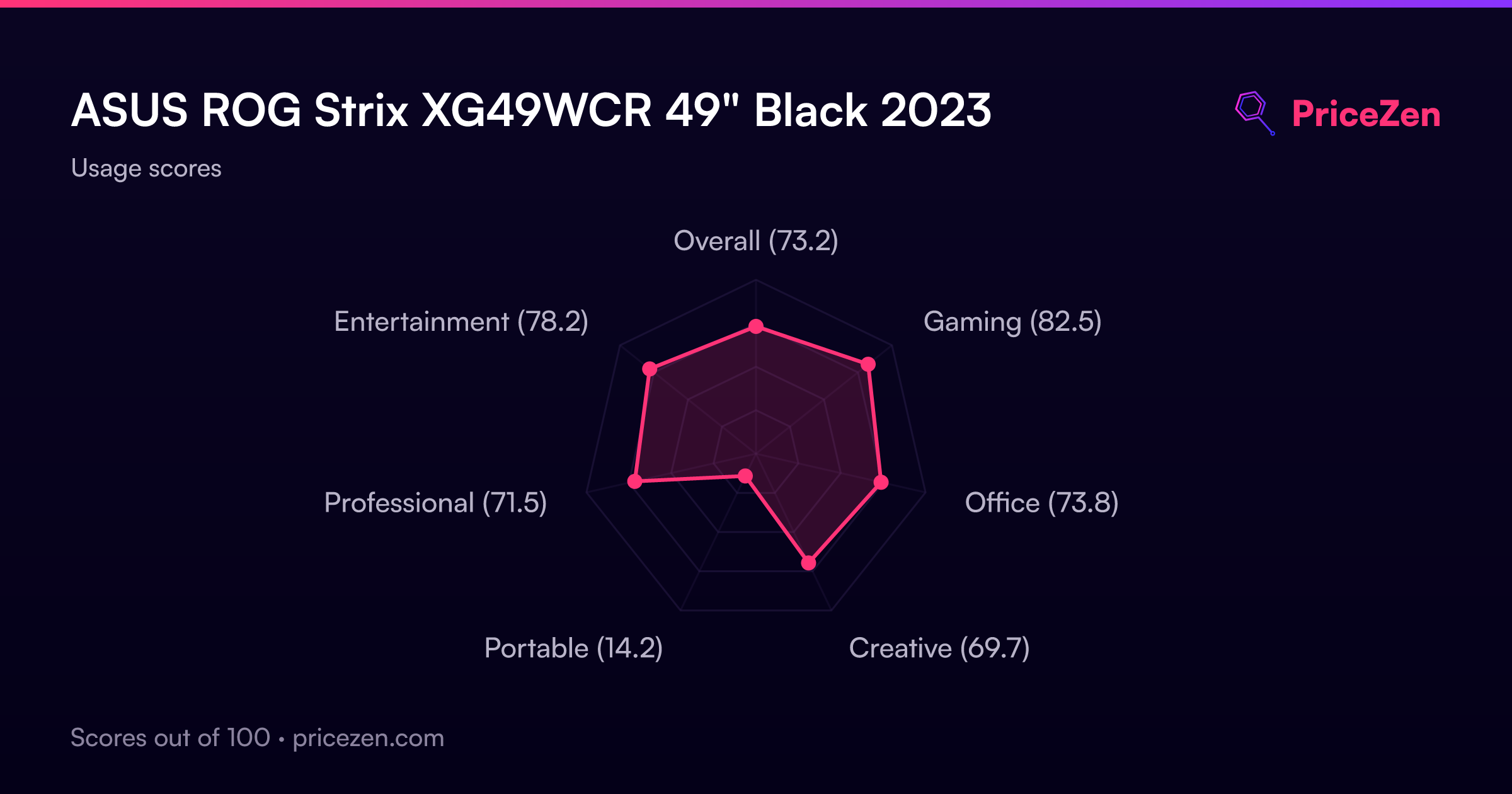
But look at where the scores land. Gaming sits at 82.6/100 and entertainment at 77.6, while the total comes out to 73.3. Strong, not untouchable. The 165Hz is overclocked, the panel is VA rather than OLED, and HDR tops out at DisplayHDR 400 with 450 nits. If you want the widest, most useful desk you can build with one cable, this is a great buy. If you want the best-looking pixels money can buy, keep reading.
Common Questions
Q: Can my GPU actually run 5120 x 1440 at 165Hz?
That's two QHD monitors' worth of pixels, so bring a serious card. And remember the 165Hz is an overclock, not a guaranteed baseline.
Q: Is the HDR any good?
No. DisplayHDR 400 with 450 nits is the entry tier. The wide gamut and 10-bit color are the real story here, not HDR punch.
Q: Will it charge my laptop?
Yes, USB-C carries up to 90W plus video, audio and data. One cable and you're done.
Who Should Skip This
If you're chasing deep blacks and HDR that actually punches, this isn't it. A VA panel at 450 nits with DisplayHDR 400 won't get you there. Go look at the Samsung Odyssey G60SD or the MSI MAG 271QPX QD-OLED E2 instead, and accept a much smaller screen in exchange.
Verdict
Buy it if your desk does two jobs. The combination of 5120 x 1440, Smart KVM, 90W USB-C and top-tier color scores makes this the rare super-ultrawide that earns its price during work hours and still holds up at 165Hz after. Skip it if HDR impact and black levels are your obsession, because 450 nits and a VA panel won't scratch that itch. For everyone else building a one-cable, one-screen command center, this is the pick.
Usage Scores
- Overall73.2
- Gaming82.5
- Office73.8
- Creative69.7
- Portable14.2
- Professional71.5
- Entertainment78.2