Lenovo Legion Pro 34WD-10 34" Raven Black 2024

Faster than 98% of the monitors we score verified Nov 21
82/100 overall score 4.5 average from 44 owner ratings
- Screen
- 34"
- Resolution
- 3440 x 1440
- Panel
- OLED
- Refresh
- 240 Hz
- Response time
- 0.03 ms
- Adaptive sync
- FreeSync Premium Pro
- HDR
- DisplayHDR TB400


Snapshot
The 30-Second Version
The Legion Pro 34WD-10 scores 98th percentile for performance and 100th percentile for connectivity in our database, which is basically the monitor equivalent of acing the final and the extra credit. You get a 34-inch curved OLED at 3440 x 1440 running 240Hz with a 0.03ms response time, plus a full USB-C dock with 140W power delivery and KVM. At $960 USD, it's a steal for what you're getting.
Pros & Cons
Pros
- 240Hz refresh rate with 0.03ms response time, top-tier motion clarity 100th
- 98.5% DCI-P3 and 130% sRGB coverage on a 10-bit OLED panel 98th
- 100th percentile connectivity with 3x USB-C, Thunderbolt, and 140W power delivery 96th
- Built-in KVM switch for running multiple devices through one setup 89th
- 3440 x 1440 ultrawide resolution with an immersive 21:9 curve
Cons
- 275 nits full-screen brightness is weak for bright rooms
- No built-in webcam despite the docking-focused feature set
- 8,700 grams makes it a pain to reposition or mount solo
- KVM functionality is poorly documented out of the box
- Aggressive curve causes text clarity issues for productivity work
What owners think
The Word on the Street
- Owners consistently rave about the OLED panel's color vibrancy and the 240Hz refresh rate, with several saying they can't go back to non-OLED displays after using this one.
- The built-in USB-C dock and KVM functionality get frequent praise for simplifying desk setups and reducing cable clutter, with multiple users calling it a game-changer for mixed gaming and work use.
- The aggressive curve divides opinion, some love the immersion while others report text clarity issues and an adjustment period for productivity tasks.
- A few buyers mention the lack of a built-in webcam as a notable omission for a monitor positioned as a docking hub, and the KVM feature is poorly documented out of the box.
How owner sentiment changed over time
ExclusiveBased on when customers actually wrote their reviews - so you can see whether early praise held up.
21 written reviews, Jul 2025 – Nov 2026: 21 happy
Across all 44 store ratings: 4.5★. Most owners rate without writing a review. The chart counts the 21 written reviews.
- Oct – Dec 202612 of 12 happy
Buyers praised the OLED display, high refresh rate, and KVM/docking features for gaming and work. Minor complaints about missing webcam, display controls requiring input, and limited USB-C ports.
- OLED picture quality and 240Hz refresh rate praised as stunning and immersive for gaming and work.
- Built-in KVM and USB-C docking reduce cable clutter and replace external docks, highly valued.
- Missing webcam noted as a drawback; some would pay extra for it. Otherwise near-perfect.
- Display controls only work with active input; limited USB-C ports and weak speakers noted.
- Jul – Sep 20264 of 4 happy
Buyers praised the OLED visuals, immersive curve, and customer support, but one flagged port connection stress and standby sync issues.
- Stunning OLED picture, deep blacks, and immersive curved design praised.
- Excellent customer support: defective unit replaced quickly and efficiently.
- Port connections (HDMI/DP) lack recess, causing cord stress and standby sync problems.
- Aggressive curve and minor fringing noted, but overall gaming experience is top-tier.
- Jul – Sep 20253 of 3 happy
Buyers in Q3 2025 praised the OLED display's rich colors, high refresh rate, and immersive curved design. The built-in USB-C dock was a standout feature, simplifying setups. One noted text clarity issues on black-and-white content and confusing menus.
- OLED display praised for rich, vibrant colors and immersive quality, especially for gaming and creative work.
- 240Hz refresh rate and fast response time deliver smooth, ghosting-free gameplay.
- Built-in USB-C dock eliminates external dock and reduces cable clutter, enhancing setup.
- Curved screen reduces black-on-white text clarity; some menus use confusing terminology.
Each dot is one written review, in the month it was written. Happy = 4-5★, mixed = 3★, unhappy = 1-2★. Period summaries are in English.
The proof
Performance
240Hz on an OLED ultrawide is the headline, and it delivers. The 0.03ms response time means motion clarity is essentially perfect, no ghosting, no smearing, just clean frames even when you're whipping the camera around in a shooter. FreeSync Premium Pro keeps things tear-free, and the 3440 x 1440 resolution gives you enough pixel density to spot enemies at distance without needing a GPU the size of a small appliance. In our database, this sits at the 98th percentile for performance, which puts it ahead of nearly everything else we've tested in this category.
The OLED panel itself is the other half of the story. True blacks, infinite contrast, and the 98.5% DCI-P3 coverage means HDR content actually looks like HDR instead of a slightly brighter SDR image. The DisplayHDR True Black 400 certification is modest on paper, but OLED's per-pixel dimming makes it punch way above what that number suggests. The 275 nits full-screen brightness is the one spec that gives us pause, it's fine for a dark room but you'll want to keep this away from direct sunlight.
Specifications
Full Specifications
Display
| Size | 34" |
| Resolution | 3440x1440 |
| Panel Type | OLED |
| Aspect Ratio | 21:9 |
| Curved | Yes |
| Curvature | 1500 |
Performance
| Refresh Rate | 240 Hz |
| Response Time | 0.03 |
| Adaptive Sync | FreeSync Premium Pro |
Color & HDR
| Brightness | 275 nits |
| Color Gamut | 130% sRGB, 99% sRGB, 98.5% DCI-P3 |
| Color Depth | 10-bit |
| HDR | DisplayHDR TB400 |
Connectivity
| HDMI Ports | 2 |
| DisplayPort | 1 |
| USB-C | 3 |
| Thunderbolt | N/A |
| Speakers | Yes |
Ergonomics
| Height Adjustable | Yes |
| Tilt | Yes |
| Swivel | Yes |
| Pivot | No |
Features
| Webcam | No |
| Touchscreen | No |
| PIP/PBP | Yes |
| Power | 64 |
| Weight | 8.7 kg / 19.2 lbs |
vs Competition
Against the Alienware AW3425DW, the Legion Pro 34WD-10 matches it on panel size and resolution but pulls ahead on refresh rate, 240Hz versus 175Hz, and adds the docking features Alienware skips. The MSI MAG 271QPX QD-OLED E2 is cheaper but smaller at 27 inches and lacks the ultrawide immersion. The LG UltraGear 45GX950A-B goes bigger at 45 inches but that's a different beast entirely, more desk-dominating than practical for mixed use. The ASUS ROG Strix XG27UCDMG has a higher resolution at 4K but sacrifices the ultrawide aspect ratio and tops out lower on refresh rate. For the money, the Legion Pro 34WD-10 is the best blend of gaming performance and daily-driver utility in this group.
| Spec | Lenovo Legion Pro 34WD-10 34" | LG UltraGear 45GX950A-B 45" | ASUS ROG Strix XG27UCDMG 27" | Dell UltraSharp U4025QW 39.7" | Alienware AW-Series AW3425DW 34" | MSI MAG 271QPX QD-OLED E2 27" |
|---|---|---|---|---|---|---|
| Screen Size | 34 | 45 | 27 | 39.7 | 34 | 27 |
| Resolution | 3440 x 1440 | 5120 x 2160 | 3840 x 2160 | 5120 x 2160 | 3440 x 1440 | 2560 x 1440 |
| Panel Type | OLED | OLED | QD-OLED | IPS | QD-OLED | QD-OLED |
| Refresh Rate | 240 | 330 | 240 | 120 | 240 | 240 |
| Response Time Ms | 0.03 | 0.03 | 0.03 | 5 | 0.03 | 0.03 |
| Adaptive Sync | FreeSync Premium Pro | FreeSync Premium Pro | FreeSync Premium Pro | Adaptive-Sync | FreeSync Premium Pro | FreeSync Premium Pro |
| Hdr | DisplayHDR TB400 | DisplayHDR True Black 400 | DisplayHDR True Black 400 | HDR600 | HDR400 | DisplayHDR True Black 400 |
| Compare | Compare | Compare | Compare | Compare |
| Product | Color | Portability | Display | Feature | User Sentiment | Ergonomic | Performance | Connectivity | Social Proof |
|---|---|---|---|---|---|---|---|---|---|
| Lenovo Legion Pro 34WD-10 34" | 79.4 | 76.5 | 84 | 96.3 | 89 | 66.9 | 97.9 | 99.6 | 49.4 |
| LG UltraGear 45GX950A-B 45" Compare | 99.4 | 76.5 | 99.7 | 96.3 | 76.6 | 90.8 | 99.4 | 96.9 | 91.9 |
| ASUS ROG Strix XG27UCDMG 27" Compare | 96.5 | 57.3 | 97.7 | 85 | 99.3 | 90.8 | 97.9 | 81 | 98.9 |
| Dell UltraSharp U4025QW 39.7" Compare | 97.9 | 76.5 | 98.6 | 96.3 | 85.4 | 90.8 | 56.1 | 99.3 | 96.8 |
| Alienware AW-Series AW3425DW 34" Compare | 98.9 | 73.9 | 84 | 96.3 | 95.7 | 90.8 | 97.9 | 95.4 | 96.8 |
| MSI MAG 271QPX QD-OLED E2 27" Compare | 99.2 | 57.3 | 73.4 | 85 | 95.7 | 90.8 | 97.9 | 81 | 98.9 |
Price
Value & Pricing
At $960 USD across two US listings, this monitor is aggressively priced for what you get. A 34-inch OLED ultrawide with 240Hz, Thunderbolt docking, and KVM support would have cost you well over $1,200 a couple years ago. The Canadian price of $1,680 CAD tracks similarly for that market. When you factor in that the USB-C dock alone replaces a $200-300 docking station, the value proposition gets even better. You're essentially getting a premium gaming display and a productivity hub in one box, and the 4.5/5 customer rating across 48 reviews suggests owners feel the same way.
Read more
Overview
The Lenovo Legion Pro 34WD-10 hits a 98th percentile performance score in our database, and honestly, that number undersells how good this thing looks in person. You're getting a 34-inch curved OLED panel running 3440 x 1440 at 240Hz with a 0.03ms response time. That's the kind of spec sheet that makes competitive gamers nod slowly and everyone else just stare at their desktop wallpaper for twenty minutes. The 98.5% DCI-P3 coverage and 130% sRGB mean colors pop without looking radioactive, and the 10-bit panel keeps gradients smooth instead of banded.
But the real sleeper feature here is connectivity. This monitor sits at the 100th percentile for connectivity in our database, and it earns that spot. Three USB-C ports, Thunderbolt support, 140W power delivery, plus HDMI and DisplayPort. You can dock a laptop, charge it, run peripherals through the built-in KVM, and still have ports left over. At 8,700 grams it's not going anywhere once you set it up, which is fine because you'll probably never want to move it anyway.
Common Questions
Q: Is the 240Hz refresh rate actually noticeable compared to 144Hz?
Yes, especially on an OLED panel. The 0.03ms response time means there's virtually no motion blur, so the jump from 144Hz to 240Hz feels cleaner than it does on slower LCD panels. Our database puts this monitor at the 98th percentile for performance, and the smoothness is a big part of that.
Q: Can this monitor replace my laptop docking station?
For most people, yes. It has three USB-C ports with Thunderbolt support and 140W power delivery, which is enough to charge most laptops while driving the display and peripherals. The built-in KVM switch lets you toggle between two devices with one keyboard and mouse. It's the 100th percentile connectivity score in our database for a reason.
Q: How does the OLED panel handle text and productivity work?
It's a mixed bag. The 3440 x 1440 resolution gives you plenty of screen real estate, and the 98.5% DCI-P3 coverage makes everything look vivid. But the aggressive curve and OLED subpixel layout cause some text fringing, and several owners report an adjustment period. It's fine for daily work, but if you're primarily doing text-heavy tasks, a flat IPS panel might serve you better.
Who Should Skip This
If you work in a bright room or near a window, the 275 nits full-screen brightness is going to fight you all day. This is a monitor that wants a dim or controlled lighting environment to show off its OLED contrast. Productivity purists who live in spreadsheets and text documents should also think twice, the aggressive curve and OLED text fringing are real annoyances that several owners mention. And if you need a built-in webcam for video calls, you'll be buying a separate one, which stings a bit at this price point. The 14.8/100 portable score also means this is a permanent desk resident, not something you'll be hauling to LAN parties.
Verdict
The Lenovo Legion Pro 34WD-10 is the rare monitor that nails both gaming and work without feeling compromised at either. The 98th percentile performance score and 100th percentile connectivity ranking tell the story: this is a top-tier gaming display that happens to also be a fantastic docking station. The 88/100 user sentiment score backs that up, with owners consistently praising the OLED quality, the 240Hz smoothness, and the USB-C dock. The 275 nits brightness and lack of a webcam are real annoyances, but they're the kind you work around, not dealbreakers. If you want one monitor that does everything well, this is it.
Usage Scores
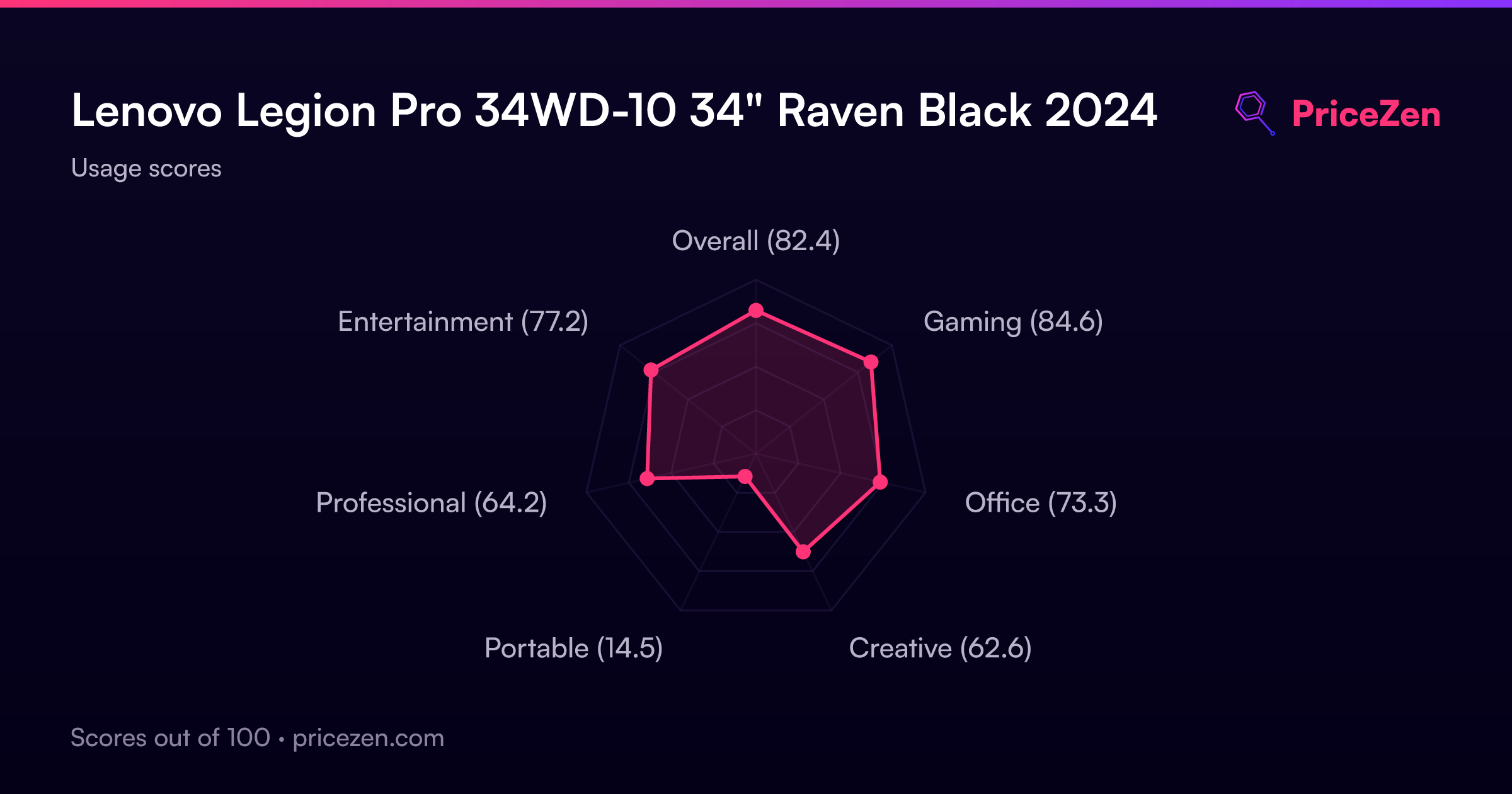
- Overall82.4
- Gaming84.6
- Office73.3
- Creative62.6
- Portable14.5
- Professional64.2
- Entertainment77.2