Lenovo L27h-4A 27" Cloud Gray 2024

One USB-C cable charges and connects your laptop verified Nov 29
76/100 overall score 4.5 average from 286 owner ratings
- Screen
- 27"
- Resolution
- 2560 x 1440
- Panel
- IPS
- Refresh
- 100 Hz
- Response time
- 1 ms
- Adaptive sync
- G-Sync Compatible
- HDR
- HDR10
Compare prices at 1 store
Cheapest first. New, refurbished and bundled offers are kept apart, so you compare like with like.
| Store | Sold by | Colour and condition | Price | vs lowest | Last checked | Link |
|---|---|---|---|---|---|---|
| New1 offerSingle unit | ||||||
| Out of stock when last checked | ||||||
| Amazon | Not known | Not listed | No price | Out of stock | Not known | Go to store |
 Source: PriceZen
A price counts as current when we checked it in the last 7 days. “Marketplace seller” means a third-party seller on that store, not the store itself.











Snapshot
The 30-Second Version
The Lenovo L27h-4A is a 27" QHD monitor that nails productivity with excellent USB-C connectivity, a sharp display, and a fully adjustable stand. Its 100Hz panel is a nice step up from standard 60Hz office monitors, and the price now starts around $230 in the US. The main downside is Lenovo's own ordering process, with several users reporting signature-related shipping delays and poor customer service.
Pros & Cons
Pros
- Excellent connectivity with USB-C, Thunderbolt, and a 4-port USB hub 97th
- Sharp QHD IPS panel with great color and viewing angles 91st
- Fully adjustable stand with height, tilt, swivel, and pivot 84th
- Genuinely useful built-in speakers tuned by Waves MaxxAudio 84th
- Natural Low Blue Light setup that doesn't wreck color accuracy
Cons
- Lenovo's direct shipping requires signatures, causing delays
- Customer service complaints are common among direct buyers
- Only a single USB-C port, and the hub could use more
- Heavier than expected at nearly 6kg for a 27-inch monitor
- User sentiment is in the 28th percentile, below average for its class
What owners think
The Word on the Street
- Buyers consistently praise the sharp QHD display and vibrant colors, saying the panel quality exceeds expectations for the price.
- The single-cable USB-C setup that charges laptops and links peripherals is repeatedly called out as a desk-transforming feature.
- A common complaint is the shipping and customer service experience when ordering directly from Lenovo, with signature requirements causing frustrating delays.
- Some users wish the monitor were lighter and had more than one USB-C port, even as they praise its overall utility.
How owner sentiment changed over time
ExclusiveBased on when customers actually wrote their reviews - so you can see whether early praise held up.
Happy owners: 92% lately, 83% in Oct 2024 – Dec 2025
Too few reviews to call that a change.
Across all 286 store ratings: 4.5★. Most owners rate without writing a review. The chart counts the 24 written reviews with stars and their own date.
59 reviews from months with approximate dates (the day we first saw a review) are left out of the trend.
1 written review without stars is left out of the trend.
Show the numbers
| Period | Reviews | Happy | Mixed | Unhappy | Happy share |
|---|---|---|---|---|---|
| Oct 2024 – Dec 2025 | 12 | 10 | 1 | 1 | 83% |
| Jan – Oct 2026 | 12 | 11 | 0 | 1 | 92% |
- Jul – Sep 20265 of 5 happy
Buyers in this period praised the monitor's display quality, design, build, and connectivity. They highlighted its high resolution, portrait rotation, and USB-C convenience, with no negative feedback.
- Display quality praised as great, with high resolution and crystal-clear visuals.
- Design and build quality appreciated for being modern, slim, and well-made.
- Connectivity valued, especially single USB-C for power and display, enabling clean setup.
- Flexibility to rotate to portrait view noted as a key feature.
- Oct – Dec 20257 of 8 happy · 1 without stars
Buyers praise the monitor's display, USB-C hub, and ergonomics, but one severe delivery complaint about Lenovo's shipping policy and poor customer service drags the score down.
- Excellent brightness, clarity, and design; works well near windows and improves work-from-home setup.
- USB-C hub charges laptop and connects peripherals with one cable; convenient and reduces cable clutter.
- Adjustable height, tilt, and rotation support good posture; easy to assemble and adjust.
- One buyer waited over a month for delivery; Lenovo requires signature, no pickup option, and customer service unhelpful.
- Jan – Mar 20253 of 3 happy
Buyers in Q1 2025 praised the monitor's large screen, USB hub, and seamless laptop connectivity, noting it centralizes their workspace. They also appreciated the clean design and image quality, with one calling it a solid value.
- Large 27-inch screen and split-screen capability enhance productivity.
- USB connection and built-in hub allow seamless device charging and centralized workspace.
- Clean, attractive design fits well with home or office decor.
- Good image quality and solid performance at an amazing price.
Each column joins calendar quarters until it holds at least 10 reviews with stars and their own date. Happy = 4-5★, mixed = 3★, unhappy = 1-2★. Period summaries are in English.
The proof
Performance
This monitor runs at 100Hz with a 1ms MPRT response time, and it's G-Sync Compatible. In our database, that puts the performance metric in the 71st percentile, which is solid but not groundbreaking. For office work, the 100Hz refresh rate makes scrolling and window dragging feel noticeably smoother than a standard 60Hz display. It's that 'once you see it, you can't unsee it' kind of upgrade. Casual gaming is totally doable too, though hardcore competitive players should look elsewhere.
The 1ms response time is MPRT, not true gray-to-gray, so take that spec with a grain of salt. In practice, motion blur is well controlled for a monitor in this price bracket, but it won't compete with a dedicated gaming panel. The 100Hz refresh rate combined with G-Sync Compatible support means you won't get screen tearing if you pair it with an NVIDIA GPU. It's a nice bonus for after-hours gaming sessions, even if the display is really built for spreadsheets first.
Specifications
Full Specifications
Display
| Size | 27" |
| Resolution | 2560x1440 (QHD) |
| Panel Type | IPS |
| Aspect Ratio | 16:9 |
| Curved | No |
| Screen Finish | matte |
Performance
| Refresh Rate | 100 Hz |
| Response Time | 1 |
| Adaptive Sync | G-Sync Compatible |
Color & HDR
| Brightness | 350 nits |
| Color Gamut | 99% sRGB, 90% DCI-P3 |
| Color Depth | 8-bit |
| HDR | HDR10 |
| HDR Support | HDR10 |
Connectivity
| HDMI Ports | 2 |
| DisplayPort | 1 |
| USB-C | 1 |
| Thunderbolt | N/A |
| Speakers | Yes |
| Headphone Jack | Yes |
Ergonomics
| Height Adjustable | Yes |
| Tilt | Yes |
| Swivel | Yes |
| Pivot | Yes |
| VESA Mount | 100x100 |
Features
| Webcam | No |
| Touchscreen | No |
| Power | 22 |
| Weight | 6.0 kg / 13.2 lbs |
vs Competition
Stacked against the other monitors near the top of our ranking, the L27h-4A has a clear lane. The ASUS ROG Strix XG27AQDPG 27" and LG UltraGear 27G810A-B 27" are gaming-first displays, and if fast motion and high refresh rates are what you're shopping for, they're the ones to look at. Where the L27h-4A differentiates itself is connectivity and USB-C convenience. For someone plugging in a work laptop every day, this Lenovo is the more practical pick, even if the panel tech isn't as flashy.
The Dell S2725QC 27" is the closer match, another 27-inch display aimed at desks rather than gaming rigs. Against it, the Lenovo's case rests on the numbers we collect: connectivity is among the best thanks to that USB-C port with Thunderbolt support and the 4-port USB hub, plus color coverage is well above average from 99% sRGB and 90% DCI-P3. Our scoring model puts performance in the 71st percentile, which is fine for spreadsheets and after-hours play but not the reason to buy it. If you're comparing this against other USB-C work monitors, the L27h-4A holds its own. Against gaming monitors, not so much. The segments are just different.
| Spec | Lenovo L27h-4A 27" | ASUS ROG Strix XG27UCDMG 27" | LG UltraGear 45GX950A-B 45" | Dell UltraSharp U4025QW 39.7" | Alienware AW-Series AW3425DW 34" | MSI MAG 271QPX QD-OLED E2 27" |
|---|---|---|---|---|---|---|
| Screen Size | 27 | 27 | 45 | 39.7 | 34 | 27 |
| Resolution | 2560 x 1440 | 3840 x 2160 | 5120 x 2160 | 5120 x 2160 | 3440 x 1440 | 2560 x 1440 |
| Panel Type | IPS | QD-OLED | OLED | IPS | QD-OLED | QD-OLED |
| Refresh Rate | 100 | 240 | 330 | 120 | 240 | 240 |
| Response Time Ms | 1 | 0.03 | 0.03 | 5 | 0.03 | 0.03 |
| Adaptive Sync | G-Sync Compatible | FreeSync Premium Pro | FreeSync Premium Pro | Adaptive-Sync | FreeSync Premium Pro | FreeSync Premium Pro |
| Hdr | HDR10 | DisplayHDR True Black 400 | DisplayHDR True Black 400 | HDR600 | HDR400 | DisplayHDR True Black 400 |
| Compare | Compare | Compare | Compare | Compare |
| Product | Color | Portability | Display | Feature | User Sentiment | Performance | Connectivity | Social Proof |
|---|---|---|---|---|---|---|---|---|
| Lenovo L27h-4A 27" | 82.5 | 83.9 | 66.9 | 70 | 29.2 | 67.8 | 96.9 | 84.3 |
| ASUS ROG Strix XG27UCDMG 27" Compare | 96.5 | 57.3 | 97.7 | 85 | 99.3 | 97.9 | 81 | 98.9 |
| LG UltraGear 45GX950A-B 45" Compare | 99.4 | 76.5 | 99.7 | 96.3 | 62 | 99.4 | 96.9 | 92.2 |
| Dell UltraSharp U4025QW 39.7" Compare | 97.9 | 76.5 | 98.6 | 96.3 | 85.5 | 56 | 99.3 | 92.2 |
| Alienware AW-Series AW3425DW 34" Compare | 98.9 | 73.9 | 84 | 96.3 | 95.8 | 97.9 | 95.3 | 96.9 |
| MSI MAG 271QPX QD-OLED E2 27" Compare | 99.1 | 57.3 | 73.3 | 85 | 95.8 | 97.9 | 81 | 98.9 |
Price
Value & Pricing
At $230 to $310 in the US, the L27h-4A offers a strong feature set on paper: QHD resolution, 100Hz refresh, USB-C connectivity, and a fully adjustable stand. The bottom of that range has dropped since we last checked, and at $230 this is a lot of monitor for the money. The problem is the buying experience. Multiple owners report that ordering directly from Lenovo is where things go sideways, with signature requirements causing delivery headaches and unhelpful customer service when issues arise. If you can grab this from a retailer like Newegg instead of Lenovo's own store, the value proposition improves dramatically. At the European price of EUR 444 to 474, it's less compelling unless the USB-C hub setup is a must-have for your workflow.
Read more
Overview
The Lenovo L27h-4A sits in that sweet spot for work monitors, a 27" QHD IPS panel that's trying to pull double duty for productivity and light gaming. We track its price across stores, and right now it runs from $230 to $310 in the US, with European buyers seeing closer to EUR 444 to 474. The low end has come down since we last looked, which pushes it further into budget-friendly territory for a 100Hz USB-C monitor. But the spec sheet mixed with real-world feedback tells an interesting story. The display itself gets high marks, but Lenovo's direct ordering experience? Not so much. So is this thing worth it? Let's get into it.
For connectivity, this monitor is genuinely excellent, ranking among the best in its category. You get 2x HDMI, 1x DisplayPort, 1x USB-C with Thunderbolt support, and a built-in 4-port USB hub. That single USB-C cable setup is the killer feature here. Plug your laptop in, and you get display, charging, and peripheral connections all at once. Users consistently praise this, saying it keeps their desk clutter-free. The catch? There's only one USB-C port, and a few owners wish the hub had even more of them.
Color is another strong point, well above average. The panel covers 99% sRGB and 90% DCI-P3 with 350 nits brightness. That's more than enough for office work, spreadsheets, and even some casual photo editing. HDR10 support is listed, but at 350 nits, don't expect actual HDR performance. It's a checkbox feature. Still, for anything in the productivity and creative categories, the color accuracy is respectable. The 1500:1 contrast ratio is better than typical IPS, so blacks look deeper than you'd expect from this panel type.
Common Questions
Q: Is the Lenovo L27h-4A good for office work?
Yes. Its QHD IPS panel, 100Hz refresh rate, USB-C hub, and fully adjustable stand make it a strong productivity monitor for daily office use. The 90% DCI-P3 color coverage also handles presentations and reports beautifully.
Q: How is the Lenovo L27h-4A for gaming?
It's fine for casual gaming thanks to the 100Hz refresh rate, 1ms MPRT response time, and G-Sync Compatible support. Hardcore competitive players will want a dedicated high-refresh gaming monitor instead.
Q: Does the Lenovo L27h-4A have built-in speakers?
Yes, it includes dual 3W speakers tuned by Waves MaxxAudio. Owners report they're clear and above average for built-in monitor audio, which is uncommon in this price range.
Q: Can the Lenovo L27h-4A charge a laptop over USB-C?
Yes, the USB-C port with Thunderbolt support can charge a laptop, power the display, and connect peripherals through the integrated 4-port USB hub with a single cable.
Who Should Skip This
If you're buying a monitor mainly for gaming, skip the L27h-4A. The ASUS ROG Strix XG27AQDPG 27" or LG UltraGear 27G810A-B 27" sit higher in our ranking for exactly that kind of use, and they're built around fast panels rather than desk convenience. Also skip it if your desk setup requires multiple USB-C connections, since this one makes do with a single port. And honestly, if you plan to buy directly from Lenovo, you should know going in that delivery delays due to signature requirements are a repeatedly documented frustration. A monitor that shows up late and requires hoops to jump through isn't worth the hassle when third-party sellers carry it with better purchasing experiences.
Verdict
The Lenovo L27h-4A is a genuinely good monitor with a serious Achilles' heel: Lenovo itself. The display, connectivity, and ergonomics all punch above their price point, especially at the $230 end of the range we're tracking right now. Owners love the sharp QHD panel, the single-cable setup, and the adjustable stand. The built-in speakers are a bonus that actually work well, which is rare for monitors. But that low user sentiment is hard to ignore. The gripes are almost entirely about ordering and support, not the hardware.
So should you buy it? Yes, if you can get it from a third-party retailer with good return policies and you value USB-C connectivity above all else. It's a strong work monitor for hybrid setups. No, if you're planning to order from Lenovo's website directly, given the documented shipping headaches. And no if gaming is your primary use case. There are better options for that. For everything else? It's a solid, practical pick.
Usage Scores
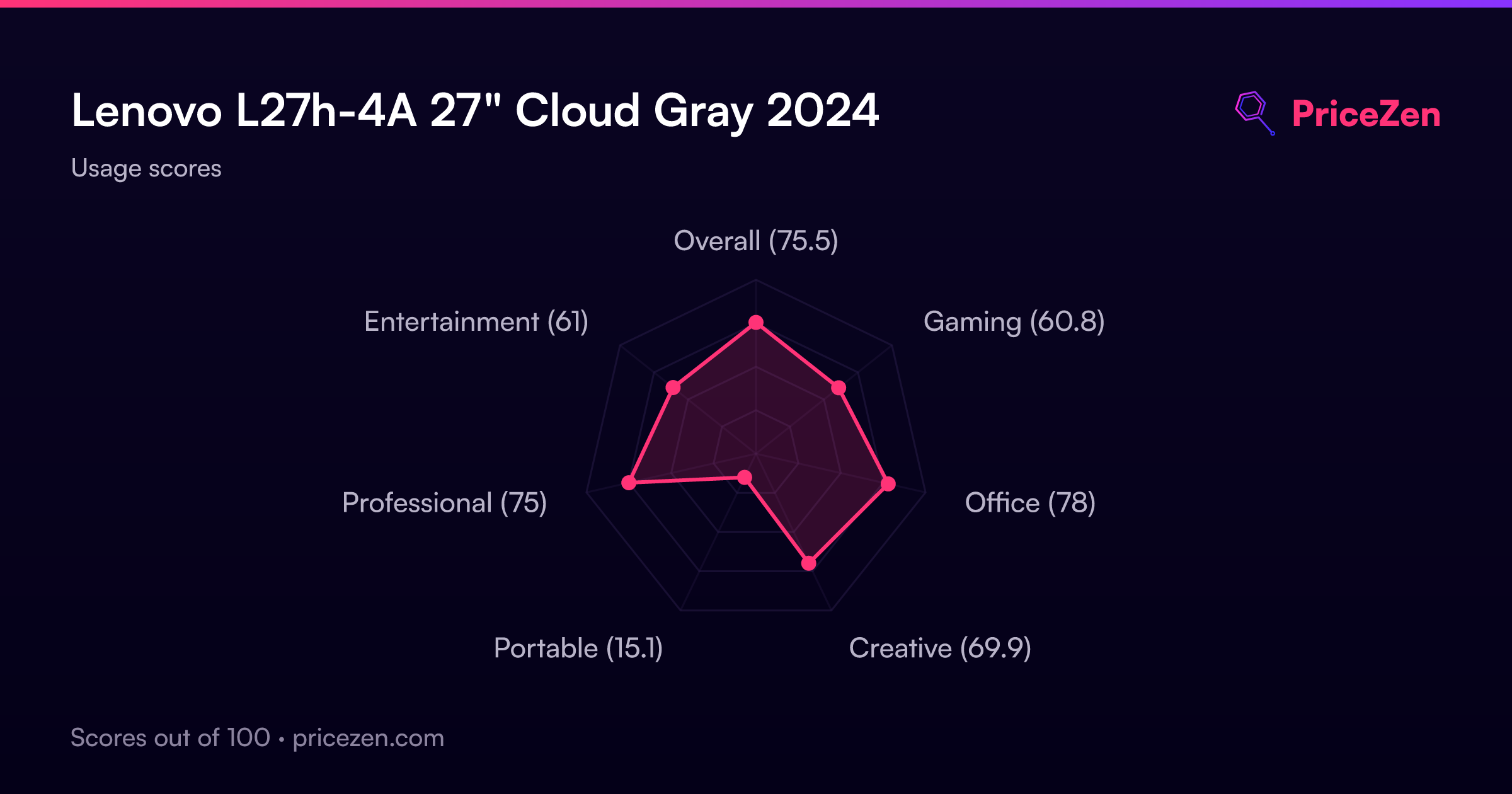
- Overall75.5
- Gaming60.8
- Office78
- Creative69.9
- Portable15.1
- Professional75
- Entertainment61