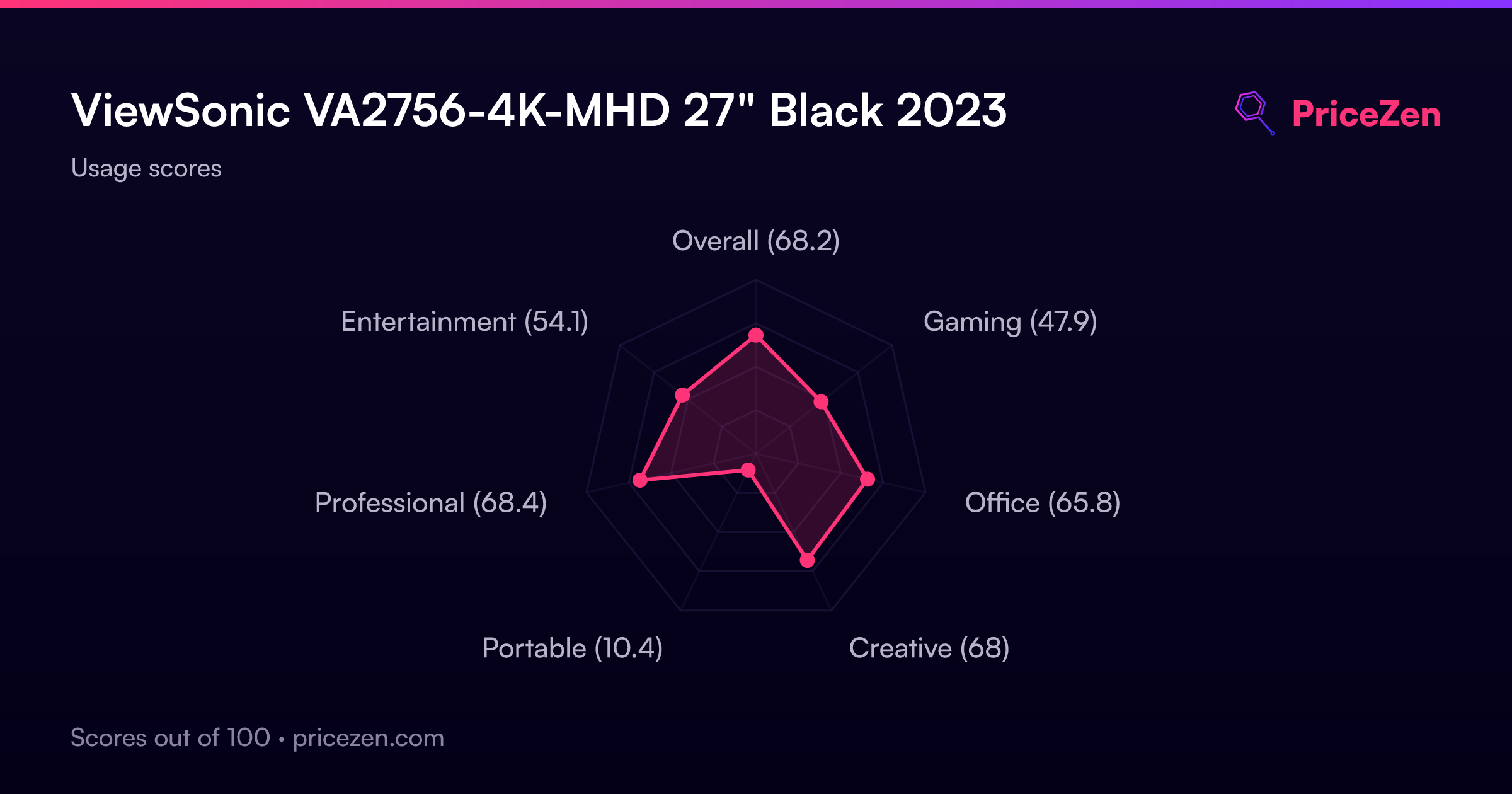
ViewSonic VA2756-4K-MHD 27" Black 2023
The 27-inch 4K IPS panel with 400 nits brightness, 100% sRGB coverage, and a 60Hz refresh rate delivers crisp visuals framed by ultra-thin bezels. Flicker-free technology and a blue light filter reduce eye fatigue, while SuperClear IPS ensures consistent colors from wide viewing angles. It’s best suited for home office users and students who need a sharp 4K monitor for productivity tasks, web browsing, and casual media consumption.

No current retailer price











Snapshot
The 30-Second Version
The ViewSonic VA2756-4K-MHD is a 27 inch 4K IPS monitor that nails the basics: sharp text, accurate colors, and a price that's hard to beat. At $230 to $280 USD, it's one of the best productivity values on the market. The 60Hz refresh rate means gamers should look elsewhere, and the awkward OSD controls are a minor annoyance. But for office work, studying, or casual creative tasks, this is a fantastic buy.
Pros & Cons
Pros
- Sharp 4K resolution on a 27 inch IPS panel makes text look fantastic 93rd
- 100% sRGB and 93% NTSC coverage means colors are accurate out of the box 92nd
- 400 nits brightness handles most indoor lighting without breaking a sweat 87th
- Multiple inputs including HDMI, DisplayPort, and VGA cover old and new devices 70th
- Built-in speakers and headphone jack save desk space for casual use
Cons
- 60Hz refresh rate rules out serious gaming
- OSD joystick and power button are awkwardly placed on the back
- No height adjustment, only tilt, so you may need a stand or books
- HDR10 support is mostly marketing at 400 nits
- Built-in speakers are functional but thin and tinny
What owners think
The Word on the Street
How owner sentiment changed over time
ExclusiveBased on when customers actually wrote their reviews - so you can see whether early praise held up.
14 written reviews, Nov 2020 – Jan 2026: 11 happy, 2 mixed, 1 without stars
Across all 469 store ratings: 4.6★. Most owners rate without writing a review. The chart counts the 14 written reviews.
- Oct – Dec 20254 of 4 happy
Buyers praise this monitor for its clear image, multiple video inputs, and good value. A few note the power switch is inconveniently placed in back.
- Clear, bright image with excellent contrast and color.
- Good value for a well-known brand; includes VGA, HDMI, and DisplayPort.
- Power switch is on the back, hard to reach for turning off at night.
- Works well for office use, coding, and compatibility with MacBooks.
- Apr – Jun 20251 of 3 happy · 1 without stars
Buyers praised the screen quality for graphics work but strongly criticized the flimsy, wobbly stand.
- Screen quality is excellent for professional photo/video/graphics work.
- Stand is very flimsy and causes screen to wobble excessively.
- KVM switch compatibility issues but solved with HDMI-to-DVI adapter.
- OSD joystick control is unusual and poorly explained in manual.
Each dot is one written review, in the month it was written. Happy = 4-5★, mixed = 3★, unhappy = 1-2★. Period summaries are in English.
The proof
Performance
Let's talk about what 4K on a 27 inch panel actually feels like. The pixel density here is around 163 pixels per inch, which means text renders with the kind of sharpness that makes 1080p look like it's been smeared with Vaseline. Reading long documents or working in Excel all day is noticeably easier on the eyes. The IPS panel also means you get 178 degree viewing angles, so colors don't shift when you lean back or show something to a coworker. Our database puts the display quality in the top 10% of monitors we track, and that tracks with what owners report.
The 400 nits of brightness is solid for indoor use. You won't be fighting glare from a sunny window, but you also won't be squinting in a dark room. Color coverage hits 100% sRGB and 93% NTSC, which is more than enough for office work, web browsing, and light photo editing. The 8-bit panel handles gradients reasonably well, though serious color-critical work would benefit from a 10-bit panel. The 5ms response time is fine for everything except fast-paced gaming. At 60Hz, you'll see some motion blur in quick camera pans during games, but for video playback and general use, it's a non-issue.
Specifications
Full Specifications
Display
| Size | 27" |
| Resolution | 3840x2160 (4K UHD) |
| Panel Type | IPS |
| Aspect Ratio | 16:9 |
| Curved | No |
| Screen Finish | matte |
Performance
| Refresh Rate | 60 Hz |
| Response Time | 5 |
Color & HDR
| Brightness | 400 nits |
| Color Gamut | 93% NTSC, 100% sRGB |
| Color Depth | 10-bit |
| HDR | HDR10 |
| HDR Support | HDR10 |
Connectivity
| HDMI Ports | 2 |
| DisplayPort | 1 |
| USB-C | 0 |
| Speakers | Yes |
| Headphone Jack | Yes |
Ergonomics
| Height Adjustable | No |
| Tilt | Yes |
| Swivel | No |
| Pivot | No |
| VESA Mount | 100x100 |
Features
| Webcam | No |
| Touchscreen | No |
| PIP/PBP | No |
| Power | 38 |
| Weight | 5.5 kg / 12.1 lbs |
vs Competition
The ASUS ROG Strix XG27AQDPG and MSI MAG 271QPX QD-OLED E2 are both excellent monitors, but they're solving a different problem. Those are high-refresh gaming displays with OLED panels that deliver incredible contrast and motion clarity. They also cost a lot more and burn through pixels faster if you leave static content on screen all day. For office work, the ViewSonic's IPS panel is actually the safer long-term bet. No burn-in risk, no aggressive ABL dimming, just consistent brightness all day.
The LG UltraGear 27GX790A-B and Samsung Odyssey G60SD sit in a similar camp. Great gaming monitors, but overkill for spreadsheets. The Gigabyte M Series OLED MO27U2 is the closest philosophical competitor, offering 4K resolution with OLED contrast, but again at a higher price. If your day involves Photoshop, video editing, or anything where color accuracy and pixel density matter more than refresh rate, the ViewSonic holds its own. The trade-off is clear: you give up motion clarity and speed for a lower price and a panel that won't punish you for leaving a Word document open for six hours.
| Spec | ViewSonic VA2756-4K-MHD 27" | ASUS ProArt PA32DC 31.5" | Apple Studio Display XDR 27" | Samsung Odyssey Ark LS55CG970NNXGO 55" | Dell UltraSharp U5226KW 51.5" | MSI MAG 274URFW 27" |
|---|---|---|---|---|---|---|
| Screen Size | 27 | 31.5 | 27 | 55 | 51.5 | 27 |
| Resolution | 3840 x 2160 | 3840 x 2160 | 5120 x 2880 | 3840 x 2160 | 6144 x 2560 | 3840 x 2160 |
| Panel Type | IPS | OLED | Mini-LED | VA | IPS | IPS |
| Refresh Rate | 60 | 60 | 120 | 165 | 120 | 160 |
| Response Time Ms | 5 | 0.10000000149011612 | - | 1 | 5 | 0.5 |
| Adaptive Sync | - | - | Adaptive-Sync | FreeSync Premium Pro | Adaptive-Sync | FreeSync Premium |
| Hdr | HDR10 | HDR400 | HDR | HDR10+ | HDR | HDR |
| Compare | Compare | Compare | Compare | Compare |
| Product | Color | Portability | Display | Feature | User Sentiment | Ergonomic | Performance | Connectivity | Social Proof |
|---|---|---|---|---|---|---|---|---|---|
| ViewSonic VA2756-4K-MHD 27" | 93.4 | 43.4 | 87 | 70.2 | 61 | 47.3 | 22.4 | 62.3 | 92 |
| ASUS ProArt PA32DC 31.5" Compare | 80.1 | 71.3 | 97.7 | 85.1 | 0 | 90.8 | 93.9 | 93.1 | 74.8 |
| Apple Studio Display XDR 27" Compare | 99.8 | 81.4 | 99.3 | 94.4 | 76.3 | 66.9 | 56.1 | 89.9 | 45.2 |
| Samsung Odyssey Ark LS55CG970NNXGO 55" Compare | 95.4 | 43.4 | 91.5 | 96.3 | 0 | 78.7 | 77.1 | 95.4 | 62.2 |
| Dell UltraSharp U5226KW 51.5" Compare | 95.1 | 76.6 | 99.8 | 96.3 | 0 | 90.8 | 56.1 | 99.9 | 22.7 |
| MSI MAG 274URFW 27" Compare | 91.9 | 57.5 | 87 | 85.1 | 0 | 90.8 | 90.8 | 81.2 | 51.3 |
Price
Value & Pricing
Here's where things get interesting. The USD price ranges from $230 to $280 across four listings, and that spread matters. If you can snag this at the $230 end, you're getting a 4K IPS panel for less than many 1440p monitors cost. Even at $280, it's still a solid deal, but the value proposition gets a bit shakier when you realize you're paying nearly 22% more for the exact same panel depending on where you click buy. Our data shows the best USD deal sits at the low end of that range, so shop around before you commit.
Compared to the competition, this monitor undercuts most 4K IPS options by a meaningful margin. The competitors in our database, like the ASUS ROG Strix XG27AQDPG and MSI MAG 271QPX QD-OLED E2, are gaming-focused panels that cost significantly more and prioritize refresh rate over raw resolution. If you don't need 240Hz, you're paying a premium for performance you'll never use. The ViewSonic's value proposition is simple: maximum pixels per dollar for people who work, not frag.
Price history
Read more
Overview
The ViewSonic VA2756-4K-MHD is one of those monitors that makes you wonder why you put up with a blurry 1080p panel for so long. It's a 27 inch IPS display pushing a full 3840 x 2160 resolution, and at the prices we're seeing, it's basically a no-brainer for anyone whose daily grind involves spreadsheets, documents, or staring at code for eight hours. This isn't a gaming monitor pretending to be a productivity tool. It's the opposite, and that's refreshing.
ViewSonic has been in the monitor game forever, and this panel leans hard into what they do best: solid color accuracy, decent brightness, and a price tag that doesn't make you flinch. The 400 nits of brightness and 100% sRGB coverage mean text looks crisp and colors look right out of the box. You also get HDR10 support, though at this brightness level it's more of a checkbox than a transformative experience. The thin bezels give it a modern look that won't embarrass you on a desk next to a MacBook.
Who's this for? Office workers, students, Mac Mini owners, and anyone who wants a ton of screen real estate without selling a kidney. The 60Hz refresh rate and 5ms response time tell you everything you need to know: this is a work monitor first. If you're chasing 240Hz esports glory, keep scrolling. But if you want four times the pixels of a standard 1080p display for under $300, this thing deserves a serious look.
Common Questions
Q: Does this monitor have built-in speakers?
Yes, it does. The built-in speakers are fine for system sounds, video calls, and casual YouTube watching, but they're not going to fill a room. If you care about audio quality, you'll want to use the 3.5mm headphone jack or external speakers.
Q: Can I use this with my MacBook?
Absolutely. The monitor supports HDMI and DisplayPort, and many owners report using it with MacBooks without issues. You may need a USB-C to HDMI or USB-C to DisplayPort adapter depending on your MacBook model, but the monitor itself handles macOS output just fine.
Q: Is this monitor good for gaming?
It depends on what you play. The 60Hz refresh rate and 5ms response time are fine for slower-paced games, strategy titles, and console gaming at 4K 60fps. But if you play fast shooters or competitive games, you'll notice the lack of high refresh rate support. This is a productivity monitor first.
Q: Does it support VESA mounting?
Yes, it has a standard 100x100mm VESA mount pattern. The included stand only offers tilt adjustment, so if you want height adjustment or a multi-monitor setup, a VESA arm or stand is a worthwhile upgrade.
Who Should Skip This
Competitive gamers should look elsewhere. The 60Hz refresh rate and 5ms response time are simply not built for fast-paced shooters or esports titles. If you're spending most of your time in games like Valorant, CS2, or Apex Legends, you'll be much happier with a 144Hz or 240Hz panel, even if it means dropping to 1440p. The ASUS ROG Strix XG27AQDPG or LG UltraGear 27GX790A-B are better fits for that use case.
Color-critical professionals should also think twice. While the 100% sRGB coverage is great for web work, the 8-bit panel and lack of hardware calibration mean it's not suitable for serious print work or HDR video grading. If you're doing client work that demands color precision, look at something with a 10-bit panel and factory calibration. And if you need a portable display for travel, this is definitely not it. At 5488 grams, it's a desktop monitor through and through.
Verdict
For office work, this is an easy recommendation. The 4K resolution on a 27 inch panel gives you enough screen real estate to have two documents side by side without squinting, and the color accuracy means what you see is what you get. Mac users will appreciate that it plays nicely with macOS, and the auto-detect video source feature means you can plug in a laptop and a desktop without fiddling with input buttons. At the low end of the price range, it's one of the best productivity values we've seen.
For creative work, it's a bit more nuanced. The 100% sRGB coverage is great for web design and social media content, but the 8-bit panel and lack of hardware calibration options mean serious print or video colorists should look elsewhere. The 400 nits brightness is fine for indoor editing, but HDR grading is out of the question. If you're a hobbyist photographer or YouTuber, this will serve you well. If you're doing client work that demands color precision, save up for something with a 10-bit panel and hardware calibration.
Usage Scores
- Overall68.2
- Gaming47.9
- Office65.8
- Creative68
- Portable10.4
- Professional68.4
- Entertainment54.1