BenQ EW2790U 27" White 2025
The 27-inch 4K IPS panel delivers 400 nits of brightness and 95% P3 coverage, with BenQ's AI Contrast technology adjusting contrast without affecting other image areas. It pairs a USB-C port with three HDMI inputs and built-in 5W speakers, plus a height-adjustable stand with tilt, swivel, and pivot for flexible setups. Best for creative professionals and office workers who need accurate color, versatile connectivity, and ergonomic comfort in a single monitor.

No current retailer price











Snapshot
The 30-Second Version
The BenQ EW2790U is a 27-inch 4K IPS monitor built for productivity and media, not gaming. It offers 95% P3 color, USB-C connectivity, and a fully adjustable stand at a reasonable price. The 60Hz refresh rate is the main trade-off, so gamers should look elsewhere.
Pros & Cons
Pros
- Sharp 4K IPS panel with 95% P3 color 96th
- Excellent connectivity with USB-C and 3 HDMI ports 91st
- Ergonomic stand with height, tilt, swivel, and pivot 87th
- Built-in 5W speakers are actually usable 85th
- AI Contrast and eye-care features for long sessions
Cons
- 60Hz refresh rate limits gaming
- 5ms response time is slow by modern standards
- 400 nits is modest for HDR
- AI Contrast can be distracting until you disable it
- No variable refresh rate support
What owners think
The Word on the Street
How owner sentiment changed over time
ExclusiveBased on when customers actually wrote their reviews - so you can see whether early praise held up.
7 written reviews, Oct 2018 – Dec 2025: 7 happy
Across all 4,827 store ratings: 4.4★. Most owners rate without writing a review. The chart counts the 7 written reviews.
Each dot is one written review, in the month it was written. Happy = 4-5★, mixed = 3★, unhappy = 1-2★.
The proof
Performance
Let's be clear about what this monitor is and isn't. The EW2790U runs at 60Hz with a 5ms response time. For spreadsheets, code, photo editing, and video, that's completely fine. For competitive gaming, it's a weak spot. Our performance data puts it in the 22nd percentile, which means most monitors in our database outpace it on speed. If you're asking whether the BenQ EW2790U is good for gaming, the answer is casual gaming only. A 60Hz panel won't give you the smoothness of a 144Hz or 240Hz display.
Where it shines is image quality. The 400-nit brightness and 95% P3 color coverage put it in the 85th percentile for color. That's genuinely good for a monitor at this price. The 10-bit panel helps with gradients, and HDR support is there, though at 400 nits it's more of a taste of HDR than the full experience. BenQ's AI Contrast feature adjusts contrast based on content, which sounds fancy but mostly means the monitor tweaks dark and bright areas on the fly. Some people love it, some find it distracting. You can turn it off if it bugs you.
Specifications
Full Specifications
Display
| Size | 27" |
| Resolution | 3840x2160 (4K UHD) |
| Panel Type | IPS |
| Aspect Ratio | 16:9 |
| Curved | No |
| Screen Finish | matte |
Performance
| Refresh Rate | 60 Hz |
| Response Time | 5 |
Color & HDR
| Brightness | 400 nits |
| Color Gamut | 95% P3 |
| Color Depth | 10-bit |
| HDR | HDR400 |
| HDR Support | HDR400 |
Connectivity
| HDMI Ports | 3 |
| DisplayPort | 0 |
| USB-C | 1 |
| Thunderbolt | N/A |
| Speakers | Yes |
| Headphone Jack | Yes |
Ergonomics
| Height Adjustable | Yes |
| Tilt | Yes |
| Swivel | Yes |
| Pivot | Yes |
| VESA Mount | 100x100 |
Features
| Webcam | No |
| Touchscreen | No |
| Power | 180 |
| Weight | 6.7 kg / 14.8 lbs |
vs Competition
The BenQ EW2790U competes with a mix of OLED gaming monitors and productivity-focused 4K panels. Against something like the MSI MAG 271QPX QD-OLED E2 or the Samsung Odyssey G60SD, the BenQ loses badly on speed. Those OLED panels run at much higher refresh rates with near-instant response times. But they also cost more and are aimed at gamers. The BenQ's advantage is color accuracy out of the box and a more ergonomic, office-friendly design.
The ASUS ROG Strix XG27AQDMG and LG UltraGear 32GX850A-B are also gaming-first displays. The LG is bigger at 32 inches and faster, but you'll pay for it. The Gigabyte M Series OLED MO27U2 SA is an interesting alternative if you want 4K and OLED in a 27-inch size, but again, it's a gaming monitor with a gaming price tag. For someone who wants a 4K monitor for work and media without spending OLED money, the BenQ holds its own. Just don't expect it to keep up with those panels in a fast-paced game.
| Spec | BenQ EW2790U 27" | MSI MAG 274URFW 27" | Acer Nitro UM.CX2AA.S01 34" | ASUS HealthCare HA3281A 31.5" | LG UltraGear 32GP750-B 32" | Dell UltraSharp U4320Q 27" |
|---|---|---|---|---|---|---|
| Screen Size | 27 | 27 | 34 | 31.5 | 32 | 27 |
| Resolution | 3840 x 2160 | 3840 x 2160 | 3440 x 1440 | 3840 x 2160 | 2560 x 1440 | 3840 x 2160 |
| Panel Type | IPS | IPS | VA | OLED | IPS | IPS |
| Refresh Rate | 60 | 160 | 165 | 60 | 165 | 60 |
| Response Time Ms | 5 | 0.5 | 1 | 0.10000000149011612 | 1 | 5 |
| Adaptive Sync | - | FreeSync Premium | FreeSync Premium | - | FreeSync Premium | - |
| Hdr | HDR400 | HDR | HDR400 | - | HDR400 | HDR400 |
| Compare | Compare | Compare | Compare | Compare |
| Product | Color | Portability | Display | Feature | Ergonomic | Performance | Connectivity | Social Proof |
|---|---|---|---|---|---|---|---|---|
| BenQ EW2790U 27" | 84.7 | 81.4 | 87.1 | 70.2 | 90.8 | 22.3 | 96.2 | 74.8 |
| MSI MAG 274URFW 27" Compare | 91.9 | 57.5 | 87.1 | 85.1 | 90.8 | 90.8 | 81.2 | 51.3 |
| Acer Nitro UM.CX2AA.S01 34" Compare | 84.7 | 20.7 | 76.1 | 90.8 | 67 | 77.1 | 84 | 84 |
| ASUS HealthCare HA3281A 31.5" Compare | 48.2 | 57.5 | 97.7 | 43.4 | 90.8 | 93.9 | 91 | 0 |
| LG UltraGear 32GP750-B 32" Compare | 88.6 | 3.7 | 72.1 | 70.2 | 78.7 | 77.1 | 53.2 | 84 |
| Dell UltraSharp U4320Q 27" Compare | 91.1 | 82.7 | 87.1 | 85.1 | 90.8 | 22.3 | 96.9 | 0 |
Price
Value & Pricing
Pricing on the EW2790U is all over the place depending on where you shop. In the US, we're seeing listings from USD 230 to USD 300 across four vendors. That's a USD 70 spread, which is enough to matter. The best deal in our data comes from the lower end of that range, so it pays to shop around before you buy. In Canada, the spread is even wider, from CAD 300 to CAD 471 across six listings. A CAD 171 difference is significant, and the cheapest CAD option is the one to hunt for. At the low end of these ranges, this monitor is a solid value for a 4K IPS panel with this color coverage and connectivity. At the high end, you're getting close to territory where faster or more color-accurate options start to look tempting.
Price history
Read more
Overview
The BenQ EW2790U is a 27-inch 4K IPS monitor aimed at people who want sharp text and good color without paying OLED money. It sits in that mid-range productivity and entertainment bracket, with a 3840 x 2160 panel, 95% P3 coverage, and a 60Hz refresh rate. If you're searching for a 4K monitor for office work, photo editing, or watching shows, this one checks a lot of boxes on paper.
BenQ leans hard into comfort here. You get height adjust, tilt, swivel, and pivot, plus their eye-care tech and a Scenario hotkey for jumping between presets. There's also a USB-C port with charging and three HDMI inputs, so it plays nice with a laptop, a console, and a streaming stick all at once. The built-in 5W speakers are a nice touch for a desk setup where you don't want external speakers cluttering things up.
Our database puts this display in the 89th percentile overall, with connectivity landing in the 96th percentile. That's a strong showing for a monitor in this price range. But the 60Hz refresh rate and 5ms response time put performance in the 22nd percentile, so gamers looking for high frame rates should keep scrolling.
Common Questions
Q: Is the BenQ EW2790U good for gaming?
It's fine for casual gaming, but the 60Hz refresh rate and 5ms response time make it a poor choice for competitive or fast-paced titles. If you play mostly single-player games or slower genres, the 4K resolution and color quality will look great.
Q: Does the BenQ EW2790U have USB-C charging?
Yes, the EW2790U has a USB-C port that supports charging and data transfer. It's a great option for connecting a laptop with a single cable while keeping it powered.
Q: Can I mount the BenQ EW2790U on a monitor arm?
Yes, it has a VESA 100x100 mount, so it works with most standard monitor arms. The included stand also offers height adjust, tilt, swivel, and pivot if you prefer to use it out of the box.
Q: How good are the built-in speakers on the BenQ EW2790U?
The built-in 5W speakers are surprisingly decent for a monitor. They won't replace a dedicated speaker setup, but they're perfectly usable for video calls, YouTube, and casual viewing.
Who Should Skip This
Skip the EW2790U if you're a gamer who plays competitive shooters, racing games, or anything that benefits from high refresh rates. A 60Hz panel will feel sluggish compared to the 144Hz and 240Hz options available at similar prices. If you need a monitor for fast-paced gaming, look at the MSI MAG 271QPX QD-OLED E2 or the ASUS ROG Strix XG27AQDMG instead. Also skip it if you need serious HDR performance. At 400 nits, this monitor's HDR is more of a checkbox than a feature. For real HDR, you'll want something with higher peak brightness or an OLED panel.
Verdict
Should you buy the BenQ EW2790U? If you want a 4K monitor for office work, photo editing, or watching content, and you don't care about high refresh rates, yes. The color coverage is strong, the stand is genuinely ergonomic, and the connectivity is excellent. The USB-C port alone makes it a great pick for laptop users who want a single-cable setup. The built-in speakers are a bonus that most monitors in this class don't offer.
But if you're a gamer, even a casual one who plays fast-paced titles, the 60Hz refresh rate will feel limiting. There are faster monitors in this price range, though you'll usually sacrifice color accuracy or resolution to get them. The EW2790U is a productivity monitor first, and it's a good one. Just know what you're signing up for.
Usage Scores
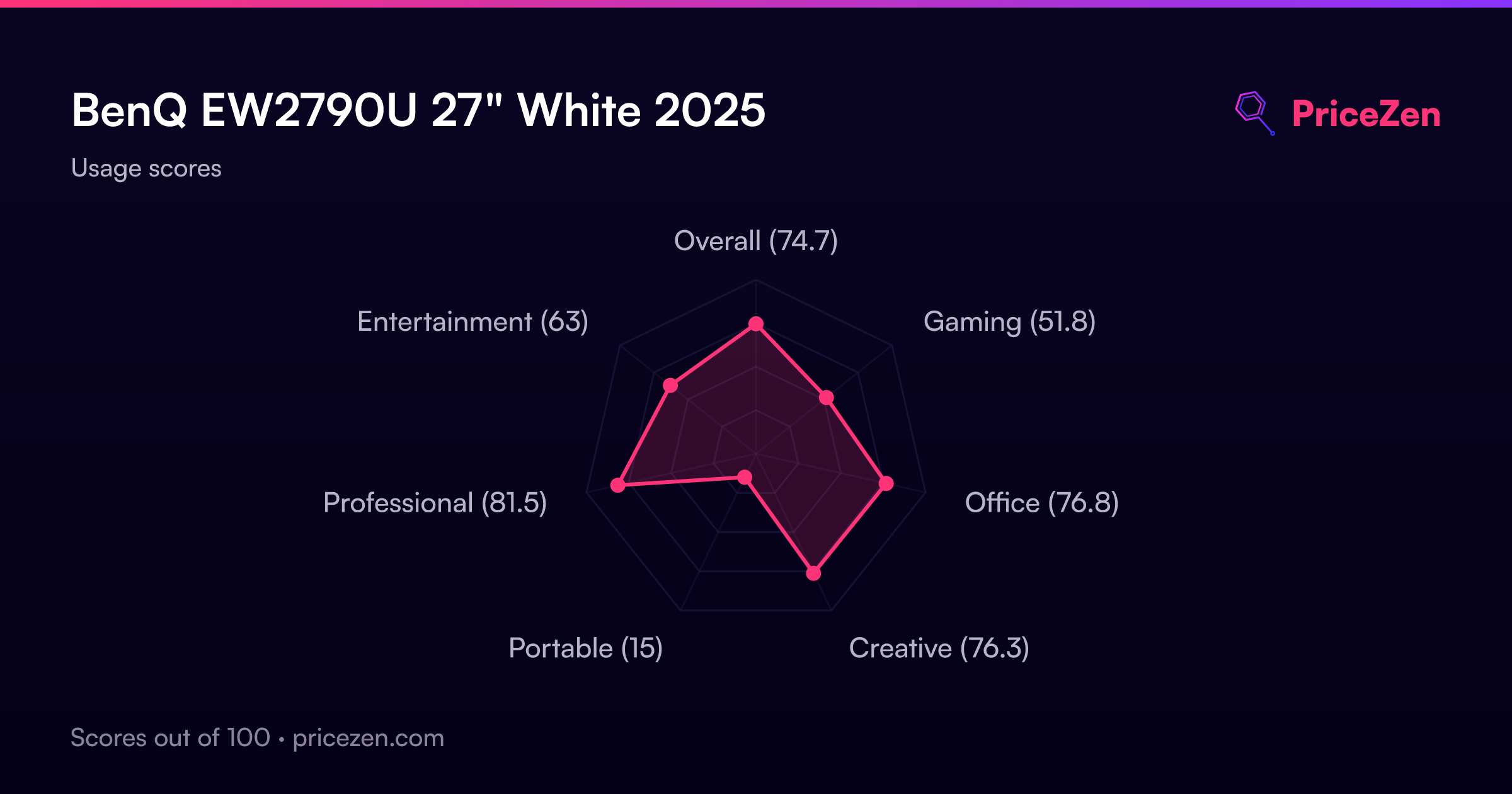
- Overall74.7
- Gaming51.8
- Office76.8
- Creative76.3
- Portable15
- Professional81.5
- Entertainment63