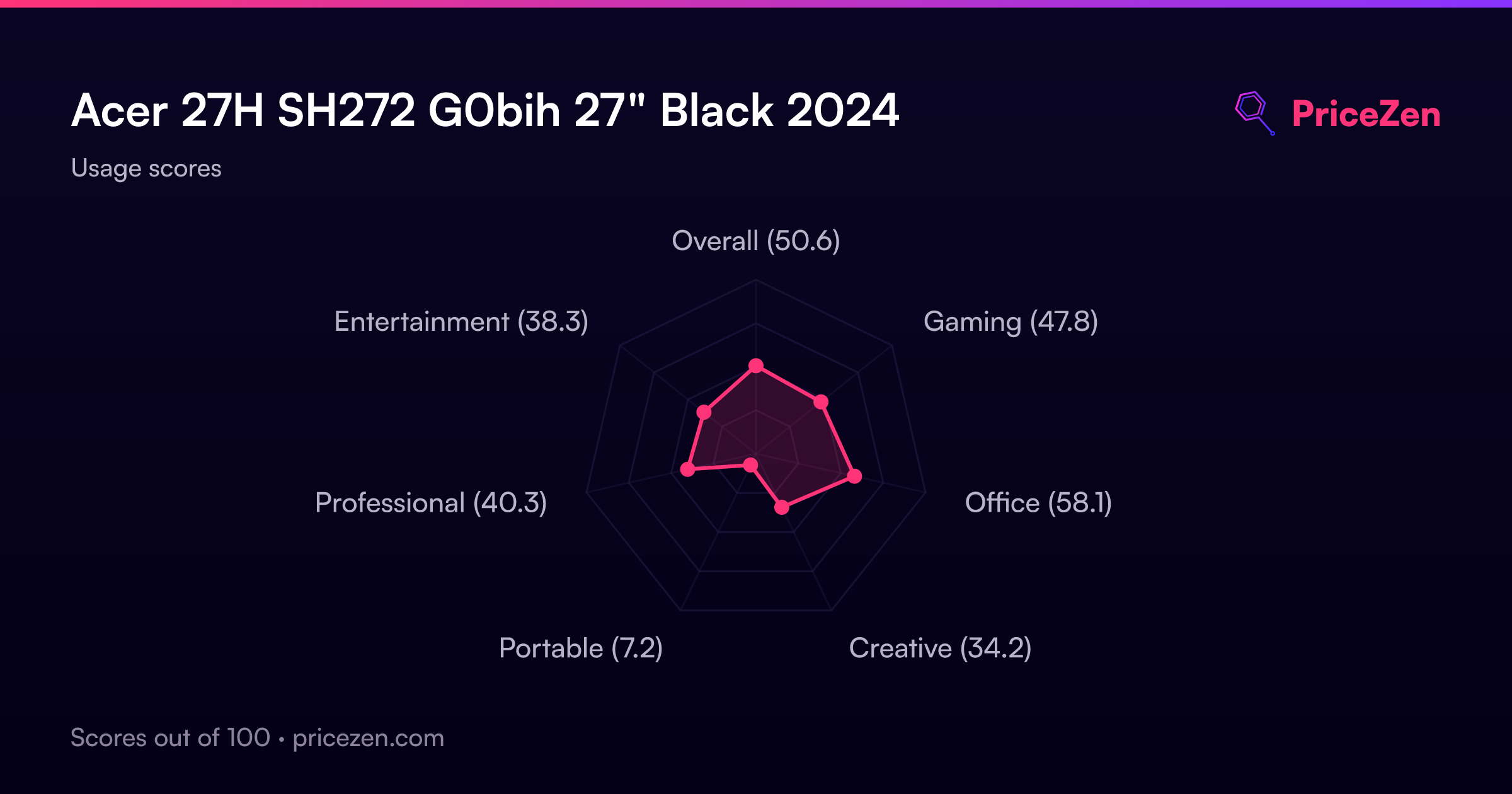
Acer 27H SH272 G0bih 27" Black 2024
The 120Hz refresh rate and 1ms response time with FreeSync support deliver smooth, tear-free motion uncommon in budget office displays. Its ergonomic stand with height, tilt, and swivel adjustments pairs with a slim frame and integrated speakers for a flexible, clutter-free workspace. This monitor is best for home office users and students who want fluid scrolling and casual gaming performance without paying a premium for higher resolutions.

No current retailer price











Snapshot
The 30-Second Version
A shockingly good 120Hz office monitor with a stand that puts $300 screens to shame. For a hundred bucks, it's the budget king, just don't forget to install the color driver.
Pros & Cons
Pros
- 120Hz refresh rate makes everything from work to gaming feel buttery smooth 74th
- The adjustable stand with height, tilt, and swivel is a rare find at this price 70th
- Thin bezels give it a clean, modern look that doesn't scream 'budget' 67th
- Excellent value, often found for around $90-$100
Cons
- 250 nits brightness is dim and gets washed out in bright rooms
- Out-of-the-box color is rough; you must install Acer's ICC driver for a decent picture
- Downward-facing ports make cable management a pain
- 1080p resolution on a 27-inch screen means visible pixels if you sit close
What owners think
The Word on the Street
How owner sentiment changed over time
ExclusiveBased on when customers actually wrote their reviews - so you can see whether early praise held up.
11 written reviews, Mar 2025 – Feb 2026: 10 happy, 1 unhappy
Across all 195 store ratings: 4.3★. Most owners rate without writing a review. The chart counts the 11 written reviews.
Each dot is one written review, in the month it was written. Happy = 4-5★, mixed = 3★, unhappy = 1-2★.
The proof
Performance
The 120Hz refresh rate and 1ms VRB response time are the real story here. We were genuinely surprised by how smooth everyday desktop navigation and casual gaming felt. Scrolling through long documents is fluid, and popping into a quick match of Rocket League is a much better experience than on any standard 60Hz office monitor. It's not going to replace a dedicated 240Hz esports panel, but for this class, the motion clarity is a standout. The 250 nits brightness is fine for a normally lit room, but it'll struggle near a sunny window. And you absolutely need to grab the ICC profile from Acer's site to fix the out-of-the-box color, which is a bit of a hassle but makes a real difference.
Specifications
Full Specifications
Display
| Size | 27" |
| Resolution | 1920x1080 (Full HD) |
| Panel Type | IPS |
| Aspect Ratio | 16:9 |
| Curved | No |
| Screen Finish | matte |
Performance
| Refresh Rate | 120 Hz |
| Response Time | 1 |
| Adaptive Sync | FreeSync |
Color & HDR
| Brightness | 250 nits |
Connectivity
| HDMI Ports | 2 |
| DisplayPort | 1 |
| Speakers | Yes |
Ergonomics
| Height Adjustable | Yes |
| Tilt | Yes |
| Swivel | Yes |
| VESA Mount | Yes |
Features
| Webcam | No |
| Touchscreen | No |
| Weight | 6.5 kg / 14.3 lbs |
vs Competition
The Acer's main fight is with the ASUS TUF Gaming VG27AQL5A and the HP OMEN 27qs G2. The ASUS and HP both step up to 1440p resolution and higher brightness, making them much better for immersive gaming and media, but they'll cost you significantly more. The Acer's 1080p panel is its biggest limitation. If you're purely gaming, the higher resolution and HDR on those competitors are worth the extra cash. But if you need a dual-purpose office and light gaming monitor on a tight budget, the Acer's ergonomic stand and 120Hz panel give it a unique edge that those pricier gaming monitors don't always match in pure desk flexibility.
| Spec | Acer 27H SH272 G0bih 27" | ASUS ProArt PA32DC 31.5" | Apple Studio Display XDR 27" | Samsung Odyssey Ark LS55CG970NNXGO 55" | Gigabyte AORUS FO32U2P 32" | MSI MAG 274URFW 27" |
|---|---|---|---|---|---|---|
| Screen Size | 27 | 31.5 | 27 | 55 | 32 | 27 |
| Resolution | 1920 x 1080 | 3840 x 2160 | 5120 x 2880 | 3840 x 2160 | 3840 x 2160 | 3840 x 2160 |
| Panel Type | IPS | OLED | Mini-LED | VA | OLED | IPS |
| Refresh Rate | 120 | 60 | 120 | 165 | 240 | 160 |
| Response Time Ms | 1 | 0.10000000149011612 | - | 1 | 0.029999999329447746 | 0.5 |
| Adaptive Sync | FreeSync | - | Adaptive-Sync | FreeSync Premium Pro | FreeSync Premium Pro | FreeSync Premium |
| Hdr | - | HDR400 | HDR | HDR10+ | DisplayHDR True Black 400 | HDR |
| Compare | Compare | Compare | Compare | Compare |
| Product | Color | Portability | Display | Feature | User Sentiment | Ergonomic | Performance | Connectivity | Social Proof |
|---|---|---|---|---|---|---|---|---|---|
| Acer 27H SH272 G0bih 27" | 15.5 | 35.2 | 50.7 | 21.3 | 61.1 | 73.5 | 69.9 | 62.3 | 67.2 |
| ASUS ProArt PA32DC 31.5" Compare | 80.1 | 71.3 | 97.7 | 85.1 | 0 | 90.8 | 93.9 | 93.1 | 74.8 |
| Apple Studio Display XDR 27" Compare | 99.8 | 81.4 | 99.3 | 94.4 | 76.5 | 67 | 56.1 | 89.9 | 45.2 |
| Samsung Odyssey Ark LS55CG970NNXGO 55" Compare | 95.4 | 43.4 | 91.5 | 96.3 | 0 | 78.7 | 77.1 | 95.4 | 62.2 |
| Gigabyte AORUS FO32U2P 32" Compare | 80.1 | 63 | 99 | 85.1 | 0 | 90.8 | 97.9 | 87.6 | 59.4 |
| MSI MAG 274URFW 27" Compare | 91.9 | 57.5 | 87.1 | 85.1 | 0 | 90.8 | 90.8 | 81.2 | 51.4 |
Price
Value & Pricing
This is where the SH272 makes its stand. With prices spotted as low as $90, it's an absolute steal for a 27-inch, 120Hz monitor with a fully adjustable stand. That's a combo you usually pay double for. We saw a wild price spread up to $3292 from some third-party sellers, which is pure noise. Stick to the major retailers where it hovers around that $100 mark, and you're getting one of the best budget deals we've seen.
Price history
Read more
Overview
The Acer SH272 G0bih is a monitor that knows exactly what it is, and that's refreshing. It's a 27-inch 1080p IPS panel aimed squarely at your desk, whether you're grinding through spreadsheets or sneaking in a few rounds of something fast-paced after hours. The one thing to know? For a budget-friendly workhorse, the 120Hz refresh rate and surprisingly solid ergonomic stand make it feel a lot more premium than its price tag suggests. Just don't expect it to light up a room or win any color accuracy awards.
Common Questions
Q: Is this monitor good for gaming?
For casual and competitive gaming on a budget, absolutely. The 120Hz refresh rate and FreeSync support make a huge difference over a standard 60Hz screen. Just don't expect the color depth or HDR performance of a pricier gaming monitor.
Q: Why do the colors look washed out?
The factory calibration isn't great. You need to download the specific ICC color profile from Acer's support site for this model and set it as your default in Windows. It's a night-and-day difference, so don't skip this step.
Q: Can I mount this monitor on a wall?
Yep, it's VESA compatible. The stand is excellent, but if you want a cleaner desk or a specific viewing angle, a monitor arm or wall mount will work perfectly.
Who Should Skip This
If you're a graphic designer, photo editor, or a gamer who values deep contrast and vibrant HDR, this isn't your monitor. The 250-nit brightness and 1080p resolution on a 27-inch screen are real limitations for color-critical work and immersive gaming. Go grab a 1440p panel like the HP OMEN 27qs G2 instead. Your eyes will thank you.
Verdict
The Acer SH272 G0bih is a killer budget monitor for the right person. If your world is a mix of office work, web browsing, and casual gaming, and you can find it for around $100, just buy it. The 120Hz panel and excellent stand are game-changers at this price. Just be prepared to spend five minutes installing a driver to fix the colors, and don't expect it to get blazing bright. For a no-frills, high-value desktop upgrade, it's an easy recommendation.
Usage Scores
- Overall50.6
- Gaming47.8
- Office58.1
- Creative34.2
- Portable7.2
- Professional40.3
- Entertainment38.3