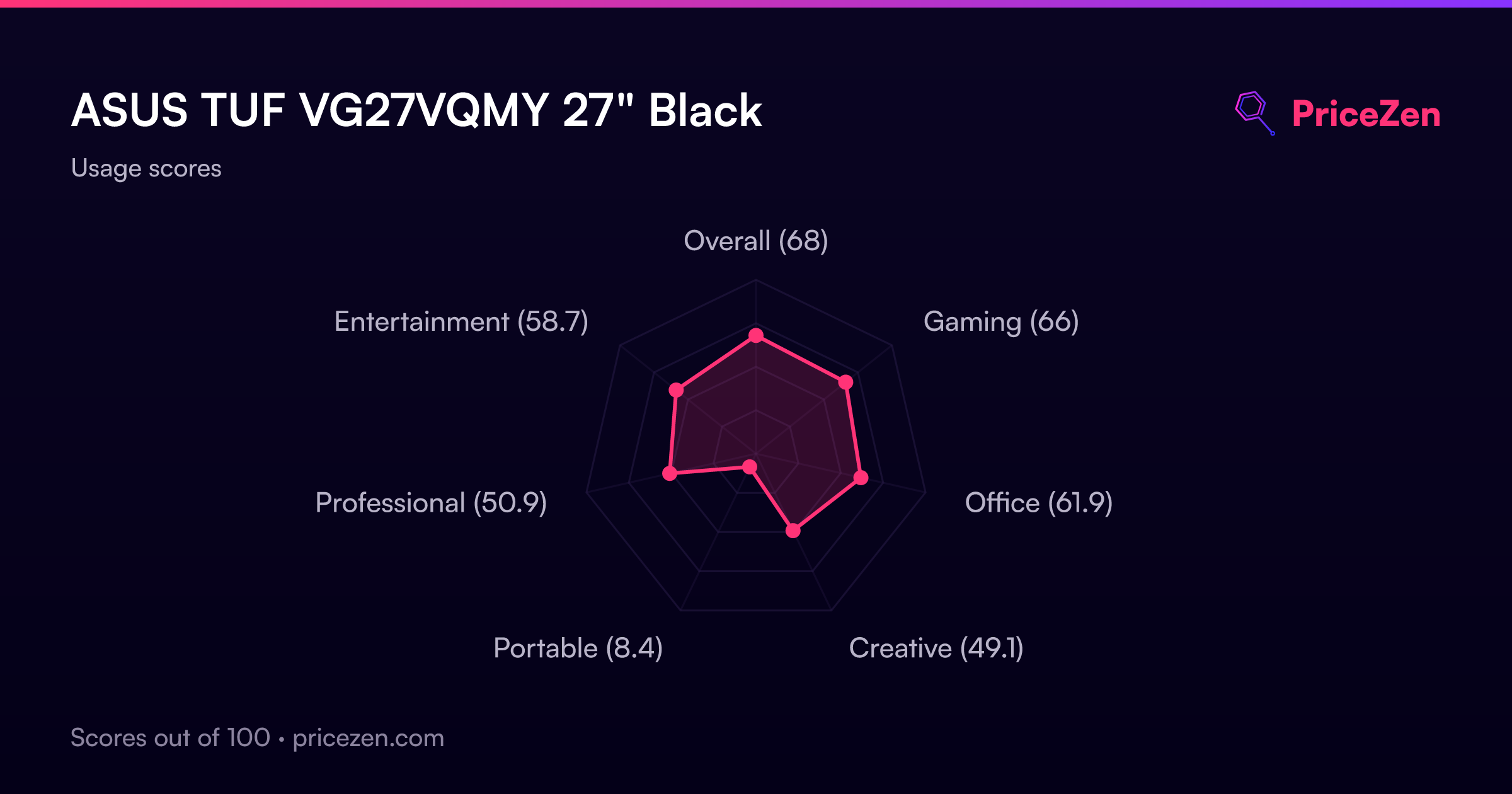
ASUS TUF VG27VQMY 27" Black
A 240Hz refresh rate and 1ms MPRT response time with ELMB technology deliver exceptionally fluid, blur-free motion on a 27-inch 1500R curved VA panel. The ergonomic stand with full swivel, tilt, and height adjustment is a practical differentiator rarely found at this performance tier, and the included Dockztorm hub adds convenient connectivity. This monitor is best for competitive FPS and esports gamers who prioritize high frame rate clarity and need an adaptable, comfortable setup for long sessions.

No current retailer price




Snapshot
The 30-Second Version
The ASUS TUF VG27VQMY is a 27-inch curved VA gaming monitor with a 240Hz refresh rate and 1ms response time. Performance is in the 88th percentile, which is excellent for the price. It's worth buying if you can find it near USD 245, but skip it if the price creeps toward USD 465.
Pros & Cons
Pros
- 240Hz refresh rate is seriously quick for the price 91st
- 1ms response time keeps motion blur in check 87th
- Curved VA panel adds immersion without being distracting 74th
- Height, tilt, and swivel adjustments are genuinely useful 73rd
Cons
- 1080p on a 27-inch screen looks a bit soft up close
- VA panel can't match IPS or OLED for color accuracy
- Only 46th percentile for features, pretty barebones
- Portable score of 8 out of 100, this thing is not moving anywhere
The proof
Performance
The 240Hz refresh rate and 1ms response time put this monitor in the 88th percentile for performance in our database. That's genuinely fast, and it shows in twitchy shooters and racing games. The VA panel handles motion well for the price, though you might notice some ghosting in darker scenes compared to a good IPS or OLED. FreeSync keeps things smooth if you're on an AMD GPU, and the 350 nits brightness is enough for most rooms, just don't expect HDR fireworks.
Specifications
Full Specifications
Display
| Size | 27" |
| Resolution | 1920x1080 (Full HD) |
| Panel Type | VA |
| Aspect Ratio | 16:9 |
| Curved | Yes |
| Curvature | 1500 |
| Screen Finish | matte |
Performance
| Refresh Rate | 240 Hz |
| Response Time | 1 |
| Adaptive Sync | FreeSync Premium |
Color & HDR
| Brightness | 350 nits |
| Color Gamut | 105% sRGB |
| Color Depth | 16.7M |
| HDR | HDR10 |
Connectivity
| HDMI Ports | 2 |
| DisplayPort | 1 |
| USB-C | 0 |
| Speakers | Yes |
| Headphone Jack | Yes |
Ergonomics
| Height Adjustable | Yes |
| Tilt | Yes |
| Swivel | Yes |
| Pivot | No |
| VESA Mount | 100x100 |
Features
| Webcam | No |
| Touchscreen | No |
| Weight | 6.0 kg / 13.2 lbs |
vs Competition
Stacked against the Alienware AW3425DW or Samsung Odyssey G60SD, the ASUS TUF VG27VQMY is playing a different game. Those are QD-OLED ultrawides and high-res panels that cost significantly more and deliver better color and contrast. The MSI MPG 271QR QD-OLED X50 also outclasses this VA panel in color and viewing angles. But none of them hit 240Hz at this price point. The LG UltraGear 32GX850A-B and Gigabyte M Series OLED MO27U2 SA are similarly premium. If your budget is tight and you want raw speed, the ASUS TUF holds its own. If you want image quality first, save up.
| Spec | ASUS TUF VG27VQMY 27" | LG UltraGear 45GX950A-B 45" | Dell UltraSharp U4025QW 39.7" | Alienware AW-Series AW3425DW 34" | MSI MAG 271QPX QD-OLED E2 27" | Samsung Odyssey G60SD 27" |
|---|---|---|---|---|---|---|
| Screen Size | 27 | 45 | 39.7 | 34 | 27 | 27 |
| Resolution | 1920 x 1080 | 5120 x 2160 | 5120 x 2160 | 3440 x 1440 | 2560 x 1440 | 2560 x 1440 |
| Panel Type | VA | OLED | IPS | QD-OLED | QD-OLED | OLED |
| Refresh Rate | 240 | 330 | 120 | 240 | 240 | 360 |
| Response Time Ms | 1 | 0.03 | 5 | 0.03 | 0.03 | 0.03 |
| Adaptive Sync | FreeSync Premium | FreeSync Premium Pro | Adaptive-Sync | FreeSync Premium Pro | FreeSync Premium Pro | FreeSync Premium Pro |
| Hdr | HDR10 | DisplayHDR True Black 400 | HDR600 | HDR400 | DisplayHDR True Black 400 | HDR10+ |
| Compare | Compare | Compare | Compare | Compare |
| Product | Color | Portability | Display | Feature | Ergonomic | Performance | Connectivity | Social Proof |
|---|---|---|---|---|---|---|---|---|
| ASUS TUF VG27VQMY 27" | 73.7 | 35.1 | 43.5 | 90.8 | 73.4 | 87.2 | 62.1 | 26.8 |
| LG UltraGear 45GX950A-B 45" Compare | 99.4 | 76.5 | 99.7 | 96.3 | 90.7 | 99.4 | 96.9 | 91.9 |
| Dell UltraSharp U4025QW 39.7" Compare | 97.9 | 76.5 | 98.6 | 96.3 | 90.7 | 56.1 | 99.3 | 96.8 |
| Alienware AW-Series AW3425DW 34" Compare | 98.9 | 73.9 | 84.1 | 96.3 | 90.7 | 97.9 | 95.4 | 96.8 |
| MSI MAG 271QPX QD-OLED E2 27" Compare | 99.2 | 57.3 | 73.4 | 85 | 90.7 | 97.9 | 81 | 98.9 |
| Samsung Odyssey G60SD 27" Compare | 90.7 | 39.3 | 73.4 | 70.1 | 90.7 | 99.5 | 87.4 | 91.9 |
Price
Value & Pricing
Pricing is all over the place right now. We're seeing USD 245 to USD 465 across three US listings, which is a huge spread for the same panel. At the low end, this is a steal for a 240Hz curved gaming monitor. At the high end, you're dangerously close to 1440p high-refresh territory and should probably hold off. If you can snag it near USD 245, the value is hard to beat. If it's closer to USD 465, wait for a sale or look elsewhere.
Read more
Overview
The ASUS TUF VG27VQMY is a 27-inch curved VA panel pushing 240Hz at 1080p. That's a solid recipe for competitive gaming on a budget, especially if you're not ready to jump to 1440p. The curve is subtle enough for daily use but adds a bit of immersion in fast-paced titles.
It's not trying to be a color-accurate workstation monitor. The 105% sRGB coverage and 350 nits brightness are fine for gaming and casual browsing, but this thing lives and dies by its refresh rate. And at 240Hz with a 1ms response time, it delivers where it counts.
Common Questions
Q: Is 1080p on a 27-inch monitor too blurry?
It depends on how close you sit. At a normal desk distance, text and fine details can look a bit soft compared to 1440p, but in fast-paced games you'll barely notice. If you do a lot of reading or photo work, a higher-res panel would be a better fit.
Q: Does FreeSync work with Nvidia GPUs?
Yes, most modern Nvidia cards support FreeSync over DisplayPort through G-Sync Compatible mode. You may need to enable it in the Nvidia Control Panel, but it generally works without issues.
Q: Is the curve distracting for non-gaming tasks?
The curve on this VA panel is fairly gentle, so most people adjust to it quickly. Spreadsheets and documents look fine, though straight lines near the edges can appear slightly bowed until you get used to it.
Who Should Skip This
Skip this if you need a monitor for color-critical work, photo editing, or anything where accurate color and sharp text matter. The VA panel and 1080p resolution fall short there. Also skip it if you want a portable or compact setup, this thing scored 8 out of 100 for portability and weighs over 13 pounds. And if you're already on 1440p or 4K, going back to 1080p at 27 inches will feel like a downgrade.
Verdict
This is a competitive gamer's monitor on a budget. If you play fast-paced shooters, battle royales, or anything where frame rate matters more than pixel density, the VG27VQMY makes a lot of sense. The 240Hz refresh rate and 1ms response time are the whole story here, and they're good enough to justify the purchase. Casual gamers and office users will find the 1080p resolution and VA panel a bit limiting, but for the right buyer, this is a focused tool that does its job well.
Usage Scores
- Overall68
- Gaming66
- Office61.9
- Creative49.1
- Portable8.4
- Professional50.9
- Entertainment58.7