ASUS Vivobook Go 14" L410MA-AH02 2023, Celeron N4020, 4GB, 64GB eMMC, Star Black
The Intel Celeron N4020 processor and 4GB DDR4 RAM handle basic tasks, while the 14-inch 1920x1080 display and 1.30kg weight make it a portable option for everyday use. Its 64GB eMMC storage and Windows 11 Home in S mode offer a secure, streamlined experience, though the integrated GPU limits graphics-heavy work. Best for students who need a lightweight laptop for note-taking, web browsing, and document editing.

No current retailer price











Snapshot
The 30-Second Version
A featherweight laptop with a decent screen and a very weak engine. Buy it cheap for basic tasks, or don't buy it at all.
Pros & Cons
Pros
- Genuinely light at 1.31kg, easy to toss in a bag 97th
- 1080p display on a budget laptop is a pleasant surprise 86th
- Windows 11 in S mode keeps the weak hardware from choking
- One year of Microsoft 365 included sweetens the deal
Cons
- 4GB of RAM is brutal for multitasking
- 64GB eMMC storage fills up fast and is slow
- Celeron N4020 struggles with anything beyond basic tasks
- Port selection is thin, only one USB-C and no card reader
The proof
Performance
The Celeron N4020 is a 4-core chip that sits right around the middle of the pack for CPUs in our database, but that's not saying much when the pack includes a lot of very slow processors. The 4GB of DDR4 RAM is the real bottleneck here, landing in the bottom 2% of all laptops we've tracked. Open more than a handful of browser tabs and you'll feel it. The 64GB eMMC storage is also near the bottom of the barrel, ranking in the bottom 4%. Windows 11 in S mode helps keep things from grinding to a halt, but it also locks you into Microsoft Store apps unless you switch out of S mode. The 14-inch 1080p display is a nice touch at this price, but it's still a below-average panel compared to the broader laptop market.
Specifications
Full Specifications
Processor
| CPU | Intel Celeron N4020 |
| Cores | 4 |
| Frequency | 1.1 GHz |
Graphics
| Type | Integrated |
Memory & Storage
| RAM | 4 GB |
| RAM Generation | DDR4 |
| Storage | 64 GB |
| Storage Type | eMMC |
Display
| Size | 14" |
| Resolution | 1920x1080 (Full HD) |
Connectivity
| USB-C Ports | 1 |
| USB Ports | 2 |
| HDMI | HDMI 1.4 |
| Wi-Fi | Wi-Fi 5 |
Physical
| Weight | 1.3 kg / 2.9 lbs |
| OS | Windows 11 Home |
vs Competition
Against something like the Lenovo ThinkPad X1 Carbon or Apple MacBook Pro, this Vivobook isn't even playing the same game. Those are premium machines with real processors, real storage, and real RAM. The Vivobook Go is closer in spirit to a Chromebook with Windows installed. If you're cross-shopping, the HP OmniBook 14 or Dell Latitude 7400 will give you dramatically better performance and build quality, but you'll pay for it. The Vivobook's only real advantage is price and weight. If those are your top two priorities, it wins. If not, look elsewhere.
| Spec | ASUS Vivobook Go 14" L410MA-AH02 | Apple MacBook Pro 14.2" M4 Max | Lenovo Legion Pro 7i Gen 10 16" | HP OMEN Transcend | Samsung Galaxy Book5 Pro 14" NP944XHA-KG3US | Dell Premium 14.5" LDA14250-7667SLV-PUS |
|---|---|---|---|---|---|---|
| CPU | Intel Celeron N4020 | Apple M4 Max | Intel Core Ultra 9 275HX | Intel Core Ultra 9 285H | Intel Core Ultra 7 258V | Intel Core Ultra 7 255H |
| RAM (GB) | 4 | 64 | 32 | 32 | 32 | 32 |
| Storage (GB) | 64 | 4096 | 1024 | 1024 | 1024 | 1024 |
| Screen | 14" 1920x1080 | 14.2" 3024x1964 | 16" 2560x1600 | 14" 2880x1800 | 14" 2880x1800 | 14.5" 3200x2000 |
| GPU | - | Apple (40-Core) | NVIDIA GeForce RTX 5070 Ti | NVIDIA GeForce RTX 5070 | Intel Arc Graphics 140V | Intel Arc Graphics |
| OS | Windows 11 Home | macOS | Windows 11 Home | Windows 11 Home | Windows 11 Pro | Windows 11 Home |
| Weight (kg) | 1.3 | 1.6 | 2.7 | 1.6 | 1.2 | 1.7 |
| Battery (Wh) | - | 72 | 99 | 71 | 63 | 62 |
| Compare | Compare | Compare | Compare | Compare |
| Product | CPU | GPU | RAM | Ports | Screen | Portability | Storage | Reliability | Affordability |
|---|---|---|---|---|---|---|---|---|---|
| ASUS Vivobook Go 14" L410MA-AH02 | 1 | 6.5 | 2.4 | 25.5 | 20.4 | 86.1 | 3.6 | 60.5 | 96.7 |
| Apple MacBook Pro 14.2" M4 Max Compare | 93.7 | 91.5 | 95.6 | 73.9 | 99.1 | 68.8 | 98.4 | 98.1 | 1.8 |
| Lenovo Legion Pro 7i Gen 10 16" Compare | 97.2 | 96.7 | 89 | 97.3 | 95 | 9.5 | 79.3 | 81.8 | 5.8 |
| HP OMEN Transcend Compare | 90.1 | 93.5 | 89.6 | 89.4 | 96 | 72.2 | 65.3 | 33.6 | 8.9 |
| Samsung Galaxy Book5 Pro 14" NP944XHA-KG3US Compare | 65.9 | 69.6 | 79.5 | 83.5 | 90.4 | 89.4 | 79.3 | 81.8 | 21 |
| Dell Premium 14.5" LDA14250-7667SLV-PUS Compare | 87 | 69.6 | 89 | 66.8 | 96.8 | 61.2 | 65.3 | 33.6 | 14.6 |
Price
Value & Pricing
Pricing is all over the place. In the US, you'll find it between USD 219 and USD 355 depending on the vendor, with Newegg offering the lower end of that range. In Europe, the spread is EUR 277 to EUR 356 across Spain, France, and Italy. At the low end, this is a reasonable throwaway laptop for a student or a travel backup. At the high end, you're getting ripped off. Shop around and don't pay more than the cheapest listing you can find.
Price history
Read more
Overview
The ASUS Vivobook Go L410MA-AH02 is a laptop that survives on one thing: being cheap and light. At 1.31kg and 0.72 inches thin, it's genuinely easy to carry. But the Celeron N4020, 4GB of RAM, and 64GB of eMMC storage mean this thing is built for basic web browsing and document work, nothing more. If you need a machine for email, streaming, and light Office tasks, it'll get you there. If you need anything beyond that, keep walking.
Common Questions
Q: Can I install regular Windows apps on this?
Yes, but you'll need to switch out of Windows 11 S mode first. It's free and takes a few minutes. Just know that once you do, the already limited 64GB of storage will fill up even faster.
Q: Is 64GB of storage enough?
Barely. Windows 11 itself eats a big chunk of that. You'll have room for a few apps and some documents, but don't expect to store photos, videos, or games. A cloud storage subscription or external drive is basically required.
Q: Can this handle video editing or gaming?
No. The Celeron N4020 and integrated graphics are not built for either. This is a web browsing, email, and document machine. Anything more demanding will be a slideshow.
Who Should Skip This
If you're looking for a laptop that can handle multitasking, creative work, or anything beyond a few browser tabs, this isn't it. Go get a used ThinkPad or a mid-range HP instead. You'll spend a bit more, but you won't want to throw it out a window after a week.
Verdict
The ASUS Vivobook Go L410MA-AH02 is a fine second laptop or a first laptop for someone who only needs the basics. It's light, cheap, and the 1080p screen is a nice bonus. But the 4GB of RAM and 64GB of eMMC storage are serious limitations that will frustrate anyone trying to do real work. Buy it only if you can get it at the low end of the price range and you know exactly what you're getting into.
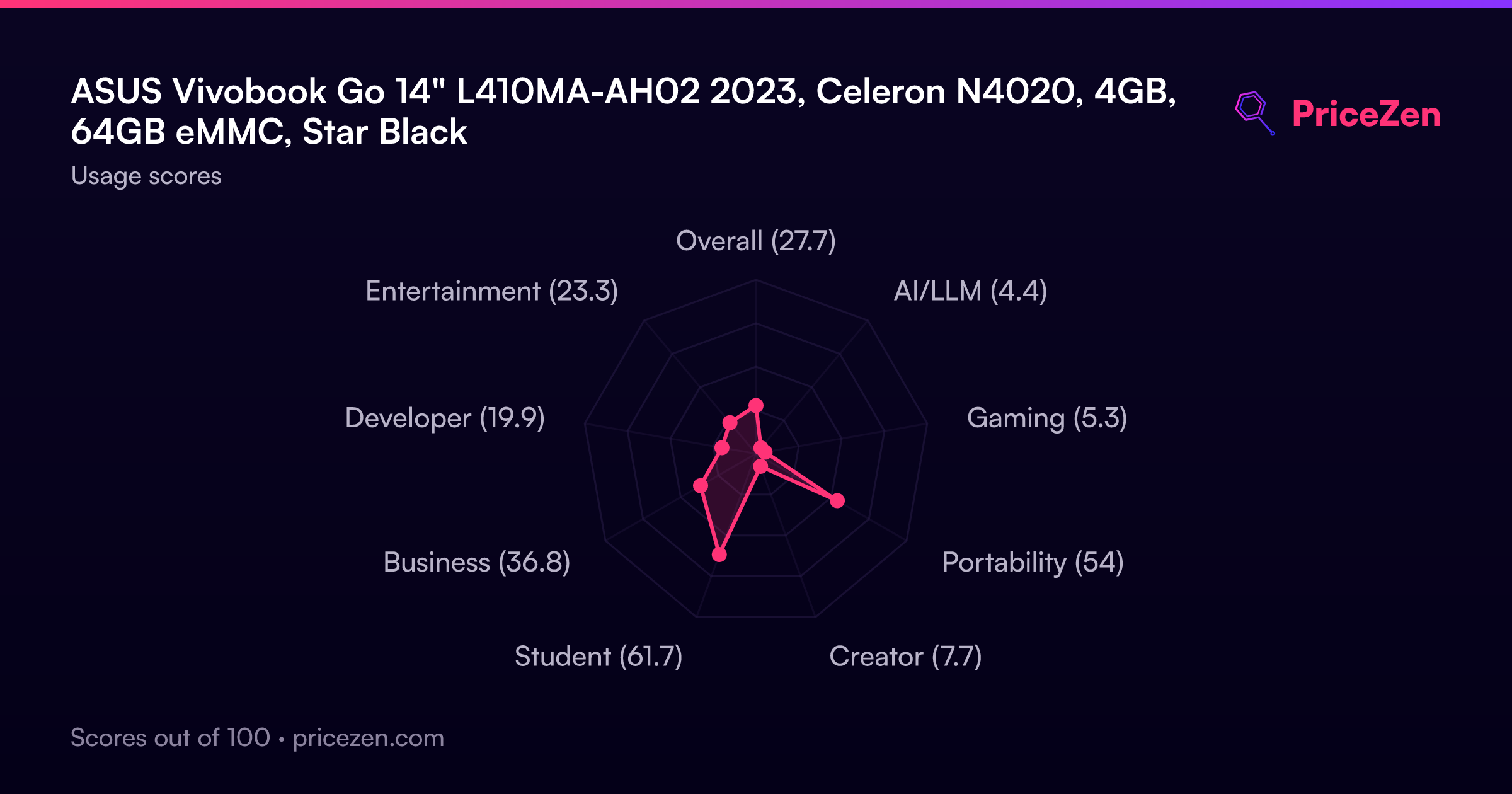
Usage Scores
- Overall27.7
- AI/LLM4.4
- Gaming5.3
- Portability54
- Creator7.7
- Student61.7
- Business36.8
- Developer19.9
- Entertainment23.3