Lenovo X Series X13 Gen 7 2024, Core Ultra 5 325, 16GB, 256GB SSD, Black

Fast boots, light enough for travel verified Nov 25
68/100 overall score 4.8 average from 18 owner ratings
- CPU
- Intel Core Ultra 5 325
- RAM
- 16 GB
- Storage
- 256 GB
- Screen
- 13.3" 1920x1200
- GPU
- AMD Intel Integrated Graphics
- OS
- Windows 11
- Weight
- 0.9 kg
- Battery
- 41 Wh


Snapshot
The 30-Second Version
The X13 Gen 7 is a 0.93kg ThinkPad that nails the portable-work-laptop brief, with compactness near the top of the charts and owner sentiment among the best. The Core Ultra 5 325 and 16GB of LPDDR5X handle everyday work easily, but 256GB of storage and a 9.3/100 gaming score rule out anything heavier. US pricing swings from USD 1,260 to USD 1,833, and Lenovo direct at USD 1,260 is the only price we'd pay. Buy it for travel and study, skip it for creative or gaming work.
Pros & Cons
Pros
- 0.93kg and 13.3", compactness near the top of the charts 97th
- Owner sentiment among the best, 4.8/5 from 18 reviews 94th
- 400-nit IPS panel with 100% sRGB coverage 82nd
- Thunderbolt, HDMI 2.1 and Wi-Fi 7 on a sub-1kg body 72nd
- Reliability ranking well above average
Cons
- 256GB SSD is one of the weaker results, tight for long-term use
- Gaming score of 9.3/100 with integrated graphics only
- Only one USB-A port, a recurring owner complaint
- Affordability below average, and some buyers call the price inflated
- 41Wh battery is small, and 16GB of soldered RAM can't be upgraded later
What owners think
The Word on the Street
- Performance comes up more than anything else, with multiple owners calling out quick boot times and smooth everyday responsiveness. It's the kind of praise that suggests the mid-pack CPU ranking doesn't feel limiting in normal use.
- Portability is the other recurring theme, and several buyers specifically mention using it as a travel machine or a second laptop alongside a work desktop. The low weight clearly registers as a real benefit rather than a spec-sheet footnote.
- Build quality gets steady mentions, with owners describing that familiar ThinkPad feel and an easy, uneventful setup process. Reliability scoring well above average in our data lines up with what buyers report.
- Value splits opinion. Most owners are happy overall, but a couple feel the price is higher than the hardware warrants, and the single USB-A port draws repeated complaints from people carrying older peripherals.
How owner sentiment changed over time
ExclusiveBased on when customers actually wrote their reviews - so you can see whether early praise held up.
12 written reviews, Jun – Nov 2026: 12 happy
Across all 18 store ratings: 4.8★. The chart counts the 12 written reviews.
- Oct – Dec 20265 of 5 happy
Buyers praised the laptop as light, fast, and ideal for travel, with classic ThinkPad quality. All reviews were positive, highlighting portability and performance.
- Lightweight and compact design, perfect for travel and carrying as a second laptop.
- Fast performance and classic ThinkPad quality, meeting work needs.
- Quick delivery and overall satisfaction with the machine.
- Jul – Sep 20264 of 4 happy
Buyers in this period praised the laptop's speed, smooth performance, and sleek design, though one noted the high price and limited USB-A ports.
- Fast boot-up and smooth performance, with no issues reported.
- Thin, sleek design and easy setup appreciated.
- Price considered high, partly due to LLM features, but performance justifies for some.
- Lack of USB-A ports requires dongle, an inconvenience.
- Apr – Jun 20263 of 3 happy
Buyers praised the X13's speed, portability, and suitability for diverse organizational needs, with minor feedback about limited USB-A ports.
- Performance and speed consistently praised, with fast boot-up and smooth operation.
- Portability and sleek design highlighted as key strengths for mobile users.
- Versatility for both technical and office users, making it a new organizational standard.
- Limited USB-A ports noted, requiring dongle use for additional connections.
Each dot is one written review, in the month it was written. Happy = 4-5★, mixed = 3★, unhappy = 1-2★. Period summaries are in English.
The proof
Performance
Let's talk about what the Core Ultra 5 325 actually does for you. Eight cores at 3.4GHz lands it above the middle in our CPU ranking, so solid, comfortably above average but nowhere near the workstation tier. For the work this laptop is aimed at, that's plenty: owners repeatedly bring up fast boot times and smooth day-to-day responsiveness, with performance being the single most mentioned strength across the reviews we collected. The 16GB of LPDDR5X is about average, the right amount for a heavy browser habit plus Teams plus Office, though it's soldered LPDDR5X, so what you buy is what you keep.
The weak spots are real and worth naming. Integrated graphics put it around the middle for GPU, and our gaming score is 9.3/100, which is a polite way of saying don't. Storage is the bigger annoyance: 256GB is one of the weaker results in our data, and Windows 11 plus a few apps eats into that fast. The 41Wh battery is modest on paper, and while Lenovo markets long battery life and travel-focused owners are happy with it, we'd treat that as a light-workload claim rather than a promise for heavy multitasking. Ports are a mixed bag too, sitting above average: Thunderbolt, two USB-C, HDMI 2.1 and Wi-Fi 7 are all welcome, but there's only one USB-A, and owners notice.
Specifications
Full Specifications
Processor
| CPU | Intel Core Ultra 5 325 |
| Cores | 8 |
| Frequency | 3.4 GHz |
| L3 Cache | 12 MB |
Graphics
| GPU | Intel Integrated Graphics |
| Type | Integrated |
| VRAM Type | GDDR6 |
Memory & Storage
| RAM | 16 GB |
| RAM Generation | LPDDR5X |
| Storage | 256 GB |
| Storage Type | NVMe SSD |
Display
| Size | 13.3" |
| Resolution | 1920x1200 (Full HD) |
| Panel | IPS |
| Refresh Rate | 60 Hz |
| Brightness | 400 nits |
| Color Gamut | 100% sRGB |
Connectivity
| USB-C Ports | 2 |
| USB Ports | 1 |
| Thunderbolt | Thunderbolt 4 x 2 |
| HDMI | HDMI 2.1 |
| Wi-Fi | Wi-Fi 7 |
| Bluetooth | Bluetooth 5.4 |
Physical
| Weight | 0.9 kg / 2.1 lbs |
| Battery | 41 Wh |
| OS | Windows 11 |
vs Competition
Cross-shopping this against the Apple MacBook Pro 14.2" M4 Pro or the ASUS ROG Zephyrus 14" GA403WW-G14.R95080 is a category error, and our own numbers show why. Those machines exist to do heavy compute and graphics work. The X13's gaming score of 9.3/100 and mid-pack GPU ranking mean it isn't playing that game at all. What it does instead is win on size and weight: 0.93kg and a 13.3" footprint put compactness near the top of the charts, and if your laptop spends more time in a backpack than on a desk, that trade is worth making. If you're rendering, compiling large projects or gaming after hours, buy one of the other two and accept the extra kilos.
The closer fight is with the Samsung Galaxy Book5 Pro 14" NP944XHA-KG3US, the HP OMEN Transcend 14-fb1023dx and the Dell Premium 14.5" LDA14250-7667SLV-PUS. Against the Samsung and Dell, the X13's argument is portability plus the ThinkPad ownership experience: reliability is well above average and owner sentiment is one of the best, the kind of numbers that come from machines people actually keep using happily. Where it gives ground is storage and raw headroom, since 256GB is a genuine constraint and the CPU sits mid-pack. The OMEN is a different animal again, aimed at graphics work the X13 can't touch. Short version: pick the X13 for the commute, pick the others for the workload.
| Spec | Lenovo X Series X13 Gen 7 | Apple MacBook Pro 14.2" M4 Pro | ASUS ROG Zephyrus 14" GA403WW-G14.R95080 | HP OMEN Transcend | Samsung Galaxy Book5 Pro 14" NP944XHA-KG3US | Dell Premium 14.5" LDA14250-7667SLV-PUS |
|---|---|---|---|---|---|---|
| CPU | Intel Core Ultra 5 325 | Apple M4 Pro | AMD Ryzen AI 9 HX 370 | Intel Core Ultra 9 285H | Intel Core Ultra 7 258V | Intel Core Ultra 7 255H |
| RAM (GB) | 16 | 48 | 32 | 32 | 32 | 32 |
| Storage (GB) | 256 | 4096 | 2048 | 1024 | 1024 | 1024 |
| Screen | 13.3" 1920x1200 | 14.2" 3024x1964 | 14" 2880x1800 | 14" 2880x1800 | 14" 2880x1800 | 14.5" 3200x2000 |
| GPU | AMD Intel Integrated Graphics | Apple (16-Core) | NVIDIA GeForce RTX 5080 | NVIDIA GeForce RTX 5070 | Intel Arc Graphics 140V | Intel Arc Graphics |
| OS | Windows 11 | macOS | Windows 11 Home | Windows 11 Home | Windows 11 Pro | Windows 11 Home |
| Weight (kg) | 0.9 | 1.6 | 1.6 | 1.6 | 1.2 | 1.7 |
| Battery (Wh) | 41 | 72 | - | 71 | 63 | 62 |
| Compare | Compare | Compare | Compare | Compare |
| Product | CPU | GPU | RAM | Ports | Screen | Portability | Storage | User Sentiment | Reliability | Social Proof | Affordability |
|---|---|---|---|---|---|---|---|---|---|---|---|
| Lenovo X Series X13 Gen 7 | 65 | 57 | 66.7 | 71.6 | 71.7 | 96.6 | 24 | 94.1 | 82 | 65.3 | 35.8 |
| Apple MacBook Pro 14.2" M4 Pro Compare | 92.4 | 78.9 | 90.6 | 73.8 | 99.1 | 68.9 | 98.4 | 90.9 | 98.2 | 99.7 | 4.6 |
| ASUS ROG Zephyrus 14" GA403WW-G14.R95080 Compare | 91.2 | 98.3 | 90.8 | 89.4 | 96 | 73.6 | 89.7 | 99.1 | 60.6 | 95.6 | 6.1 |
| HP OMEN Transcend Compare | 90.1 | 93.5 | 89.7 | 89.4 | 96 | 72.2 | 65.4 | 81.5 | 33.7 | 93.2 | 9 |
| Samsung Galaxy Book5 Pro 14" NP944XHA-KG3US Compare | 65.8 | 69.6 | 79.5 | 83.5 | 90.3 | 89.4 | 79.3 | 0 | 82 | 95.6 | 21.3 |
| Dell Premium 14.5" LDA14250-7667SLV-PUS Compare | 87 | 69.6 | 89 | 66.7 | 96.8 | 61.3 | 65.4 | 90.9 | 33.7 | 95.6 | 14.9 |
Price
Value & Pricing
Here's where you need to pay attention, because the pricing on this thing is all over the map. In our US data it runs from USD 1,260 to USD 1,833, a spread of USD 573 for the same machine. Lenovo itself is the cheapest at USD 1,260 right now, and buying direct is the obvious move. If you're seeing a listing near the top of that range, you're paying a premium for nothing. We track prices over time, partly through our community browser extension, and gaps this wide usually mean somebody's markup is doing the heavy lifting.
At USD 1,260 the value argument works: you're getting best-in-class portability, a genuinely good screen and strong owner satisfaction. At USD 1,833 it stops making sense, because affordability is already below average in our ranking and multiple buyers flag the price as inflated even when they love the laptop. The German listing at EUR 1,658 is a separate market and not comparable to the US figures. Our advice: set a mental ceiling near the Lenovo direct price and walk away from anything above it.
Read more
Overview
The ThinkPad X13 has always been the sensible one in Lenovo's lineup, and Gen 7 keeps that streak going. You get a 13.3" machine weighing 0.93kg, an Intel Core Ultra 5 325 with 8 cores at 3.4GHz, 16GB of LPDDR5X and Windows 11 out of the box. Nothing here is chasing a spec-sheet trophy. It's built for people who carry a laptop more than they stare at it, and our ranking agrees: compactness is near the top of the charts for this category.
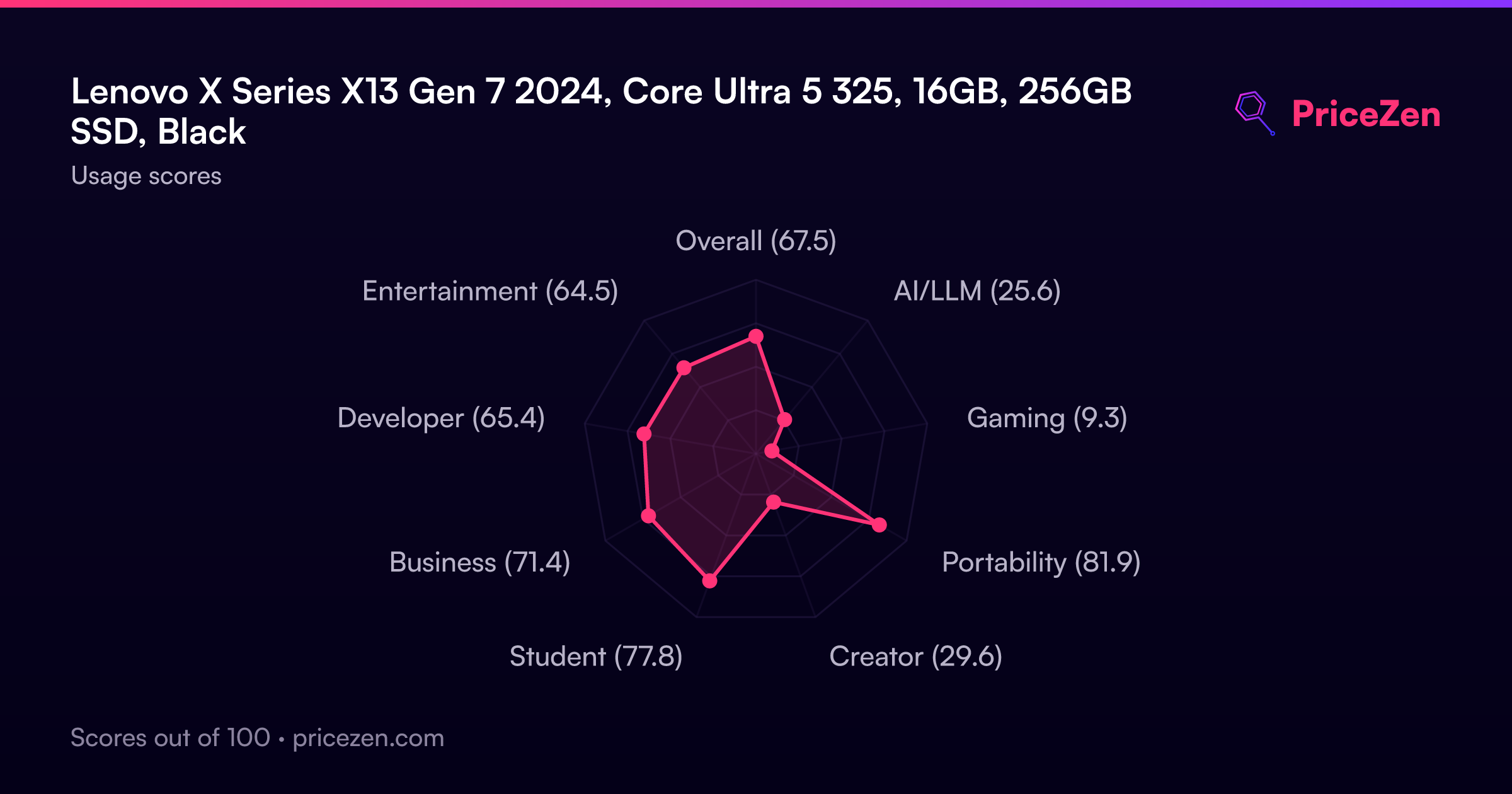
Who's it for? Students, road warriors and anyone whose work lives in a browser, a spreadsheet and a video call. Our scoring model puts it at 81.9/100 for compact use, 74.9 for students and 71.4 for business, and those three numbers tell you the whole personality of this thing. The 1920x1200 IPS panel runs at 400 nits with full sRGB coverage, so it's bright enough for a window seat and accurate enough for everyday design work. The 16:10 aspect ratio also means a bit more vertical room for documents, which matters more on a small screen than most spec sheets admit.
What makes it interesting is the gap between how it scores and how owners feel about it. On paper, several metrics land mid-pack: CPU is above average, RAM is similar, and screen is a bit better. But owner sentiment is one of the best we've seen, with a 91/100 sentiment score and a 4.8/5 average across 18 reviews. That mismatch is the story here. People aren't buying this for headline numbers, they're buying it because it disappears into a bag and boots fast every morning.
Common Questions
Q: Is 256GB of storage enough, or will I regret it?
It depends entirely on where your files live. Storage is one of the weaker points in our ranking, so it's genuinely a weak spot, and Windows 11 plus a handful of applications will claim a chunk immediately. If you work in cloud docs and a browser you'll be fine, but if you keep local photo libraries, video projects or a game install or two, plan on external storage or a bigger drive from day one.
Q: Can I upgrade the RAM later?
No. The 16GB is LPDDR5X, which is soldered to the board, so the configuration you buy is the one you keep. 16GB is about average in our data and is comfortable for office work, browsing and video calls right now. Just be honest about your habits before buying, because heavy multitasking years down the road won't have an upgrade escape hatch.
Q: Why is the price so different between stores?
In our US data the same machine ranges from USD 1,260 to USD 1,833, a USD 573 gap, and Lenovo direct is currently the cheapest at USD 1,260. Affordability already ranks below average, so paying the top of that range makes a middling value proposition worse. We track prices over time and our simple rule here is to buy at or near the direct price and ignore the rest.
Q: Will the battery get me through a full day?
The 41Wh cell is small, and while Lenovo markets long battery life, we'd read that as a claim about light productivity work rather than heavy loads. Owners who use it for travel and document work report being happy with it, which fits that reading. If you're running demanding apps for hours away from a plug, the Thunderbolt and USB-C ports mean a compact charger or power bank is worth packing.
Who Should Skip This
Skip this if you need graphics muscle or local storage space. A 9.3/100 gaming score and integrated graphics around the middle mean modern games, 3D work and serious video editing are off the table, and 256GB will frustrate anyone with a big media library. The ASUS ROG Zephyrus 14" GA403WW-G14.R95080 or the HP OMEN Transcend 14-fb1023dx are the direction to look if that's your workload, and the Apple MacBook Pro 14.2" M4 Pro if you want sustained compute headroom.
Also skip it if you're price-sensitive and only seeing the expensive listings. At USD 1,833 this is a hard sell given the mid-pack CPU and small SSD, and affordability is already below average. And if your desk setup relies on several USB-A devices, the single port will have you living on a dongle, which rather defeats the point of a laptop this light.
Verdict
If you're a student, a consultant, or someone who works from three different rooms in a week, this is an easy recommendation at USD 1,260 from Lenovo. Our student score of 74.9 and business score of 71.4 back that up, and the owner feedback is unusually consistent: light, fast to boot, classic ThinkPad build, easy setup. A 4.8/5 average across 18 reviews with sentiment among the best isn't noise, it's people who bought a tool and found it did exactly what they wanted. The 400-nit sRGB screen and Wi-Fi 7 are nice bonuses at this size.
If your work involves video editing, 3D, gaming or big local file libraries, look elsewhere. The 9.3/100 gaming score and weak storage aren't things you can workaround your way past, and the soldered 16GB means no upgrade path later. And whatever you do, don't pay the high end of that USD 573 spread. This is a great small laptop at the right price and a mediocre deal at the wrong one.
Usage Scores
- Overall67.5
- AI/LLM25.6
- Gaming9.3
- Portability81.9
- Creator29.6
- Student77.8
- Business71.4
- Developer65.4
- Entertainment64.5