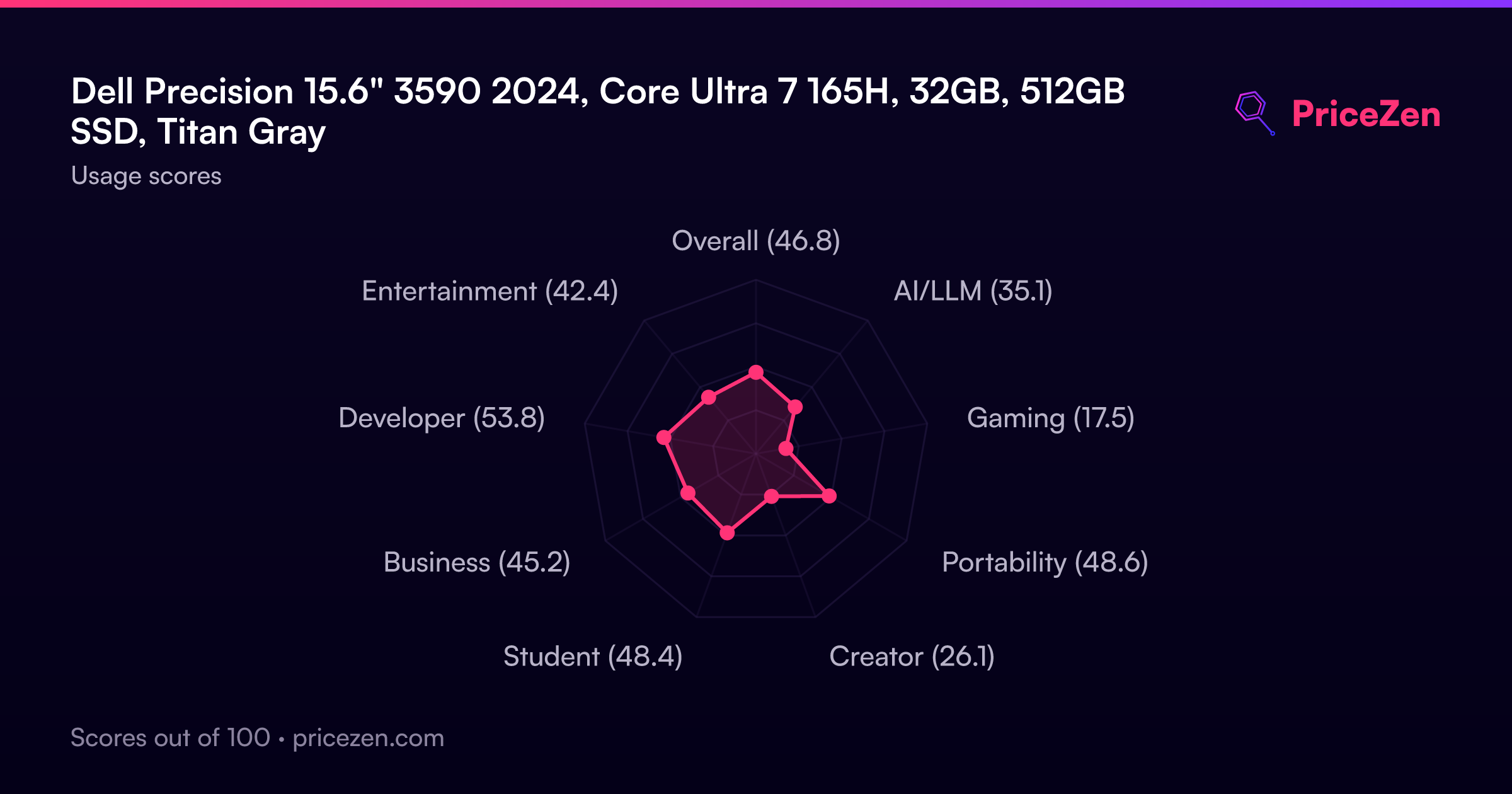
Dell Precision 15.6" 3590 2024, Core Ultra 7 165H, 32GB, 512GB SSD, Titan Gray
The Intel Core Ultra 7 165H 16-core processor and NVIDIA RTX 500 Ada GPU with 4GB VRAM deliver solid performance for entry-level creative and design workloads. The 15.6-inch 1920x1080 touchscreen adds flexibility, while the 32GB RAM and 512GB SSD support multitasking and storage needs. This mobile workstation suits developers and students who need a reliable, portable machine for coding and design tasks, though it is not built for gaming.

No current retailer price
Where we saw it before. Check the store for today's price.









Snapshot
The 30-Second Version
The Core Ultra 7 165H at the 78th percentile and 32GB of RAM at the 73rd percentile make this a solid CPU-focused workstation. But the 512GB SSD, 21st percentile screen, and 21st percentile port selection hold it back hard. If you can snag it near USD 1,799, it's worth a look for developers who don't care about the display.
Pros & Cons
Pros
- Core Ultra 7 165H with 16 cores at 3.8GHz ranks at the 78th percentile, well above average for CPU performance 82nd
- 32GB of RAM at the 73rd percentile gives you serious multitasking headroom 79th
- RTX 500 Ada GPU at the 60th percentile is solid for professional workloads 72nd
- 1.63kg weight makes it genuinely portable for a 15.6-inch workstation
- Touchscreen and backlit keyboard included, which isn't always a given at this tier
Cons
- 512GB SSD at the 37th percentile is tight for a workstation, you'll fill it fast
- Screen quality ranks at the 21st percentile, a real letdown for creative work
- Port selection at the 21st percentile means dongle life is likely in your future
- Reliability score at the 33rd percentile is underwhelming for a Precision-branded machine
- Gaming performance of 14.7 out of 100 is one of the worst we've seen, though that's not really the point
The proof
Performance
The Core Ultra 7 165H is the star of this show. Sixteen cores running at 3.8GHz puts this CPU at the 78th percentile in our database, which means it's well above average and will chew through compile jobs, rendering tasks, and heavy multitasking without breaking a sweat. The 32GB of RAM at the 73rd percentile backs that up nicely, so you can keep a pile of browser tabs, a VM or two, and your IDE all running at once without hitting swap.
The RTX 500 Ada with 4GB of VRAM sits at the 60th percentile, which is solid for a professional GPU but nothing to write home about. It'll handle CAD work, light 3D modeling, and video editing at 1080p, but don't expect miracles. The 512GB SSD is where things get tight. At the 37th percentile, it's mediocre for this class of machine, and you'll likely be shopping for an external drive before long if you work with large media files. The 1080p touchscreen at the 21st percentile is a real weak spot. It's fine for spreadsheets and code, but anyone doing color-sensitive creative work will want an external monitor.
Specifications
Full Specifications
Processor
| CPU | Intel Core Ultra 7 165H |
| Cores | 16 |
| Frequency | 3.8 GHz |
| L3 Cache | 24 MB |
Graphics
| GPU | NVIDIA RTX 500 Ada |
| VRAM | 4 GB |
Memory & Storage
| RAM | 32 GB |
| Storage | 512 GB |
| Storage Type | SSD |
Display
| Size | 15.6" |
| Resolution | 1920x1080 (Full HD) |
Connectivity
| Wi-Fi | Wi-Fi 6 |
| Bluetooth | Yes |
Physical
| Weight | 1.6 kg / 3.6 lbs |
| OS | Windows 11 Pro |
vs Competition
Stacked against the competition, the Precision 3590 has a clear identity but some glaring gaps. The Apple MacBook Pro M4 Max absolutely destroys it in display quality, storage speed, and reliability, though you'll pay a lot more for that privilege. The ASUS ROG Zephyrus G14 and HP OMEN Transcend 14 both bring far better screens and gaming performance, but they're aimed at a different buyer. The Lenovo ThinkPad P14s Gen 6 is probably the closest direct rival, and it typically offers better port selection and reliability scores in our database. The MSI Raider brings more raw GPU power but at a heavier weight. Where the Precision 3590 holds its own is the CPU and RAM combo at this price point, but the weak screen and port situation make it a harder recommendation than the spec sheet alone would suggest.
| Spec | Dell Precision 15.6" 3590 | Lenovo Legion 15.1" 83F0CTO1WW | ASUS ROG Strix G16 Gaming Laptop | MSI Katana Thin 15 | Microsoft Surface Laptop 13.8" EP2-42030 | HP OMEN Transcend 14 |
|---|---|---|---|---|---|---|
| CPU | Intel Core Ultra 7 165H | Intel Core Ultra 9 275HX | AMD Ryzen 9 8940HX | Intel Core i9 14900HX | Qualcomm Snapdragon X Plus X1P-64-100 | Intel Core Ultra 9 285H |
| RAM (GB) | 32 | 32 | 64 | 32 | 32 | 32 |
| Storage (GB) | 512 | 2048 | 4096 | 2048 | 1024 | 1024 |
| Screen | 15.6" 1920x1080 | 15.1" 2560x1600 | 16" 1920x1200 | 15.6" 2560x1600 | 13.8" 2304x1536 | 14" 2880x1800 |
| GPU | NVIDIA RTX 500 Ada | NVIDIA GeForce RTX 5070 | NVIDIA GeForce RTX 5070 Ti | NVIDIA GeForce RTX 5070 | Qualcomm Adreno | NVIDIA GeForce RTX 5070 |
| OS | Windows 11 Pro | Windows 11 Home | Windows 11 Pro | Windows 11 Home | Windows 11 Home | Windows 11 Home |
| Weight (kg) | 1.6 | 1.9 | 2.5 | 1.9 | 1.3 | 1.7 |
| Battery (Wh) | - | 80 | - | - | - | 71 |
| Compare | Compare | Compare | Compare | Compare |
| Product | CPU | GPU | RAM | Ports | Screen | Portability | Storage | Reliability | Affordability |
|---|---|---|---|---|---|---|---|---|---|
| Dell Precision 15.6" 3590 | 81.7 | 78.7 | 72.1 | 18.6 | 20.3 | 51.6 | 35.8 | 33.7 | 19.3 |
| Lenovo Legion 15.1" 83F0CTO1WW Compare | 97.2 | 93.5 | 86.3 | 94.6 | 93.5 | 57.3 | 97.3 | 81.9 | 15.7 |
| ASUS ROG Strix G16 Gaming Laptop Compare | 95.1 | 96.7 | 97.7 | 83.5 | 76.2 | 12.1 | 98.4 | 60.6 | 6.1 |
| MSI Katana Thin 15 Compare | 93.2 | 93.5 | 79.5 | 74.9 | 86.7 | 43.7 | 93.9 | 60.6 | 15.8 |
| Microsoft Surface Laptop 13.8" EP2-42030 Compare | 72.3 | 13.3 | 79.5 | 58.4 | 84.4 | 89.6 | 65.3 | 81.9 | 23.6 |
| HP OMEN Transcend 14 Compare | 90.1 | 93.5 | 79.5 | 77.8 | 96 | 71.8 | 79.3 | 33.7 | 8.9 |
Price
Value & Pricing
Pricing on this thing is all over the place. US listings range from USD 1,799 to USD 2,352, a spread of USD 553 for what appears to be the same used, like-new configuration. That's a huge gap, and it means you could be overpaying by a lot if you don't shop around. The lower end of that range feels reasonable for a used workstation with this CPU and RAM combo, but pushing past USD 2,000 for a machine with a bottom-tier screen, limited ports, and a 512GB SSD starts to feel like a tough sell. If you're in the US, the cheaper listing is the obvious move, just make sure you're comparing the exact same specs before you pull the trigger.
Price history
Read more
Overview
The Dell Precision 3590 lands in our database with a total score of 40.8 out of 100, which puts it firmly in the middle of the pack for mobile workstations. The CPU is the clear highlight here, sitting at the 78th percentile, while the 32GB of RAM at the 73rd percentile gives you real headroom for multitasking. But the rest of the machine tells a different story. Storage, reliability, screen, and ports all rank in the bottom third, and the gaming score of 14.7 out of 100 is one of the weakest we've seen in this category.
Dell pitches this as a workstation for entry-level creative and design work, and the Core Ultra 7 165H with its 16 cores at 3.8GHz backs that up reasonably well. The RTX 500 Ada with 4GB of VRAM is a professional GPU, not a gaming card, so the terrible gaming score makes sense. What's harder to swallow is the 512GB SSD at the 37th percentile and a 15.6-inch 1080p touchscreen that ranks near the bottom for display quality. At 1.63kg it's portable enough, but you're making real compromises for that portability.
Common Questions
Q: Is the Dell Precision 3590 good for gaming?
No, not at all. The gaming score of 14.7 out of 100 is one of the weakest in our database for this category. The RTX 500 Ada with 4GB of VRAM is a professional GPU built for CAD and design work, not gaming. If you want to play games, look at the ASUS ROG Zephyrus G14 or HP OMEN Transcend 14 instead.
Q: Can I upgrade the storage on the Precision 3590?
The 512GB SSD at the 37th percentile is on the small side for a workstation, so you'll likely want to upgrade or add external storage. Dell's Precision line generally allows SSD swaps, but you should check the specific service manual for this model before buying. Given the port selection ranks at the 21st percentile, an external drive might require a hub or dongle.
Q: Is the touchscreen display any good for creative work?
The 15.6-inch 1080p touchscreen ranks at the 21st percentile in our database, which is a real weak spot. It's fine for general use, coding, and office work, but if you're doing color-sensitive design or photo editing, you'll want to budget for an external monitor. The resolution and color accuracy just aren't there for serious creative work.
Who Should Skip This
Skip this if you care about your screen. The display ranks at the 21st percentile, which is a real letdown for a machine marketed at creative professionals. Anyone doing photo editing, video color grading, or design work will be frustrated by the 1080p panel. Also skip it if you need lots of ports, since the port selection sits at the same 21st percentile. And if you're hoping to game even a little, the 14.7 out of 100 gaming score should send you running toward the ASUS ROG Zephyrus G14 or HP OMEN Transcend 14 instead.
Verdict
The Dell Precision 3590 is a machine with one great trick and several notable weaknesses. The Core Ultra 7 165H and 32GB of RAM make it a genuinely capable workstation for CPU-heavy tasks like compiling code, running VMs, or handling large datasets. But the 512GB SSD, bottom-tier screen, and limited ports drag the overall experience down. At the lower end of the USD 1,799 to USD 2,352 price range, it's a defensible buy for developers and engineers who live in the terminal and don't care about display quality. At the higher end, you're paying too much for too many compromises.
Usage Scores
- Overall46.8
- AI/LLM35.1
- Gaming17.5
- Portability48.6
- Creator26.1
- Student48.4
- Business45.2
- Developer53.8
- Entertainment42.4