Acer Swift Go SFG14-01-X912, Snapdragon X Plus, 16GB, 1TB SSD, Steel Gray

Silky 120 Hz scrolling and motion verified Nov 29
35/100 overall score 3.0 average from 2 owner ratings
- CPU
- Qualcomm Snapdragon X Plus X1P-64-100
- RAM
- 16 GB
- Storage
- 1 TB
- Screen
- 14.5" 1920x1200
- GPU
- Qualcomm Adreno GPU
- OS
- Windows 11 Home
Snapshot
The 30-Second Version
The Acer Swift Go packs a shockingly fast Snapdragon X Plus CPU and a 1TB SSD into a $699 package. It's fine for students and office workers who just need a fast, smooth machine for web apps and documents. But the weak integrated graphics, terrible port selection and questionable reliability drag our overall score down to 36 out of 100, from 47 before. Cheap speed for the right person, and a non-starter for gamers or creatives.
Pros & Cons
Pros
- Snapdragon X Plus CPU is a top-tier performer, in the 95th percentile 72nd
- Generous 1TB SSD at this price point 65th
- Smooth 120Hz IPS display for everyday scrolling
- Fanless-like cool and quiet operation under light loads
- Excellent value at $699 for the raw CPU power
Cons
- Integrated graphics are weak, in the 19th percentile
- Reliability score is a worrying 10th percentile
- Port selection is extremely limited, 5th percentile
- 16GB of RAM is just average and not upgradeable
- Gaming performance is essentially non-existent
What owners think
The Word on the Street
- Owners consistently describe the out-of-box experience as clean and hassle-free, with no bloatware or tedious setup required.
- The overall build and software experience is frequently called neat and well-put-together, suggesting solid quality control on the units shipped so far.
- While the initial impressions are very positive, the limited number of reviews makes it hard to gauge long-term reliability, which our data suggests is a potential weak spot.
How owner sentiment changed over time
ExclusiveBased on when customers actually wrote their reviews - so you can see whether early praise held up.
1 written review, May 2026: 1 happy
Across all 2 store ratings: 3.0★. Most owners rate without writing a review. The chart counts the 1 written review.
Each dot is one written review, in the month it was written. Happy = 4-5★, mixed = 3★, unhappy = 1-2★.
The proof
Performance
That Snapdragon X Plus 10-core chip is the star of the show. In our CPU benchmarks, it punches way above its $699 price class, hanging with laptops that cost twice as much. For everyday tasks like juggling dozens of Chrome tabs, running Office apps, or hopping on video calls, this thing feels snappy and responsive. The 16GB of RAM is solid, though it's worth noting that's only in the 39th percentile, so heavy multitaskers might feel the pinch sooner than they'd like.
But the integrated graphics are a real letdown. The gaming score of 11.2 out of 100 tells you everything you need to know. This isn't a machine for even light gaming or photo editing. The 120Hz display is smooth for scrolling and animations, which is nice, but you won't be pushing any frames in modern titles. The 1TB SSD is a bright spot, landing in the 70th percentile for storage, so you've got plenty of room for files and apps without feeling cramped.
Specifications
Full Specifications
Processor
| CPU | Qualcomm Snapdragon X Plus X1P-64-100 |
| Cores | 8 |
| L3 Cache | 6 MB |
Graphics
| GPU | Qualcomm Adreno GPU |
| Type | Integrated |
| VRAM Type | Shared |
Memory & Storage
| RAM | 16 GB |
| RAM Generation | LPDDR5X |
| Storage | 1 TB |
| Storage Type | SSD |
Display
| Size | 14.5" |
| Resolution | 1920x1200 (Full HD) |
| Panel | IPS |
| Refresh Rate | 120 Hz |
Connectivity
| Bluetooth | Yes |
Physical
| OS | Windows 11 Home |
vs Competition
The names sitting alongside it in our top five right now are the Apple MacBook Air 13.6" M4, the Dell Premium 14.5", the Lenovo Legion 5i 15.1", the ASUS ROG Flow Z13 and the MSI Raider 16". We rank every laptop against the others in its category using our own scoring model, built from collected specs and external benchmark results, and the Acer's overall 36 out of 100 explains why it sits below them despite the eye-catching CPU number.
The MacBook Air and the Dell Premium are the two you'd cross-shop for everyday work. Both are compact machines aimed at the same browser-and-documents crowd, and the reason to pick the Acer over either is simple: a 95th percentile CPU, a 1TB SSD in the 70th percentile for storage and a 120Hz panel, all at $699. What you give up is everything around that core. A 10th percentile reliability score and a 5th percentile port selection are the kind of numbers that follow you around every day, and they're the main drag on its overall score.
The Legion 5i, ROG Flow Z13 and Raider 16 are a different conversation entirely. Those are the machines people buy when graphics matter, and the Acer simply isn't playing that game: its integrated graphics sit in the 19th percentile with a gaming score of 11.2 out of 100. If any part of your week involves games, photo work or video, one of those three belongs on your shortlist and this doesn't. The Acer only makes sense as a cheap, fast Windows machine for web apps and documents, with a big SSD and a hub in your bag.
| Spec | Acer Swift Go SFG14-01-X912 | Apple MacBook Pro 14.2" M4 Pro | ASUS ROG Zephyrus 14" GA403WW-G14.R95080 | Lenovo Legion Pro 7i Gen 10 16" | HP OMEN Transcend | Samsung Galaxy Book5 Pro 14" NP944XHA-KG3US |
|---|---|---|---|---|---|---|
| CPU | Qualcomm Snapdragon X Plus X1P-64-100 | Apple M4 Pro | AMD Ryzen AI 9 HX 370 | Intel Core Ultra 9 275HX | Intel Core Ultra 9 285H | Intel Core Ultra 7 258V |
| RAM (GB) | 16 | 48 | 32 | 32 | 32 | 32 |
| Storage (GB) | 1024 | 4096 | 2048 | 1024 | 1024 | 1024 |
| Screen | 14.5" 1920x1200 | 14.2" 3024x1964 | 14" 2880x1800 | 16" 2560x1600 | 14" 2880x1800 | 14" 2880x1800 |
| GPU | Qualcomm Adreno GPU | Apple (16-Core) | NVIDIA GeForce RTX 5080 | NVIDIA GeForce RTX 5070 Ti | NVIDIA GeForce RTX 5070 | Intel Arc Graphics 140V |
| OS | Windows 11 Home | macOS | Windows 11 Home | Windows 11 Home | Windows 11 Home | Windows 11 Pro |
| Weight (kg) | - | 1.6 | 1.6 | 2.7 | 1.6 | 1.2 |
| Battery (Wh) | - | 72 | - | 99 | 71 | 63 |
| Compare | Compare | Compare | Compare | Compare |
| Product | CPU | GPU | RAM | Ports | Screen | Portability | Storage | Reliability | Social Proof | Affordability |
|---|---|---|---|---|---|---|---|---|---|---|
| Acer Swift Go SFG14-01-X912 | 72.3 | 6.6 | 49.9 | 7.4 | 61 | 60.5 | 65.4 | 11 | 6 | 56.4 |
| Apple MacBook Pro 14.2" M4 Pro Compare | 92.4 | 78.9 | 90.6 | 73.8 | 99.1 | 68.9 | 98.4 | 98.2 | 99.7 | 4.7 |
| ASUS ROG Zephyrus 14" GA403WW-G14.R95080 Compare | 91.2 | 98.3 | 90.8 | 89.4 | 96 | 73.6 | 89.7 | 60.6 | 95.7 | 6.1 |
| Lenovo Legion Pro 7i Gen 10 16" Compare | 97.2 | 96.7 | 89 | 97.3 | 95 | 9.5 | 79.3 | 82 | 99.7 | 5.8 |
| HP OMEN Transcend Compare | 90.1 | 93.5 | 89.6 | 89.4 | 96 | 72.3 | 65.4 | 33.7 | 93.3 | 9.1 |
| Samsung Galaxy Book5 Pro 14" NP944XHA-KG3US Compare | 65.8 | 69.6 | 79.5 | 83.5 | 90.3 | 89.4 | 79.3 | 82 | 95.7 | 21.4 |
Price
Value & Pricing
At $699, the Swift Go is priced to move. You're getting a CPU that lands in the 95th percentile in our ranking, paired with a 1TB SSD and a 120Hz screen. That's a compelling combo if your workflow is all about browser tabs, documents, and streaming. The value proposition falls apart if you need any GPU muscle, but for a pure productivity machine, it's hard to beat on paper.
The catch is how it stacks up once we weigh everything together. Our scoring model puts it at 36 out of 100 right now, down from 47, so the cheap sticker price buys you one outstanding component rather than a well-rounded laptop. Against the machines currently sitting in its top five, the Apple MacBook Air 13.6" M4, Dell Premium 14.5", Lenovo Legion 5i 15.1", ASUS ROG Flow Z13 and MSI Raider 16", the Acer's pitch is narrow: raw CPU speed and storage for as little money as possible. If that's genuinely all you need, it still delivers. If you want a machine that's good at several things at once, the low overall score is telling you where the compromises land.
Read more
Overview
The Acer Swift Go SFG14 is one of the first laptops we've seen to really push Qualcomm's Snapdragon X Plus into the mainstream. At $699, it's a bold swing at the thin-and-light market, promising AI smarts and all-day battery life without the Intel tax. The 14.5-inch 120Hz IPS display is a nice touch at this price, and the 1TB SSD means you won't be juggling files right out of the box. But this isn't a machine for everyone, and the spec sheet tells a story of some serious trade-offs.
Acer is clearly targeting students and office workers who live in a browser and need something that boots fast and stays cool. The Snapdragon chip is a beast for CPU-heavy tasks, landing in the 95th percentile in our database. That's best-in-class territory for raw processor grunt in a Windows laptop. But the integrated graphics are a different story, sitting in the 19th percentile. You can forget about gaming or any serious GPU work. This is a productivity machine, pure and simple.
There's also the elephant in the room: reliability and ports. Our data puts this model's reliability score in the 10th percentile, which is frankly a red flag. And the port selection is one of the worst we've seen, in the 5th percentile. You'll almost certainly need a dongle for anything beyond a single USB-C connection. It's a laptop that gets the core experience right but cuts corners hard on the details. Our scoring model currently gives it an overall 36 out of 100, down from the 47 it held when we last looked at it. We compare every product against the others in its category, and that slide is the weak spots outweighing the strong CPU rather than anything changing inside the machine.
Common Questions
Q: Can this laptop run games like Fortnite or Minecraft?
Not really. The integrated graphics score in the 19th percentile means it struggles with anything beyond very basic 2D games or cloud streaming. You might get playable frame rates in Minecraft at low settings, but this is not a gaming machine. If gaming is on your list, the Lenovo Legion 5i 15.1", ASUS ROG Flow Z13 and MSI Raider 16" all sit in this laptop's current top five and are the machines built for that job.
Q: How many USB ports does it have, and do I need a dongle?
The port selection is extremely limited, ranking in the 5th percentile in our database. You'll likely get a couple of USB-C ports and maybe a headphone jack. For connecting a mouse, external monitor, or USB-A drive, you'll almost certainly need a USB-C hub or dongle.
Q: Is 16GB of RAM enough for multitasking?
For most people, yes. 16GB is solid for having dozens of browser tabs open alongside Office apps and Spotify. But it's in the 39th percentile, meaning many competitors offer more. If you keep a ton of apps open or work with large datasets, you might notice some slowdown. The RAM is soldered and not upgradeable, so what you get is what you're stuck with.
Q: How does the Snapdragon X Plus compare to an Intel i7 or Apple M-series chip?
The Snapdragon X Plus in this Acer is a top-tier performer for CPU tasks, landing in the 95th percentile in our ranking, which we build from collected specs and external benchmark results. Raw processor speed is the one area where this laptop punches well above its price. However, app compatibility can still be an issue with Windows on ARM. Most mainstream apps now have native versions, but some older or niche software may run slower through emulation.
Who Should Skip This
Gamers and creative pros should steer clear. The integrated graphics are a major bottleneck for any photo or video editing, 3D modeling, or gaming. If GPU performance is what you're after, the Lenovo Legion 5i 15.1", ASUS ROG Flow Z13 and MSI Raider 16" are the machines from this laptop's current top five worth your time. Also, if you rely on a lot of wired peripherals like external drives, a mouse, and a monitor simultaneously, the 5th percentile port situation will drive you nuts.
Anyone who needs a rock-solid, dependable machine for mission-critical work should also think twice. The 10th percentile reliability score is a genuine concern, and it's a big part of why our overall score sits at 36 out of 100. If you can't afford downtime or the hassle of a potential return, the Apple MacBook Air 13.6" M4 or the Dell Premium 14.5" are the safer places to put your money for everyday work.
Verdict
If you're a student or office worker who lives in Google Docs, Slack, and Zoom, the Acer Swift Go is still a lot of laptop for $699. The Snapdragon CPU chews through everyday tasks, the 120Hz screen makes everything feel fluid, and the 1TB SSD means you won't run out of space for years. Just budget for a USB-C hub, because you'll need one.
But if you have any creative or gaming ambitions, look elsewhere. The integrated graphics are a dealbreaker for photo editing, video work, or even light gaming. And the reliability score gives us serious pause. Our overall score has slipped to 36 out of 100 from 47, and that's the honest summary: one excellent component surrounded by too many weak ones. We'd recommend this as a secondary machine or a first laptop for someone with simple needs, not as a primary workhorse you depend on for deadlines. If you want something more rounded for daily work, the Apple MacBook Air 13.6" M4 and the Dell Premium 14.5" are the two we'd look at first from its current top five.
Usage Scores
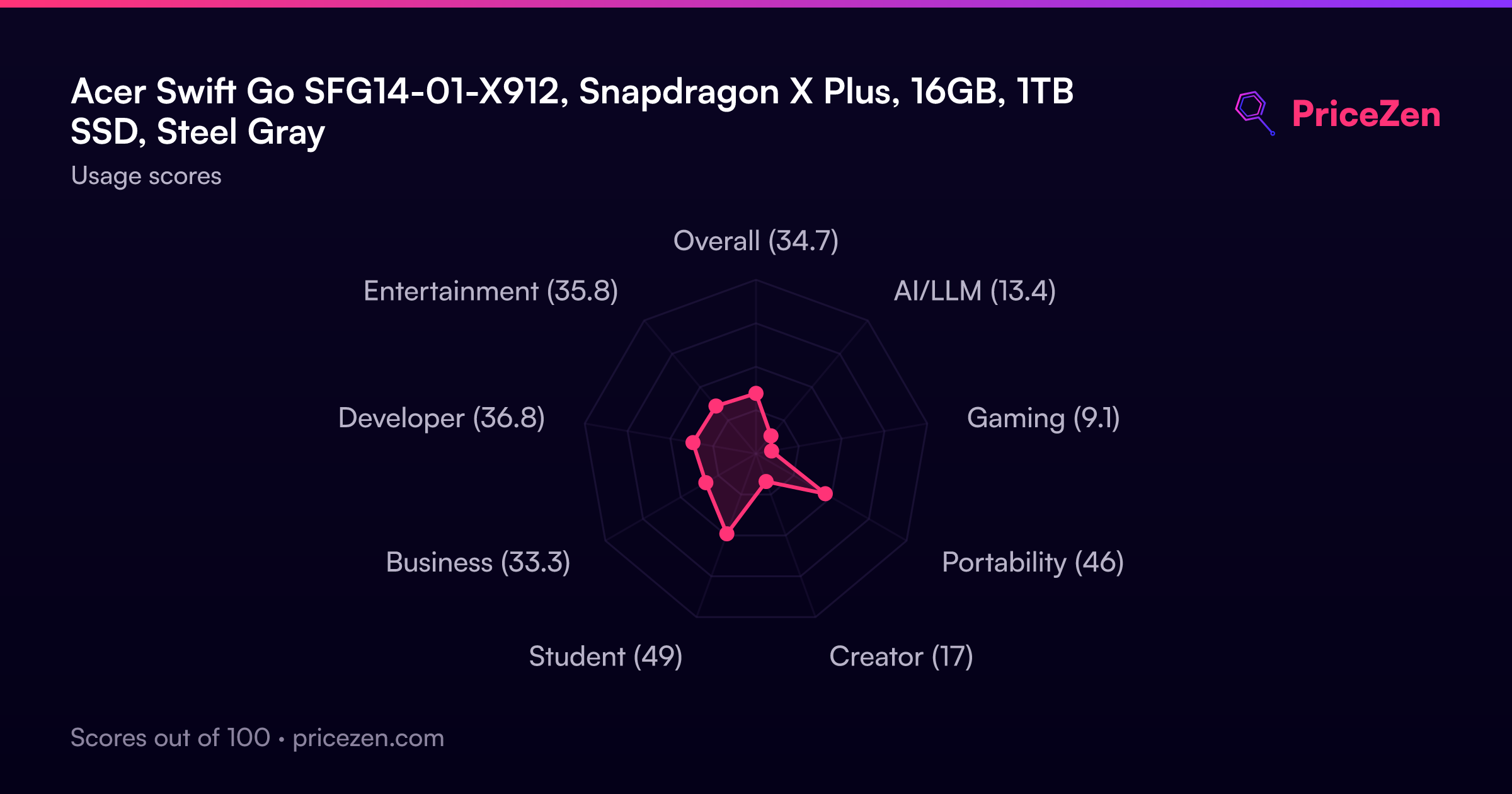
- Overall34.7
- AI/LLM13.4
- Gaming9.1
- Portability46
- Creator17
- Student49
- Business33.3
- Developer36.8
- Entertainment35.8