Lenovo ThinkPad X1 Carbon 14" 21KC00B1US 2025, Core Ultra 7 165U, 32GB, 512GB SSD, Black

1.1kg, yet it packs 32GB of RAM verified Nov 28
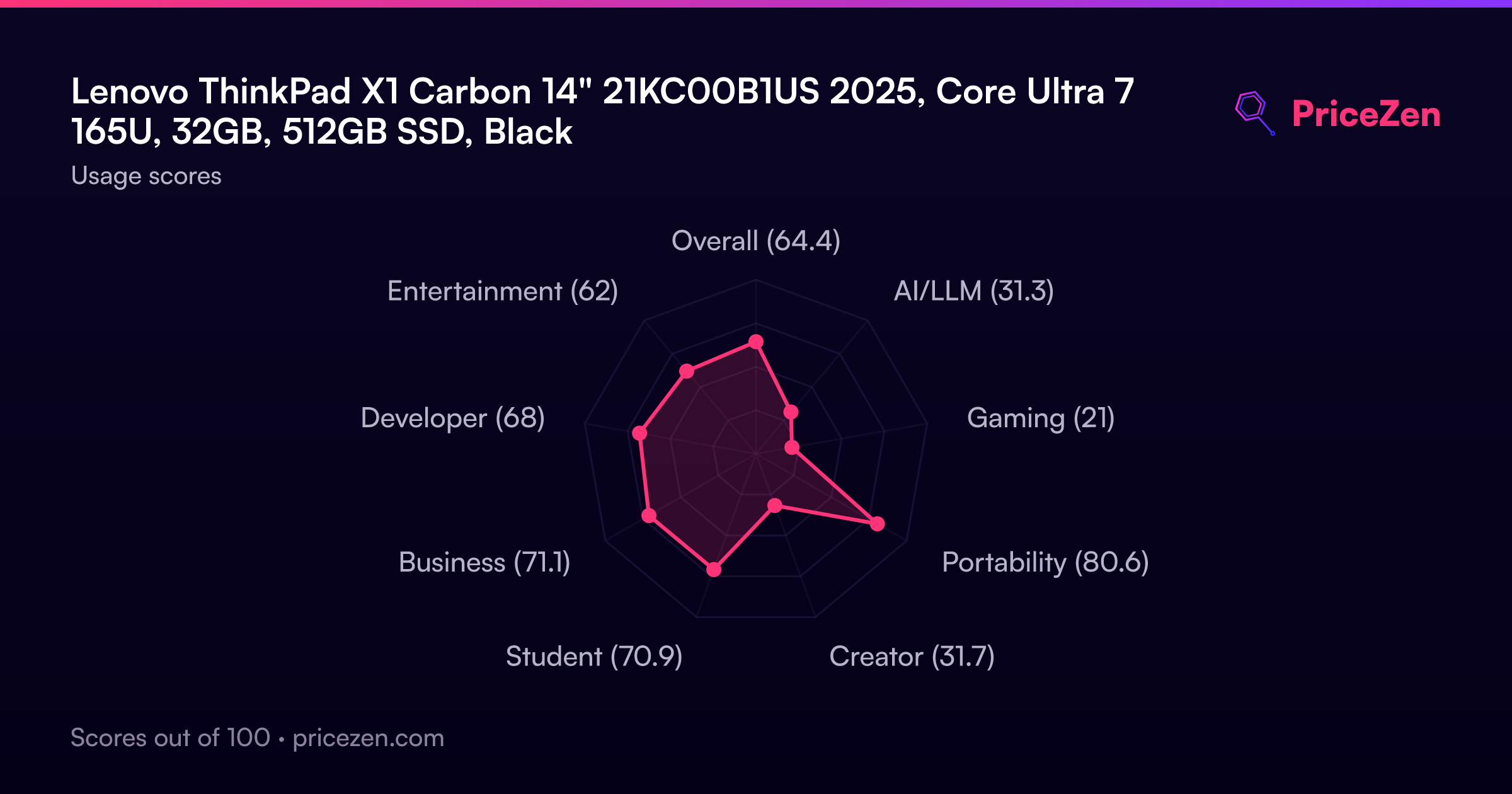
64/100 overall score
- CPU
- Intel Core Ultra 7 165U
- RAM
- 32 GB
- Storage
- 512 GB
- Screen
- 14" 1920x1200
- GPU
- Intel Graphics
- OS
- Windows 11 Pro
- Weight
- 1.1 kg
- Battery
- 57 Wh










Snapshot
The 30-Second Version
The X1 Carbon Gen 12 in this config is a 1.07kg business ultraportable with 32GB of RAM, and both of those numbers are standouts in our rankings. The trade-offs are real: a mid-pack Core Ultra 7 165U, a 60Hz 1920x1200 screen, and a gaming score of just 21/100. At USD 2,699 it lands in the bottom 10% for affordability, though three years of Premier Support softens that. Great for frequent travelers doing office work, wrong for gamers, creators or budget-conscious students.
Pros & Cons
Pros
- 1.07kg puts it in the top 10% for compactness, genuinely one of the lightest 14-inch machines around 91st
- 32GB LPDDR5X is well above what most ultraportables ship with, ranking among the best 89th
- Real port coverage: Thunderbolt, 2x USB-C, 2x USB-A and HDMI 2.1, no dongle hunt 82nd
- Three years of Lenovo Premier Support included, with direct access to engineers 72nd
- Reliability scores in the top fifth in our model, strong for the category
Cons
- Gaming score of 21/100 with integrated Intel Graphics, this is not a gaming machine at all
- Affordability sits in the bottom 10%, one of the pricier options we track
- 1920x1200 IPS at 60Hz is only mid-pack for screens, no high refresh or OLED here
- 512GB SSD is average capacity at this price, tight for large local files
- Core Ultra 7 165U lands at about average for CPU, fine for office work but not heavy compute
The proof
Performance
Let's talk about what those numbers actually mean. The Core Ultra 7 165U sits at about average for CPU in our data, so basically mid-pack for the laptops we track. That's not a knock on the chip so much as a reflection of what it is: a U-series part designed for efficiency in thin chassis, not sustained heavy lifting. For spreadsheets, Slack, twenty Chrome tabs, a couple of Docker containers and a video call, you'll never feel it. Where you'd notice is long compiles or batch exports, where a higher-wattage processor pulls ahead. The 32GB of LPDDR5X is the counterweight here, ranking among the best in our data. In practice that means memory almost never becomes your bottleneck. You can leave everything open, run a VM alongside your work apps, and the machine won't start swapping. For a lot of professional workflows, having headroom in RAM matters more than raw CPU throughput, and Lenovo clearly made that bet on purpose.
Graphics land in the top third of our rankings, which sounds decent until you remember that's a ranking of integrated solutions against a field that includes plenty of weaker ones. Our gaming score for this machine is 21 out of 100, and that's the honest number to look at if you were hoping to sneak in some play after work. Integrated Intel Graphics with no discrete GPU means indie titles and older games at low settings, and nothing modern at playable frame rates. Storage is a 512GB NVMe drive, right about average in our data. Fast enough for daily work, but if you're keeping local video projects or a big Steam library, you'll be managing space. The 57Wh battery in a 1.07kg body is a reasonable pairing given the efficiency-focused chip, though the real-world endurance depends heavily on how hard you lean on that touchscreen.
Specifications
Full Specifications
Processor
| CPU | Intel Core Ultra 7 165U |
| Cores | 12 |
| Frequency | 1.7 GHz |
| L3 Cache | 12 MB |
Graphics
| GPU | Intel Graphics |
| Type | Integrated |
Memory & Storage
| RAM | 32 GB |
| RAM Generation | LPDDR5X |
| Storage | 512 GB |
| Storage Type | NVMe SSD |
Display
| Size | 14" |
| Resolution | 1920x1200 (Full HD) |
| Panel | IPS |
| Refresh Rate | 60 Hz |
Connectivity
| USB-C Ports | 2 |
| USB Ports | 2 |
| Thunderbolt | Thunderbolt 4 x 2 |
| HDMI | 1 x HDMI 2.1 |
| Wi-Fi | Wi-Fi 6E |
| Bluetooth | Yes |
Physical
| Weight | 1.1 kg / 2.4 lbs |
| Battery | 57 Wh |
| OS | Windows 11 Pro |
vs Competition
Cross-shopping this against the Apple MacBook Pro 14.2" M4 Pro is the most common decision point, and it comes down to what you're optimizing for. The X1 Carbon's argument is its 1.07kg weight and its port layout, including two USB-A ports and HDMI 2.1 that let you walk into any meeting room and plug in. Its weakness in that matchup is the mid-pack CPU ranking and the 60Hz 1920x1200 panel, which is a modest screen for the money. If your work is compute-heavy or display-critical, the MacBook is the one to look at. If your work is email, documents, calls and travel, the ThinkPad's weight and Windows 11 Pro compatibility tilt it back.
Against the Samsung Galaxy Book5 Pro 14" and the Dell Premium 14.5", you're in a closer fight, since all three chase the same thin-and-light professional. The ThinkPad's edge is that 32GB of RAM ranking among the best in our data, plus the strong reliability score and the bundled three-year support. Those are concrete things you can point at. The ASUS ROG Zephyrus 14" and HP OMEN Transcend 14 are a different conversation entirely: our gaming score of 21/100 for this machine tells you everything about why you'd pick either of those instead. They exist for people who want one laptop for work and play. This one very much does not.
| Spec | Lenovo ThinkPad X1 Carbon 14" 21KC00B1US | Apple MacBook Pro 14.2" M4 Pro | ASUS ROG Zephyrus 14" GA403WW-G14.R95080 | HP OMEN Transcend | Samsung Galaxy Book5 Pro 14" NP944XHA-KG3US | Dell Premium 14.5" LDA14250-7667SLV-PUS |
|---|---|---|---|---|---|---|
| CPU | Intel Core Ultra 7 165U | Apple M4 Pro | AMD Ryzen AI 9 HX 370 | Intel Core Ultra 9 285H | Intel Core Ultra 7 258V | Intel Core Ultra 7 255H |
| RAM (GB) | 32 | 48 | 32 | 32 | 32 | 32 |
| Storage (GB) | 512 | 4096 | 2048 | 1024 | 1024 | 1024 |
| Screen | 14" 1920x1200 | 14.2" 3024x1964 | 14" 2880x1800 | 14" 2880x1800 | 14" 2880x1800 | 14.5" 3200x2000 |
| GPU | Intel Graphics | Apple (16-Core) | NVIDIA GeForce RTX 5080 | NVIDIA GeForce RTX 5070 | Intel Arc Graphics 140V | Intel Arc Graphics |
| OS | Windows 11 Pro | macOS | Windows 11 Home | Windows 11 Home | Windows 11 Pro | Windows 11 Home |
| Weight (kg) | 1.1 | 1.6 | 1.6 | 1.6 | 1.2 | 1.7 |
| Battery (Wh) | 57 | 72 | - | 71 | 63 | 62 |
| Compare | Compare | Compare | Compare | Compare |
| Product | CPU | GPU | RAM | Ports | Screen | Portability | Storage | Reliability | Affordability |
|---|---|---|---|---|---|---|---|---|---|
| Lenovo ThinkPad X1 Carbon 14" 21KC00B1US | 54.1 | 69.6 | 89 | 71.6 | 53.9 | 90.7 | 51.1 | 82 | 10.3 |
| Apple MacBook Pro 14.2" M4 Pro Compare | 92.4 | 78.9 | 90.6 | 73.8 | 99.1 | 68.9 | 98.4 | 98.2 | 4.6 |
| ASUS ROG Zephyrus 14" GA403WW-G14.R95080 Compare | 91.2 | 98.3 | 90.8 | 89.4 | 96 | 73.6 | 89.7 | 60.6 | 6.1 |
| HP OMEN Transcend Compare | 90.1 | 93.5 | 89.7 | 89.4 | 96 | 72.2 | 65.4 | 33.7 | 9 |
| Samsung Galaxy Book5 Pro 14" NP944XHA-KG3US Compare | 65.8 | 69.6 | 79.5 | 83.5 | 90.3 | 89.4 | 79.3 | 82 | 21.3 |
| Dell Premium 14.5" LDA14250-7667SLV-PUS Compare | 87 | 69.6 | 89 | 66.7 | 96.8 | 61.3 | 65.4 | 33.7 | 14.9 |
Price
Value & Pricing
At USD 2,699 from Amazon, this is not a cheap laptop and it isn't pretending to be. Our affordability ranking puts it in the bottom 10% of laptops we track, meaning roughly nine out of ten cost less. What you're paying for is the weight, the build reputation, the 32GB of memory and three years of Premier Support bundled in. That support package is a real line item, not a marketing bullet: direct access to engineers around the clock, parts prioritization and onsite labor. If you're a solo consultant whose income stops when your laptop dies, that has genuine dollar value. If you're buying with your own money for personal use, it's a harder sell.
Pricing gets messy across regions. In Canada we're tracking listings from CAD 3,140 to CAD 3,999, a spread of CAD 859 for the same machine. That's a big enough gap that shopping around within Canada is worth an hour of your time. European listings run EUR 3,112 to EUR 3,191 across Spain, France and Italy, and the UK sits at GBP 3,361. We track these prices over time, partly through our community browser extension, and the Canadian spread in particular is the kind of thing that shifts week to week. Nobody can pay us to tell you this is a good deal, so here's the straight version: it's a premium-priced machine that makes sense for a specific buyer and looks expensive to everyone else.
Read more
Overview
The ThinkPad X1 Carbon has been the default answer to "what laptop should a road warrior buy" for years, and this Gen 12 config (21KC00B1US) is a pretty specific take on it. You get an Intel Core Ultra 7 165U, a 12-core chip running at a 1.7GHz base, paired with 32GB of LPDDR5X and a 512GB NVMe SSD. The whole thing weighs 1.07kg with a 14-inch touchscreen in the lid. That weight is the headline: our scoring puts its compactness in the top 10% of machines we track, which means it's one of the lightest relative to everything else in the category.
This is aimed squarely at people whose laptop lives in a bag. Consultants, sales folks, anyone who spends more time in airport lounges than at a desk. The port selection backs that up better than most thin machines manage: Thunderbolt, two USB-C, two USB-A, HDMI 2.1 and Wi-Fi 6E. You can plug into a conference room projector and a legacy USB peripheral without hunting for a dongle, which is a genuinely rare thing at this weight. Windows 11 Pro comes standard, and Lenovo throws in three years of Premier Support with actual engineers on the phone rather than a script reader.
What makes this particular SKU interesting is the memory choice. 32GB in a 1.07kg chassis is unusual, and it ranks among the best in our data. Most ultraportables at this weight ship with half that. But there's a trade-off baked in, and it's worth naming early: the CPU scores only mid-pack in our model, the display is a 1920x1200 IPS panel at 60Hz, and the graphics are integrated Intel. This machine is built to be light and to keep a lot of browser tabs alive, not to render video or push pixels.
Common Questions
Q: Is 32GB of RAM overkill for a laptop like this?
For basic email and browsing, yes, you'd never touch it. But 32GB ranks among the best in our data and it's the spec that future-proofs this machine most. If you run virtual machines, keep dozens of tabs open alongside Teams and Excel, or work with large datasets, that headroom means the system never starts swapping to the SSD. Given the CPU is only mid-pack, having memory that never bottlenecks is a smart trade.
Q: Can I game on this at all?
Our gaming score for this configuration is 21 out of 100, which is a weak spot and we won't dress it up. The Intel Graphics here are integrated with no discrete GPU, so you're limited to older titles and lightweight indie games at reduced settings. Anything modern and demanding is off the table. If gaming matters even a little, look at the ASUS ROG Zephyrus 14" or HP OMEN Transcend 14 instead.
Q: Is the 1920x1200 60Hz display good enough at this price?
It's a practical panel rather than an impressive one. The screen ranks at about average in our data, so right around the middle for the category. 1920x1200 on 14 inches gives you a bit more vertical room than standard 1080p, which helps with documents and code, and the touchscreen is a nice extra for quick navigation. But at USD 2,699 you're not getting high refresh or a premium panel technology, and that's a fair criticism.
Q: Do I really need dongles with this?
Mostly no, which is unusual for something this light. You get Thunderbolt, two USB-C, two USB-A and a full HDMI 2.1 port, plus Wi-Fi 6E. That covers projectors, external monitors, wired peripherals and legacy USB gear without an adapter. Port coverage ranks in the top third in our model, solid rather than class-leading, but for a 1.07kg machine it's genuinely well covered.
Who Should Skip This
Gamers and anyone doing GPU-dependent creative work should walk away now. A 21/100 gaming score with integrated Intel Graphics isn't a limitation you can work around with settings tweaks, it's a category mismatch. Video editors, 3D artists and anyone rendering locally will also bump into the mid-pack CPU ranking and the 512GB drive, which sits right at the category average for capacity. The ASUS ROG Zephyrus 14" and HP OMEN Transcend 14 exist precisely for people who need real graphics horsepower in a similar size.
Students and value-focused buyers should also think twice. At USD 2,699 this lands in the bottom 10% for affordability, and a lot of what you're paying for is enterprise support and extreme portability. If your laptop mostly lives on a desk, you're buying a benefit you won't use. The Samsung Galaxy Book5 Pro 14" and Dell Premium 14.5" are worth cross-shopping if you want the thin-and-light feel without committing to this price bracket.
Verdict
If you travel constantly and your work lives in a browser, Office and a video call app, this is close to the ideal shape of a laptop. The 1.07kg weight is the thing you'll appreciate every single day, the ports mean you stop carrying adapters, and 32GB of RAM means you never think about memory again. Add the three-year Premier Support and it's a legitimately sensible business purchase, especially if your employer is footing the bill or you're billing hours that a broken laptop would interrupt.
If you're a student or a general-purpose buyer spending your own money, we'd hesitate. Our student score is 70.9/100, which is decent but not compelling at USD 2,699, and the bottom-10% affordability ranking stings. You're paying a premium for portability and enterprise support that a student mostly doesn't need. And if there's any gaming or creative ambition in the mix, the 21/100 gaming score and integrated graphics rule this out immediately. Buy it for what it is: a very light, very well-supported Windows work machine with unusually generous memory.
Usage Scores
- Overall64.4
- AI/LLM31.3
- Gaming21
- Portability80.6
- Creator31.7
- Student70.9
- Business71.1
- Developer68
- Entertainment62