Lenovo Legion 5 16" 2025, Core i9-14900HX, 32GB, 1TB SSD + 256GB SSD, RTX 4060, Luna Grey
The 24-core Intel Core i9-14900HX and RTX 4060 drive a 16-inch 240Hz WQXGA IPS panel with 500 nits, 100% sRGB, G-SYNC, and Dolby Vision for smooth, vibrant gaming. 32GB DDR5 RAM and a 1TB SSD handle large assets, while Wi-Fi 6E and dual USB-C ports provide fast connectivity for peripherals. It suits gamers seeking high-frame-rate 1600p play and content creators needing a color-accurate display with powerful multi-core rendering.

No current retailer price
Snapshot
The 30-Second Version
The Lenovo Legion 5 packs a top-tier i9-14900HX and 32GB of DDR5 into a 16-inch chassis with a stunning 240Hz display. It's a creator's dream, but the RTX 4060 holds it back for pure gaming. Right now it's out of stock everywhere we track, with no live price to judge, so this is a watch-list machine rather than a buy-today one. Want it for the processor and screen, not the GPU.
Pros & Cons
Pros
- i9-14900HX is a top-tier laptop CPU, 92nd percentile in our database 93rd
- 32GB of fast DDR5 at 5600 MHz, plenty for heavy multitasking 91st
- 16-inch 2560x1600 240Hz display with 500 nits and 100% sRGB 90th
- 1TB NVMe SSD plus a 256GB secondary drive for extra storage 89th
- Strong port selection selection with 2x USB-C, 3x USB-A, HDMI 2.1, and Ethernet
Cons
- RTX 4060 is a mid-range GPU, not a great match for the high-end CPU
- 5.2 lbs and 0.99 inches thick, this is not a portable machine
- Battery life tops out around 6 hours, and that's with light use
- Compact score is 14th percentile, one of the bulkiest in its class
- Only 8GB of VRAM, which may feel limiting for future AAA titles
The proof
Performance
The i9-14900HX is the star here, and it's not close. With 8 performance cores and 16 efficiency cores, this thing chews through multi-threaded workloads like video editing, 3D rendering, and code compilation. It sits in the 92nd percentile for CPU performance in our database, which puts it among the best laptop processors you can buy right now. The 5.8 GHz boost clock means single-threaded tasks feel snappy too. If you're coming from an older quad-core or even a mid-range hexa-core laptop, the difference will feel like night and day.
The RTX 4060 is a solid GPU, landing in the 84th percentile. It'll handle 1080p gaming at high settings without breaking a sweat, and it can push 1440p on the native display if you're willing to dial back a few settings. But here's the thing: the CPU is so much more powerful than the GPU that you'll rarely see the 4060 bottleneck in CPU-heavy games. In GPU-bound titles, the 4060 is the limiting factor, not the i9. That's not a criticism, just a reality check. The 8GB of VRAM is fine for today's games at 1440p, but it might feel tight in a couple of years as textures get bigger.
The 240Hz display is a nice pairing for esports titles like Valorant or CS2, where the 4060 can actually push frame rates high enough to matter. The G-SYNC support helps smooth things out when frame rates dip. And the dual SSD setup, 1TB plus 256GB, gives you a fast boot drive and a separate scratch disk if you want to keep your project files isolated.
Specifications
Full Specifications
Processor
| CPU | Intel Core i9 14900HX |
| Cores | 24 |
| Frequency | 2.2 GHz |
| L3 Cache | 36 MB |
Graphics
| GPU | NVIDIA GeForce RTX 4060 |
| Type | Discrete |
| VRAM | 8 GB |
| VRAM Type | GDDR6 |
Memory & Storage
| RAM | 32 GB |
| RAM Generation | DDR5 |
| Storage 1 | 1 TB |
| Storage 1 Type | NVMe SSD |
| Storage 2 | 256 GB |
| Storage 2 Type | NVMe SSD |
Display
| Size | 16" |
| Resolution | 2560x1600 (QHD) |
| Panel | IPS |
| Refresh Rate | 165 Hz |
| Brightness | 500 nits |
| Color Gamut | 100% sRGB |
Connectivity
| USB-C Ports | 2 |
| USB Ports | 3 |
| HDMI | HDMI 2.1 |
| Wi-Fi | Wi-Fi 6E |
| Bluetooth | Bluetooth 5.2 |
| Ethernet | RJ-45 |
Physical
| Weight | 2.3 kg / 5.1 lbs |
| Battery | 80 Wh |
| OS | Windows 11 Home |
vs Competition
The Apple MacBook Pro M4 Max is the elephant in the room, and right now it has one practical advantage the Legion can't answer: you can actually go and buy one. Beyond that, the Legion's pitch is Windows, a 16-inch 240Hz panel and an i9-14900HX that sits in the 92nd percentile for CPU performance in our ranking. If your work depends on Windows-only software or you want to game on the same machine you edit on, that's the reason to stay in this camp. If macOS fits your workflow, the wait for Legion stock gets a lot harder to justify.
The ASUS ROG Zephyrus G14 is the more direct Windows alternative, and it's the one we'd point portability-minded buyers toward. Our compact score for the Legion 5 lands in the 14th percentile, which tells you exactly how much chassis you're signing up for at 5.2 lbs and 0.99 inches thick. The HP OMEN Transcend 14 is the other name worth a look if you want something easier to carry, though you're stepping away from the raw CPU headroom the i9 gives you here. The Samsung Galaxy Book5 Pro sits in a different lane again, aimed at everyday productivity rather than heavy sustained workloads, so it's only really a cross-shop if you've decided you don't need this much processor after all.
None of that changes what the Legion 5 is: a CPU-first desktop replacement with a very good screen. It just means the comparison is currently theoretical for anyone who needs a laptop this week.
| Spec | Lenovo Legion 5 16" | Apple MacBook Pro 14.2" M4 Pro | ASUS ROG Zephyrus 14" GA403WW-G14.R95080 | HP OMEN Transcend | Samsung Galaxy Book5 Pro 14" NP944XHA-KG3US | Dell Premium 14.5" LDA14250-7667SLV-PUS |
|---|---|---|---|---|---|---|
| CPU | Intel Core i9 14900HX | Apple M4 Pro | AMD Ryzen AI 9 HX 370 | Intel Core Ultra 9 285H | Intel Core Ultra 7 258V | Intel Core Ultra 7 255H |
| RAM (GB) | 32 | 48 | 32 | 32 | 32 | 32 |
| Storage (GB) | 1024 | 4096 | 2048 | 1024 | 1024 | 1024 |
| Screen | 16" 2560x1600 | 14.2" 3024x1964 | 14" 2880x1800 | 14" 2880x1800 | 14" 2880x1800 | 14.5" 3200x2000 |
| GPU | NVIDIA GeForce RTX 4060 | Apple (16-Core) | NVIDIA GeForce RTX 5080 | NVIDIA GeForce RTX 5070 | Intel Arc Graphics 140V | Intel Arc Graphics |
| OS | Windows 11 Home | macOS | Windows 11 Home | Windows 11 Home | Windows 11 Pro | Windows 11 Home |
| Weight (kg) | 2.3 | 1.6 | 1.6 | 1.6 | 1.2 | 1.7 |
| Battery (Wh) | 80 | 72 | - | 71 | 63 | 62 |
| Compare | Compare | Compare | Compare | Compare |
| Product | CPU | GPU | RAM | Ports | Screen | Portability | Storage | Reliability | Social Proof | Affordability |
|---|---|---|---|---|---|---|---|---|---|---|
| Lenovo Legion 5 16" | 93.2 | 90.9 | 86.3 | 89.5 | 89.3 | 14.4 | 88 | 82 | 44 | 0 |
| Apple MacBook Pro 14.2" M4 Pro Compare | 92.4 | 78.9 | 90.6 | 73.9 | 99.1 | 68.9 | 98.4 | 98.2 | 99.7 | 4.7 |
| ASUS ROG Zephyrus 14" GA403WW-G14.R95080 Compare | 91.2 | 98.3 | 90.8 | 89.5 | 96 | 73.6 | 89.7 | 60.6 | 95.6 | 6.1 |
| HP OMEN Transcend Compare | 90.1 | 93.5 | 89.7 | 89.5 | 96 | 72.2 | 65.4 | 33.7 | 93.2 | 9.1 |
| Samsung Galaxy Book5 Pro 14" NP944XHA-KG3US Compare | 65.8 | 69.7 | 79.5 | 83.5 | 90.4 | 89.4 | 79.3 | 82 | 95.6 | 21.3 |
| Dell Premium 14.5" LDA14250-7667SLV-PUS Compare | 87 | 69.7 | 89 | 66.7 | 96.8 | 61.3 | 65.4 | 33.7 | 95.6 | 14.8 |
Price
Value & Pricing
The awkward part right now is that there's no price to talk about. We track this config across the stores we pull from, and every one of them currently shows it out of stock with no live listing behind it. That means no number to weigh against the spec sheet, and no way to tell you whether it's a bargain or a stretch at the moment.
What we can say is that the hardware itself still makes sense on paper. A top-tier CPU sitting in the 92nd percentile, 32GB of DDR5, a dual SSD setup and a bright 240Hz panel is a lot of machine, and for someone who lives in renders and compile jobs rather than frame counters, that combination is worth chasing. The catch is that value is always a conversation between specs and price, and half of that conversation is missing until stock comes back.
So treat this one as a watch-list item rather than a buy-today pick. If you're a video editor or developer who needs CPU muscle above all else, keep an eye on the listings and be ready to move when a real price appears. If you're mostly gaming, the RTX 4060 was already the weak link here, and waiting on an out-of-stock config for a mid-range GPU is a hard argument to make. There are other machines in this category that will serve you better without the wait.
Read more
Overview
The Lenovo Legion 5 with the i9-14900HX is a bit of an odd duck, and I mean that in the best way. You've got a 24-core desktop-class processor crammed into a 16-inch laptop paired with an RTX 4060. That's like putting a V8 engine in a sensible sedan. It's not the most balanced spec sheet on paper, but for a specific kind of buyer, it's an absolute monster. This is a machine built for people who need serious CPU muscle for work and still want to game at high settings on the side.
Lenovo's Legion line has been quietly killing it for years, and this config leans hard into the creator and developer angle. The 32GB of DDR5 running at 5600 MHz and the 1TB NVMe SSD mean you won't be waiting around for renders or compile times. The 16-inch 2560x1600 display is a standout too, with 500 nits of brightness and full sRGB coverage. That's a screen you can actually use outdoors or in a bright room without squinting.
At 5.2 lbs and nearly an inch thick, this is not an ultrabook. It's a desktop replacement that happens to have a battery. The 80Wh cell will get you through a few hours of light work, but don't expect to leave the 230W power brick at home if you're doing anything demanding. That's the trade-off for this much performance, and it's one you'll need to be okay with before you buy.
Common Questions
Q: Can the RTX 4060 handle the 2560x1600 display for gaming?
Yes, but with caveats. The 4060 can push 1440p at medium to high settings in most modern games, and you'll hit 60+ fps in many titles. For esports games like Valorant or CS2, the 240Hz refresh rate is actually usable because those games are light enough to run at very high frame rates. For demanding AAA games like Cyberpunk 2077, you'll need to dial settings back to medium or use DLSS to maintain smooth frame rates at native resolution.
Q: How is the battery life on this laptop?
The 80Wh battery is rated for up to 6 hours, but that's with light use like web browsing and document editing. If you're gaming or rendering video, expect 1-2 hours at most. The i9-14900HX is a power-hungry chip, and the 230W power adapter is a hint that this machine is meant to be plugged in for serious work. If battery life is a priority, this is not the laptop for you.
Q: Is the display good for photo and video editing?
Yes, the 16-inch 2560x1600 IPS panel covers 100% of the sRGB color space and hits 500 nits of brightness, which is excellent for a laptop in this price range. The DisplayHDR 400 certification and Dolby Vision support are nice bonuses. For professional color-critical work, you'd want a panel with wider gamut coverage like DCI-P3 or Adobe RGB, but for most creators, this screen is more than adequate.
Q: Can I upgrade the RAM and storage later?
The Legion 5 typically uses standard SODIMM slots for RAM, so the 32GB of DDR5 can be upgraded to 64GB if you need more. The storage is also user-accessible, with the 1TB and 256GB NVMe drives occupying two M.2 slots. If you want to swap in larger drives later, that's absolutely doable. Just check the specific model's service manual before opening it up.
Who Should Skip This
If you're a gamer first and foremost, skip this. The RTX 4060 is a mid-range GPU, and this config asks you to pay for a CPU that won't help you in most games. Put your money into graphics instead, even if it means stepping down to a Ryzen 7 or Core i7. You'll get better frame rates and a more balanced machine.
If portability matters, this is also a pass. At 5.2 lbs and nearly an inch thick, the Legion 5 is a desktop replacement, not a travel companion. The compact score of 14th percentile tells the story. If you need something to carry to class or on flights, look at the ASUS ROG Zephyrus G14 or the HP OMEN Transcend 14. They give up some of the CPU headroom the i9 offers here, but they're far easier to live with on the go.
And if you need a laptop soon, skip it for now regardless of how well the specs fit. Every store we track has this config out of stock, so there's nothing to order and no price to plan around. Waiting on a maybe is a bad trade when you have work to do.
Verdict
If you're a creator, developer, or power user who needs a Windows machine with serious CPU performance and a beautiful display, the Legion 5 is still an easy machine to like. The i9-14900HX is a beast, the 32GB of RAM is future-proof, and the 16-inch 2560x1600 240Hz panel is one of the nicest screens you'll find on a laptop built for this kind of work. The RTX 4060 is good enough for 1440p gaming at medium to high settings, and the high refresh rate makes competitive titles feel great.
The problem is availability. Every store we track currently has this config out of stock, and with no live price anywhere, we can't call it good value or bad value. It's simply not something you can buy right now. If you have time to wait and this exact balance of CPU, RAM and screen is what you want, add it to your watch list and let the price come to you.
For pure gamers, this was already a tougher sell, and being unavailable makes it easier to walk away. The 4060 is the bottleneck, and your money is better spent on GPU than on cores you won't use in most games. And if you do more than game, if you edit video, compile code, or run virtual machines, the Legion 5 is worth circling back to once stock returns. Just don't hold up a purchase you need to make now for it.
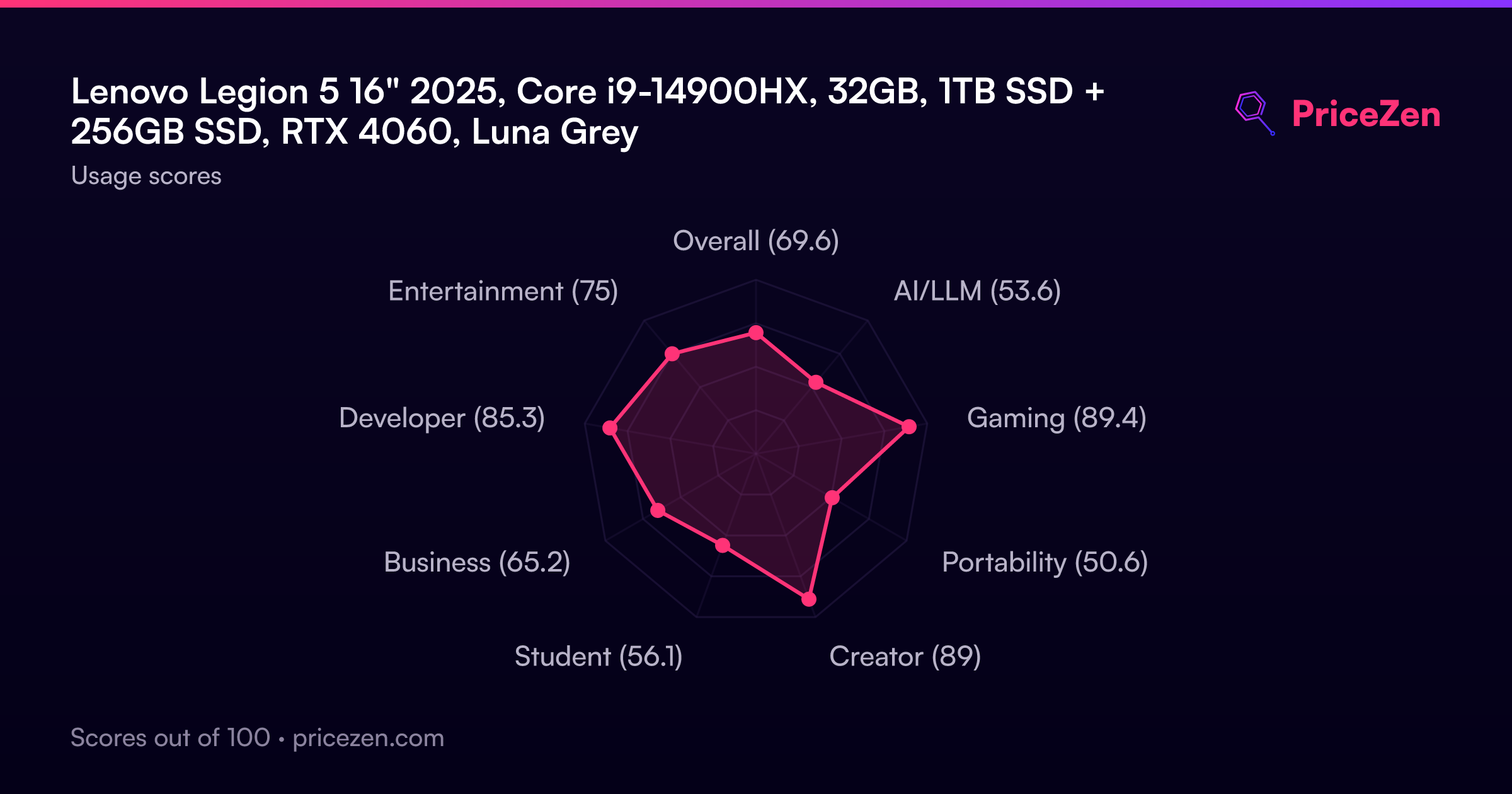
Usage Scores
- Overall69.6
- AI/LLM53.6
- Gaming89.4
- Portability50.6
- Creator89
- Student56.1
- Business65.2
- Developer85.3
- Entertainment75