HP OmniBook 3 2025, Ryzen AI 5 330, 16GB, 512GB SSD, Glacier Silver

Light 1.7kg laptop with 512GB SSD verified Nov 29
54/100 overall score 4.8 average from 296 owner ratings
- CPU
- AMD Ryzen AI 5 330
- RAM
- 16 GB
- Storage
- 512 GB
- Screen
- 15.6" 1920x1080
- GPU
- AMD Radeon 820M
- OS
- Windows 11 Home
- Weight
- 1.7 kg
- Battery
- 41 Wh
Compare prices at 1 store
Cheapest first. New, refurbished and bundled offers are kept apart, so you compare like with like.
| Store | Sold by | Colour and condition | Price | vs lowest | Last checked | Link |
|---|---|---|---|---|---|---|
| New1 offerSingle unit | ||||||
| Not checked in the last 7 days, so these prices may have changed | ||||||
| Amazon | Marketplace seller | Not listed | MX$18,850.00 | Nov 3 | Go to store | |
 Source: PriceZen, checked Nov 3, 2026
A price counts as current when we checked it in the last 7 days. “Marketplace seller” means a third-party seller on that store, not the store itself.
Price history
Checked that dayNot checked that day, still on offer
Source: PriceZen, checked Nov 3, 2026










Snapshot
The 30-Second Version
The HP OmniBook 3 15-fn0105dx is a budget-friendly 15.6-inch touchscreen laptop that nails the basics for students and everyday users. With 16GB of RAM, a 512GB SSD, and a responsive AMD Ryzen AI 5 330 processor, it handles daily tasks with ease and delivers surprisingly good battery life. Just don't expect to game on it, and try to find it near the USD 382 end of the price range.
Pros & Cons
Pros
- 16GB DDR5 RAM at a budget price 99th
- Fast and responsive for everyday tasks 98th
- Precise, vibrant touchscreen display 77th
- Excellent battery life for the price 68th
- Great value with 512GB SSD included
Cons
- Gaming performance is nearly nonexistent
- Display color coverage is weak at 62.5 percent
- 41Wh battery is small for a 15.6-inch laptop
- Reliability scores sit in the 33rd percentile
- No discrete GPU option
What owners think
The Word on the Street
- Buyers consistently praise the laptop's speed and responsiveness for everyday tasks like browsing, schoolwork, and streaming.
- Multiple owners highlight the battery life as a standout, saying it lasts noticeably longer than their previous laptops.
- The touchscreen gets frequent compliments for being precise and vibrant, and many call the overall value excellent for the price.
- A few users mention that initial Windows setup can be frustrating, though they still like the hardware itself.
How owner sentiment changed over time
ExclusiveBased on when customers actually wrote their reviews - so you can see whether early praise held up.
Owners are as happy as early on: 95% lately, 98% in Oct – Dec 2025
Across all 296 store ratings: 4.8★. The chart counts the 220 written reviews with stars and their own date.
Show the numbers
| Period | Reviews | Happy | Mixed | Unhappy | Happy share |
|---|---|---|---|---|---|
| Oct – Dec 2025 | 55 | 54 | 1 | 0 | 98% |
| Jan – Mar 2026 | 99 | 94 | 3 | 2 | 95% |
| Apr – Aug 2026 | 66 | 63 | 3 | 0 | 95% |
- Apr – Jun 202654 of 57 happy
Buyers in Q2 2026 praised the OmniBook 3 as fast, lightweight, and great value for everyday use, though some noted cheap feel, battery life, and missing features like a backlit keyboard or flip-to-tablet mode.
- Fast performance, lightweight, and easy setup for daily tasks
- Good value and affordable for budget-conscious buyers
- Battery life praised by some, criticized by others as short
- Feels cheapish; missing backlit keyboard and flip-to-tablet feature
- Jan – Mar 202694 of 99 happy
Buyers in Q1 2026 praised the OmniBook 3 for its speed, value, and battery life. A few reported defects: a broken CPU, sticky touchpad, and keyboard wear.
- Fast performance, good value, and long battery life
- Great screen quality and lightweight design
- CPU failure during setup, requiring lengthy repairs
- Sticky touchpad and keyboard letters wearing off
- Oct – Dec 202554 of 55 happy
Buyers in Q4 2025 praised the HP OmniBook 3 for its fast performance, touchscreen, and value during Black Friday sales. A few noted a cheap-feeling, sticky trackpad as a recurring flaw.
- Fast performance, touchscreen, and good value for the price
- Great Black Friday and Cyber Monday deals
- Trackpad feels cheap and sticks, detracting from otherwise premium experience
- Lightweight design and sleek Glacier Silver finish
Each column joins calendar quarters until it holds at least 10 reviews with stars and their own date. Happy = 4-5★, mixed = 3★, unhappy = 1-2★. Period summaries are in English.
The proof
Performance
The AMD Ryzen AI 5 330 is a 4-core, 2.0GHz chip that lands in the 41st percentile for CPUs in our database. That's not going to blow anyone away, but it's fine for everyday tasks. Paired with 16GB of DDR5 RAM, this OmniBook handles browser tabs, Office apps, and video calls without much fuss. The integrated Radeon 820M graphics sit in the 39th percentile, which tells you everything you need to know: don't expect to play anything beyond light or older titles. Our gaming score for this machine is a rough 14.6 out of 100, so if you're shopping for a gaming laptop, this isn't it.
The 512GB PCIe Gen4 NVMe SSD is a bright spot. It's not the largest drive out there, but it's fast enough that boot times and app launches feel snappy. Owners repeatedly mention how quick and responsive the laptop feels in daily use, and that tracks with what we'd expect from this storage setup. The 16GB of RAM sits in the 60th percentile, which is about average for this class, but it's enough to keep things smooth for a few years of schoolwork or office use.
Specifications
Full Specifications
Processor
| CPU | AMD Ryzen AI 5 330 |
| Cores | 4 |
| Frequency | 2.0 GHz |
| L3 Cache | 4 MB |
Graphics
| GPU | AMD Radeon 820M |
| Type | Integrated |
Memory & Storage
| RAM | 16 GB |
| RAM Generation | DDR5 |
| Storage | 512 GB |
| Storage Type | SSD |
Display
| Size | 15.6" |
| Resolution | 1920x1080 (Full HD) |
| Panel | IPS |
| Refresh Rate | 60 Hz |
| Brightness | 300 nits |
| Color Gamut | 62.5 percent |
Connectivity
| USB-C Ports | 1 |
| USB Ports | 2 |
| Thunderbolt | 0 |
| HDMI | HDMI 1.4b |
| Wi-Fi | Wi-Fi 6 |
| Bluetooth | Bluetooth 5.4 |
| Ethernet | 0 |
Physical
| Weight | 1.7 kg / 3.8 lbs |
| Battery | 41 Wh |
| OS | Windows 11 Home |
vs Competition
Stacked against the Lenovo Slim 7 83MC0001US, the OmniBook 3 loses on build quality and display. The Slim 7 has a more premium chassis and a better screen, but it typically costs more. The Apple MacBook Air M2 is in a different league for performance and battery life, though you'll pay significantly more and give up the touchscreen. If you're deep in the Apple ecosystem, the MacBook Air is the obvious choice, but it's not a fair fight at this price point.
The ASUS Zenbook UX3402VA-GH95 and Samsung Galaxy Book6 Pro NP940XJG-KG2US both offer better displays and more refined designs, but again, they cost more. The Dell Latitude XPS 13 is a business-class machine with better reliability scores, which matters if this laptop is going to be your daily driver for work. The OmniBook 3's main advantage is price. It undercuts most of these competitors while still offering 16GB of RAM and a touchscreen, which is a combo you don't always find in this bracket.
| Spec | HP OmniBook 3 | Apple MacBook Pro 14.2" M5 Max | Lenovo Legion Pro 7i 16" | ASUS ROG Strix SCAR 16 G635LX | MSI Titan 18 HX AI Norse Myth 18" | Microsoft Surface Laptop 13.8" EP2-42030 |
|---|---|---|---|---|---|---|
| CPU | AMD Ryzen AI 5 330 | Apple M5 Max | Intel Core Ultra 9 275HX | Intel Core Ultra 9 275HX | Intel Core Ultra 9 285HX | Qualcomm Snapdragon X Plus X1P-64-100 |
| RAM (GB) | 16 | 64 | 32 | 64 | 64 | 32 |
| Storage (GB) | 512 | 8192 | 1024 | 4096 | 2048 | 1024 |
| Screen | 15.6" 1920x1080 | 14.2" 3024x1964 | 16" 2560x1600 | 16" 2560x1600 | 18" 3840x2400 | 13.8" 2304x1536 |
| GPU | AMD Radeon 820M | Apple 40-Core GPU | NVIDIA GeForce RTX 5090 | NVIDIA GeForce RTX 5090 | NVIDIA GeForce RTX 5080 | Qualcomm Adreno |
| OS | Windows 11 Home | macOS | Windows 11 Home | Windows 11 Pro | Windows 11 Pro | Windows 11 Home |
| Weight (kg) | 1.7 | 1.6 | 2.7 | 2.8 | 0.5 | 1.3 |
| Battery (Wh) | 41 | 72 | 100 | 90 | 100 | - |
| Compare | Compare | Compare | Compare | Compare |
| Product | CPU | GPU | RAM | Ports | Screen | Portability | Storage | User Sentiment | Reliability | Social Proof | Affordability |
|---|---|---|---|---|---|---|---|---|---|---|---|
| HP OmniBook 3 | 40.6 | 38.9 | 59.9 | 68.3 | 50.4 | 48.2 | 35.8 | 99.1 | 33.7 | 97.6 | 76.8 |
| Apple MacBook Pro 14.2" M5 Max Compare | 99.8 | 95.9 | 95.6 | 73.8 | 99.1 | 68.9 | 99.6 | 0 | 98.2 | 0 | 0.3 |
| Lenovo Legion Pro 7i 16" Compare | 97.2 | 99.5 | 89 | 97.3 | 95 | 9.6 | 93.9 | 81.6 | 82 | 77.4 | 1.4 |
| ASUS ROG Strix SCAR 16 G635LX Compare | 97.2 | 99.5 | 97.6 | 89.4 | 91.7 | 9 | 98.4 | 81.6 | 60.6 | 0 | 1 |
| MSI Titan 18 HX AI Norse Myth 18" Compare | 98.8 | 98.3 | 97.6 | 98.6 | 99.6 | 62.7 | 98.4 | 0 | 60.6 | 0 | 1.1 |
| Microsoft Surface Laptop 13.8" EP2-42030 Compare | 72.3 | 13.4 | 79.5 | 58.3 | 84.4 | 89.6 | 65.4 | 90.9 | 82 | 83.5 | 24.7 |
Price
Value & Pricing
Here's where the OmniBook 3 gets interesting. Prices in our database range from USD 382 to USD 500 across five US listings, which is a spread of USD 118. That's a meaningful gap, so it pays to shop around. At the lower end of that range, this laptop is a steal. You're getting 16GB of RAM, a 512GB SSD, a touchscreen, and a Copilot+ capable processor for under USD 400. At the higher end, the value proposition gets shakier, especially when you consider that a MacBook Air M2 or a Lenovo Slim 7 can be found for not much more. If you can snag this near the USD 382 mark, it's one of the better budget laptop deals we've seen. If you're paying closer to USD 500, you should think hard about whether the touchscreen and AI features are worth the premium over alternatives with better displays and build quality.
Read more
Overview
The HP OmniBook 3 15-fn0105dx is a 15.6-inch touchscreen Windows laptop aimed squarely at students and everyday users who want a Copilot+ PC without spending a fortune. It sits in the budget to mid-range bracket, typically landing between USD 382 and USD 500 depending on the vendor. That's aggressive pricing for a machine with 16GB of DDR5 RAM, a 512GB SSD, and an AMD Ryzen AI 5 330 processor. HP is leaning hard into the AI angle here, and the 50 NPU TOPS means this thing qualifies for Copilot+ features in Windows 11.
So is the HP OmniBook 3 good for college? Based on our database and the 592 customer reviews we've seen, the answer is mostly yes. It's not a gaming laptop, and it's not trying to be. What it does well is handle the daily grind: web browsing, document editing, video streaming, and light multitasking. The touchscreen is a nice bonus at this price, and owners consistently mention how responsive and vibrant it feels.
We should be upfront about one thing: the spec sheet is a mixed bag. You get solid RAM and a decent port selection, but the 41Wh battery is small for a 15.6-inch laptop, and the display's color coverage is underwhelming at 62.5 percent. Still, for the money, HP has put together a package that covers the basics well.
Common Questions
Q: Is the HP OmniBook 3 good for gaming?
No, the HP OmniBook 3 is not a gaming laptop. Its integrated AMD Radeon 820M graphics score just 14.6 out of 100 in our gaming tests, so it can only handle very light or older titles.
Q: How long does the HP OmniBook 3 battery last?
HP claims up to 11 hours and 30 minutes of video playback, and owners report battery life that's better than their previous laptops. Real-world mixed usage should get you through a full day of school or office work.
Q: Is the HP OmniBook 3 good for college students?
Yes, the OmniBook 3 is a solid choice for college students. It has 16GB of RAM, a 512GB SSD, a touchscreen, and enough performance for research, writing, and streaming, all at a budget-friendly price.
Q: Does the HP OmniBook 3 have a touchscreen?
Yes, the HP OmniBook 3 15-fn0105dx has a 15.6-inch Full HD IPS touchscreen with anti-glare coating and AMD FreeSync support.
Who Should Skip This
Skip the HP OmniBook 3 if you're a gamer, a video editor, or anyone who needs real GPU horsepower. The integrated Radeon 820M graphics are among the weakest in our database, and the 14.6 out of 100 gaming score speaks for itself. Creative professionals who need accurate color should also look elsewhere, since the display only covers 62.5 percent of the color gamut. If reliability is your top concern, the 33rd percentile reliability score is a yellow flag, and something like a Dell Latitude XPS 13 would be a safer bet for business use. And if you're already in the Apple ecosystem, the MacBook Air M2 is worth the extra money for the performance and battery life alone.
Verdict
Should you buy the HP OmniBook 3 15-fn0105dx? If you're a student or someone who needs a reliable everyday laptop for web browsing, document work, and streaming, and you can find it near the USD 382 end of the price range, then yes. It's fast enough for daily tasks, the touchscreen is genuinely nice, and owners report battery life that beats their previous laptops. The 16GB of RAM means it won't feel outdated in two years the way 8GB machines do.
But if you need to edit video, play games, or do anything that pushes the GPU, look elsewhere. The gaming score of 14.6 out of 100 is one of the weakest we've seen in this category. And if you're picky about displays, the 62.5 percent color coverage will bother you. This is a budget laptop that does budget laptop things well, and not much else.
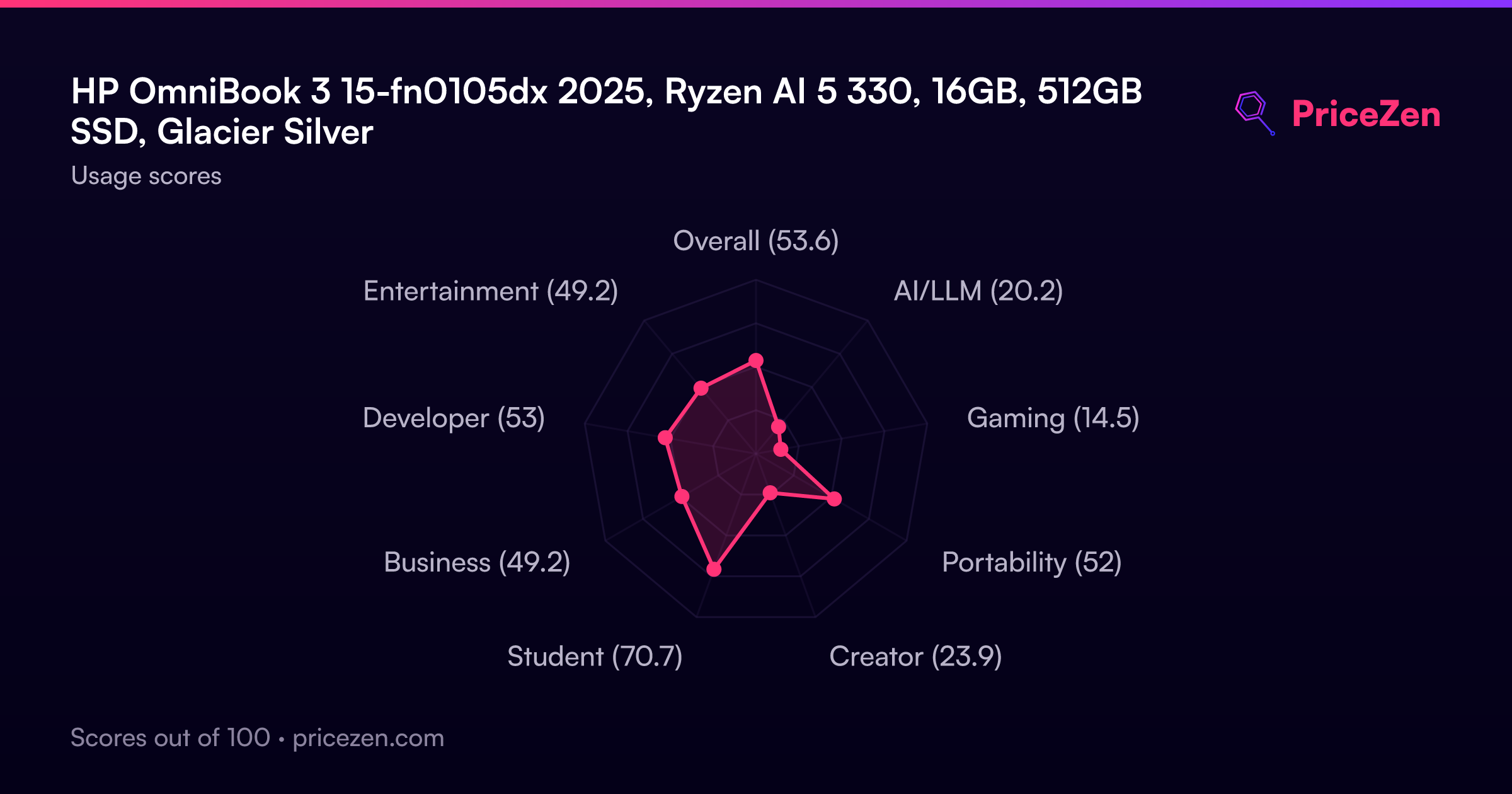
Usage Scores
- Overall53.6
- AI/LLM20.2
- Gaming14.5
- Portability52
- Creator23.9
- Student70.7
- Business49.2
- Developer53
- Entertainment49.2