HP ZBook Fury 16" A6UM8UT#ABA 2024, Core i7-13850HX, 32GB, 1TB SSD, RTX 3500 Ada, Silver

A 95 Wh battery, just under the flight limit verified Nov 29
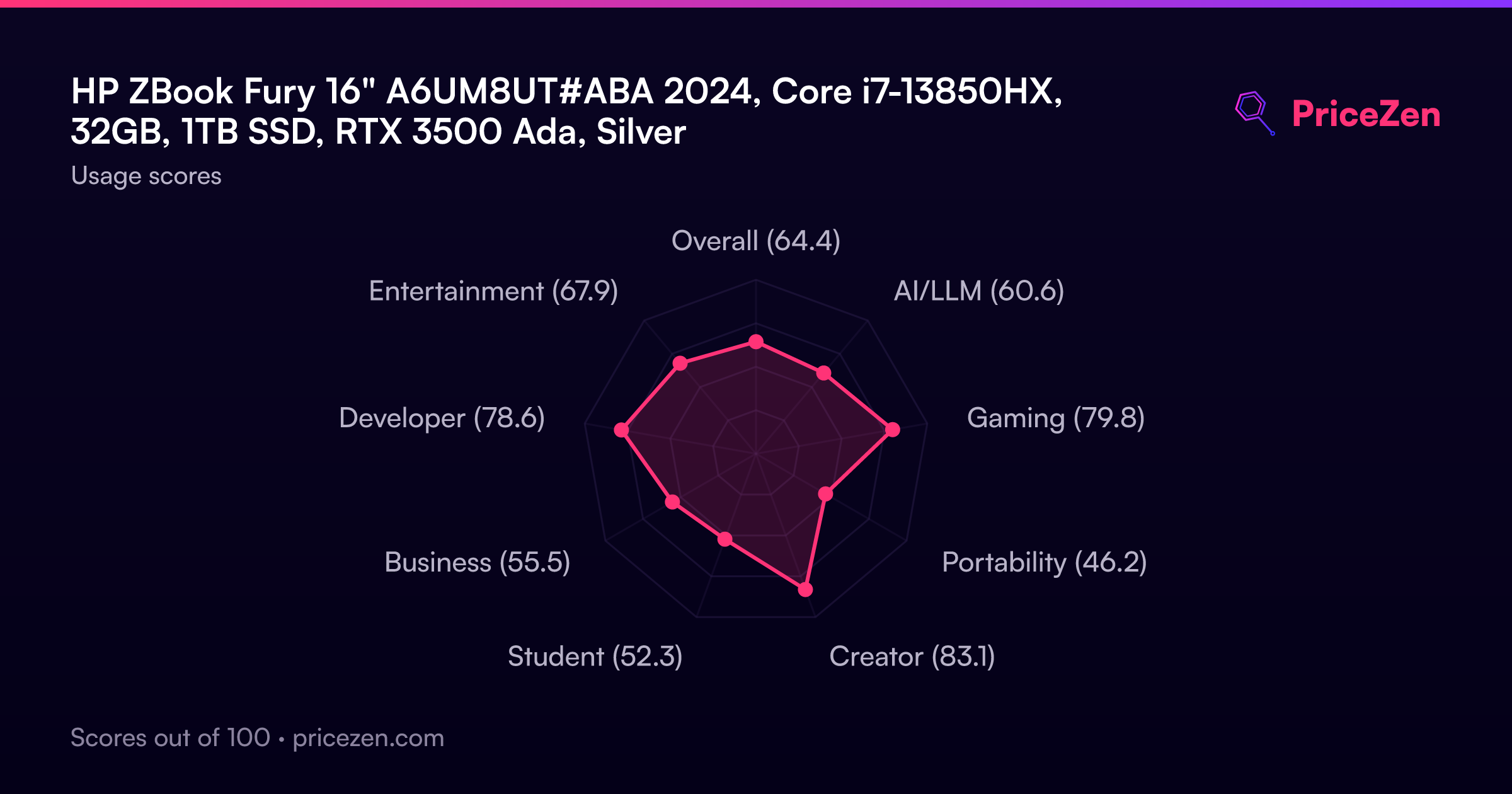
64/100 overall score
- CPU
- Intel Core i7 13850HX
- RAM
- 32 GB
- Storage
- 1 TB
- Screen
- 16" 1920x1200
- GPU
- NVIDIA RTX 3500 Ada
- OS
- Windows 11 Pro
- Weight
- 2.4 kg
- Battery
- 95 Wh
Compare prices at 1 store
Cheapest first. New, refurbished and bundled offers are kept apart, so you compare like with like.
| Store | Sold by | Colour and condition | Price | vs lowest | Last checked | Link |
|---|---|---|---|---|---|---|
| New1 offerSingle unit | ||||||
| Out of stock when last checked | ||||||
| Amazon | Not known | Not listed | No price | Out of stock | 3 days ago | Go to store |
 Source: PriceZen, checked Nov 26, 2026
A price counts as current when we checked it in the last 7 days. “Marketplace seller” means a third-party seller on that store, not the store itself.











Snapshot
The 30-Second Version
The ZBook Fury 16 G11 is a desktop replacement wearing a laptop costume, with an RTX 3500 Ada and 12GB of VRAM that rank near the top for graphics. The 20-core i7-13850HX and 32GB of upgradeable DDR5 back it up, and the port selection is near the top of our charts. But at USD 4,930 it sits near the bottom for affordability, and 2.35kg rules out daily commuting. Buy it if your work is GPU-bound and Windows-native; skip it if you just want a fast, portable laptop.
Pros & Cons
Pros
- RTX 3500 Ada with 12GB VRAM ranks near the top for GPU 96th
- 20-core i7-13850HX lands among the best for CPU 95th
- Port selection near the top: Thunderbolt 4, HDMI 2.1, Ethernet, SD Express 92nd
- 32GB of 5600MHz DDR5, upgradeable to 128GB per HP 86th
- 95Wh battery and Wi-Fi 7 with Bluetooth 5.4
Cons
- Affordability near the bottom, USD 4,930 is steep
- 2.35kg and a low compactness score
- 60Hz 1920x1200 panel is only mid-pack for this price bracket
- Reliability ranking of 34 falls behind most of the category
- 1TB SSD is well above average but not class-leading at this cost
The proof
Performance
Let's talk about what those rankings actually mean day to day. The i7-13850HX is a 20-core HX-series chip, the desktop-derived class of Intel mobile processor, running at a 2.1GHz base. In our data it ranks among the best for CPU in this category. Practically, that's the part that handles your compiles, your encodes, your simulation solves and anything else that scales across cores. Pair it with 32GB of 5600MHz DDR5 (a standout, well above average) and you've got room for a heavy IDE, a couple of containers and a browser with far too many tabs open. And if 32GB stops being enough, HP says this platform goes up to 128GB, which is the kind of upgrade path most thin laptops simply don't offer.
The RTX 3500 Ada with 12GB of GDDR6 is the headline, sitting near the top of our GPU rankings. That VRAM figure matters more than people expect: 12GB is what lets you hold a large scene, a high-res texture set or a decent-sized model in memory without falling back to system RAM and watching throughput collapse. Storage is a 1TB PCIe 4.0 x4 NVMe drive, which lands well above average but not the fastest thing we track. The weak link in the performance story is the display: 1920x1200 at 60Hz, 400 nits, 100% sRGB, 1000:1 contrast. That's a perfectly honest working panel with full sRGB coverage and an anti-glare coating, but our screen ranking puts it only in the upper-middle of the pack. You're buying compute here, not pixels.
Specifications
Full Specifications
Processor
| CPU | Intel Core i7 13850HX |
| Cores | 20 |
| Frequency | 2.1 GHz |
| L3 Cache | 30 MB |
Graphics
| GPU | NVIDIA RTX 3500 Ada |
| Type | Discrete |
| VRAM | 12 GB |
Memory & Storage
| RAM | 32 GB |
| RAM Generation | DDR5 |
| Storage | 1 TB |
| Storage Type | NVMe SSD |
Display
| Size | 16" |
| Resolution | 1920x1200 (Full HD) |
| Panel | IPS |
| Refresh Rate | 60 Hz |
| Brightness | 400 nits |
| Color Gamut | 100% sRGB |
Connectivity
| USB-C Ports | 2 |
| USB Ports | 2 |
| Thunderbolt | Thunderbolt 4 |
| HDMI | HDMI 2.1 |
| Wi-Fi | Wi-Fi 7 |
| Bluetooth | Bluetooth 5.4 |
| Ethernet | Gigabit Ethernet |
Physical
| Weight | 2.4 kg / 5.2 lbs |
| Battery | 95 Wh |
| OS | Windows 11 Pro |
vs Competition
Cross-shop this against the Apple MacBook Pro 14.2" M4 Pro first, because that's the default creative-pro pick and the philosophies couldn't be more different. The ZBook's argument is discrete GPU muscle: 12GB of dedicated VRAM on an RTX 3500 Ada that ranks near the top, plus CUDA-dependent toolchains that simply need NVIDIA hardware. Its counterargument is portability, where our compactness score of 46.2 for creators versus a low overall ranking tells you the 2.35kg chassis is a real cost. If your software chain is GPU-accelerated and Windows-native, the HP wins on raw capability. If it isn't, you're carrying weight for nothing.
The Lenovo Legion Pro 7i Gen 10 16" and the ASUS ROG Zephyrus 14" GA403WW-G14.R95080 are the gaming-side alternatives, and our gaming score of 79.8 says the ZBook is genuinely capable there, just not purpose-built for it. That 60Hz panel is the tell: a gaming machine lives and dies on refresh rate, and this one doesn't chase it. Against the Samsung Galaxy Book5 Pro 14" and the Dell Premium 14.5", the HP gives ground on size and price but takes the win decisively on GPU and port rankings, both near the top of our charts. Those are thinner, lighter propositions; this is the one you buy when the workload, not the backpack, sets the requirements.
| Spec | HP ZBook Fury 16" A6UM8UT#ABA | Apple MacBook Pro 14.2" M4 Pro | ASUS ROG Zephyrus 14" GA403WW-G14.R95080 | Lenovo Legion Pro 7i Gen 10 16" | Samsung Galaxy Book5 Pro 14" NP944XHA-KG3US | MSI Raider 16 Max HX |
|---|---|---|---|---|---|---|
| CPU | Intel Core i7 13850HX | Apple M4 Pro | AMD Ryzen AI 9 HX 370 | Intel Core Ultra 9 275HX | Intel Core Ultra 7 258V | Intel Core Ultra 9 290HX |
| RAM (GB) | 32 | 48 | 32 | 32 | 32 | 32 |
| Storage (GB) | 1024 | 4096 | 2048 | 1024 | 1024 | 1024 |
| Screen | 16" 1920x1200 | 14.2" 3024x1964 | 14" 2880x1800 | 16" 2560x1600 | 14" 2880x1800 | 16" 2560x1600 |
| GPU | NVIDIA RTX 3500 Ada | Apple (16-Core) | NVIDIA GeForce RTX 5080 | NVIDIA GeForce RTX 5070 Ti | Intel Arc Graphics 140V | NVIDIA GeForce RTX 5080 |
| OS | Windows 11 Pro | macOS | Windows 11 Home | Windows 11 Home | Windows 11 Pro | Windows 11 Home |
| Weight (kg) | 2.4 | 1.6 | 1.6 | 2.7 | 1.2 | 2.6 |
| Battery (Wh) | 95 | 72 | - | 99 | 63 | 100 |
| Compare | Compare | Compare | Compare | Compare |
| Product | CPU | GPU | RAM | Ports | Screen | Portability | Storage | Reliability | Affordability |
|---|---|---|---|---|---|---|---|---|---|
| HP ZBook Fury 16" A6UM8UT#ABA | 91.6 | 95.7 | 86.3 | 94.6 | 71.7 | 14.3 | 79.3 | 33.7 | 1.8 |
| Apple MacBook Pro 14.2" M4 Pro Compare | 92.4 | 78.9 | 90.6 | 73.8 | 99.1 | 68.9 | 98.4 | 98.2 | 4.7 |
| ASUS ROG Zephyrus 14" GA403WW-G14.R95080 Compare | 91.2 | 98.3 | 90.8 | 89.4 | 96 | 73.6 | 89.7 | 60.6 | 6.1 |
| Lenovo Legion Pro 7i Gen 10 16" Compare | 97.2 | 96.7 | 89 | 97.3 | 95 | 9.5 | 79.3 | 82 | 5.8 |
| Samsung Galaxy Book5 Pro 14" NP944XHA-KG3US Compare | 65.8 | 69.6 | 79.5 | 83.5 | 90.3 | 89.4 | 79.3 | 82 | 21.4 |
| MSI Raider 16 Max HX Compare | 99.6 | 98.3 | 86.3 | 98.6 | 91.4 | 10.9 | 79.3 | 60.6 | 7.9 |
Price
Value & Pricing
Here's the uncomfortable part. We track this at USD 4,930 at B&H Photo, and in Canada at CAD 7,055. Those are separate markets, not conversions of each other, so don't try to arbitrage them. Our affordability ranking puts it near the bottom, meaning almost everything else we track in this category costs less. There's no clever shopping angle here either, since we only have one US listing in stock right now, so there's no store-to-store spread to hunt.
So is it worth it? Only if the GPU and CPU rankings translate directly into billable hours saved. You're paying a workstation premium for 12GB of professional VRAM, a 20-core HX chip, a 128GB RAM ceiling and a port array that lets you dock a whole studio without adapters. If your work genuinely needs those things, the price is a business expense with a return. If you just want a fast laptop, you're paying several times over for capability you'll never touch, and our comparison section below has better options.
Read more
Overview
The HP ZBook Fury A6UM8UT#ABA is a mobile workstation built for people whose laptop is their paycheck. It packs a 20-core Intel Core i7-13850HX, an NVIDIA RTX 3500 Ada with 12GB of VRAM, 32GB of DDR5 and a 1TB PCIe 4.0 SSD into a 16-inch chassis. This isn't trying to be your thin-and-light carry-everywhere machine. It's trying to replace a desktop tower that happens to have a hinge.
Our scoring model puts it at 83.1 out of 100 for creators, which is its strongest use case by a clear margin. That makes sense: the GPU is among the best we track in this category, and the CPU is close behind. If you're rendering 3D scenes, cutting video timelines or training models locally, those are the two numbers that decide whether you wait on your machine or your machine waits on you. Developers get a solid 78.6 score too, mostly off the back of that core count and the RAM headroom.
What makes it interesting is the combination of workstation-class silicon with genuinely good connectivity. Thunderbolt 4, two USB-C, two USB-A, HDMI 2.1, Gigabit Ethernet, an SD Express card reader and Wi-Fi 7. Our port ranking has it near the top of the charts. The trade-off is obvious the moment you look at the rest of the sheet: 2.35kg, a compactness score that is among the lowest we track, and an affordability ranking that is near the bottom. This thing is powerful, plugged-in and expensive, and it doesn't pretend otherwise.
Common Questions
Q: Can I upgrade the RAM and storage later?
HP lists this configuration as 32GB of 5600MHz DDR5 with support for up to 128GB, which is a genuinely useful ceiling for a workstation and rare in thinner machines. Storage starts at a 1TB PCIe 4.0 x4 NVMe SSD, which ranks well above average in our data. If your projects involve large asset libraries, plan on adding capacity rather than expecting the base drive to hold everything.
Q: Is the 60Hz display a dealbreaker?
Depends entirely on what you do. The 16-inch 1920x1200 IPS panel covers 100% sRGB at 400 nits with an anti-glare coating, so it's accurate and usable for color-conscious work, but our screen ranking puts it only in the upper-middle of the pack for this category. For rendering, CAD and code it's fine. For competitive gaming or anyone who wants a high-refresh, high-resolution canvas, it's the clearest compromise HP made here.
Q: Is it good for gaming?
Our model scores it 79.8 for gaming, which is respectable, and the RTX 3500 Ada with 12GB of VRAM sits near the top for GPU across the category. The catch is that 60Hz panel and the professional driver focus, plus a price near the bottom for affordability. You'd be paying a workstation premium for gaming performance you could get elsewhere for less.
Q: How portable is it really?
At 2.35kg with a 16-inch chassis, our compactness ranking puts it near the bottom, which is a weak spot against the rest of the field. The 95Wh battery is generous on paper, but a 20-core HX CPU and a discrete professional GPU are not frugal parts. Treat this as a machine that moves between desks, not one you carry across campus all day.
Who Should Skip This
Skip this if portability is anywhere near the top of your list. A 2.35kg 16-inch workstation with a low compactness ranking is going to feel like a brick in a backpack by Wednesday, and the affordability score near the bottom means you're paying a premium for power you'll be throttling on battery anyway. Look at the Apple MacBook Pro 14.2" M4 Pro, the Samsung Galaxy Book5 Pro 14" or the Dell Premium 14.5" instead, all of which are smaller propositions built around mobility rather than raw throughput.
Also skip it if you're primarily a gamer or a general-purpose buyer chasing speed per dollar. The 60Hz refresh rate caps what that excellent GPU can show you, and our comparison puts the Lenovo Legion Pro 7i Gen 10 16" and ASUS ROG Zephyrus 14" GA403WW-G14.R95080 in play as machines designed around that job. And if long-term dependability is your single biggest concern, the reliability ranking of 34 here falls behind most of the category, which is worth weighing hard before you spend USD 4,930.
Verdict
If you're a 3D artist, a video editor working with heavy timelines, or someone training models on local hardware, this is a serious recommendation. The 83.1 creator score is backed by a GPU near the top of our charts and a CPU that is among the best, and the 12GB VRAM buffer plus the 128GB RAM upgrade path means the machine can grow with your projects instead of forcing a replacement. Add the SD Express reader and Thunderbolt 4 and it slots into a real production desk without a dongle bag. For that buyer, USD 4,930 is defensible.
For everyone else, we'd pump the brakes. Developers get a strong 78.6 score, but a lot of that comes from GPU headroom you may never call on, and the 2.35kg weight plus a low compactness ranking make it a poor commuter. The reliability ranking of 34 is the other thing we'd want you to sit with, because it falls behind most of the category and this is a machine you're planning to depend on. Buy it for the compute, keep it on a desk, and go in with realistic expectations about longevity rather than assuming workstation branding guarantees it.
Usage Scores
- Overall64.4
- AI/LLM60.6
- Gaming79.8
- Portability46.2
- Creator83.1
- Student52.3
- Business55.5
- Developer78.6
- Entertainment67.9