Acer Chromebook 315 15.6", N4500, 4GB, 64GB eMMC, Silver
The Intel Celeron N4500 and 4GB LPDDR4 RAM handle basic web browsing and document editing without slowdowns, while the 15.6-inch FHD IPS display delivers clear visuals for streaming and video calls. It includes a full-size numeric keypad and a bundled 7-in-1 docking station with 160GB extra storage, adding practical value for everyday use. This Chromebook is best for students or home users who need a low-cost, simple laptop for online classes, email, and media consumption.

No current retailer price
Where we saw it before. Check the store for today's price.











Snapshot
The 30-Second Version
The Acer Chromebook 315 has a 4.5/5 rating from 778 buyers and an affordability score in the 94th percentile, but the Celeron N4500 and 4GB RAM both sit at the 2nd percentile. The 64GB eMMC storage is in the 4th percentile, one of the worst we've seen. It's a cheap machine for light work, and that's about it.
Pros & Cons
Pros
- 4.5/5 rating from 778 buyers, 96th percentile for social proof 93rd
- Affordability score in the 94th percentile at JPY 79,421 90th
- Bonus docking station set adds 256GB of external storage
- WiFi 6 and 2x USB-C ports at a budget price
- 15.6" FHD IPS display with a full-size numeric keypad
Cons
- Celeron N4500 CPU sits at the 2nd percentile, one of the worst we've seen
- 4GB RAM also at the 2nd percentile, constant tab reloads incoming
- 64GB eMMC storage is in the 4th percentile, cramped and slow
- Reliability score in the 11th percentile, a real weak spot
- 2.04kg weight puts it in the 36th percentile for compactness
What owners think
The Word on the Street
The proof
Performance
The Celeron N4500 is a 2-core chip running at 1.1GHz. In our database, that puts it at the 2nd percentile for CPUs. Dead last territory. ChromeOS is lightweight, sure, but 4GB of RAM (also 2nd percentile) means you'll hit swap memory constantly with more than a handful of tabs open. The integrated Intel UHD Graphics sits at the 28th percentile, which is mediocre at best. Don't expect anything beyond basic video playback.
Storage is the real kicker. 64GB eMMC is in the 4th percentile. That's not just slow, it's cramped. The docking station set adds 128GB plus a 32GB microSD, which helps, but you're still dealing with eMMC speeds on the main drive. The 15.6" IPS display scores in the 39th percentile for screens. It's fine for a budget panel, but nothing to write home about. The port selection is also 39th percentile, though 2x USB-C and 2x USB-A is honestly more than I'd expect at this price.
Specifications
Full Specifications
Processor
| CPU | Intel Celeron N4500 |
| Cores | 2 |
| Frequency | 1.1 GHz |
| L3 Cache | 4 MB |
Graphics
| GPU | Intel UHD Graphics |
| Type | Integrated |
Memory & Storage
| RAM | 4 GB |
| RAM Generation | LPDDR4 |
| Storage | 64 GB |
| Storage Type | eMMC |
Display
| Size | 15.6" |
| Resolution | 1920x1080 (Full HD) |
| Panel | IPS |
Connectivity
| USB-C Ports | 2 |
| USB Ports | 2 |
| Wi-Fi | Wi-Fi 6 |
| Bluetooth | ✓ |
Physical
| Weight | 2.0 kg / 4.5 lbs |
| OS | ChromeOS |
vs Competition
Stacked against the competition in our database, this thing is in a different universe. The ASUS ROG Zephyrus GA403WR, Lenovo ThinkPad P1 Gen 7, and MSI Raider are all high-performance machines with discrete GPUs and serious CPUs. They're not even playing the same game. The HP OmniBook X Flip and Samsung Galaxy Book5 Pro are closer in spirit, but they're premium ultrabooks with far better screens, CPUs, and RAM. The Chromebook 315's 2nd percentile CPU and RAM scores put it at the absolute bottom of our charts. The only place it competes is price, and even then, you're trading away reliability (11th percentile) and storage speed (4th percentile) to get there.
| Spec | Acer Chromebook 315 15.6" | Apple MacBook Pro 14.2" M4 Max | ASUS ROG Zephyrus 14" GA403WW-G14.R95080 | Lenovo Legion Pro 7i Gen 10 16" | HP OMEN Transcend | Samsung Galaxy Book5 Pro 14" NP944XHA-KG3US |
|---|---|---|---|---|---|---|
| CPU | Intel Celeron N4500 | Apple M4 Max | AMD Ryzen AI 9 HX 370 | Intel Core Ultra 9 275HX | Intel Core Ultra 9 285H | Intel Core Ultra 7 258V |
| RAM (GB) | 4 | 64 | 32 | 32 | 32 | 32 |
| Storage (GB) | 64 | 4096 | 2048 | 1024 | 1024 | 1024 |
| Screen | 15.6" 1920x1080 | 14.2" 3024x1964 | 14" 2880x1800 | 16" 2560x1600 | 14" 2880x1800 | 14" 2880x1800 |
| GPU | Intel UHD Graphics | Apple (40-Core) | NVIDIA GeForce RTX 5080 | NVIDIA GeForce RTX 5070 Ti | NVIDIA GeForce RTX 5070 | Intel Arc Graphics 140V |
| OS | ChromeOS | macOS | Windows 11 Home | Windows 11 Home | Windows 11 Home | Windows 11 Pro |
| Weight (kg) | 2 | 1.6 | 1.6 | 2.7 | 1.6 | 1.2 |
| Battery (Wh) | - | 72 | - | 99 | 71 | 63 |
| Compare | Compare | Compare | Compare | Compare |
| Product | CPU | GPU | RAM | Ports | Screen | Portability | Storage | Reliability | Social Proof | Affordability |
|---|---|---|---|---|---|---|---|---|---|---|
| Acer Chromebook 315 15.6" | 2 | 28.3 | 2.4 | 39.6 | 37.5 | 36 | 3.7 | 10.9 | 90.4 | 93 |
| Apple MacBook Pro 14.2" M4 Max Compare | 93.7 | 91.5 | 95.6 | 73.9 | 99.1 | 68.9 | 98.4 | 98.2 | 72.7 | 1.8 |
| ASUS ROG Zephyrus 14" GA403WW-G14.R95080 Compare | 91.2 | 98.3 | 90.8 | 89.4 | 96 | 73.6 | 89.7 | 60.6 | 95.6 | 6 |
| Lenovo Legion Pro 7i Gen 10 16" Compare | 97.2 | 96.7 | 89 | 97.3 | 95 | 9.5 | 79.3 | 81.9 | 99.7 | 5.8 |
| HP OMEN Transcend Compare | 90.1 | 93.5 | 89.7 | 89.4 | 96 | 72.2 | 65.3 | 33.7 | 93.1 | 8.9 |
| Samsung Galaxy Book5 Pro 14" NP944XHA-KG3US Compare | 65.9 | 69.6 | 79.5 | 83.5 | 90.4 | 89.4 | 79.3 | 81.9 | 95.6 | 21 |
Price
Value & Pricing
At JPY 79,421, the Chromebook 315 is cheap. The affordability score confirms it at the 94th percentile. And the docking station bundle genuinely adds value, with 128GB of extra storage, a 32GB microSD, and a handful of cables. But cheap doesn't always mean good value. You're getting bottom-tier CPU and RAM performance, and the reliability score is in the 11th percentile. That's a gamble. If this machine dies in 18 months, the low price stops mattering. For a basic homework machine that lives in a backpack and never leaves Chrome, it's defensible. For anything else, you're paying for frustration.
Price history
Read more
Overview
The Acer Chromebook 315 lands in a weird spot. It's got a 4.5/5 rating from 778 buyers, which puts it in the 96th percentile for social proof, and the affordability score sits at the 94th percentile. People seem happy with what they paid for. But our database tells a different story once you look under the hood. The Intel Celeron N4500 and 4GB of LPDDR4 RAM both sit at the 2nd percentile for their categories. That's not a typo. This thing is scraping the bottom of the performance barrel.
For a student machine at JPY 79,421, the value proposition is... complicated. You get a 15.6" FHD IPS display, WiFi 6, and a bonus docking station set that adds 256GB of storage. But the core specs are rough. The 64GB eMMC internal storage is in the 4th percentile, which is genuinely one of the worst we've seen. If you're just doing Google Docs and web browsing, it'll limp along. If you expect anything more, you'll feel the pain fast.
Common Questions
Q: Can this Chromebook handle gaming?
No. The integrated Intel UHD Graphics sits at the 28th percentile in our database, and the Celeron N4500 CPU is at the 2nd percentile. You might get away with browser games or very light Android titles, but anything demanding will be a slideshow.
Q: Is 64GB of storage enough?
It's tight. The 64GB eMMC drive is in the 4th percentile for storage, which is one of the worst we've seen. ChromeOS is lightweight, but apps, downloads, and offline files add up fast. The included docking station set adds 128GB plus a 32GB microSD, which helps, but the main drive is still slow eMMC.
Q: How does this compare to other budget Chromebooks?
The affordability score is in the 94th percentile, so it's genuinely cheap. But the CPU and RAM both sit at the 2nd percentile, meaning most competitors at similar prices will have similar or better internals. The 4.5/5 rating from 778 buyers suggests people are satisfied for basic use, but the reliability score in the 11th percentile is a concern.
Who Should Skip This
Skip this if you're a tab hoarder, a multitasker, or anyone who needs a machine that won't choke on a dozen browser tabs. The 4GB RAM and Celeron N4500 both sit at the 2nd percentile, which means constant reloads and sluggish performance. The 64GB eMMC storage is in the 4th percentile, so if you need local files, you'll be juggling space constantly. And the reliability score in the 11th percentile is a red flag. If you need a machine that'll last through four years of college, this probably isn't it.
Verdict
The Acer Chromebook 315 is a budget machine that knows its place, mostly. The 4.5/5 rating from 778 buyers suggests people who buy it with realistic expectations are satisfied. And at JPY 79,421 with a docking station bundle, it's hard to argue with the price. But the 2nd percentile CPU and RAM scores are a hard ceiling. This is a machine for light web browsing, Google Docs, and not much else. If you need a cheap Chromebook for school and you're disciplined about tabs, it works. If you want to do anything beyond the basics, the reliability and performance scores say look elsewhere.
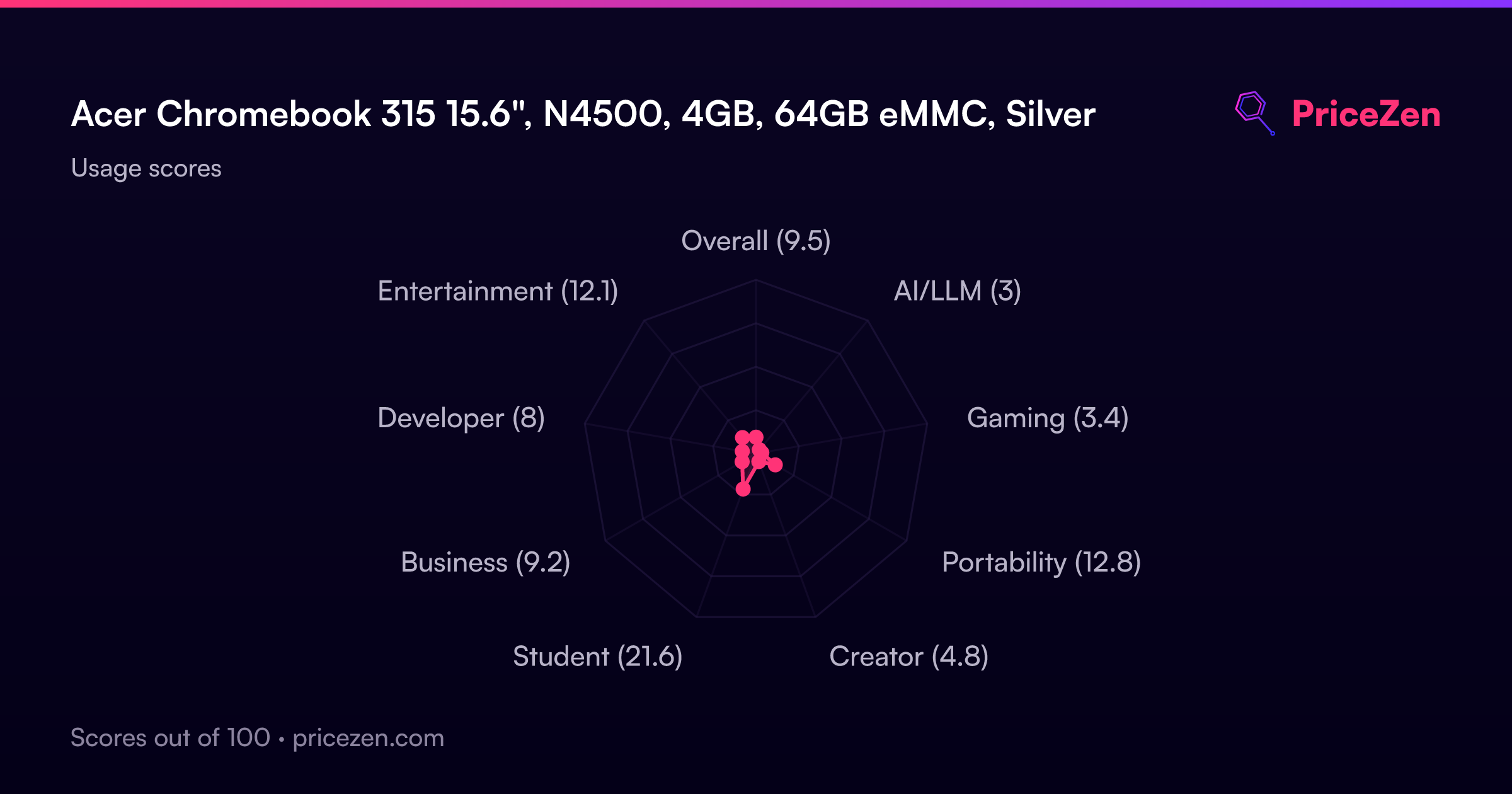
Usage Scores
- Overall9.5
- AI/LLM3
- Gaming3.4
- Portability12.8
- Creator4.8
- Student21.6
- Business9.2
- Developer8
- Entertainment12.1