Lenovo ThinkStation P2 Tower Gen 2, Core Ultra 7 265 vPro, 32GB, 1TB SSD, RTX 5070, Raven Black
The Intel Core Ultra 7 265 vPro 20-core 2.4GHz CPU and NVIDIA GeForce RTX 5070 12GB VRAM GPU deliver AI-optimized performance for complex workstation tasks, supported by 32GB DDR5 RAM and a 1024GB NVMe SSD. Its mid-tower design keeps weight at 5.84kg while offering Wi-Fi 7, HDMI 2.1, and eight USB-A ports, making it a practical choice for mixed use. This workstation suits professionals running CAD, rendering, or data-heavy simulations who also want solid gaming capability, though its compactness score is the weakest area.

No current retailer price
Snapshot
The 30-Second Version
The ThinkStation P2 Tower Gen 2 pairs a 20-core Core Ultra 7 265 vPro with an RTX 5070, both ranking near the top of this category, and scores 86.9/100 for workstation use. At USD 4,179 from Lenovo it's a serious investment, and owners love the build and upgradeability. But a lone USB-C port and a quality control complaint keep owner sentiment merely average despite the 4.8/5 rating. Great for Windows professionals, worth inspecting closely on arrival.
Pros & Cons
Pros
- RTX 5070 with 12GB VRAM ranks in the top tier of this category 91st
- 20-core Core Ultra 7 265 vPro, one of the stronger CPUs here 88th
- Owners repeatedly praise solid build and easy upgradeability 87th
- Strong port selection score with Wi-Fi 7, HDMI 2.1 and Ethernet onboard 82nd
- Gaming score of 82.3/100 makes it a legit dual-purpose box
Cons
- Only one USB-C port against eight USB-A, and owners notice
- 1TB NVMe is merely mid-pack for storage in this class
- One verified owner reported loose internal cables causing noise
- Bundled mouse and keyboard can't be opted out of
- Owner sentiment is only average despite the high star rating
What owners think
The Word on the Street
How owner sentiment changed over time
ExclusiveBased on when customers actually wrote their reviews - so you can see whether early praise held up.
9 written reviews, Feb – Nov 2026: 8 happy, 1 mixed
Across all 25 store ratings: 4.6★. Most owners rate without writing a review. The chart counts the 9 written reviews.
Each dot is one written review, in the month it was written. Happy = 4-5★, mixed = 3★, unhappy = 1-2★.
The proof
Performance
Start with the silicon. The GPU ranks in the 91st percentile against everything else in this category, and the CPU sits at 88, so both are among the best you can buy in a machine like this right now. Practically, that means the 20-core Ultra 7 chews through parallel work like encoding, compiling and simulation while the RTX 5070 handles viewport acceleration and GPU-assisted effects without breaking a sweat. Owners describe multitasking as smooth even with heavier workloads stacked up, which lines up with what those numbers suggest. The 12GB of VRAM is the ceiling to watch: it's plenty for most editing and CAD work, but if you're loading enormous scenes or large local AI models, that's where you'll hit a wall before the CPU complains.
The supporting cast is more mixed. 32GB of DDR5 is well above average for this class, though heavy VM users will want more, and the good news is owners consistently praise how easy this chassis is to upgrade. Storage is the soft spot: 1TB of NVMe lands around the middle of the pack in our rankings, so it's fast but not roomy once you're storing project files and footage locally. Port selection scores strongly overall at 87, helped by Wi-Fi 7, Ethernet, HDMI 2.1 and DisplayPort, yet there's only a single USB-C alongside eight USB-A. That ratio is fine for a keyboard-and-peripherals desk and annoying for anyone living on modern USB-C docks and drives.
Specifications
Full Specifications
Processor
| CPU | Intel Core Ultra 7 265 |
| Cores | 20 |
| Frequency | 2.4 GHz |
| L3 Cache | 30 MB |
Graphics
| GPU | NVIDIA GeForce RTX 5070 |
| Type | Discrete |
| VRAM | 12 GB |
| VRAM Type | GDDR7 |
Memory & Storage
| RAM | 32 GB |
| RAM Generation | DDR5 |
| Storage | 1 TB |
| Storage Type | NVMe SSD |
Build
| Form Factor | mid-tower |
| PSU | 750 |
| Weight | 5.8 kg / 12.9 lbs |
Connectivity
| USB-C Ports | 1 |
| USB Ports | 8 |
| HDMI | 1x HDMI 2.1 TMDS |
| DisplayPort | 2x DisplayPort 1.4 |
| Wi-Fi | Wi-Fi 7 |
| Bluetooth | Bluetooth 5.4 |
| Ethernet | Ethernet (RJ45) |
System
| OS | Windows 11 Pro |
vs Competition
The obvious cross-shop is the Apple Mac Studio M5 Max, and it's a philosophical fork rather than a spec fight. If your work lives in macOS-only software, nothing here changes that. But if you need Windows applications, CUDA-accelerated tools or a machine you can crack open and add RAM and drives to later, the P2's upgrade-friendly tower design and 86.9/100 workstation score make a strong case, and owners specifically call out that expandability as a reason they bought it.
Against the Dell Desktop ECT1250, the HP OMEN GT16-0364, the ASUS ROG GM700 and the MSI Aegis ZS2 A9NVP-1407US, the Lenovo's argument is balance. Those gaming-leaning boxes are worth a look if pure frame rates are the goal, but the P2 pairs a GPU in the 91st percentile with a CPU at 88 and adds vPro and Windows 11 Pro, which is the stuff IT departments actually ask for. Its weakest area by far is compactness at 35.3/100, so if desk space is tight, this 5.84kg mid-tower is the wrong shape and you should be looking elsewhere in that list.
| Spec | Lenovo ThinkStation P2 Tower Gen 2 | Apple Mac Studio M5 Max | Dell Desktop ECT1250 | HP OMEN GT16-0364 | ASUS ROG GM700 | MSI Aegis ZS2 A9NVP-1407US |
|---|---|---|---|---|---|---|
| CPU | Intel Core Ultra 7 265 | Apple M5 Max | Intel Core Ultra 7 265 | AMD Ryzen 7 8700F | AMD Ryzen 7 9800X3D | AMD Ryzen 9 9900X |
| RAM (GB) | 32 | 48 | 32 | 32 | 32 | 32 |
| Storage (GB) | 1024 | 1024 | 2048 | 1024 | 2048 | 2048 |
| GPU | NVIDIA GeForce RTX 5070 | Apple (40-Core) | Intel UHD Graphics | NVIDIA GeForce RTX 5070 | NVIDIA GeForce RTX 5070 Ti | NVIDIA GeForce RTX 5070 |
| Form Factor | mid-tower | mini | sff | mid-tower | mid-tower | mid-tower |
| Psu W | 750 | 480 | 180 | 850 | 850 | 750 |
| OS | Windows 11 Pro | macOS | Windows 11 Home | Windows 11 Home | Windows 11 Home | Windows 11 Home |
| Compare | Compare | Compare | Compare | Compare |
| Product | CPU | GPU | RAM | Ports | Storage | User Sentiment | Reliability | Social Proof |
|---|---|---|---|---|---|---|---|---|
| Lenovo ThinkStation P2 Tower Gen 2 | 88.1 | 90.7 | 81.6 | 87.3 | 68.6 | 53.1 | 70.3 | 72.3 |
| Apple Mac Studio M5 Max Compare | 95.7 | 84.9 | 95 | 89.1 | 68.6 | 95 | 99.3 | 71.1 |
| Dell Desktop ECT1250 Compare | 88.1 | 60 | 81.6 | 75 | 82.5 | 98.5 | 70.3 | 98.2 |
| HP OMEN GT16-0364 Compare | 69.4 | 90.7 | 87 | 97.9 | 53.3 | 98.5 | 70.3 | 98.2 |
| ASUS ROG GM700 Compare | 80.4 | 94.6 | 81.6 | 96.1 | 90 | 98.5 | 37.8 | 99.3 |
| MSI Aegis ZS2 A9NVP-1407US Compare | 92.4 | 90.7 | 87 | 90.4 | 82.5 | 88.6 | 37.8 | 99.3 |
Price
Value & Pricing
At USD 4,179 from Lenovo, this isn't cheap, and we only have that single listing in our price tracking right now, so there's no cross-store shopping arbitrage to chase. What you're paying for is the combination: a top-tier GPU and CPU pairing, vPro manageability, Windows 11 Pro and a chassis owners say is easy to open and expand. For a business buying a machine that has to earn its keep across several years of billable work, that math can work. Value-for-money feedback from owners is genuinely split, though, and the fact you can't decline the bundled mouse and keyboard stings a bit at this price.
Read more
Overview
The ThinkStation P2 Tower Gen 2 is Lenovo's entry-level workstation, and "entry-level" is doing some heavy lifting here. Inside that mid-tower you get an Intel Core Ultra 7 265 vPro with 20 cores at 2.4GHz, an RTX 5070 carrying 12GB of VRAM, 32GB of DDR5 and a 1TB NVMe drive, all fed by a 750W power supply and running Windows 11 Pro. Our scoring model puts it at 86.9/100 for workstation duty and 80.4 overall, which lands it comfortably in the upper tier of everything we track in this category.
This is a machine aimed at people who bill by the hour and can't afford a blue screen in the middle of a render. CAD, video editing, data crunching, running a stack of virtual machines while your browser eats another few gigabytes: that's the target. The vPro badge matters if you've got an IT department managing fleets of these things remotely, and owners back that up, with corporate buyers reporting their staff are happy and the thing just gets on with business workloads.
What makes it interesting is the split personality. It scores 82.3/100 for gaming, which is genuinely strong for something sold as a workstation, so this doubles as a very capable after-hours machine. But the owner feedback isn't uniformly glowing. Sentiment sits at about the middle of the pack in our data despite a 4.8/5 rating from 23 reviews, and the reason is quality control rather than performance. We'll get into that.
Common Questions
Q: Can I upgrade the RAM and storage later?
Yes, and it's one of the things owners praise most about this tower. It ships with 32GB of DDR5 and a 1TB NVMe SSD, and the storage capacity is only mid-pack for this category, so adding a drive for project files is a sensible early move. The mid-tower chassis is designed to be opened, which is a real advantage over sealed alternatives.
Q: Is it any good for gaming, or strictly a work machine?
It's genuinely capable. Our model scores it 82.3/100 for gaming, backed by an RTX 5070 with 12GB of VRAM that ranks in the 91st percentile of this category. You give up nothing meaningful by choosing the workstation badge, though dedicated gaming towers from HP, ASUS and MSI are worth cross-shopping if frames are your only priority.
Q: Are the ports enough for a modern desk setup?
Mostly, with one caveat. You get eight USB-A, HDMI 2.1, DisplayPort, Ethernet and Wi-Fi 7, which covers most peripherals and displays comfortably. But there's only a single USB-C, and owners specifically flag that as a limitation if you rely on USB-C docks, drives or accessories.
Q: Should I worry about the quality control complaints?
One verified owner reported loose cables inside the case causing noise, which is not what you want at USD 4,179. It's a single report against a 4.8/5 average from 23 reviews, so we wouldn't call it a pattern, but we'd open the side panel on arrival, check that everything is seated, and listen for rattles during the return window.
Who Should Skip This
Skip this if your work lives on macOS, since the Apple Mac Studio M5 Max exists for exactly that reason, or if desk space is at a premium: compactness is this machine's worst score at 35.3/100, and a 5.84kg mid-tower doesn't shrink. Pure gamers should also think twice, because the HP OMEN GT16-0364, ASUS ROG GM700 and MSI Aegis ZS2 are built around that job, and you'd be paying for vPro manageability you'll never touch.
And if your workflow leans hard on USB-C, one port is going to frustrate you daily, which owners already report. Heavy local AI or massive-scene users should also pause on the 12GB VRAM ceiling before committing.
Verdict
For professional Windows workloads, we think this is a strong buy. The CPU and GPU both rank near the top of the category, owners report reliable day-to-day operation under real business loads, and the ability to upgrade later means the USD 4,179 outlay stretches further than a sealed box would. If you're outfitting a small studio or a corporate team that needs vPro management, it does the job it was designed for.
For everyone else, temper the enthusiasm slightly. The 4.8/5 average looks fantastic, but our sentiment analysis of the actual review text lands closer to average, dragged down by a quality control report involving loose cables rattling around inside. With only a handful of detailed reviews in our data, we'd treat that as a yellow flag rather than a dealbreaker: check the internals when it arrives, listen for rattles, and don't hesitate to use the warranty. Buy it for the specs and the expandability, not because the star rating tells you it's flawless.
Usage Scores
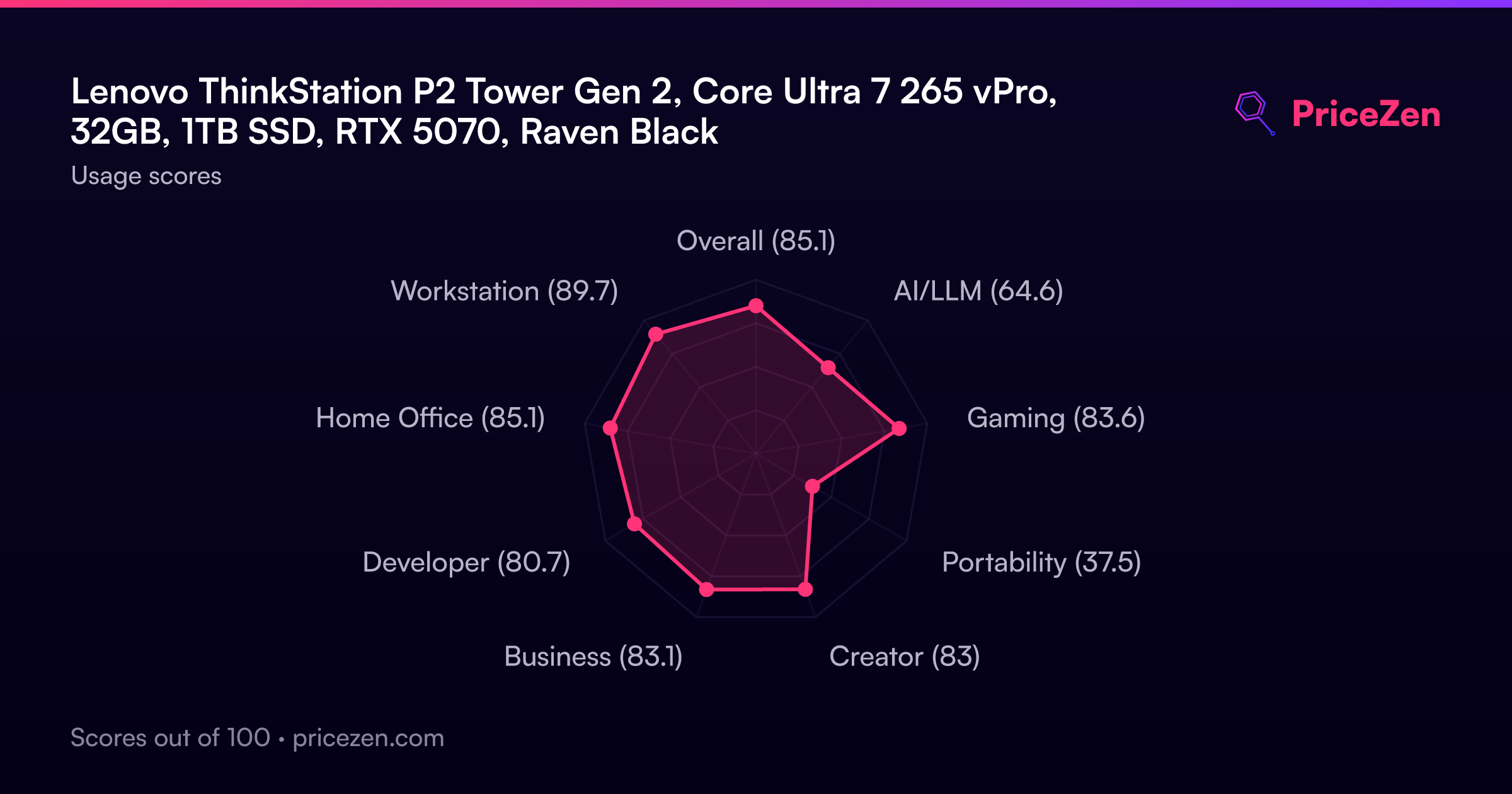
- Overall85.1
- AI/LLM64.6
- Gaming83.6
- Portability37.5
- Creator83
- Business83.1
- Developer80.7
- Home Office85.1
- Workstation89.7