ASUS NUC 14 Pro+ RNUC14RVSU50000UI 2024, Core Ultra 5 125H, Silver

46/100 overall score 4.3 average from 3 owner ratings
- CPU
- Intel Core Ultra 5 125H
- GPU
- Intel Arc Graphics
- Form factor
- mini
- Psu
- 120 W
- OS
- No OS
Compare prices at 1 store
Cheapest first. New, refurbished and bundled offers are kept apart, so you compare like with like.
| Store | Sold by | Colour and condition | Price | vs lowest | Last checked | Link |
|---|---|---|---|---|---|---|
| New1 offerSingle unit | ||||||
| Not checked in the last 7 days, so these prices may have changed | ||||||
| Amazon | Marketplace seller | Not listed | MX$13,234.62 | Nov 2 | Go to store | |
 Source: PriceZen, checked Nov 2, 2026
A price counts as current when we checked it in the last 7 days. “Marketplace seller” means a third-party seller on that store, not the store itself.
Price history
Checked that dayNot checked that day, still on offer
Source: PriceZen, checked Nov 3, 2026




Snapshot
The 30-Second Version
The ASUS NUC 14 Pro+ is a compact barebone mini PC with great ports and a capable 14-core CPU, but you supply the RAM, storage, and OS. Gaming is a lost cause, and setup takes some effort. At USD 429 or CAD 598, it's a solid deal for a DIY productivity box.
Pros & Cons
Pros
- Compact and light at 0.82kg with a clean white aluminum build 66th
- Thunderbolt 4, dual HDMI 2.1, and 2.5G Ethernet in a tiny box
- Dual M.2 slots and dual DDR5 SO-DIMM slots for easy upgrades
- Wi-Fi 6E and Bluetooth 5.3 built in
Cons
- Barebone kit means no RAM, storage, or OS included
- Gaming performance is basically a non-starter
- RAM and storage percentile rankings are near the bottom
- Setup is more involved than a typical prebuilt desktop
What owners think
The Word on the Street
- Owners like the compact size and build quality, especially compared to other mini PC brands.
- Several buyers mention the initial setup and OS installation is more complicated than expected.
- Some reviewers cross-shopped Beelink, Minisforum, and Geekom, and felt the NUC was nicer but pricier.
How owner sentiment changed over time
ExclusiveBased on when customers actually wrote their reviews - so you can see whether early praise held up.
2 written reviews, Aug 2024 – Mar 2025: 2 happy
Across all 3 store ratings: 4.3★. The chart counts the 2 written reviews.
Each dot is one written review, in the month it was written. Happy = 4-5★, mixed = 3★, unhappy = 1-2★.
The proof
Performance
The Core Ultra 5 125H is a 14-core chip with a 1.2GHz base clock, and it handles everyday office work, web browsing, and light content creation without breaking a sweat. The integrated Intel Arc graphics are fine for video playback and basic photo editing, but the gaming score of 10.1/100 tells you everything. Don't expect to run modern titles at anything beyond low settings. The port situation is a highlight, with Thunderbolt 4, dual HDMI 2.1, 2.5G Ethernet, and Wi-Fi 6E. That's better connectivity than many full-size desktops. The 120W PSU is plenty for this chip, and the 0.82kg weight makes it easy to mount behind a monitor with the included VESA bracket.
Specifications
Full Specifications
Processor
| CPU | Intel Core Ultra 5 125H |
| Cores | 14 |
| Frequency | 1.2 GHz |
| L3 Cache | 18 MB |
Graphics
| GPU | Intel Arc Graphics |
| Type | Integrated |
| VRAM Type | Shared |
Memory & Storage
| RAM Generation | DDR5 |
| Storage Type | NVMe SSD |
Build
| Form Factor | mini |
| PSU | 120 |
| Weight | 0.8 kg / 1.8 lbs |
Connectivity
| USB-C Ports | 2 |
| USB Ports | 4 |
| Thunderbolt | Thunderbolt 4 x 2 |
| HDMI | 2x HDMI 2.1 |
| Wi-Fi | Wi-Fi 6E |
| Bluetooth | Bluetooth 5.3 |
| Ethernet | 2.5 GbE |
System
| OS | No OS |
vs Competition
Against the Apple Mac mini M4, the NUC 14 Pro+ loses on raw performance and ease of setup. The Mac mini comes ready to go with storage and macOS, and Apple's silicon crushes the Core Ultra 5 in most tasks. But the NUC has more ports and runs Windows or Linux natively, which matters for some workflows. The Minisforum DeskMini UM880 Plus is a closer competitor, often cheaper and with similar expandability, though ASUS has better build quality and a longer warranty track record. The HP OmniDesk and Dell Tower are traditional desktops, so they're bigger but come fully assembled. If you want a tiny Windows box and don't mind DIY, the NUC holds its own. If you want zero hassle, the Mac mini or a prebuilt Dell is the safer bet.
| Spec | ASUS NUC 14 Pro+ RNUC14RVSU50000UI | Apple Mac Studio M5 Max | CLX SET TGMSETRTU5204BM | Lenovo Legion Tower 5i Gen 10 | Dell Area-51 | HP Z2 Mini G1a |
|---|---|---|---|---|---|---|
| CPU | Intel Core Ultra 5 125H | Apple M5 Max | Intel Core i9 14900KF | Intel Core Ultra 9 275HX | Intel Core Ultra 9 285K | AMD Ryzen AI Max+ Pro 395 |
| RAM (GB) | - | 64 | 64 | 32 | 32 | 128 |
| Storage (GB) | - | 4096 | 8192 | 2048 | 2048 | 2048 |
| GPU | Intel Arc Graphics | Apple (40-Core) | NVIDIA GeForce RTX 5070 | NVIDIA GeForce RTX 5070 Ti | NVIDIA GeForce RTX 5080 | AMD Radeon 8060S |
| Form Factor | mini | mini | mid-tower | mid-tower | desktop | mini |
| Psu W | 120 | 480 | 850 | 850 | 1500 | 300 |
| OS | No OS | macOS | Windows 11 Home | Windows 11 Home | Windows 11 Home | Windows 11 Pro |
| Compare | Compare | Compare | Compare | Compare |
| Product | CPU | GPU | RAM | Ports | Storage | Reliability | Social Proof |
|---|---|---|---|---|---|---|---|
| ASUS NUC 14 Pro+ RNUC14RVSU50000UI | 51.3 | 60 | 17.3 | 65.5 | 1.8 | 37.7 | 25.6 |
| Apple Mac Studio M5 Max Compare | 95.7 | 84.9 | 98.3 | 89.1 | 98.1 | 99.3 | 66.6 |
| CLX SET TGMSETRTU5204BM Compare | 94.8 | 90.6 | 96.5 | 84.4 | 99.2 | 11.7 | 90.4 |
| Lenovo Legion Tower 5i Gen 10 Compare | 92.8 | 94.6 | 81.6 | 97.2 | 90 | 70.3 | 90.5 |
| Dell Area-51 Compare | 98 | 97.3 | 90.4 | 99.4 | 90 | 70.3 | 38.4 |
| HP Z2 Mini G1a Compare | 91.4 | 74.3 | 99.7 | 93.3 | 90 | 70.3 | 48.4 |
Price
Value & Pricing
Pricing is all over the place. In the US, listings range from USD 429 to USD 589 across three vendors. That's a USD 160 spread for the same barebone kit, so shop around. The best US deal we see is at USD 429. In Canada, the gap is even wider, CAD 598 to CAD 879 across two listings, a CAD 281 difference. The CAD 598 listing is the one to grab if you're up north. Remember, you still need to buy RAM, an SSD, and a Windows license, so factor in another couple hundred bucks. At the low end of that price range, it's a decent value for a compact productivity machine. At the high end, you're paying too much.
Read more
Overview
The ASUS NUC 14 Pro+ is a barebone mini PC that looks sharp in its white aluminum chassis but asks you to bring your own RAM and storage. That's the deal here. You get a 14-core Intel Core Ultra 5 125H, integrated Arc graphics, and a surprisingly generous port selection for a box this small. It's aimed at compact productivity and light AI workloads, not gaming. Our database puts its compact score at 51/100 and total at 46.7/100, so it's a solid but not spectacular performer in its category.
Setup is not plug-and-play. You'll need to install DDR5 SO-DIMMs and an NVMe drive, then load an OS. The two M.2 slots and dual DDR5 slots give you flexibility, but the RAM percentile is 18th and storage is 2nd, which just reflects the barebone nature. If you're comfortable with a screwdriver and a Windows USB stick, this is a fun little project. If not, buy something prebuilt.
Common Questions
Q: Does the ASUS NUC 14 Pro+ come with RAM and storage?
No, this is a barebone kit. You'll need to add your own DDR5 SO-DIMM RAM and an M.2 NVMe SSD. It has two RAM slots and two M.2 slots, one 2280 and one 2242.
Q: Can I play games on the NUC 14 Pro+?
Not really. The integrated Intel Arc graphics are fine for video and light tasks, but the gaming score in our database is 10.1/100. Stick to older or very low-demand titles if you must.
Q: What operating system does it come with?
No OS is included. You'll need to install Windows 11 or a Linux distribution yourself. The hardware is Windows 11 ready, so a standard USB installer works fine.
Who Should Skip This
Skip this if you want a computer that works out of the box. The barebone nature means buying RAM, storage, and an OS separately, then assembling and installing everything. If you need gaming performance, look elsewhere, the Arc integrated graphics won't cut it. And if you're not comfortable opening up a PC, a prebuilt mini PC or the Mac mini M4 will save you a headache.
Verdict
This is for the tinkerer who wants a compact, well-built Windows or Linux machine and doesn't mind installing their own parts. It's a great little office PC, a decent home server, or a clean living room box for streaming. The port selection is genuinely impressive for the size. Just know that gaming is off the table and you'll spend an afternoon getting it set up. If that sounds fun, grab one at the low end of the price range. If it sounds like a chore, buy a prebuilt.
Usage Scores
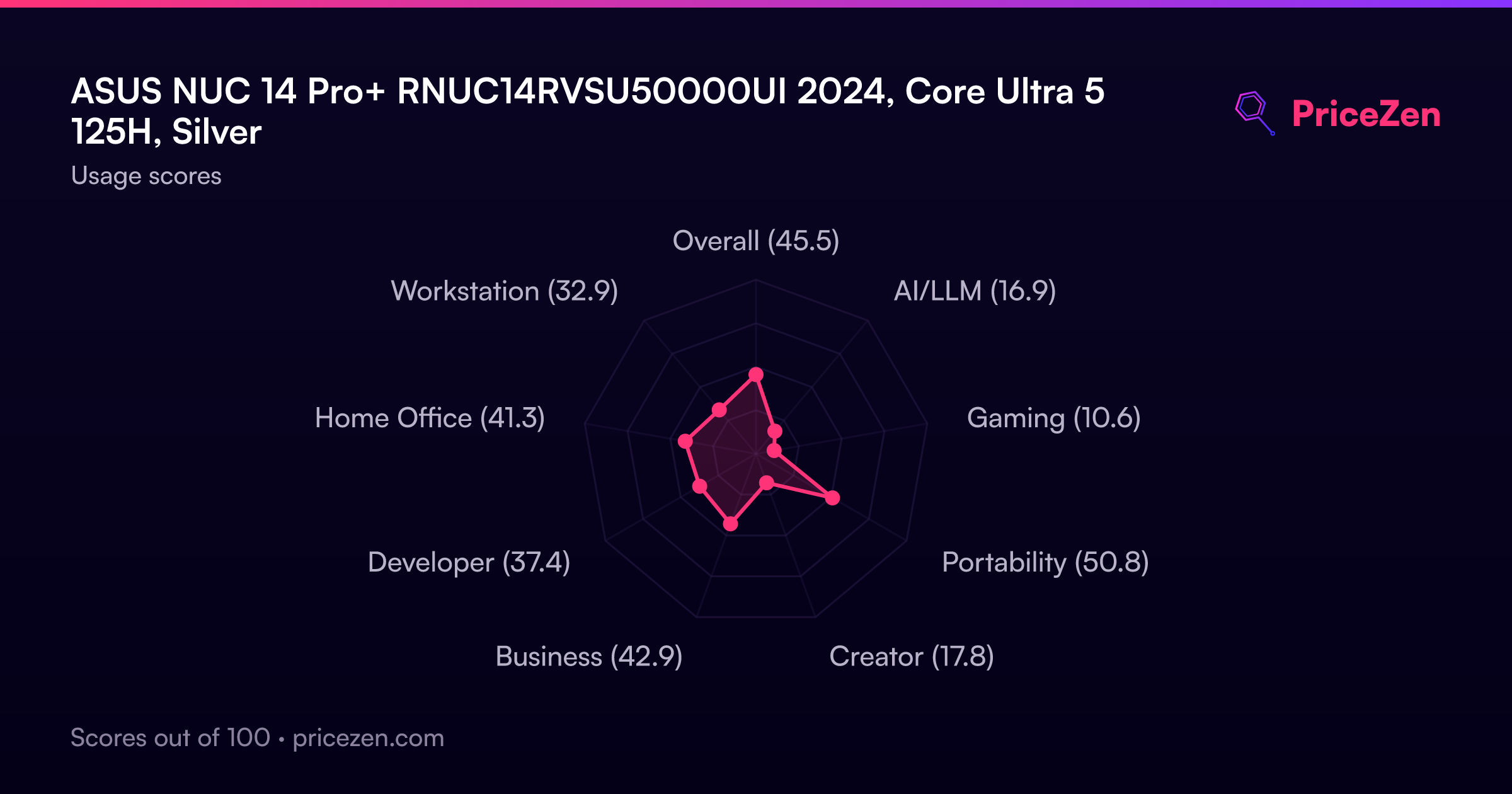
- Overall45.5
- AI/LLM16.9
- Gaming10.6
- Portability50.8
- Creator17.8
- Business42.9
- Developer37.4
- Home Office41.3
- Workstation32.9