Lenovo ThinkCentre Neo 50q Gen 5 2025, Core 5 210H, 32GB, 1TB SSD, Eclipse Black

Boots fast and hides behind your monitor verified Nov 29
66/100 overall score 4.6 average from 39 owner ratings
- CPU
- Intel Core 5 210H
- RAM
- 32 GB
- Storage
- 1 TB
- GPU
- Integrated Intel Graphics
- Form factor
- mini
- Psu
- 90 W
- OS
- Windows 11 Pro
Snapshot
The 30-Second Version
The ThinkCentre Neo 50q Gen 5 is a tiny, quiet office PC with generous RAM and storage, but a middling CPU and weak integrated graphics. It's built for business tasks, not anything demanding. At $1,929, you're paying for the form factor and reliability, not raw power.
Pros & Cons
Pros
- Tiny footprint that disappears behind a monitor 82nd
- 32GB of DDR5 is more RAM than most office PCs 78th
- Quiet operation for a shared workspace 70th
- 1TB NVMe SSD means fast boots and app loads 69th
Cons
- Integrated graphics are nearly bottom of the barrel
- CPU performance is just average for the category
- Bloatware and pre-installed junk annoy owners
- Fan noise can get noticeable under load
What owners think
The Word on the Street
- Owners consistently praise the compact size and how well it fits into small offices or behind monitors.
- Many buyers report fast setup, quick boot times, and smooth performance for everyday business tasks.
- A recurring gripe is the bloatware and pre-installed software that needs cleaning up after unboxing.
How owner sentiment changed over time
ExclusiveBased on when customers actually wrote their reviews - so you can see whether early praise held up.
34 written reviews, Jun – Oct 2026: 32 happy, 1 mixed, 1 unhappy
Across all 39 store ratings: 4.6★. The chart counts the 34 written reviews.
- Oct – Dec 20263 of 3 happy
Buyers praised the mini desktop's price, performance, compact size, and solid build, noting fast setup and minimal bloat.
- Performance and value praised; great price for the performance.
- Compact size ideal for small offices with limited space.
- Solid build and stability under load with stock specs.
- Fast setup with little bloatware; good unboxing experience.
- Jul – Sep 202627 of 29 happy
Buyers praised the compact size, speed, and quiet operation, with many calling it a great value. A few noted loud fans, setup documentation gaps, and one severe DOA/return experience.
- Compact design and small footprint repeatedly praised; fits tight spaces and frees desk area.
- Fast performance and smooth operation for daily tasks, business use, and multitasking.
- Quiet operation exceeded expectations; several noted it runs silent even under load.
- One DOA unit with poor customer service; replacement unavailable, only refund offered.
Each dot is one written review, in the month it was written. Happy = 4-5★, mixed = 3★, unhappy = 1-2★. Period summaries are in English.
The proof
Performance
For everyday office work, this thing is fine. 32GB of DDR5 is a standout, landing in the 83rd percentile for RAM, and the 1TB NVMe SSD gives you fast boot times and snappy app loading. Owners consistently mention quick startups and smooth daily performance. But the CPU is the bottleneck. The Core 5 210H sits at the 41st percentile, which means it's about average for this category. That's fine for email and spreadsheets, but don't expect it to chew through heavy multitasking or anything creative. The integrated Intel graphics are a weak spot, 14th percentile, so even light photo editing will feel sluggish. This is a machine built for one thing: getting office work done quietly.
Specifications
Full Specifications
Processor
| CPU | Intel Core 5 210H |
| Cores | 8 |
| Frequency | 2.2 GHz |
| L3 Cache | 12 MB |
Graphics
| GPU | Integrated Intel Graphics |
| Type | Integrated |
Memory & Storage
| RAM | 32 GB |
| RAM Generation | DDR5 |
| Storage | 1 TB |
| Storage Type | NVMe SSD |
Build
| Form Factor | mini |
| PSU | 90 |
| Weight | 1.1 kg / 2.5 lbs |
Connectivity
| USB-C Ports | 1 |
| USB Ports | 5 |
| HDMI | 1x HDMI 2.1 |
| DisplayPort | 1x DisplayPort 1.4 |
| Wi-Fi | Wi-Fi 6E |
| Bluetooth | Bluetooth 5.3 |
| Ethernet | Integrated Ethernet |
System
| OS | Windows 11 Pro |
vs Competition
Stacked against the Apple Mac mini M4 Pro, this thing gets embarrassed on performance. The Mac mini's chip is in a completely different league, and it's not much bigger. The HP OMEN GT22-3080 and Dell Area-51 are gaming machines with dedicated GPUs, so they're not really the same buyer, but they show what $1,900 can get you if you don't need the tiny footprint. The CLX SET and Horizon Pcs Autherium Dragon are also in that gaming space. Honestly, the Neo 50q's real competition is other mini business PCs, and in that niche it holds its own. But if you're cross-shopping with a Mac mini, the Lenovo only wins on Windows compatibility and enterprise management features.
| Spec | Lenovo ThinkCentre Neo 50q Gen 5 | Apple Mac Studio M5 Max | HP OMEN GT16-0364 | Dell Desktop ECT1250 | ASUS ROG GM700 | CLX SET TGMSETRTU5204BM |
|---|---|---|---|---|---|---|
| CPU | Intel Core 5 210H | Apple M5 Max | AMD Ryzen 7 8700F | Intel Core Ultra 7 265 | AMD Ryzen 7 9800X3D | Intel Core i9 14900KF |
| RAM (GB) | 32 | 48 | 32 | 32 | 32 | 64 |
| Storage (GB) | 1024 | 1024 | 1024 | 2048 | 2048 | 8192 |
| GPU | Integrated Intel Graphics | Apple (40-Core) | NVIDIA GeForce RTX 5070 | Intel UHD Graphics | NVIDIA GeForce RTX 5070 Ti | NVIDIA GeForce RTX 5070 |
| Form Factor | mini | mini | mid-tower | sff | mid-tower | mid-tower |
| Psu W | 90 | 480 | 850 | 180 | 850 | 850 |
| OS | Windows 11 Pro | macOS | Windows 11 Home | Windows 11 Home | Windows 11 Home | Windows 11 Home |
| Compare | Compare | Compare | Compare | Compare |
| Product | CPU | GPU | RAM | Ports | Storage | User Sentiment | Reliability | Social Proof |
|---|---|---|---|---|---|---|---|---|
| Lenovo ThinkCentre Neo 50q Gen 5 | 47.3 | 49.9 | 81.6 | 59.1 | 68.6 | 62.9 | 70.2 | 77.5 |
| Apple Mac Studio M5 Max Compare | 95.7 | 85 | 95 | 89.1 | 68.6 | 95 | 99.3 | 71.4 |
| HP OMEN GT16-0364 Compare | 69.3 | 90.7 | 87 | 97.9 | 53.2 | 98.6 | 70.2 | 98.3 |
| Dell Desktop ECT1250 Compare | 88 | 60.1 | 81.6 | 75.1 | 82.5 | 98.6 | 70.2 | 98.3 |
| ASUS ROG GM700 Compare | 80.3 | 94.6 | 81.6 | 96.1 | 90 | 98.6 | 37.7 | 99.3 |
| CLX SET TGMSETRTU5204BM Compare | 94.8 | 90.7 | 96.5 | 84.5 | 99.2 | 98.6 | 11.7 | 90.9 |
Price
Value & Pricing
At $1,929 USD, this is a tough sell on pure specs. You're paying a premium for the tiny form factor and Lenovo's business-grade build quality. The RAM and storage are generous, but the CPU and GPU don't justify that price on their own. Owners do say it feels like good value for money, and the 4.6-star rating backs that up. But if you don't need the ultra-compact size, you can get a lot more processing power for the same cash in a standard desktop. The value here is in the space savings and quiet operation, not raw performance.
Read more
Overview
The ThinkCentre Neo 50q Gen 5 is Lenovo's pitch for small businesses that need a real PC without a tower hogging desk space. It's a 1.11kg box with a Core 5 210H, 32GB of DDR5, and a 1TB NVMe drive. On paper, that's a serious little workhorse for spreadsheets, browsers, and the usual office grind.
But here's the thing. The specs look better than the actual CPU ranking. That Core 5 210H lands in the 41st percentile for CPUs in our database, which is solidly middle of the pack. The integrated graphics are worse, 14th percentile. So this is not a machine for anything beyond basic display output. It's a business tool, not a toy.
Common Questions
Q: Can this handle dual monitors?
Yes. It has DisplayPort, HDMI 2.1, and USB-C with display output, so running two monitors is straightforward. The integrated graphics can handle basic dual-display office work without breaking a sweat.
Q: Is the fan noise a problem in a quiet office?
Most owners say it runs quietly during normal tasks, but a few mention the fan gets noticeable under sustained load. For typical office work, it should stay pretty unobtrusive.
Q: Can I upgrade the RAM or storage later?
The 32GB of DDR5 and 1TB NVMe SSD are already generous for a mini PC of this size. Upgradability in ultra-compact systems like this is usually limited, so it's best to spec it right from the start.
Who Should Skip This
Skip this if you need any kind of graphics performance. The integrated GPU is one of the weakest we've seen, so photo editing, video work, or even casual gaming is off the table. Also skip it if you're a home user who doesn't need enterprise features, because you're paying a business premium for things like TIO integration and ICE 7.0 security that you'll never touch. And if you want the most performance per dollar, a standard desktop tower will crush this at the same price.
Verdict
This is for small businesses that need a fleet of quiet, compact, reliable Windows machines. The ThinkCentre Neo 50q Gen 5 nails that brief. It's small enough to mount behind a monitor, quiet enough for open offices, and has enough RAM and storage to keep employees happy for years. The 90th percentile social proof and 70th percentile reliability score suggest Lenovo has a solid track record here. Just don't buy it expecting a performance machine. It's a workhorse, not a racehorse.
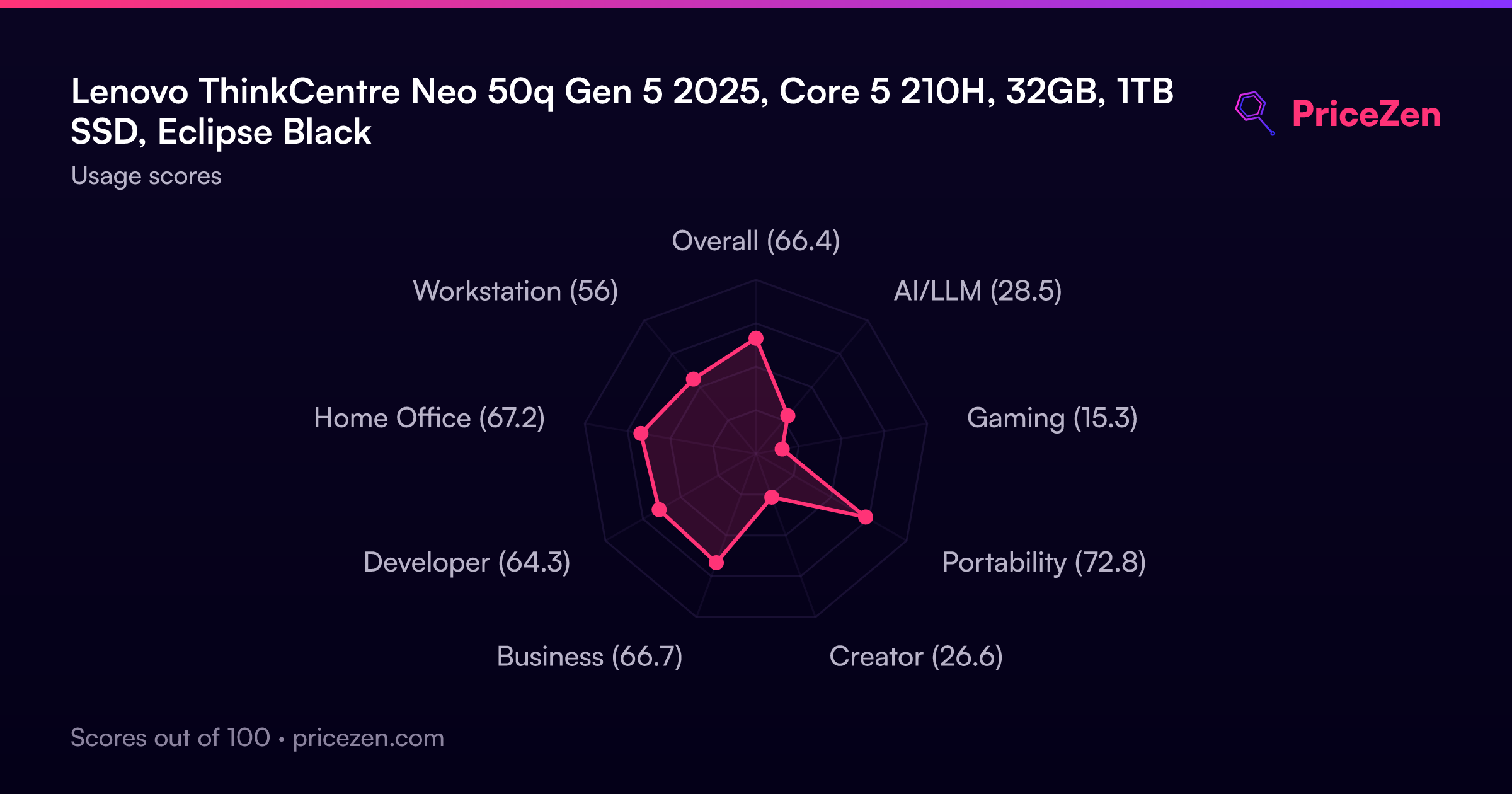
Usage Scores
- Overall66.4
- AI/LLM28.5
- Gaming15.3
- Portability72.8
- Creator26.6
- Business66.7
- Developer64.3
- Home Office67.2
- Workstation56