YOBANSE 10" P30 2026, 26GB, 256GB, Cellular, Silver
The 26GB of RAM and included keyboard connector with stylus support make this a versatile 2-in-1 for light multitasking on Android 15. Its 8000mAh battery and expandable storage up to 2TB offer solid endurance and flexibility at a budget-friendly price point. This tablet is best for students or casual users who need a basic, all-in-one package for note-taking and media consumption.

現在、販売店の最新価格はありません


概要
The 30-Second Version
A $90 tablet with a spec sheet that screams 'flagship' but a screen that whispers 'dollar store.' The included keyboard and mouse are a steal, but you'll be staring at one of the weakest displays we've seen.
Pros & Cons
長所
- Insane amount of RAM for the price keeps apps from reloading 96th
- Includes a full accessory kit: keyboard, mouse, case, and stylus 85th
- Android 15 out of the box with expandable storage up to 2TB 82nd
- Solid 8000mAh battery life for all-day casual use 80th
短所
- The 10" screen is a dull, low-quality panel that ruins media consumption
- Wi-Fi 5 and no Wi-Fi 6 means slower, less reliable connectivity
- Build quality and long-term reliability are complete unknowns
- The '26GB' RAM is likely a mix of physical and slower virtual RAM
実証データ
Performance
The performance story here is a tale of two tablets. The 8-core CPU and GPU sit in the 81st to 85th percentile, which means for basic navigation, streaming, and light apps, it actually keeps up better than most cheap slates. What surprised us is how much the mediocre screen undermines that. Scrolling feels fine, but you're looking at a display that ranks in the 30th percentile, so colors are washed out and it's not very bright. The massive 26GB of RAM is the head-scratcher. It's a 96th percentile figure that lets you keep a ton of apps in memory, but the processor isn't powerful enough to do anything demanding with them. It's like having a huge desk with a tiny chair.
Specifications
Full Specifications
Processor
| Cores | 8 |
Memory & Storage
| RAM | 26 GB |
| Storage | 256 GB |
| Expandable | Yes |
Display
| Size | 10" |
Connectivity
| Wi-Fi | Wi-Fi 5 |
| Bluetooth | Bluetooth 5.0 |
| Cellular | Yes |
Features
| Stylus Support | Yes |
Physical
| OS | Android 15 |
vs Competition
Stacked against the Apple iPad 10th Generation, the YOBANSE is playing a different sport. The iPad's screen, build quality, and processor are in another universe, but it also costs over three times as much before you buy a single accessory. The more relevant fight is with the Lenovo Idea Tab Plus. The Lenovo will give you a much better screen and cleaner software experience for a bit more money. The YOBANSE wins on pure bang-for-the-buck and included accessories, but loses on the core tablet experience you have to stare at all day.
| Spec | YOBANSE 10" P30 | Apple iPad Pro 13" M5 | Microsoft Surface Pro 11 13" | Samsung Galaxy Tab 12.4" S10+ | Lenovo Yoga Tab Plus 12.7" ZAEG0096US | Xiaomi Pad 7 11.2" 2AFZZCRP4CG |
|---|---|---|---|---|---|---|
| CPU | - | Apple M5 | Qualcomm Snapdragon X Elite X1E-84-100 | MediaTek Dimensity 9300+ | QTI SM8650 | Snapdragon 7+ Gen 3 |
| RAM (GB) | 26 | 16 | 16 | 12 | 16 | 8 |
| Storage (GB) | 256 | 1024 | 1024 | 512 | 256 | 256 |
| Screen | 10" | 13" 2752x2064 | 13" 2880x1920 | 12.4" 2800x1752 | 12.7" 2944x1840 | 11.2" 3200x2136 |
| OS | Android 15 | iPadOS | Windows 11 Home | Android 14 | Android 14 | Android 14 |
| Stylus | true | true | true | true | true | true |
| Cellular | true | true | false | false | false | false |
| Battery (Wh) | - | 39 | 53 | - | - | - |
| Compare | Compare | Compare | Compare | Compare |
| 製品 | CPU | GPU | RAM | 画面 | Battery | Feature | ストレージ | Connectivity | ユーザー評価 | Affordability | Reading Battery | Water Resistance |
|---|---|---|---|---|---|---|---|---|---|---|---|---|
| YOBANSE 10" P30 | 71.8 | 69.9 | 95.9 | 30.1 | 79.8 | 68.2 | 74.8 | 57.9 | 31.9 | 82.3 | 84.9 | 46.5 |
| Apple iPad Pro 13" M5 Compare | 99.1 | 99.4 | 92.3 | 99.7 | 97.6 | 96.6 | 97.7 | 99.2 | 99.2 | 1.6 | 41.2 | 46.5 |
| Microsoft Surface Pro 11 13" Compare | 98.4 | 96.5 | 92.3 | 99.1 | 99.6 | 74.5 | 97.7 | 92.9 | 91 | 4.7 | 86.9 | 97.3 |
| Samsung Galaxy Tab 12.4" S10+ Compare | 82.1 | 79 | 80.7 | 95.6 | 88 | 96.6 | 92.9 | 77.3 | 91 | 16 | 56.9 | 97.3 |
| Lenovo Yoga Tab Plus 12.7" ZAEG0096US Compare | 84 | 82.1 | 92.3 | 96.8 | 88.8 | 96.6 | 83.7 | 92.9 | 87.2 | 21 | 52.1 | 46.5 |
| Xiaomi Pad 7 11.2" 2AFZZCRP4CG Compare | 86.3 | 84 | 65.7 | 98.2 | 85.2 | 60.8 | 83.7 | 77.3 | 91 | 32.6 | 71.3 | 46.5 |
価格
Value & Pricing
For $90, the value proposition is almost comical. You're getting a tablet plus a bag of accessories for less than the price of a first-party keyboard case from Apple or Samsung. If you need a disposable note-taker for a workshop or a first tablet for a kid who will destroy it, the price is right. Just know you're paying for quantity of stuff, not quality of experience.
詳細情報
Overview
The YOBANSE P30 is the budget tablet that throws the kitchen sink at you for under a hundred bucks. You get a keyboard, a case, a mouse, a stylus, and a spec sheet that looks wildly overqualified on paper, headlined by a claimed 26GB of RAM. The one thing to know is that this is a classic 'too good to be true' spec monster. The core experience is built around an aging 10-inch display that drags the whole package down. It's a functional, cheap-as-chips Android machine for very light work, but don't let the RAM numbers fool you into thinking it's a powerhouse.
Common Questions
Q: Is the 26GB of RAM real?
Sort of. It's almost certainly a combination of physical RAM and virtual RAM borrowed from the storage. The physical RAM is likely much lower, but the system reports the total. It helps with multitasking light apps, but it won't make the tablet any faster for gaming or heavy work.
Q: Can this replace a laptop for school?
Only for the lightest tasks. The keyboard is handy for typing notes in Google Docs, but the small, low-quality screen makes research and split-screen work a chore. It's fine as a secondary note-taker, but you'd go crazy trying to write a term paper on this thing full-time.
Q: Does it have Google Play Store and Gemini AI?
Yes, it's fully Google-certified with GMS, so the Play Store works out of the box. It runs Android 15 with some Gemini AI features baked in, but don't expect magic. The AI tools are basic and won't transform the experience on this hardware.
Who Should Skip This
If you plan to watch a lot of movies, read comics, or do any photo editing, skip this tablet entirely. The screen is its Achilles' heel, ranking near the bottom of our database. Go grab a Lenovo Idea Tab Plus or a used iPad instead. Your eyes will thank you.
Verdict
Buy the YOBANSE P30 if you need a cheap, temporary Android tablet with all the accessories in the box and have rock-bottom expectations for the screen. It's a functional tool for a specific, budget-constrained job. For everyone else, spending a little more on a Lenovo or Samsung will get you a screen that doesn't make you squint and a device that feels less like a disposable gadget.
Usage Scores
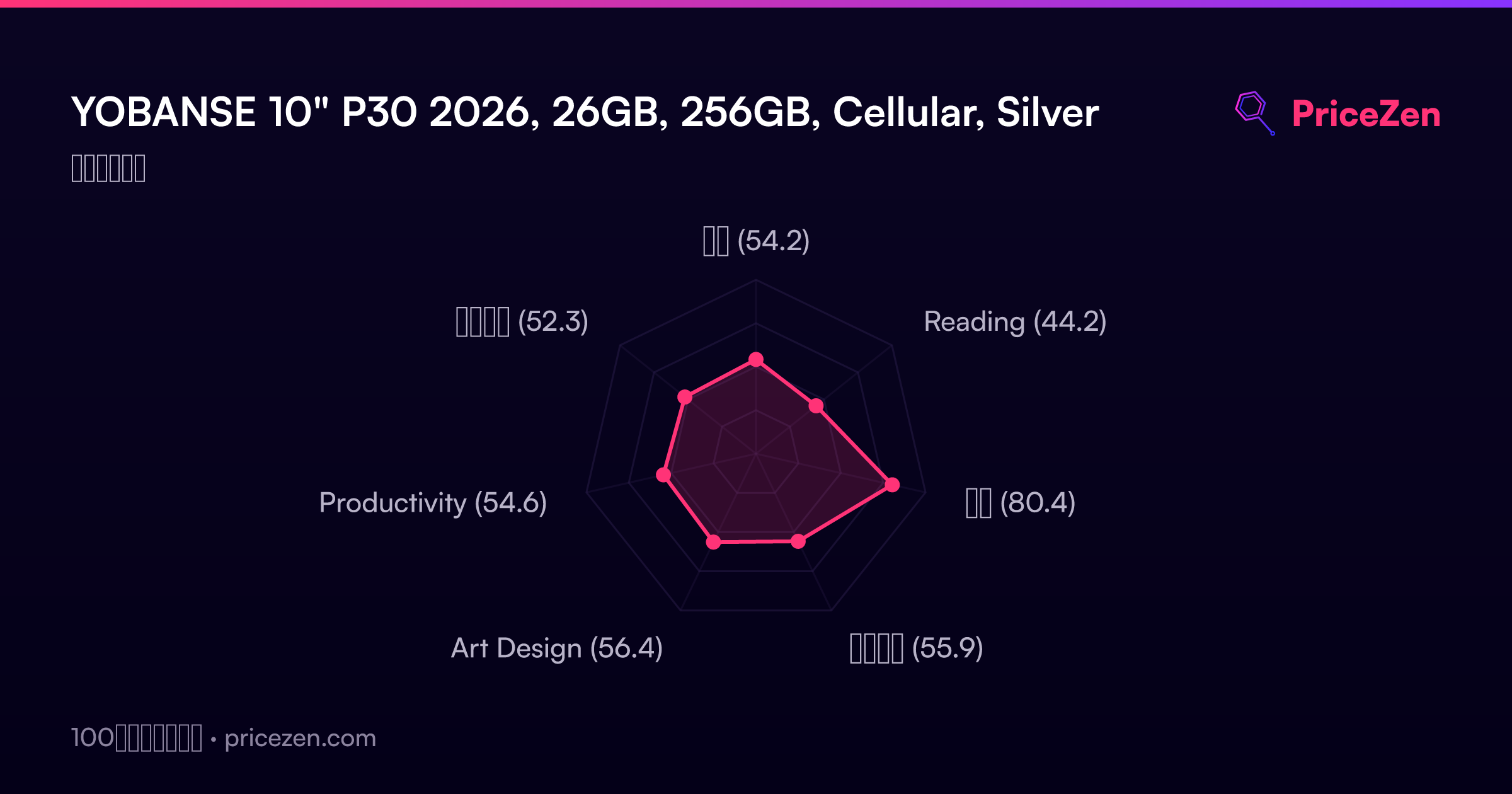
- 総合54.2
- Reading44.2
- 学生80.4
- ビジネス55.9
- Art Design56.4
- Productivity54.6
- エンタメ52.3