Apple iPad Pro (3rd Generation) 12.9" 2018, A12X Bionic, 4GB, 256GB, Cellular, Space Gray
The A12X Bionic chip with Neural Engine delivers performance that outpaces many PC laptops, driving a 12.9-inch edge-to-edge Liquid Retina display with ProMotion. Face ID enables secure authentication and Apple Pay, while the four-speaker audio system provides wide stereo sound for immersive media consumption. This renewed model is best for artists and media consumers who prioritize a large, high-refresh-rate canvas and robust app ecosystem over the latest M-series processor.

現在、販売店の最新価格はありません


概要
The 30-Second Version
The 2018 iPad Pro is still a fantastic tablet in 2025, especially at renewed prices. The 12.9-inch 120Hz Liquid Retina display and A12X Bionic chip hold up beautifully for note-taking, drawing, and daily tasks. Battery life on renewed units is the biggest gamble, often landing around 5-6 hours instead of the original 10. At $300-400 for a good condition unit, this is one of the best tablet values available.
Pros & Cons
長所
- 120Hz ProMotion display is still one of the best screens on any tablet 96th
- A12X Bionic GPU at 90th percentile handles creative work and gaming well 96th
- Apple Pencil 2 support with magnetic charging is genuinely great for note-taking 92nd
- Face ID works reliably and beats typing a passcode every time 91st
- Refurbished pricing makes this a serious value compared to newer iPad Pros
短所
- 4GB RAM at 31st percentile means apps reload more often than you'd like
- Battery life on renewed units often lands around 5-6 hours, not the original 10
- 635g weight makes one-handed reading uncomfortable
- Cosmetic condition varies wildly between renewed units
- Battery replacement costs $119 if you get a dud
オーナーの声
The Word on the Street
購入者の評価が時間とともにどう変化したか
独自顧客が実際にレビューを書いた時期に基づいています。発売当初の高評価が続いたかどうかがわかります。
満足した購入者:最近92%、2020/04~2024/12は90%
レビューが少なく、変化とは言えません。
ストア評価全3,447件:4.4★。 多くの購入者はレビューを書かずに評価だけを付けています。 グラフは星と投稿日のある書かれたレビュー22件を数えています。
数値を表示
| 期間 | レビュー | 満足 | 普通 | 不満 | 満足の割合 |
|---|---|---|---|---|---|
| 2020/04~2024/12 | 10 | 9 | 0 | 1 | 90% |
| 2025/04~2026/05 | 12 | 11 | 0 | 1 | 92% |
各列は、星と投稿日のあるレビューが10件以上になるまで四半期をまとめています。満足 = 4〜5★、普通 = 3★、不満 = 1〜2★。
実証データ
Performance
The A12X Bionic sits at the 81st percentile for CPU performance in our database, which is solid but not spectacular by 2025 standards. For context, that's well above average for tablets overall, but it's not going to match Apple's M-series chips in newer iPad Pros. The GPU lands at the 90th percentile, which is more impressive. This chip was designed for graphics-heavy work, and it shows. Video editing, drawing in Procreate, and even some light gaming all feel responsive. The 4GB of RAM is the weak link here at the 31st percentile. It's enough for most tasks, but you'll notice apps reloading more often than on newer iPads with 8GB or 16GB.
The 120Hz ProMotion display is the real star. Scrolling feels buttery, and the Apple Pencil 2 latency is low enough that handwriting feels natural. The 2732x2048 resolution puts sharpness at the 67th percentile, which is fine but not class-leading. Where this screen really shines is color accuracy and brightness. The Liquid Retina panel with wide color and True Tone support makes photos and videos pop. Battery life is a mixed bag. The 37Wh cell ranks at the 97th percentile for battery capacity, but that's comparing against all tablets including much smaller ones. Real-world reports from renewed units suggest 5-6 hours of screen-on time, which is noticeably less than the 10 hours Apple originally claimed. That's the reality of buying a used battery.
Specifications
Full Specifications
Processor
| CPU | Apple A12X Bionic |
| Cores | 8 |
| GPU | Apple A12X |
Memory & Storage
| RAM | 4 GB |
| Storage | 256 GB |
| Storage Type | SSD |
| Expandable | No |
Display
| Size | 12.9" |
| Resolution | 2732x2048 |
| Panel | Liquid Retina |
| Refresh Rate | 120 Hz |
Connectivity
| Wi-Fi | Wi-Fi 6 |
| Bluetooth | Bluetooth 5.0 |
| USB-C | 1 |
| Cellular | Yes |
Features
| Stylus Support | Yes |
| Stylus Model | Apple Pencil (2nd Generation) |
| Fingerprint Reader | No |
| Face Unlock | Yes |
Physical
| Weight | 0.6 kg / 1.4 lbs |
| Battery | 37 Wh |
| OS | iPadOS |
vs Competition
The Microsoft Surface Pro EP2-33676 is the most direct competitor here. It runs full Windows, which means real desktop apps like full Photoshop and proper file management. The Surface Pro also has a built-in kickstand and better keyboard options. But the iPad Pro's display is better, the Apple Pencil experience is smoother, and iPadOS is far more touch-friendly. If you need Windows software, get the Surface. If you want a tablet that feels like a tablet first, the iPad wins.
The Samsung Galaxy Tab S11 is another strong alternative, especially if you're not locked into the Apple ecosystem. Samsung's AMOLED displays are gorgeous, and the S Pen is included in the box, which saves you $129 compared to buying an Apple Pencil 2 separately. The Lenovo Yoga Tab Plus ZAEG0096US and Xiaomi Pad 7 2AFZZCRP4CG are both cheaper options that offer good displays and decent performance, but neither matches the iPad Pro's combination of display quality, app ecosystem, and long-term software support. The TABWEE T60 Pro is a budget pick that doesn't really compete on performance or build quality, but it's dramatically cheaper if you just need a basic media tablet.
| Spec | Apple iPad Pro (3rd Generation) 12.9" | Microsoft Surface Pro 11 13" | Samsung Galaxy Tab 12.4" S10+ | Lenovo Yoga Tab Plus 12.7" ZAEG0096US | Xiaomi Pad 7 11.2" 2AFZZCRP4CG | TABWEE T60 Pro 13.4" |
|---|---|---|---|---|---|---|
| CPU | Apple A12X Bionic | Qualcomm Snapdragon X Elite X1E-84-100 | MediaTek Dimensity 9300+ | QTI SM8650 | Snapdragon 7+ Gen 3 | Unisoc |
| RAM (GB) | 4 | 16 | 12 | 16 | 8 | 8 |
| Storage (GB) | 256 | 1024 | 512 | 256 | 256 | 256 |
| Screen | 12.9" 2732x2048 | 13" 2880x1920 | 12.4" 2800x1752 | 12.7" 2944x1840 | 11.2" 3200x2136 | 13.4" 1920x1200 |
| OS | iPadOS | Windows 11 Home | Android 14 | Android 14 | Android 14 | Android 15 |
| Stylus | true | true | true | true | true | true |
| Cellular | true | false | false | false | false | false |
| Battery (Wh) | 37 | 53 | - | - | - | - |
| Compare | Compare | Compare | Compare | Compare |
| 製品 | CPU | GPU | RAM | 画面 | Battery | Feature | ストレージ | User Sentiment | Sharpness | Portability | Connectivity | ユーザー評価 | Affordability | Reading Battery | Water Resistance |
|---|---|---|---|---|---|---|---|---|---|---|---|---|---|---|---|
| Apple iPad Pro (3rd Generation) 12.9" | 82.9 | 79.7 | 31 | 91 | 96.3 | 91.5 | 83.7 | 81.9 | 73.6 | 43 | 96.1 | 81.7 | 33.7 | 20.2 | 46.5 |
| Microsoft Surface Pro 11 13" Compare | 98.4 | 96.6 | 92.3 | 99.1 | 99.6 | 74.5 | 97.7 | 40.8 | 82.3 | 21.8 | 92.8 | 91 | 5.5 | 86.7 | 97.3 |
| Samsung Galaxy Tab 12.4" S10+ Compare | 82.1 | 79 | 80.8 | 95.3 | 88 | 96.5 | 92.9 | 96.3 | 82.3 | 50.1 | 77.1 | 91 | 8.3 | 56.8 | 97.3 |
| Lenovo Yoga Tab Plus 12.7" ZAEG0096US Compare | 84 | 82.1 | 92.3 | 96.4 | 88.7 | 96.5 | 83.7 | 71.1 | 89.6 | 43 | 92.8 | 87.2 | 21.5 | 52.1 | 46.5 |
| Xiaomi Pad 7 11.2" 2AFZZCRP4CG Compare | 86.3 | 84 | 65.7 | 98 | 85.2 | 60.7 | 83.7 | 90.7 | 99.3 | 60 | 77.1 | 91 | 33 | 71.1 | 46.5 |
| TABWEE T60 Pro 13.4" Compare | 95.3 | 88.9 | 65.7 | 55 | 86.7 | 88.5 | 74.9 | 81.9 | 27.5 | 32.6 | 77.1 | 87.2 | 36.2 | 17.9 | 46.5 |
価格
Value & Pricing
Here's where things get interesting. US pricing spans from $300 to $810 across five listings, which is a massive $510 spread. That's the renewed market for you. The cheapest listings are going to have more visible wear, possibly a battery that's seen better days, and maybe some screen scratches. The pricier ones are likely in better shape with healthier batteries. If you can find one in the $300-400 range with a decent battery, this is an absolute steal. You're getting a 12.9-inch 120Hz display, Apple Pencil 2 support, and a chip that still handles daily tasks without breaking a sweat.
For Canadian buyers, the spread is CAD 750 to CAD 999 across two listings. That's a CAD 249 gap, which is proportionally tighter but still meaningful. The value proposition here depends entirely on what condition you receive. A renewed unit in good shape at the low end of that range is a fantastic deal. At the high end, you're getting close to newer iPad Air territory, and that's where the math gets murkier. The affordability percentile sits at 35, which reflects that even renewed, this is not a cheap tablet. But compared to a new iPad Pro at $1,099+, the renewed route saves you serious cash.
詳細情報
Overview
The 2018 iPad Pro is one of those devices that aged better than anyone expected. Apple dropped the home button, stretched the screen to 12.9 inches, and stuffed an A12X Bionic chip inside that still holds up remarkably well in 2025. This is the 3rd generation model, and it's being sold as renewed or refurbished, which changes the conversation entirely. You're not paying flagship money anymore, but you're getting a tablet that was flagship-tier when it launched and still feels quick for most daily tasks.
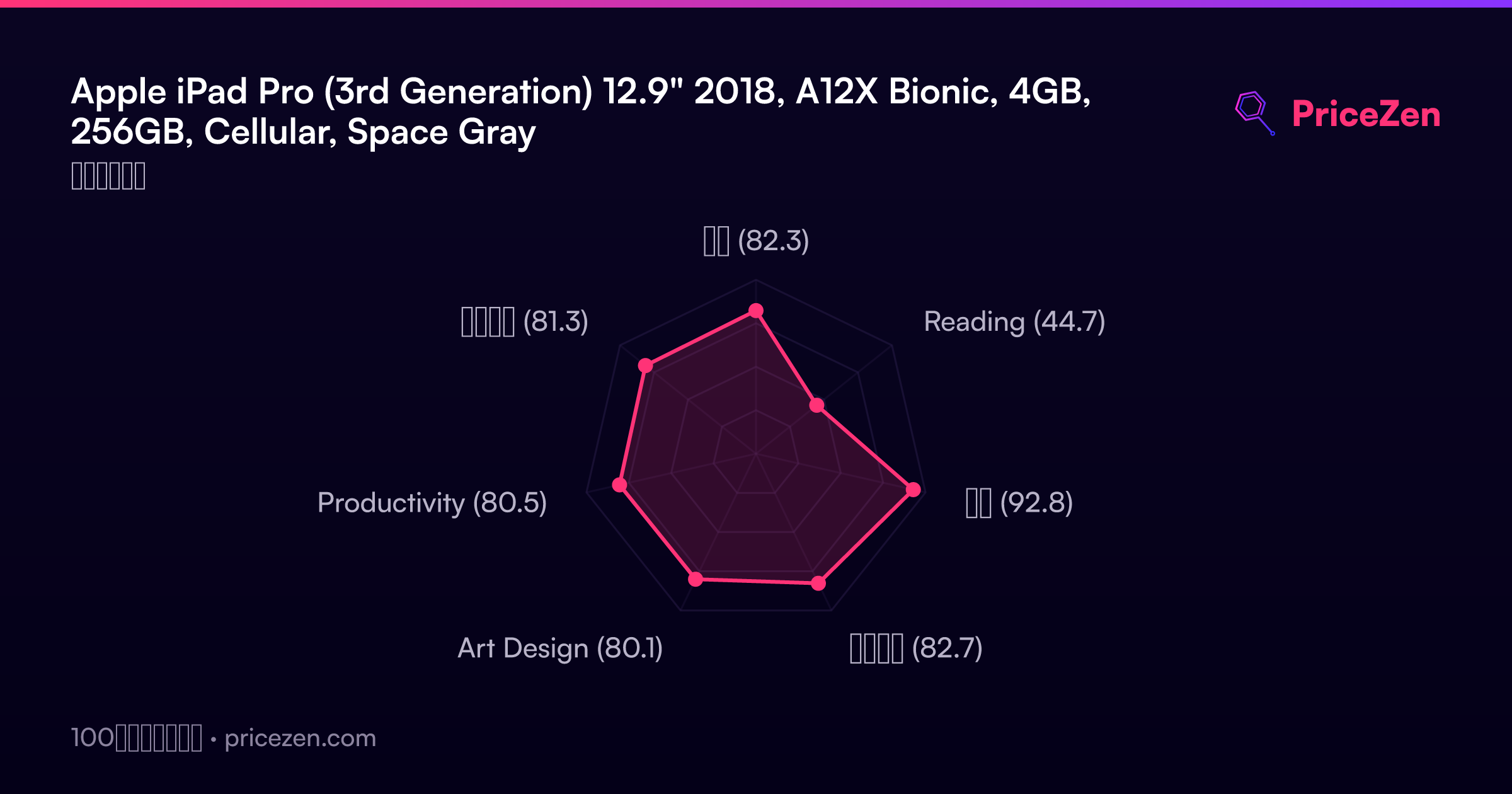
Who is this for? Students, mostly. Our database scores it 90.4 out of 100 for student use, which makes sense. The Apple Pencil 2 support, the big bright display, and the keyboard connector turn this into a legit note-taking and light productivity machine. Business users score it 83.1, and overall it lands at 83.2. The weakest area is reading at 44.4, which is a bit surprising for a tablet, but the 635g weight and 12.9-inch footprint make it awkward for one-handed reading sessions.
The interesting thing here is the renewed angle. You're buying a tablet that's roughly seven years old at this point, but the A12X Bionic with 8 cores and 4GB of RAM still pushes iPadOS smoothly. The 120Hz ProMotion display is something you won't find on most budget tablets even today. And the Liquid Retina screen at 2732x2048 is genuinely gorgeous. The gamble is cosmetic condition and battery health, which we'll dig into below.
Common Questions
Q: How is the battery life on a renewed 2018 iPad Pro?
It varies significantly. The original battery was rated for about 10 hours of use, but renewed units are 5-7 years old at this point. Many owners report 5-6 hours of screen-on time, which is noticeably less than new. Battery health isn't visible in iPadOS settings, so you're taking a bit of a gamble. If battery life is critical, factor in the $119 replacement cost or look for a listing that explicitly mentions battery condition.
Q: Does the Apple Pencil 2 work with this model?
Yes, the 3rd generation iPad Pro supports the Apple Pencil 2, which attaches magnetically to the side of the tablet for pairing and charging. This is a big upgrade over the first generation Pencil, which required plugging into the Lightning port. The 120Hz ProMotion display also means lower latency when writing or drawing, making this a great option for digital note-taking and art.
Q: Is 4GB of RAM enough for multitasking in 2025?
For most daily tasks, yes. The A12X Bionic chip is efficient, and iPadOS manages memory well. You can comfortably run split-screen apps, browse with multiple Safari tabs, and use creative apps like Procreate. However, you will notice apps reloading more frequently than on newer iPads with 8GB or 16GB of RAM. If you're a heavy multitasker who jumps between many apps constantly, this might frustrate you.
Q: What's the difference between Wi-Fi only and Wi-Fi + Cellular models?
The Wi-Fi + Cellular model has an LTE modem built in, so you can use a data plan and stay connected without Wi-Fi. This adds flexibility for travel or working away from home. The cellular models tend to cost more on the renewed market, but they also hold their value better. If you don't need cellular connectivity, the Wi-Fi only model saves you money and works identically when connected to Wi-Fi.
Who Should Skip This
If you're a heavy multitasker who keeps a dozen apps open and switches between them constantly, the 4GB RAM ceiling will annoy you. Apps reload more often than on newer iPads, and that friction adds up. You should look at an iPad Air with M1 or M2 chip, which gives you 8GB of RAM and much better longevity. If battery life is your top priority, this is also a risky buy. Renewed units often deliver 5-6 hours, and the $119 battery replacement eats into the savings. A newer iPad or even a Surface Pro with a fresh battery will serve you better for all-day use.
If you're buying for reading, the 635g weight and 12.9-inch size make this awkward for long reading sessions. The reading score of 44.4 is our weakest metric for this device. An iPad Mini or a Kindle is far more comfortable for books and articles. And if you're sensitive to cosmetic imperfections, the renewed market is not for you. Scratches, dents, and scuffed edges are common, and while some units arrive nearly pristine, there's no guarantee. Buy new or certified refurbished directly from Apple if condition matters more than price.
Verdict
For students, this is still one of the best tablet deals out there. The 90.4 student score reflects how well the Apple Pencil 2 and big display work for note-taking, annotating PDFs, and reading textbooks. The 120Hz refresh rate makes handwriting feel immediate, and the 12.9-inch screen gives you plenty of room for split-screen multitasking. If you're taking notes in class and doing light creative work, a renewed 3rd gen iPad Pro at $300-400 is hard to beat.
For business users, it's more of a mixed bag. The 83.1 business score is respectable, and the keyboard connector means you can turn this into a decent laptop replacement for email, documents, and video calls. But the 4GB RAM ceiling and aging battery mean you'll want to keep a charger nearby. If your work involves heavy multitasking or you need all-day battery life, you're better off with a newer iPad Air or a Surface Pro. For casual users who just want a big screen for streaming and browsing, this is overkill, but at renewed prices it's still a better buy than most mid-range Android tablets.
Usage Scores
- 総合82.3
- Reading44.7
- 学生92.8
- ビジネス82.7
- Art Design80.1
- Productivity80.5
- エンタメ81.3