Amazon Kindle 6" Kids 2024, 16GB, Ocean Explorer
The 6-inch E-Paper display with 25% brighter front light and dark mode delivers glare-free reading in any light, backed by a 2-year worry-free guarantee. Its 16GB storage holds thousands of books, and a single USB-C charge lasts up to 6 weeks, while the Parent Dashboard lets you control age filters and bedtime. Best for parents of kids aged 3-12 who want a distraction-free device to build daily reading habits.

現在、販売店の最新価格はありません
概要
The 30-Second Version
A focused, kid-proof reading machine with a killer replacement guarantee. It's slow and basic, but that's kind of the point.
Pros & Cons
長所
- 2-year worry-free guarantee is a genuine lifesaver for kids 100th
- Top-tier eye comfort and a bright, glare-free screen 99th
- Featherweight at 158g, easy for small hands 95th
- Parental controls and Amazon Kids+ actually work well together
短所
- Noticeable lag and occasional Wi-Fi drops
- 16GB storage is fine for books but laughable for anything else
- No water resistance to speak of
- Feature set is bare bones, even for an e-reader
オーナーの声
The Word on the Street
購入者の評価が時間とともにどう変化したか
独自顧客が実際にレビューを書いた時期に基づいています。発売当初の高評価が続いたかどうかがわかります。
書かれたレビュー 5件、2026年6月:満足 4件、普通 1件
ストア評価全12件:4.5★。 多くの購入者はレビューを書かずに評価だけを付けています。 グラフは書かれたレビュー5件を数えています。
各点は書かれたレビュー1件で、書かれた月に置いています。満足 = 4〜5★、普通 = 3★、不満 = 1〜2★。
実証データ
Performance
The reading experience is where this thing shines. The 6-inch e-paper display sits in the 99th percentile for eye comfort, and the front light is 25% brighter than the previous model, matching the Paperwhite at max. That means bedtime reading in a dark room is genuinely comfortable. Battery life is rated at up to 6 weeks per charge, which lands in the 95th percentile for reading battery. You'll forget where the charger is.
What surprised us is the lag. Owners mention occasional slowness and Wi-Fi connectivity issues that sometimes require a restart. The CPU and RAM sit around the 31st to 35th percentile, so this is not a snappy device. Page turns are fine, but navigating menus or downloading a batch of books can feel sluggish. For a reading device, that's tolerable. For anything else, it would be a dealbreaker.
Specifications
Full Specifications
Memory & Storage
| Storage | 16 GB |
| Expandable | No |
Display
| Size | 6" |
| Panel | E-Paper |
Connectivity
| USB-C | 1 |
| Cellular | No |
Features
| Stylus Support | No |
Physical
| Weight | 0.2 kg / 0.3 lbs |
| OS | Kindle |
vs Competition
The obvious comparison is the Apple iPad mini A17 Pro, but that's a $500+ device aimed at a completely different use case. If your kid needs apps, drawing, or video, the iPad mini is the better tool, but you'll pay double and lose the worry-free guarantee. The Samsung Galaxy Tab S10 FE+ and Lenovo Idea Tab Pro are also full tablets with far more features, but they're heavier, pricier, and come with the same screen-time battles. For pure reading, the Kindle Kids beats all of them on eye comfort and battery life. It's not even close.
| Spec | Amazon Kindle 6" Kids | Apple iPad Pro 13" M5 | Microsoft Surface Pro 11 13" | Samsung Galaxy Tab 12.4" S10+ | Lenovo Yoga Tab Plus 12.7" ZAEG0096US | Xiaomi Pad 7 11.2" 2AFZZCRP4CG |
|---|---|---|---|---|---|---|
| CPU | - | Apple M5 | Qualcomm Snapdragon X Elite X1E-84-100 | MediaTek Dimensity 9300+ | QTI SM8650 | Snapdragon 7+ Gen 3 |
| RAM (GB) | - | 16 | 16 | 12 | 16 | 8 |
| Storage (GB) | 16 | 1024 | 1024 | 512 | 256 | 256 |
| Screen | 6" | 13" 2752x2064 | 13" 2880x1920 | 12.4" 2800x1752 | 12.7" 2944x1840 | 11.2" 3200x2136 |
| OS | Kindle | iPadOS | Windows 11 Home | Android 14 | Android 14 | Android 14 |
| Stylus | false | true | true | true | true | true |
| Cellular | false | true | false | false | false | false |
| Battery (Wh) | - | 39 | 53 | - | - | - |
| Compare | Compare | Compare | Compare | Compare |
| 製品 | CPU | GPU | RAM | 画面 | Battery | Feature | ストレージ | User Sentiment | Eye Comfort | Portability | Connectivity | ユーザー評価 | Affordability | Reading Battery | Water Resistance |
|---|---|---|---|---|---|---|---|---|---|---|---|---|---|---|---|
| Amazon Kindle 6" Kids | 37.9 | 36.4 | 31 | 41.9 | 32 | 7.4 | 1.9 | 40.7 | 99 | 99.8 | 32.7 | 18.6 | 0 | 95.1 | 46.5 |
| Apple iPad Pro 13" M5 Compare | 99.1 | 99.4 | 92.3 | 99.7 | 97.6 | 96.5 | 97.7 | 90.7 | 48 | 48.7 | 99.2 | 99.2 | 1.7 | 41.1 | 46.5 |
| Microsoft Surface Pro 11 13" Compare | 98.4 | 96.5 | 92.3 | 99.1 | 99.6 | 74.2 | 97.7 | 40.7 | 48 | 21.8 | 92.8 | 91 | 5.4 | 86.7 | 97.3 |
| Samsung Galaxy Tab 12.4" S10+ Compare | 82.1 | 79 | 80.8 | 95.3 | 87.9 | 96.5 | 92.9 | 96.3 | 48 | 50.2 | 76.9 | 91 | 8.3 | 56.7 | 97.3 |
| Lenovo Yoga Tab Plus 12.7" ZAEG0096US Compare | 84 | 82.1 | 92.3 | 96.4 | 88.7 | 96.5 | 83.7 | 71.1 | 48 | 43 | 92.8 | 87.1 | 21.6 | 51.9 | 46.5 |
| Xiaomi Pad 7 11.2" 2AFZZCRP4CG Compare | 86.3 | 84 | 65.8 | 98 | 85.1 | 60.7 | 83.7 | 90.7 | 48 | 60.1 | 76.9 | 91 | 33 | 71.1 | 46.5 |
価格
Value & Pricing
At $180, this is a fair price for a dedicated kids' e-reader, especially with the 2-year replacement guarantee baked in. You're not paying for specs, you're paying for peace of mind and a device that won't distract your kid with apps and videos. If you can find it on sale, even better. Just don't expect tablet-level performance at this price.
詳細情報
Overview
The Kindle Kids is a single-purpose device that nails its one job: getting kids to read more. It's light, the screen is easy on young eyes, and the parental controls are actually useful, not just a checkbox feature. The big story here is the 2-year worry-free guarantee. Kids break things. Amazon replaces it. That alone makes this a smarter buy than handing a kid a $500 tablet.
But this is not a tablet. No apps, no video, no games. If your kid expects YouTube or Minecraft, they'll be disappointed in about four seconds. If you want a focused reading device that won't turn into a fight over screen time, this is the right tool.
Common Questions
Q: Can my kid watch videos or play games on this?
No. This is a pure e-reader. No apps, no video, no games. If that's a problem, get a tablet instead.
Q: How durable is it for young kids?
It's lightweight and feels solid, but the real safety net is the 2-year worry-free guarantee. If it breaks, Amazon replaces it for free.
Q: Do I need an Amazon Kids+ subscription?
You don't need it, but it's a big part of the value. It gives you thousands of age-appropriate books that adjust as your kid grows. Without it, you're just buying books individually.
Who Should Skip This
If you're looking for a device that can handle apps, video, or even light web browsing, this isn't it. Go get an iPad mini or a Samsung Galaxy Tab instead. Also skip this if your kid is a heavy graphic novel reader who wants color, the e-paper screen is black and white only.
Verdict
Buy the Kindle Kids if you want a distraction-free reading device for a child aged 3 to 12. The parental controls, the bright e-paper screen, and the 2-year replacement guarantee make it the best option in its niche. Just know that it's slow, and it's not a tablet. If you need a do-everything device, get an iPad mini and a good case.
Usage Scores
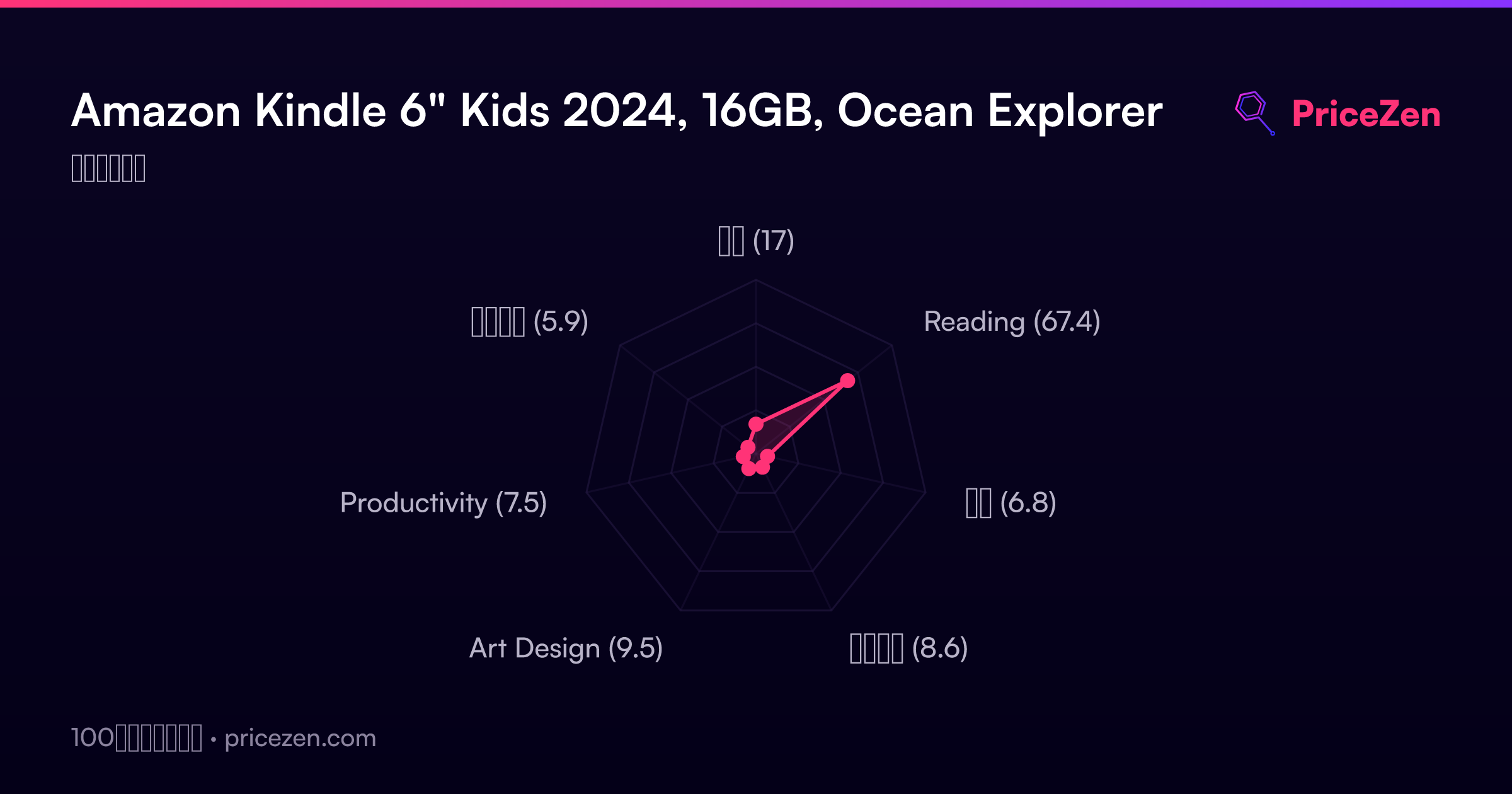
- 総合17
- Reading67.4
- 学生6.8
- ビジネス8.6
- Art Design9.5
- Productivity7.5
- エンタメ5.9