Microsoft Surface Pro 8 13" 2021, Core i7, 16GB, 512GB, Graphite
The Intel Core i7 processor, 16GB DDR4 RAM, and 512GB SSD deliver laptop-level performance in an 889g tablet, with a 13-inch 2880x1920 IPS 120Hz touchscreen and Thunderbolt 4 connectivity. Its detachable keyboard with built-in Slim Pen 2 storage and charging, plus the integrated Kickstand, make it a flexible 2-in-1 for on-the-go work and creative tasks. Best for professionals who need a portable device for productivity, digital art, and entertainment, though its 3.8/5 rating suggests some trade-offs in build or user experience.

現在、販売店の最新価格はありません
概要
The 30-Second Version
The Surface Pro 8 pairs a gorgeous 13" 2880x1920 120Hz display with 16GB of RAM and a 512GB SSD, all ranking near the top of our tablet data. But at USD 1,480 device only, affordability sits near the bottom and CPU performance lags badly against rival tablets. Buy it if you specifically need Windows 11 and pen input in one 889g package. Skip it if you just want a great tablet, because you're paying a steep premium for the flexibility.
Pros & Cons
長所
- 13" 2880x1920 120Hz IPS screen ranks near the top 93rd
- 512GB SSD is one of the best storage configs in the category 93rd
- 16GB DDR4 handles heavy multitasking comfortably 88th
- Thunderbolt and Wi-Fi 6 put connectivity in the leading group 86th
- 889g with kickstand and Slim Pen 2 support covers laptop and tablet modes
短所
- USD 1,480 puts affordability near the bottom
- CPU ranks near the bottom against other tablets
- Battery falls behind most rivals
- Device only listing means keyboard and pen cost extra
- 3.8/5 across 83 reviews, with seller authenticity complaints
オーナーの声
The Word on the Street
購入者の評価が時間とともにどう変化したか
独自顧客が実際にレビューを書いた時期に基づいています。発売当初の高評価が続いたかどうかがわかります。
書かれたレビュー 7件、2021/11~2022/06:満足 5件、不満 2件
ストア評価全83件:3.8★。 多くの購入者はレビューを書かずに評価だけを付けています。 グラフは書かれたレビュー7件を数えています。
各点は書かれたレビュー1件で、書かれた月に置いています。満足 = 4〜5★、普通 = 3★、不満 = 1〜2★。
実証データ
Performance
Let's talk numbers, because they tell a split story. The display is the headline: 2880x1920 across 13 inches puts sharpness well above average for a tablet, and the screen overall is among the best in our data, meaning very few tablets we track look this good. The 120Hz refresh rate matters more than people expect. Scrolling, pen strokes and window dragging all feel smoother, and if you're drawing with the Slim Pen 2, that high refresh is what makes ink feel like it's flowing out of the nib instead of trailing behind your hand. Storage is another standout, ranking near the top, and 512GB is genuinely enough room for a full Windows install plus real project files, not just apps and photos. 16GB of RAM ranks among the best on the market here, which is the difference between keeping a dozen browser tabs and Photoshop open together versus watching things reload every time you switch.
The weak spot is raw compute. That Core i7 lands near the bottom against the tablet category, which sounds brutal until you remember what it's being compared to: modern ARM and Apple silicon tablets have moved the goalposts a long way. In practice this means everyday Windows work is fine, but sustained heavy lifting like long video exports or big compiles isn't where this thing shines. Graphics rank strong, above most rivals, so light creative work and casual games are reasonable. Battery ranks below the middle of the pack, and portability sits near the bottom, which is the honest cost of running full Windows in a tablet shell. Eye comfort is about average, so plan on breaks during long sessions.
Specifications
Full Specifications
Processor
| CPU | Core i7 |
| Cores | 1 |
| GPU | Iris Xe Graphics |
Memory & Storage
| RAM | 16 GB |
| RAM Generation | DDR4 |
| Storage | 512 GB |
| Storage Type | SSD |
Display
| Size | 13" |
| Resolution | 2880x1920 |
| Panel | IPS |
| Refresh Rate | 120 Hz |
Connectivity
| Wi-Fi | Wi-Fi 6 |
| USB-C | 2 |
Features
| Stylus Support | Yes |
| Stylus Model | Surface Slim Pen 2 |
Physical
| Weight | 0.9 kg / 2.0 lbs |
| OS | Windows 11 Home |
vs Competition
Cross-shopping this against the Apple iPad Pro 13" M5 is the obvious move, and it's a genuine fork in the road. The Surface's argument is Windows 11 Home and Thunderbolt: desktop file systems, desktop apps, dock compatibility. Its weakness in that matchup is exactly where our data flags it, with CPU performance near the bottom and battery below average, while the screen and storage stay competitive at the top of our rankings. If your work lives in Adobe or Office desktop versions and you need a proper file explorer, the Surface earns its keep. If it doesn't, you're paying more for less efficiency.
Against the Samsung Galaxy Tab S 12.4" S10+ and the Lenovo Yoga Tab Plus 12.7" ZAEG0096US, the Surface's 13" 2880x1920 120Hz panel and 512GB of storage are its strongest cards, both ranking near the top. Those are Android tablets, so the decision is really about software, not specs. The Xiaomi Pad 11.2" 62751 and TABWEE T60 Pro 13.4" are the value end of the field, and given this Surface's bottom-tier affordability ranking, they'll win any pure price-to-spec argument. They won't run Windows, and that's the entire point. Buy the Surface for the operating system and the pen-on-screen workflow, not because it beats these on value, because it doesn't.
| Spec | Microsoft Surface Pro 8 13" | Apple iPad Pro 13" M5 | Samsung Galaxy Tab S 12.4" S10+ | Lenovo Yoga Tab Plus 12.7" ZAEG0096US | Xiaomi Pad 11.2" 62751 | TABWEE T60 Pro 13.4" |
|---|---|---|---|---|---|---|
| CPU | Core i7 | Apple M5 | MediaTek Dimensity 9300+ | QTI SM8650 | Snapdragon 8s Gen 3 | Unisoc |
| RAM (GB) | 16 | 16 | 12 | 16 | 12 | 8 |
| Storage (GB) | 512 | 1024 | 512 | 256 | 512 | 256 |
| Screen | 13" 2880x1920 | 13" 2752x2064 | 12.4" 2800x1752 | 12.7" 2944x1840 | 11.2" 3200x2136 | 13.4" 1920x1200 |
| OS | Windows 11 Home | iPadOS | Android 14 | Android 14 | Android 14 | Android 15 |
| Stylus | Yes | Yes | Yes | Yes | Yes | Yes |
| Cellular | No | Yes | No | No | No | No |
| Battery (Wh) | - | 39 | - | - | - | - |
| Compare | Compare | Compare | Compare | Compare |
| 製品 | CPU | GPU | RAM | 画面 | Battery | Feature | ストレージ | Sharpness | Portability | Connectivity | ユーザー評価 | Affordability | Water Resistance |
|---|---|---|---|---|---|---|---|---|---|---|---|---|---|
| Microsoft Surface Pro 8 13" | 10.5 | 81.5 | 87.8 | 92.8 | 31.9 | 60.7 | 93.1 | 82.7 | 21.6 | 85.9 | 42 | 5.7 | 46.4 |
| Apple iPad Pro 13" M5 Compare | 99.1 | 99.4 | 92.7 | 99.7 | 97.7 | 96.4 | 97.9 | 73.8 | 48.3 | 99.2 | 99.2 | 1.8 | 46.4 |
| Samsung Galaxy Tab S 12.4" S10+ Compare | 82.4 | 79.2 | 81.3 | 95.1 | 87.9 | 96.4 | 93.1 | 82.7 | 49.9 | 76.7 | 90.9 | 5.9 | 97.3 |
| Lenovo Yoga Tab Plus 12.7" ZAEG0096US Compare | 84.2 | 82.4 | 92.7 | 96.2 | 88.7 | 96.4 | 83.9 | 90 | 42.7 | 92.8 | 87.1 | 21.4 | 46.4 |
| Xiaomi Pad 11.2" 62751 Compare | 86.8 | 85.7 | 81.3 | 97.8 | 85.1 | 64.9 | 89.6 | 99.3 | 78.9 | 76.7 | 90.9 | 14.1 | 46.4 |
| TABWEE T60 Pro 13.4" Compare | 95.4 | 88.9 | 66.2 | 55 | 86.7 | 88.4 | 75.1 | 27.8 | 32.7 | 76.7 | 87.1 | 37.1 | 46.4 |
価格
Value & Pricing
This is where we have to be blunt. USD 1,480 at Amazon, and our price tracking shows only that one US listing, places this near the bottom for affordability. That's close to dead last among tablets we compare. And the listing is explicitly device only, so the Signature Keyboard and Slim Pen 2 that make the Surface Pro concept work aren't in the box. You're buying the tablet and then buying the rest of the idea separately.
What you get for that money is real: a top-tier display, generous storage and RAM, Thunderbolt, and a full Windows 11 install that runs the software your job probably requires. If you'd otherwise carry a laptop plus a tablet, consolidating into one device can justify the premium. If you already own a decent laptop, the math gets a lot harder. We'd watch the price closely before pulling the trigger, because at this number there's very little slack for buyer's remorse.
詳細情報
Overview
The Surface Pro 8 is Microsoft's attempt at the thing everyone keeps asking for: a real Windows machine that also happens to be a tablet. This particular config packs an Intel Core i7, 16GB of DDR4 and a 512GB SSD behind a 13" 2880x1920 IPS panel that runs at 120Hz. It weighs 889g, ships with Windows 11 Home, and has the kickstand plus detachable keyboard connector that define the whole Surface Pro idea. It's also the first Surface Pro built on Intel's Evo platform, which is Microsoft's way of saying it should feel snappy without turning into a hot brick.
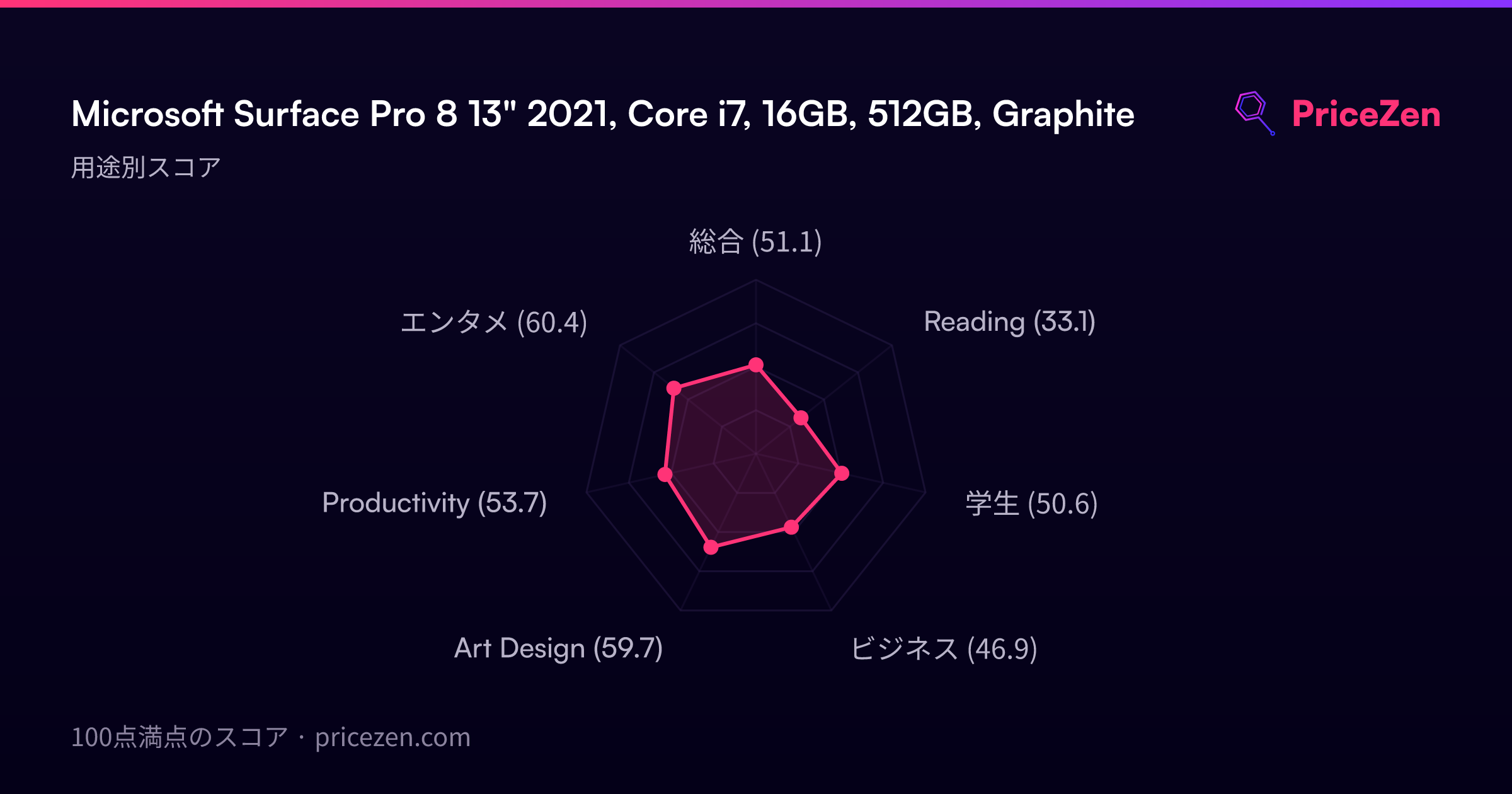
Who's this for? People who need actual desktop software but hate carrying a clamshell. If your day involves Office files, a browser with too many tabs, and the occasional sketch or annotation with the Surface Slim Pen 2, this shape makes a lot of sense. Our scoring puts entertainment (60.4/100) and art and design (59.7/100) ahead of productivity (53.7/100), which tells you it's a capable generalist rather than a workstation. Reading is its weakest area at 33.1/100, so don't buy it as a bedtime ebook device.
Here's the interesting tension, though. The screen and storage sit near the top of our tablet rankings, RAM and connectivity are leading, and Thunderbolt plus Wi-Fi 6 mean it plays nicely with docks and fast networks. But affordability lands in the bottom tier of everything we track, and CPU performance ranks poorly against the tablet field. At USD 1,480 from Amazon, and that's device only, you're paying a premium for flexibility. Whether that trade is worth it depends entirely on how much you actually use the tablet half.
Common Questions
Q: Does the keyboard and pen come included at this price?
No. The Amazon listing at USD 1,480 is explicitly marked Device Only, so the Surface Pro Signature Keyboard and Slim Pen 2 are separate purchases. That matters because the keyboard connector and pen storage are core to the Surface Pro concept, so factor those into your real budget before comparing against other tablets.
Q: Is the Core i7 fast enough for real work?
For everyday Windows work, yes. The 16GB of DDR4 ranks among the best in the category and graphics sit above most rivals, so multitasking and light creative work are comfortable. But CPU performance ranks near the bottom against other tablets, so sustained heavy workloads like long renders will feel slower than newer silicon.
Q: How good is the display for drawing and note-taking?
It's the strongest reason to buy this. The 13" 2880x1920 IPS panel at 120Hz ranks near the top in our data, and sharpness is well above average. Combined with Slim Pen 2 support, that high refresh rate is what makes ink feel immediate rather than laggy.
Q: How do I make sure I'm getting a real Pro 8 and not a Pro 7?
Check the model number in Windows system settings as soon as it arrives, since some owners reported units with altered labels and system names. Our data shows a 3.8/5 rating across 83 reviews with authenticity complaints concentrated on certain sellers, so verify before your return window closes.
Who Should Skip This
Skip this if you mainly want a tablet for reading, streaming and browsing. Reading scores just 33.1/100 here, eye comfort is only about average, and battery lands below most rivals, so you'd be paying flagship money for a worse version of what cheaper slates do better. The Samsung Galaxy Tab S 12.4" S10+ or Xiaomi Pad 11.2" 62751 make far more sense for that life, and the Apple iPad Pro 13" M5 is the one to cross-shop if you want top-end tablet performance without needing Windows.
Also skip it if you're a heavy compute user hoping the i7 badge means laptop-class grunt. Our rankings put this CPU near the bottom against the tablet field, and portability sits near the bottom, so you're not getting ultrabook efficiency either. If your workload is sustained rendering or compiling, buy a proper laptop and a cheap tablet instead of asking one 889g device to do both badly.
Verdict
If you need Windows in a tablet body, this is still one of the few honest options, and the good parts are genuinely good. The 120Hz 2880x1920 screen, 16GB of RAM and 512GB SSD mean you're not compromising on the things you touch and look at all day. For note-takers, illustrators using the Slim Pen 2, and anyone who wants one device for meetings and couch browsing, we think it works. Just go in knowing the battery and CPU rankings are middling-to-poor for the category, and budget for the keyboard.
For everyone else, we'd hesitate. At USD 1,480 device only, with affordability near the bottom of our rankings and a 3.8/5 owner rating across 83 reviews, this isn't a casual purchase. Media-first buyers and readers should look elsewhere, since reading scores just 33.1/100 here. And if you do buy, check the model number in system settings when it arrives. More than one owner reported receiving a Surface Pro 7 relabeled as an 8, which is a seller problem rather than a Microsoft one, but it's your problem either way.
Usage Scores
- 総合51.1
- Reading33.1
- 学生50.6
- ビジネス46.9
- Art Design59.7
- Productivity53.7
- エンタメ60.4