Fikwot FN501 Pro Portable PCIe 3.0 x4

バックアップや旅行に使えるポータブルSSD 11月29日に確認済み
21/100 総合スコア
- Form factor
- External
- Interface
- PCIe 3.0 x4
概要
The 30-Second Version
The Fikwot FN501 Pro 256GB delivers respectable PCIe 3.0 speeds at a rock-bottom USD 53, ranking among the most affordable NVMe drives we track. But 256GB of capacity and 200TBW endurance are real constraints that limit who this is actually for. Buy it only if you need a cheap boot drive for an older Gen3 system and nothing more.
Pros & Cons
長所
- Top-tier affordability, ranking in the 88th percentile among all drives we track 88th
- 2800MB/s reads and 2000MB/s writes are plenty fast for PCIe 3.0 systems
- TLC NAND rather than QLC, which means better sustained write behavior
- Standard M.2 2280 form factor fits virtually any compatible laptop or desktop
- 3-year warranty with 24/7 technical support included
短所
- 256GB capacity ranks dead last (1st percentile), barely enough for OS plus a few apps
- 200TBW endurance falls behind most competitors (15th percentile)
- Feature set is bare-bones, also in the 15th percentile
- Explicitly incompatible with PS5, limiting console upgrade options
- PCIe 3.0 interface means you're capped well below what newer slots can deliver
実証データ
Performance
Sequential read speeds of 2800MB/s and write speeds of 2000MB/s put this squarely in PCIe 3.0 territory, which our data ranks around the middle of the pack for speed overall. For everyday tasks like booting Windows, launching apps, and loading games, those numbers are more than enough. You'll notice a massive difference coming from a SATA SSD or, heaven forbid, a mechanical drive. The dynamic SLC cache helps maintain those peak speeds during bursts, though sustained writes will eventually drop once that cache fills up, which is standard behavior for drives in this class.
Random performance is solid but unremarkable, landing in the upper half of drives we track. That metric matters most for multitasking and OS responsiveness, lots of small reads and writes happening simultaneously. It'll handle general productivity work fine. Where things get rough is endurance: 200TBW ranks in the bottom 15% of drives we track. For a 256GB drive used as a boot disk with light workloads, you'll probably never hit that ceiling. But if you're writing large files regularly or using this as a scratch disk, that number should give you pause.
Specifications
Full Specifications
Drive
| Form Factor | External |
| Interface | PCIe 3.0 x4 |
| External | Yes |
vs Competition
If you're cross-shopping the Kingston NV3, you're looking at another budget-oriented option, but the FN501 Pro's 256GB capacity is a serious limitation that even budget competitors typically don't impose at this price range. The SanDisk WD Blue SN5100 is another name worth considering in the value segment. Our ranking puts the FN501 Pro's capacity at literally the bottom of everything we track, which means almost any competitor will give you more breathing room.
On the other end, drives like the Crucial T500, SK Hynix Platinum P41, and Corsair MP700 Elite exist in a completely different performance tier. If your motherboard supports PCIe 4.0 or 5.0, spending more on one of those gets you substantially faster speeds and almost certainly more capacity. The FN501 Pro only makes sense as a competitor to these if your system literally can't use anything faster than Gen3, and even then, the capacity issue remains. It wins on price alone, and loses on nearly everything else.
| Spec | Fikwot FN501 Pro | Western Digital WD_BLACK SN8100 | Samsung 9100 PRO | Kingston FURY Renegade G5 | Crucial T500 | SanDisk WD_BLACK |
|---|---|---|---|---|---|---|
| Capacity | - | 4TB | 8TB | 4TB | 2TB | 8TB |
| Form Factor | External | M.2 2280 | M.2 2280 | M.2 2280 | M.2 2280 | M.2 2280 |
| Interface | PCIe 3.0 x4 | PCIe 5.0 x4 | PCIe 5.0 x4 | PCIe 5.0 x4 | PCIe 4.0 x4 | PCIe 5.0 x4 |
| Seq Read | - | 14,900 MB/s | 14,800 MB/s | 14,800 MB/s | 7,400 MB/s | 14,900 MB/s |
| Nand Type | - | TLC | TLC | TLC | TLC | TLC |
| Dram Cache | - | No | Yes | Yes | Yes | Yes |
| Endurance | - | 2400 TBW | 4800 TBW | 4000 TBW | 1200 TBW | 4800 TBW |
| Compare | Compare | Compare | Compare | Compare |
| 製品 | Speed | Random | Feature | Capacity | Endurance | Affordability |
|---|---|---|---|---|---|---|
| Fikwot FN501 Pro | 54.2 | 62.6 | 15.8 | 1.8 | 16.7 | 87.7 |
| Western Digital WD_BLACK SN8100 Compare | 99.7 | 99.6 | 86.7 | 91.3 | 81 | 10.1 |
| Samsung 9100 PRO Compare | 99.3 | 99.8 | 99.8 | 96.8 | 86.1 | 2.1 |
| Kingston FURY Renegade G5 Compare | 99.5 | 99.1 | 91.4 | 91.3 | 93.7 | 9.6 |
| Crucial T500 Compare | 94.2 | 97.1 | 99 | 78 | 83.1 | 17.2 |
| SanDisk WD_BLACK Compare | 99.1 | 99.4 | 97.7 | 96.8 | 81 | 3.8 |
価格
Value & Pricing
At USD 53 from Amazon (the only US listing we're tracking), this is one of the cheapest NVMe drives you can buy right now. Canadian buyers are looking at CAD 65, and in France it's EUR 77. The affordability ranking at the 88th percentile confirms what the price tag suggests: you're getting a lot of sequential speed per dollar. But value isn't just about the sticker price. At 256GB, you're paying roughly USD 0.21 per gigabyte, and you'll likely need a second drive or cloud storage almost immediately if this is your only disk. That hidden cost matters.
詳細情報
Overview
The Fikwot FN501 Pro is a budget M.2 NVMe drive that doesn't pretend to be anything else. This particular listing is the 256GB version, running on PCIe Gen3 x4 with NVMe 1.3, rated for up to 2800MB/s reads and 2000MB/s writes thanks to dynamic SLC caching. It's TLC NAND with 3D stacking, wrapped in a graphene heat dissipation sticker, in the standard M.2 2280 form factor. Nothing exotic here, and that's kind of the point.
This is a drive for people who need to get an older laptop or desktop off a spinning hard drive without spending much. If your machine has an M.2 slot that tops out at PCIe 3.0, you're not leaving performance on the table by going with something like this. The compatibility list covers Windows 7 through 11, all-in-ones, laptops, and desktops. And yes, they explicitly call out that it does NOT work with PS5, which saves you the headache of finding out the hard way.
What makes it interesting is the price-to-spec ratio. At USD 53 on Amazon, you're getting sequential speeds that would've been flagship-tier not long ago, TLC rather than QLC, and a 3-year warranty with 200TBW endurance. Our scoring model puts its affordability in the top tier of drives we track. But the total score sits low at 23.2 out of 100, dragged down hard by capacity and endurance rankings. This is a drive with a very specific lane, and it stays in it.
Common Questions
Q: Will this work in my PS5?
No. Fikwot explicitly states the FN501 Pro is not compatible with PS5. Our scoring reflects this with a console rating of just 8 out of 100. If you need a PS5 expansion drive, look elsewhere entirely.
Q: Is 256GB enough for a main drive?
For a Windows installation plus basic productivity apps, you can make it work, but it'll be tight. Our capacity ranking puts this at the 1st percentile, meaning virtually every other drive we track offers more space. If you install games or work with large files, you'll run out fast.
Q: How does PCIe 3.0 compare to newer standards for everyday use?
For booting, launching apps, and general desktop work, the 2800MB/s read speed is more than adequate and you won't notice a difference versus faster drives in those tasks. The gap shows up in sustained large file transfers and heavy workloads. If your motherboard only supports Gen3 anyway, there's no reason to pay more for Gen4 or Gen5 speeds you can't use.
Q: What does 200TBW mean for longevity?
TBW stands for terabytes written, and 200TBW means the drive is rated to handle 200 terabytes of total writes over its lifetime. For light use as a boot drive, that could last many years. But it ranks in the bottom 15% of drives we track for endurance, so heavy-write workloads will burn through that allowance faster than most alternatives.
Who Should Skip This
Gamers should skip this entirely. Modern game installs routinely eat 50-100GB each, and 256GB gives you room for maybe two games alongside your OS. The PS5 incompatibility seals the deal. Look at the Kingston NV3 or SanDisk WD Blue SN5100 in larger capacities instead.
Anyone doing video editing, running VMs, or using their drive as a scratch disk should also pass. The 200TBW endurance rating is a weak spot, and sustained write performance will disappoint once the SLC cache exhausts. If your system supports PCIe 4.0, drives like the Crucial T500 or SK Hynix Platinum P41 will serve you far better across every metric that matters for demanding work.
Verdict
If you're reviving an older laptop or building a bare-bones office PC on a shoestring budget, and you genuinely only need 256GB for a boot drive with a handful of applications, the FN501 Pro does the job. The sequential speeds are fast enough that you won't feel bottlenecked in daily use, and the price is hard to argue with. Just go in knowing you're buying a drive with minimal headroom for growth.
For anyone else, we'd steer you toward something with more capacity. Gamers need space for modern installs. Content creators need endurance this drive doesn't offer. And if you have a PCIe 4.0 slot sitting empty, filling it with a Gen3 drive is leaving free performance on the table. The FN501 Pro is a niche solution for a niche problem. Make sure your problem actually matches before clicking buy.
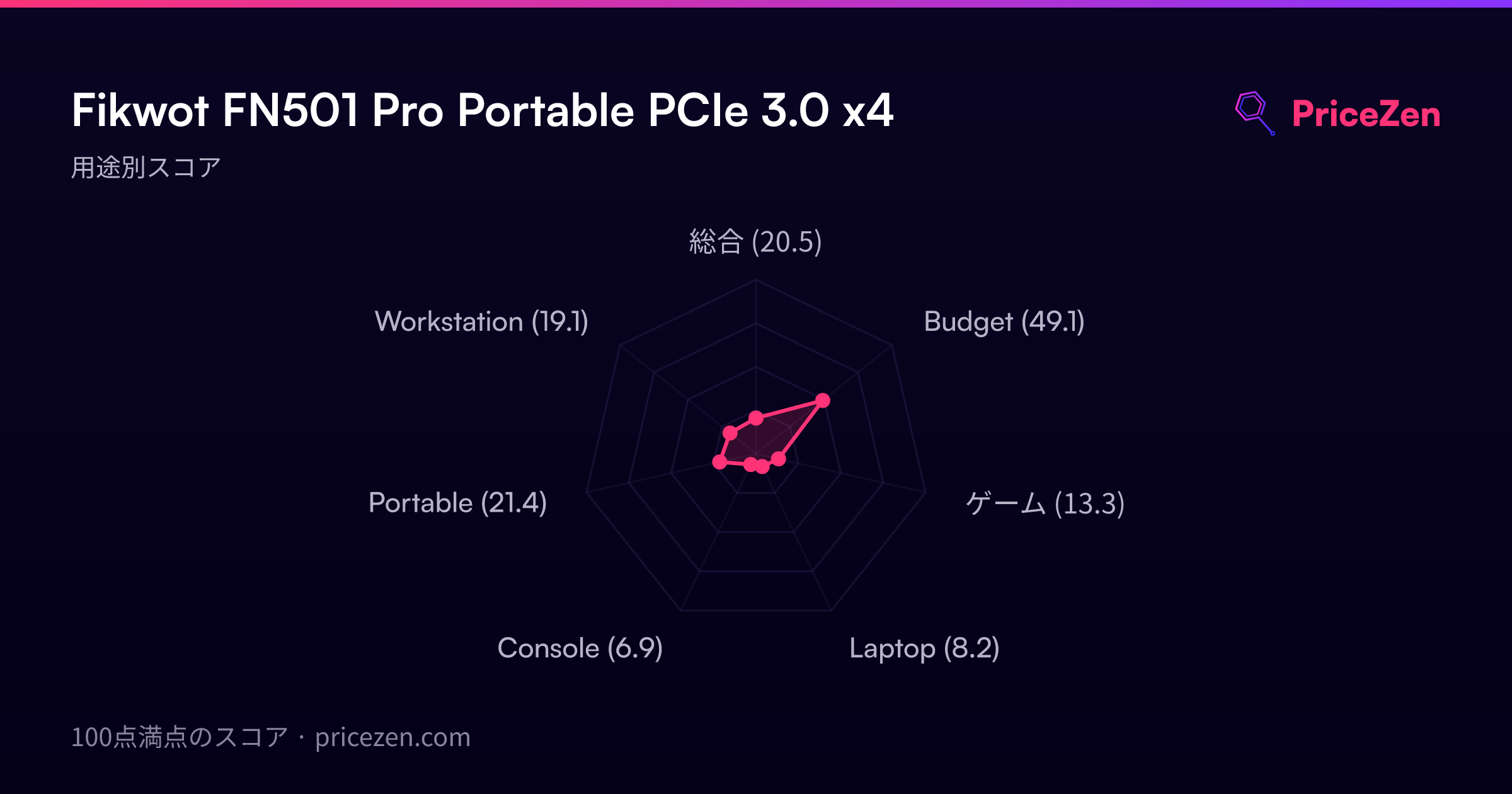
Usage Scores
- 総合20.5
- Budget49.1
- ゲーム13.3
- Laptop8.2
- Console6.9
- Portable21.4
- Workstation19.1