Samsung 980 500GB PCIe 3.0 x4 NVMe M.2 2280

ハードウェア暗号化でファイルを守る 11月29日に確認済み
70/100 総合スコア 4.8 オーナー評価880件の平均
- Capacity
- 500GB
- Form factor
- M.2 2280
- Interface
- PCIe 3.0 x4
- Read speed
- 3,100 MB/s
- NAND
- TLC
- Endurance
- 300 TBW
1店舗の価格を比較
安い順。新品・整備済み品・バンドルのオファーは分けて表示するので、同じ条件どうしで比較できます。
| 店舗 | 販売元 | カラーと状態 | 価格 | 最安との差 | 最終確認 | リンク |
|---|---|---|---|---|---|---|
| 新品1件の価格単品 | ||||||
| 最後の確認時に在庫なし | ||||||
| Amazon | 不明 | 記載なし | 価格なし | 在庫切れ | 不明 | 店舗へ |
 出典: PriceZen
過去7日以内に確認した価格を「現在の価格」としています。 「マーケットプレイス出品者」とは、その店舗自身ではなく、店舗上の第三者の出品者を指します。











概要
The 30-Second Version
The Samsung 980 is a fast, reliable PCIe 3.0 NVMe drive that's perfect for breathing new life into older systems. It hits 3,100 MB/s reads and delivers top-tier random performance despite being DRAM-less. Pricing varies from $220 to $330, so shop around. If you're on SATA storage and your board has an M.2 slot, this is a fantastic upgrade.
Pros & Cons
長所
- Blazing fast for PCIe 3.0 at 3,100 MB/s read 95th
- Excellent random performance with 400K read IOPS 86th
- Easy drop-in upgrade for older systems 81st
- 300 TBW endurance is solid for a 500GB drive 80th
- Hardware encryption included at no extra cost
短所
- DRAM-less design struggles with sustained heavy writes
- 500GB capacity fills up fast with modern games
- No mounting screw in the box
- PCIe 3.0 limits future-proofing
- Price varies wildly between retailers
オーナーの声
The Word on the Street
- Owners consistently mention how much faster their systems feel after swapping from SATA SSDs or hard drives, with boot times and game loads improving dramatically.
- A recurring theme is that this drive delivers excellent value for the price, especially when caught on sale or at the lower end of the retail range.
- Several buyers note compatibility quirks with older systems, particularly around BIOS updates and M.2 slot support, though most resolve these without much hassle.
- A common gripe is that the drive ships without a mounting screw, which catches first-time builders off guard and sends them hunting through spare parts bins.
購入者の評価が時間とともにどう変化したか
独自顧客が実際にレビューを書いた時期に基づいています。発売当初の高評価が続いたかどうかがわかります。
書かれたレビュー 30件、2021/04~2026/03:満足 28件、普通 1件、不満 1件
ストア評価全880件:4.8★。 多くの購入者はレビューを書かずに評価だけを付けています。 グラフは書かれたレビュー30件を数えています。
各点は書かれたレビュー1件で、書かれた月に置いています。満足 = 4〜5★、普通 = 3★、不満 = 1〜2★。
実証データ
Performance
The headline numbers are 3,100 MB/s sequential read and 2,600 MB/s write. That's about as fast as PCIe 3.0 gets before you hit the ceiling of the interface itself. For context, that's roughly five to six times faster than a typical SATA SSD. Boot times drop to single digits, game loading screens stop being snack breaks, and file transfers feel instant until you're moving truly massive folders.
Random performance is where this drive really shines. 400K random read IOPS and 470K random write IOPS put it in the top tier of PCIe 3.0 drives in our database. That's the stuff that makes everyday use feel responsive. Opening apps, switching between browser tabs, loading save files. The DRAM-less design does show up under very heavy sustained writes, but for normal desktop and gaming use, you'll rarely notice it.
Specifications
Full Specifications
Drive
| Capacity | 500 |
| Form Factor | M.2 2280 |
| Interface | PCIe 3.0 x4 |
| Protocol | NVMe |
| PCIe Generation | 3 |
| External | No |
Performance
| Sequential Read (MB/s) | 3100 |
| Sequential Write (MB/s) | 2600 |
| Random Read (IOPS) | 400000 |
| Random Write (IOPS) | 470000 |
Hardware
| NAND | TLC |
| DRAM Cache | No |
| Controller | Pablo |
Reliability
| Endurance (TBW) | 300 |
| MTBF (hours) | 1500000 |
Features
| Hardware Encryption | Yes |
vs Competition
The WD_BLACK SN850P is the obvious step-up option. It's a PCIe 4.0 drive that doubles the sequential read speed of the 980, though you'll pay more and need a compatible motherboard to actually see those speeds. If your system only has PCIe 3.0 slots, the SN850P's extra speed is wasted, and the 980 makes more sense.
The Kingston Fury Renegade and Team Group MP44 are also worth a look. Both offer PCIe 4.0 speeds at prices that sometimes dip close to the 980's range. The trade-off is brand trust and consistency. Samsung's track record for reliability is hard to beat, and the 980's 300 TBW endurance rating is competitive for its class. The Crucial T710 and Lexar NM1090 PRO are even faster PCIe 5.0 drives, but those are overkill for most people and require newer, pricier motherboards.
| Spec | Samsung 980 | Western Digital WD_BLACK SN8100 | Kingston FURY Renegade G5 | Crucial T500 | SanDisk WD_BLACK | Corsair MP700 PRO |
|---|---|---|---|---|---|---|
| Capacity | 500GB | 4TB | 4TB | 2TB | 8TB | 4TB |
| Form Factor | M.2 2280 | M.2 2280 | M.2 2280 | M.2 2280 | M.2 2280 | M.2 2280 |
| Interface | PCIe 3.0 x4 | PCIe 5.0 x4 | PCIe 5.0 x4 | PCIe 4.0 x4 | PCIe 5.0 x4 | PCIe 5.0 x4 |
| Seq Read | 3,100 MB/s | 14,900 MB/s | 14,800 MB/s | 7,400 MB/s | 14,900 MB/s | 12,400 MB/s |
| Nand Type | TLC | TLC | TLC | TLC | TLC | TLC |
| Dram Cache | No | No | Yes | Yes | Yes | Yes |
| Endurance | 300 TBW | 2400 TBW | 4000 TBW | 1200 TBW | 4800 TBW | 3000 TBW |
| Compare | Compare | Compare | Compare | Compare |
| 製品 | Speed | Random | Feature | Capacity | User Sentiment | Endurance | ユーザー評価 | Affordability |
|---|---|---|---|---|---|---|---|---|
| Samsung 980 | 60.4 | 86.1 | 79.7 | 29.4 | 80.6 | 71.1 | 95.1 | 43.2 |
| Western Digital WD_BLACK SN8100 Compare | 99.7 | 99.6 | 86.6 | 91.2 | 95.3 | 81 | 95.1 | 10 |
| Kingston FURY Renegade G5 Compare | 99.5 | 99.1 | 91.4 | 91.2 | 67.9 | 93.7 | 85.9 | 9.5 |
| Crucial T500 Compare | 94.2 | 97.1 | 99 | 78 | 80.6 | 83.1 | 95.1 | 17.1 |
| SanDisk WD_BLACK Compare | 99.1 | 99.4 | 97.7 | 96.8 | 95.3 | 81 | 40.1 | 3.8 |
| Corsair MP700 PRO Compare | 96.9 | 82 | 91.4 | 91.2 | 0 | 91.1 | 85.9 | 8.7 |
価格
Value & Pricing
Pricing on this drive is all over the place. In the US, we're seeing listings from $220 to $330 for the same 500GB drive. That's a $110 spread, which is frankly ridiculous. The best deal in our database is at Newegg, where you can grab it at the lower end of that range. If you're paying $300 or more for a 500GB PCIe 3.0 drive in 2025, you're getting hosed.
At the $220 mark, this is a genuinely good value. You're getting Samsung reliability, top-tier random performance, and a drive that'll breathe new life into an older machine. But at $330, you're dangerously close to PCIe 4.0 territory, where drives like the WD_BLACK SN850P offer dramatically higher sequential speeds. Shop around before you click buy.
詳細情報
Overview
The Samsung 980 is one of those drives that makes you wonder why you waited so long to ditch your old SATA SSD. It's a 500GB M.2 NVMe stick that slots into a PCIe 3.0 x4 slot and just gets out of the way. No RGB, no chunky heatsink, no drama. Just a clean little board with Samsung's Pablo controller and TLC NAND doing the heavy lifting.
Who's this for? Mostly folks upgrading older desktops and laptops that never had NVMe storage. If you're still booting off a spinning hard drive or a SATA SSD from 2018, this thing will feel like a time machine. It's also a solid pick for budget builders who want reliable speed without paying PCIe 4.0 or 5.0 prices.
What makes it interesting is the DRAM-less design. Samsung pulled off something a bit unusual here. Most DRAM-less drives feel sluggish under sustained writes, but the 980 leans on Host Memory Buffer tech to keep things snappy. It's not magic, but it's closer than you'd expect from a drive without its own cache chip.
Common Questions
Q: How does this drive handle heat without a heatsink?
Samsung uses a nickel coating on the controller and a heat spreader label over the NAND to manage thermals. For typical desktop and laptop use, this is plenty. The drive will throttle under sustained heavy writes, but that's true of most DRAM-less drives and rarely matters for everyday workloads.
Q: Is 500GB enough for gaming?
It depends on your library. Modern AAA titles routinely eat 50 to 100GB each, so you'll fit maybe four to eight games comfortably. If you play a lot of big titles or do video editing, consider the 1TB version or a secondary drive for storage. For OS plus a handful of games, 500GB works fine.
Q: Will this work in my older motherboard?
The 980 uses a standard M.2 2280 form factor and PCIe 3.0 x4 interface, so it'll work in most boards from the last several years. Some older systems may need a BIOS update to boot from NVMe, and a few very old boards only support SATA M.2 drives, which this is not. Check your motherboard manual before buying.
Q: How long will this drive last?
Samsung rates it for 300 TBW, which means you could write 300 terabytes before hitting the warranty limit. For typical home use, that's easily a decade or more. The MTBF rating of 1.5 million hours is also solid. Realistically, you'll outgrow the capacity before you wear out the NAND.
Who Should Skip This
If you're building a new system with a PCIe 4.0 or 5.0 motherboard, skip this drive. You're paying for last-gen speed when faster options like the WD_BLACK SN850P or Kingston Fury Renegade are available for not much more. The 980's 3,100 MB/s ceiling will feel limiting once you experience what newer drives can do.
Also skip it if you need serious storage. 500GB is tight for anyone with a large game library, video editing workflow, or lots of raw photos. The capacity percentile in our database puts this drive near the bottom of the pack. If you're constantly juggling files to free up space, step up to 1TB or 2TB. The 980 is an upgrade drive for older systems, not a primary storage solution for power users.
Verdict
If you're upgrading an older PC or laptop that's still running SATA storage, the Samsung 980 is an easy recommendation. The speed jump is massive, installation is straightforward, and the reliability story is strong. Just make sure you're paying a fair price. At $220 to $250, it's a no-brainer. At $300 plus, look elsewhere or wait for a sale.
For new builds, the calculus changes. If you're buying a modern motherboard with PCIe 4.0 or 5.0 slots, you're leaving performance on the table by going with a PCIe 3.0 drive. The 980 makes more sense as an upgrade part than as the foundation of a brand new system. Gamers with large libraries should also consider stepping up to 1TB, since 500GB disappears fast once you install a few modern titles.
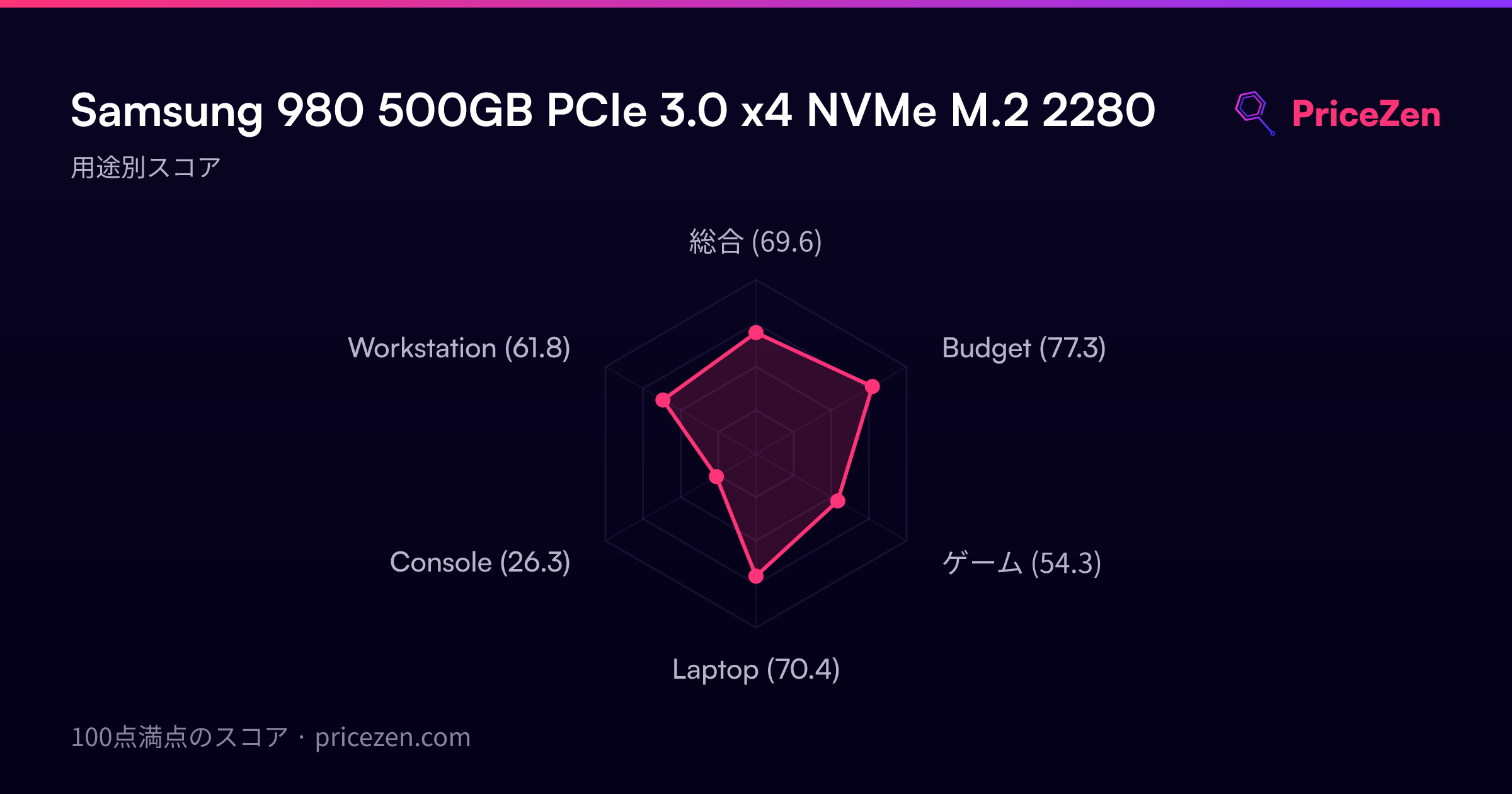
Usage Scores
- 総合69.6
- Budget77.3
- ゲーム54.3
- Laptop70.4
- Console26.3
- Workstation61.8