SK Hynix 16GB DDR4-2666 SODIMM (HMA82GS6JJR8N)
The dual-rank 2Rx8 configuration provides a slight performance edge over single-rank modules at the same 2666 MT/s speed by enabling memory interleaving. This 16GB DDR4 SODIMM delivers a straightforward, cost-effective upgrade for older laptops, reflected in its strong 61.9/100 budget score. It’s best for users needing to extend the life of an aging notebook for general productivity and web browsing.












概要
The 30-Second Version
The SK Hynix HMA82GS6JJR8N is a 16GB DDR4 SODIMM that nails the basics for budget laptop upgrades. It runs at 2666 MT/s with CL19 timings, which is slow by modern standards but fine for older systems. Pricing starts at $84 in the US and EUR 109 in Europe, with a EUR 20 spread across EU vendors. Buy it if your laptop is stuck at 2666 MT/s and you just need more capacity. Skip it if your machine supports faster memory.
Pros & Cons
長所
- Strong budget score of 83.3/100 in our database 87th
- 16GB capacity is a meaningful upgrade from 8GB for most laptops 73rd
- Dual-rank (2Rx8) design can improve memory bandwidth on some systems
- Low 1.2V power draw helps with laptop battery life
- Excellent social proof with a 4.7/5 rating across 379 reviews
短所
- CL19 latency ranks near the bottom at the 10th percentile
- 2666 MT/s speed is below average for DDR4 SODIMMs
- Feature score of 18th percentile means no extras like heat spreaders or XMP
- Weak server suitability at 30.7/100
- No overclocking headroom or performance tuning options
実証データ
Performance
Let's talk numbers. 2666 MT/s puts this stick in the lower-middle of the pack for DDR4 SODIMMs, landing around the 38th percentile for speed in our database. That's fine for most daily tasks, but it's not going to impress anyone running memory-sensitive workloads. The CL19 latency is the real weak spot here, sitting near the bottom at the 10th percentile. Higher latency means the memory takes a bit longer to respond to requests, which can show up as slightly slower performance in games and certain productivity apps.
In real-world terms, you probably won't notice the difference between this and a 3200 MT/s stick when you're just browsing, writing, or watching video. But if you're doing anything that hammers memory, like compiling code, running VMs, or playing games on integrated graphics, the slower speed and loose timings will cost you a few frames or a bit of extra wait time. The dual-rank design helps offset some of that, since dual-rank modules can interleave memory accesses more efficiently. Still, this is a capacity play, not a speed play.
Specifications
Full Specifications
Memory
| Type | DDR4 |
| Form Factor | SODIMM |
| Total Capacity | 16384 |
| Modules | 1 |
| Per Module | 16384 |
| Pins | 260 |
| Rank | 2Rx8 |
Performance
| Speed | 2666 |
Class
| Registered | No |
vs Competition
The Corsair Vengeance LPX CMK32GX4M2D3600C18 and G.Skill TridentZ RGB F4-3600C16D-32GTZRC are both desktop DDR4 kits running at 3600 MT/s, so they're not direct competitors for a SODIMM laptop stick. But they highlight what you're giving up here. Those kits have tighter timings, higher clocks, and in the G.Skill's case, flashy RGB. If you're building a desktop, skip this SODIMM entirely and look at those instead.
For laptop users, the real comparison is against other 16GB DDR4 SODIMMs. The PNY XLR8 and Patriot Viper Venom are desktop kits too, so the field of true competitors is thinner than the list suggests. What matters is whether your laptop supports faster memory. If it does, a 3200 MT/s SODIMM from Crucial or Kingston will beat this stick on both speed and latency for roughly the same price. If your laptop caps out at 2666 MT/s, this SK Hynix module is as good as anything else you'll find.
| Spec | SK Hynix 16GB DDR4 SODIMM | G.Skill Flare X5 | Team Group T-Create Master | KLEVV Urbane V RGB | Micron 128GB DDR5 RDIMM | v-color 256GB DDR5 RDIMM |
|---|---|---|---|---|---|---|
| Capacity | 16GB | 256GB | 192GB | 32GB | 128GB | 256GB |
| Kit | 1 x 16GB | 4 x 64GB | 8 x 24GB | 2 x 16GB | 1 x 128GB | 4 x 64GB |
| Memory Type | DDR4 | DDR5 | DDR5 | DDR5 | DDR5 | DDR5 |
| Speed Mts | 2666 | 6000 | 6000 | 6000 | 5600 | 6000 |
| Cas Latency | - | CL36 | CL32 | CL30 | CL46 | CL34 |
| Form Factor | SODIMM | UDIMM | RDIMM | UDIMM | RDIMM | RDIMM |
| Ecc | - | No | Yes | No | Yes | Yes |
| Compare | Compare | Compare | Compare | Compare |
| 製品 | Speed | Feature | Latency | Capacity | ユーザー評価 | Affordability |
|---|---|---|---|---|---|---|
| SK Hynix 16GB DDR4 SODIMM | 37.2 | 18 | 9.3 | 44.8 | 87.3 | 72.9 |
| G.Skill Flare X5 Compare | 87.6 | 74.8 | 75.1 | 98.4 | 45.9 | 1.2 |
| Team Group T-Create Master Compare | 87.6 | 99.3 | 79.9 | 97.8 | 37.5 | 1.5 |
| KLEVV Urbane V RGB Compare | 87.6 | 89.5 | 87.6 | 70.5 | 51.7 | 22.6 |
| Micron 128GB DDR5 RDIMM Compare | 77.6 | 89.5 | 22.3 | 96.6 | 0 | 1 |
| v-color 256GB DDR5 RDIMM Compare | 87.6 | 99.9 | 77.1 | 98.4 | 16.4 | 1.1 |
価格
Value & Pricing
Pricing on this stick is all over the map depending on where you live. In the US, you're looking at $84 for a single 16GB module. European buyers see a spread from EUR 109 to EUR 129 across four listings in Germany, Spain, France, and Italy. That EUR 20 gap is worth paying attention to if you're shopping around. The best deal in our database comes from the lower end of that range, so it pays to check a couple of vendors before clicking buy.
For a 16GB DDR4 SODIMM, $84 is reasonable but not a steal. You can find faster 3200 MT/s sticks for similar money if you're patient, and those will serve you better in the long run. But if your laptop is locked to 2666 MT/s anyway, which is common on older Intel and AMD platforms, there's no point paying extra for speed your system can't use. In that case, this SK Hynix module is a solid, no-nonsense choice.
価格履歴
詳細情報
Overview
The SK Hynix HMA82GS6JJR8N is a 16GB DDR4 SODIMM stick aimed squarely at laptop owners who just need more RAM without any fuss. No heat spreaders, no RGB, no overclocking headroom. Just a green PCB with chips on it, ready to slot into a spare memory bay. It runs at 2666 MT/s with CL19 timings and sips 1.2V, which is about as standard as DDR4 laptop memory gets.
Who's this for? Mostly people with older laptops or mini PCs that shipped with 8GB and are starting to choke on browser tabs, Zoom calls, and light photo work. If your machine supports DDR4 SODIMMs and you're not chasing benchmark glory, this is a straightforward capacity upgrade. The 2Rx8 configuration means it's dual-rank, which can actually help a bit with memory bandwidth on some systems compared to single-rank sticks.
What makes it interesting is the price-to-capacity story. In our database, this module scores an 83.3 out of 100 for budget use, which is well above average. The social proof is strong too, sitting near the top of the charts with a 4.7 rating across 379 reviews. But the speed and latency rankings tell a different story. This is not a performance part, and it doesn't pretend to be.
Common Questions
Q: Will this work in my laptop?
This is a 260-pin DDR4 SODIMM, which is the standard form factor for laptop memory since around 2015. You'll need to check that your laptop uses DDR4 rather than DDR3 or DDR5, and that it has a free SODIMM slot or an existing stick you're replacing. Most laptops from the Intel 6th gen through 11th gen era and AMD Ryzen 2000 through 5000 series use DDR4 SODIMMs. The 1.2V operating voltage is standard for DDR4, so compatibility is broad as long as your system supports the form factor.
Q: Can I mix this with my existing RAM?
Technically yes, but there are caveats. If you pair this 2666 MT/s stick with a faster module, your system will run both at the slower speed. Mixing different capacities, like an 8GB stick with this 16GB stick, can also disable dual-channel mode in some configurations, which costs you memory bandwidth. For best results, try to match the speed, capacity, and rank of your existing module. If you can't match them, this stick will still work, just not at peak efficiency.
Q: Is CL19 latency bad for gaming?
For gaming on a laptop with integrated graphics, yes, it matters. Integrated GPUs use system memory as video memory, so slower speeds and higher latency directly impact frame rates. CL19 at 2666 MT/s is near the bottom of our database for latency, ranking at the 10th percentile. If you're gaming on a laptop with a dedicated GPU, the impact is smaller but still present. For serious gaming, look for a 3200 MT/s SODIMM with CL16 or CL18 timings instead.
Q: Does this have a lifetime warranty?
Yes, SK Hynix lists a limited lifetime warranty on this module. That's standard for memory from major manufacturers and covers defects in materials and workmanship. It doesn't cover physical damage, improper installation, or running the module outside its rated specifications. In practice, RAM failures are rare, and the 4.7-star rating across 379 reviews suggests this module is reliable.
Who Should Skip This
If your laptop supports DDR4-3200 or faster, don't buy this. You're leaving performance on the table for no real savings. A 3200 MT/s SODIMM with tighter timings will cost about the same and give you noticeably better results in games, content creation, and anything memory-sensitive. The CL19 latency on this stick is a genuine weak spot, and there's no reason to accept it if your hardware can do better.
Desktop builders should also steer clear. This is a SODIMM, which means it physically won't fit in a standard desktop motherboard. If you're putting together a desktop system, look at full-size DIMMs from Corsair, G.Skill, or Crucial instead. And if you're speccing out a server, this module's 30.7 out of 100 server score makes it a poor fit. Servers need ECC memory for reliability, and this stick is non-ECC.
Verdict
If you've got an older laptop with 8GB of RAM and it's starting to wheeze, this is a perfectly fine upgrade. The 16GB capacity will make multitasking dramatically smoother, and the low power draw won't hurt your battery life. The dual-rank design is a nice bonus that can squeeze out a little extra bandwidth on systems that support it. For everyday use, this stick does exactly what it needs to do.
But if you're buying memory for a newer laptop that supports 3200 MT/s or faster, look elsewhere. The CL19 latency and 2666 MT/s ceiling will hold back performance in games and memory-intensive apps. And if you're building a desktop or a server, this SODIMM is the wrong form factor entirely. The server score of 30.7 out of 100 tells you everything you need to know there.
Usage Scores
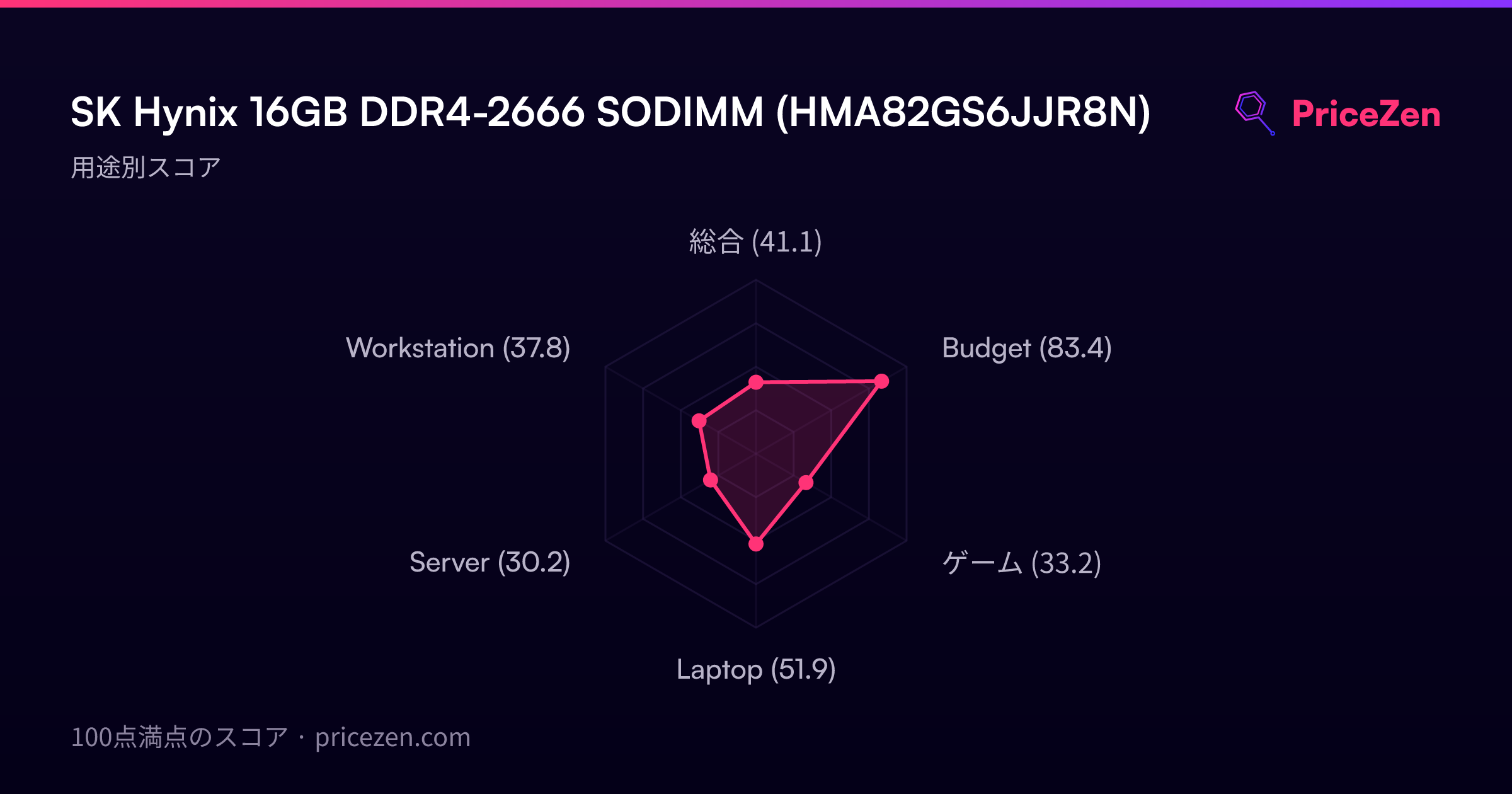
- 総合41.1
- Budget83.4
- ゲーム33.2
- Laptop51.9
- Server30.2
- Workstation37.8