Timetec 8GB (2x4GB) DDR3-1600 CL11 SODIMM (76TT16NUSL1R8-4G)

ノートPCやミニPC向けのSO-DIMMサイズ 11月29日に確認済み
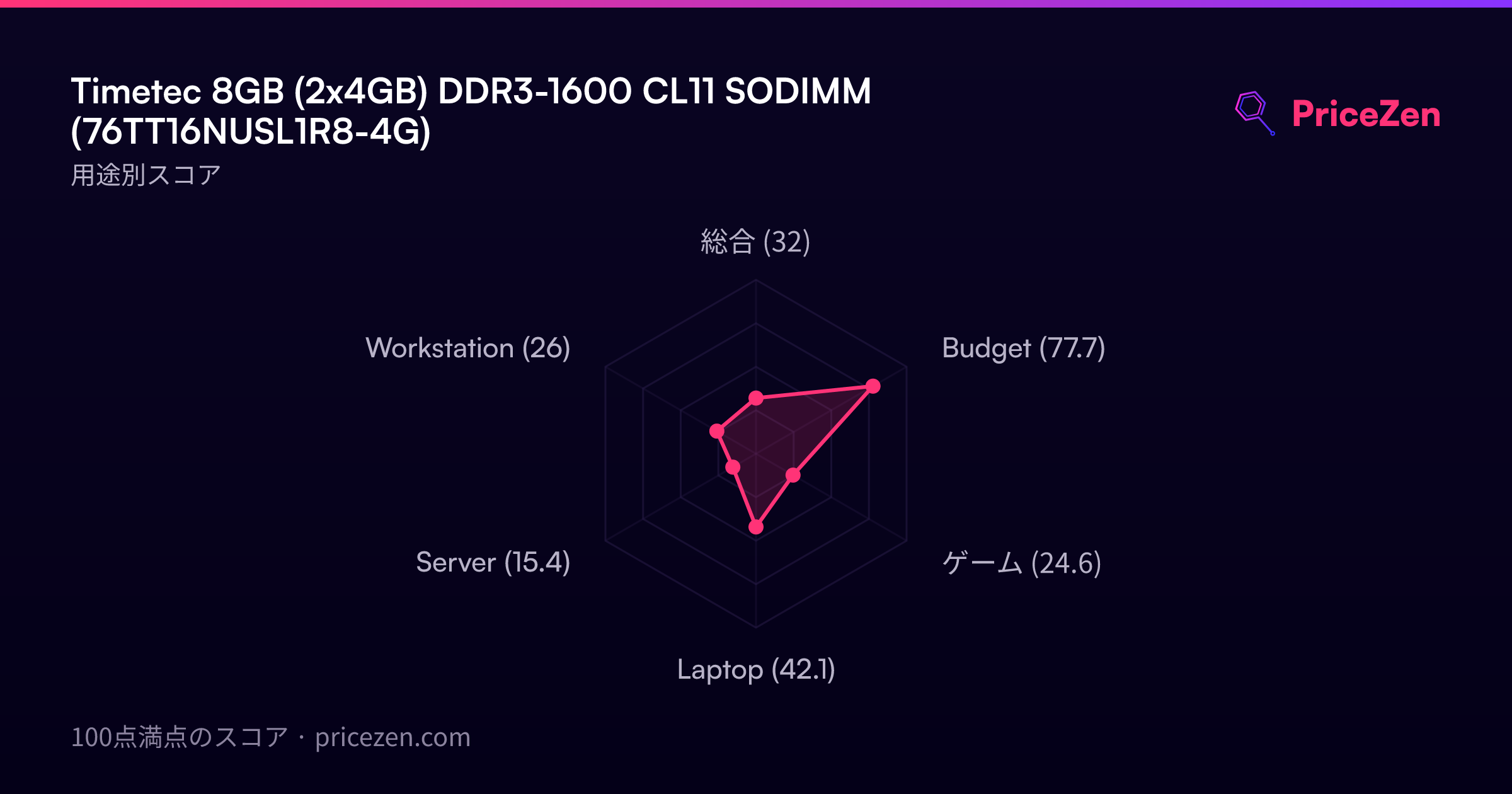
32/100 総合スコア
- Capacity
- 8GB
- Kit
- 2 x 4GB
- Memory
- DDR3
- Speed
- 1600 MT/s
- CAS latency
- CL11
- Form factor
- SODIMM
1店舗の価格を比較
安い順。新品・整備済み品・バンドルのオファーは分けて表示するので、同じ条件どうしで比較できます。
| 店舗 | 販売元 | カラーと状態 | 価格 | 最安との差 | 最終確認 | リンク |
|---|---|---|---|---|---|---|
| 新品1件の価格単品 | ||||||
| 最後の確認時に在庫なし | ||||||
| Amazon | 不明 | 記載なし | 価格なし | 在庫切れ | 不明 | 店舗へ |
 出典: PriceZen
過去7日以内に確認した価格を「現在の価格」としています。 「マーケットプレイス出品者」とは、その店舗自身ではなく、店舗上の第三者の出品者を指します。
価格履歴
この期間にこの種類のオファーはありません。
その日に確認その日は未確認、オファーは継続中
出典: PriceZen, checked 2026年1月21日











概要
The 30-Second Version
Cheap, reliable DDR3 RAM for old laptops. It won't win any speed records, but it'll make your aging machine usable again.
Pros & Cons
長所
- Dirt cheap way to double your RAM 95th
- Dual voltage works in DDR3 and DDR3L laptops
- Lifetime warranty from a US-based company
- Low power draw at 1.35V
短所
- 1600 MT/s is slow even for DDR3
- Only 8GB total, and 4GB sticks limit future upgrades
- PCB color is a lottery, black or green
- Not for desktops, SODIMM only
実証データ
Performance
The 1600 MT/s speed lands this kit in the bottom tier of our database, so don't expect any miracles. But for the laptops this is meant for, it's perfectly adequate. The dual voltage support (1.35V and 1.5V) is a nice touch, meaning it'll drop into both DDR3L and standard DDR3 slots without fuss. Latency is middle of the pack, which is fine for a value kit.
Specifications
Full Specifications
Memory
| Type | DDR3 |
| Form Factor | SODIMM |
| Total Capacity | 8192 |
| Modules | 2 |
| Per Module | 4096 |
| Pins | 204 |
| Rank | 1Rx8 |
Performance
| Speed | 1600 |
| CAS Latency | 11 |
| Voltage | 1.35 |
Class
| ECC | No |
| Registered | No |
vs Competition
The Kingston ValueRAM KVR64A52BS6-8 is a single 8GB stick, which leaves a slot free for future upgrades, but it'll cost you more. The G.Skill Ripjaws F4-2400C16S-4GRS is faster at 2400 MT/s, but it's a single 4GB stick, so you'd need two for the same capacity. If you want the absolute cheapest path to 8GB and don't care about upgrade headroom, the Timetec kit wins. If you think you might want 16GB later, get a single 8GB stick instead.
| Spec | Timetec 8GB DDR3 SODIMM | Kingston FURY Beast | G.Skill Trident Z5 Royal | Corsair VENGEANCE RGB | Team Group T-CREATE EXPERT | Crucial Pro Overclocking |
|---|---|---|---|---|---|---|
| Capacity | 8GB | 64GB | 64GB | 64GB | 32GB | 32GB |
| Kit | 2 x 4GB | 2 x 32GB | 2 x 32GB | 2 x 32GB | 2 x 16GB | 2 x 16GB |
| Memory Type | DDR3 | DDR5 | DDR5 | DDR5 | DDR5 | DDR5 |
| Speed Mts | 1600 | 6400 | 6000 | 6400 | 6400 | 6400 |
| Cas Latency | CL11 | CL32 | CL26 | CL32 | CL32 | CL32 |
| Form Factor | SODIMM | UDIMM | UDIMM | UDIMM | UDIMM | UDIMM |
| Ecc | No | No | No | No | No | No |
| Compare | Compare | Compare | Compare | Compare |
| 製品 | Speed | Feature | Latency | Capacity | Affordability |
|---|---|---|---|---|---|
| Timetec 8GB DDR3 SODIMM | 13.4 | 44.8 | 57.6 | 22.3 | 94.7 |
| Kingston FURY Beast Compare | 94.8 | 89.6 | 87.6 | 89.4 | 7.6 |
| G.Skill Trident Z5 Royal Compare | 87.6 | 89.6 | 99 | 89.4 | 3.9 |
| Corsair VENGEANCE RGB Compare | 94.8 | 89.6 | 87.6 | 89.4 | 6.7 |
| Team Group T-CREATE EXPERT Compare | 94.8 | 74.8 | 87.6 | 70.4 | 23.9 |
| Crucial Pro Overclocking Compare | 94.8 | 74.8 | 87.6 | 70.4 | 27 |
価格
Value & Pricing
At USD 19 to USD 26 across US listings, this is about as cheap as an 8GB DDR3 kit gets. The spread between vendors is worth checking, and Newegg's listing is the one to watch for the best deal. For that money, you're getting a lifetime warranty and a genuine capacity upgrade for an aging laptop. Hard to argue with that.
詳細情報
Overview
This is a budget DDR3 SODIMM kit for breathing life into older laptops, and that's exactly where it shines. The Timetec 76TT16NUSL1R8-4G gives you 8GB across two 4GB sticks at 1600 MT/s, which is the sweet spot for machines from the DDR3 era. It's not fast by modern standards, but if your laptop is choking on 4GB, this is a cheap and easy fix.
Common Questions
Q: Will this work in my laptop?
If your laptop takes DDR3 or DDR3L SODIMM sticks and has a free slot, yes. It's 204-pin, so it won't fit in desktops or newer DDR4/DDR5 machines.
Q: Can I mix this with my existing RAM?
You can, but it's not ideal. Mixing different speeds and timings can cause instability. For best results, replace all your RAM with matching sticks.
Q: Is 8GB enough for Windows 10 or 11?
For basic tasks like browsing, email, and office work, 8GB is fine. If you're doing heavy multitasking or gaming, you'll want 16GB, but that's rare on DDR3-era laptops.
Who Should Skip This
If you're looking for high performance or future upgrade headroom, this isn't it. Get a single 8GB stick like the Kingston ValueRAM instead, so you can add another later. And if you have a desktop, this SODIMM kit won't even fit, go look at full-size DIMMs.
Verdict
If you've got an old laptop with 4GB of RAM and a tight budget, this Timetec kit is a no-brainer. It's not exciting, it's not fast, but it's cheap, reliable, and backed by a lifetime warranty. For DDR3-era machines, that's all you need.
Usage Scores
- 総合32
- Budget77.7
- ゲーム24.6
- Laptop42.1
- Server15.4
- Workstation26