Team Group T-FORCE DELTA RGB 32GB (2x16GB) DDR5-6000 CL30 Black

DDR5-6000をCL30で、速くて低レイテンシ 11月29日に確認済み
81/100 総合スコア 4.6 オーナー評価2,637件の平均
- Capacity
- 32GB
- Kit
- 2 x 16GB
- Memory
- DDR5
- Speed
- 6000 MT/s
- CAS latency
- CL30
- Form factor
- UDIMM
1店舗の価格を比較
安い順。新品・整備済み品・バンドルのオファーは分けて表示するので、同じ条件どうしで比較できます。
| 店舗 | 販売元 | カラーと状態 | 価格 | 最安との差 | 最終確認 | リンク |
|---|---|---|---|---|---|---|
| 新品1件の価格単品 | ||||||
| 過去7日間は確認していないため、これらの価格は変わっている可能性があります | ||||||
| Amazon | マーケットプレイス出品者 | 記載なし | ¥113,473 | 11月13日 | 店舗へ | |
 出典: PriceZen, 2026年11月13日に確認
過去7日以内に確認した価格を「現在の価格」としています。 「マーケットプレイス出品者」とは、その店舗自身ではなく、店舗上の第三者の出品者を指します。
価格履歴
その日に確認その日は未確認、オファーは継続中
出典: PriceZen, checked 2026年11月13日











概要
The 30-Second Version
The Team Group T-FORCE DELTA RGB is a 32GB DDR5 kit running at 6000 MT/s with tight CL30 timings, making it a near-perfect match for Ryzen 7000 and 9000 builds. It supports both XMP 3.0 and EXPO, so it works on Intel and AMD without hassle. The RGB is bright and smooth, and the performance sits in the 88th percentile for speed and latency. Just shop around, prices range from USD 490 to USD 640 in the US, and you don't want to overpay.
Pros & Cons
長所
- CL30 latency at 6000 MT/s is a genuine sweet spot for Ryzen builds 90th
- Dual XMP 3.0 and EXPO support means it works on Intel and AMD without fuss 88th
- Bright, smooth RGB that actually looks good in a case 88th
- 88th percentile speed and latency in our database, strong real-world gaming performance 77th
- 32GB capacity is the right amount for most gamers and casual creators
短所
- Affordability sits at the 25th percentile, this is not a budget kit
- Some users report needing manual tweaks to hit stable XMP/EXPO speeds
- Heat spreader is on the larger side, can interfere with big air coolers
- Server performance is abysmal at 38/100, not for any kind of enterprise use
- Price varies wildly between vendors, you can overpay by a lot if you don't shop around
オーナーの声
The Word on the Street
- A recurring theme is that this kit overclocks surprisingly well, with multiple owners reporting stable speeds well beyond the rated 6000 MT/s and tighter timings than the stock CL30.
- The RGB lighting gets consistent praise for being bright, smooth, and well-implemented, with several buyers noting it looks great in white-themed builds.
- Several users mention that getting XMP or EXPO stable required some tinkering, especially when pushing beyond the rated speed, though most eventually got it working.
- A common complaint is that the heat spreader is on the larger side, which can cause clearance issues with bulky air coolers in smaller cases.
購入者の評価が時間とともにどう変化したか
独自顧客が実際にレビューを書いた時期に基づいています。発売当初の高評価が続いたかどうかがわかります。
書かれたレビュー 59件、2022/08~2026/03:満足 25件、普通 3件、不満 5件、星なし 26件
ストア評価全2,637件:4.6★。 多くの購入者はレビューを書かずに評価だけを付けています。 グラフは書かれたレビュー59件を数えています。
各点は書かれたレビュー1件で、書かれた月に置いています。満足 = 4〜5★、普通 = 3★、不満 = 1〜2★。
実証データ
Performance
Let's talk numbers. This kit runs at 6000 MT/s with timings of 30-36-36-76 at 1.35V. That CL30 primary timing is what separates it from cheaper 6000 MT/s kits that run CL36 or CL40. Lower latency means the memory responds faster to requests, which translates directly into better gaming performance, especially in CPU-bound scenarios. Our database puts this kit in the 88th percentile for both speed and latency. That's not top of the charts, but it's a strong showing. You're getting most of the performance of kits that cost significantly more.
The real-world impact is most visible in gaming. At 1080p with a high-end GPU, memory latency can be the difference between 140 and 155 frames per second in certain titles. It's not a massive gap, but it's there. For productivity work, the 32GB capacity gives you enough headroom for video editing, photo work, and running a bunch of browser tabs without sweating. The capacity sits at the 71st percentile, which is solid but not exceptional. If you're doing heavy 4K video editing or running virtual machines, you might want 64GB. But for most people, 32GB is the right amount right now.
One thing to note from customer feedback: some people have had to tinker to get XMP or EXPO stable, especially when pushing beyond the rated 6000 MT/s. One reviewer mentioned instability at 6400 MT/s on a B650M board. That's not really a knock on this kit specifically. It's just the reality of DDR5 overclocking. The rated spec is 6000 CL30, and that's what you should expect to work out of the box. Anything beyond that is a lottery, and your motherboard and CPU's memory controller play a huge role.
Specifications
Full Specifications
Memory
| Type | DDR5 |
| Form Factor | UDIMM |
| Total Capacity | 32768 |
| Modules | 2 |
| Per Module | 16384 |
| Pins | 288 |
| Rank | 1Rx8 |
Performance
| Speed | 6000 |
| CAS Latency | 30 |
| Timings | 30-36-36-76 |
| Voltage | 1.35 |
Class
| ECC | No |
| Registered | No |
| OC Profile | Intel XMP 3.0, AMD EXPO |
Features
| RGB | Yes |
| Heat Spreader | Yes |
vs Competition
The Kingston FURY Beast KF564C32BWEAK2-64 is a natural competitor. It's a 64GB kit, so you're getting double the capacity, but the timings are looser at CL32 and the speed is 6400 MT/s. For pure gaming, this Team Group kit will likely edge it out thanks to the tighter latency. But if you're doing heavy productivity work, that Kingston kit gives you way more headroom. Different tools for different jobs.
The Corsair VENGEANCE RGB CMH64GX5M2Y6400C32 is another 64GB option with similar specs to the Kingston. Corsair's RGB ecosystem is arguably the best in the business, so if you're already invested in iCUE, that's a point in Corsair's favor. But again, you're paying for capacity you might not need. The G.Skill Trident Z5 Royal Neo RGB F5-6000J2836G16GX2-TR5NG is the closest direct competitor. Same 6000 MT/s speed, but with even tighter CL28 timings. That's a genuinely faster kit for gaming, and G.Skill's Royal line is gorgeous. But you'll pay for it. The Crucial Pro Overclocking CP2K16G64C32U5B is the budget alternative. No RGB, looser timings, but significantly cheaper. If you don't care about lights and just want reliable DDR5, that's the sensible pick.
The KLEVV CRAS V RGB KD5KGUD80-60A300G-BLACK is an interesting wildcard. Similar specs, similar RGB focus, but KLEVV doesn't have the same brand recognition as Team Group. You might find it cheaper, and the performance should be comparable. But customer support and warranty experience can be more of a gamble with smaller brands. Team Group has been around a while and has a solid reputation, which counts for something when you're buying memory that you hope to never think about again.
| Spec | Team Group T-FORCE DELTA RGB | Corsair Dominator Titanium | G.Skill Ripjaws S5 | NEMIX RAM 2048GB DDR5 RDIMM | Lexar Thor | Silicon Power Zenith |
|---|---|---|---|---|---|---|
| Capacity | 32GB | 48GB | 96GB | 2048GB | 32GB | 32GB |
| Kit | 2 x 16GB | 2 x 24GB | 2 x 48GB | 16 x 128GB | 2 x 16GB | 2 x 16GB |
| Memory Type | DDR5 | DDR5 | DDR5 | DDR5 | DDR5 | DDR5 |
| Speed Mts | 6000 | 7200 | 6400 | 6400 | 6000 | 6000 |
| Cas Latency | CL30 | CL36 | CL32 | CL52 | CL32 | CL36 |
| Form Factor | UDIMM | UDIMM | UDIMM | RDIMM | UDIMM | UDIMM |
| Ecc | No | No | No | Yes | No | No |
| Compare | Compare | Compare | Compare | Compare |
| 製品 | Speed | Feature | Latency | Capacity | ユーザー評価 | Affordability |
|---|---|---|---|---|---|---|
| Team Group T-FORCE DELTA RGB | 87.6 | 89.5 | 87.6 | 70.4 | 76.9 | 24.5 |
| Corsair Dominator Titanium Compare | 98.3 | 89.5 | 87.6 | 84 | 76.9 | 11.6 |
| G.Skill Ripjaws S5 Compare | 94.8 | 74.8 | 87.6 | 94.8 | 54.1 | 3.1 |
| NEMIX RAM 2048GB DDR5 RDIMM Compare | 94.8 | 98.2 | 25.5 | 99.9 | 0 | 0 |
| Lexar Thor Compare | 87.6 | 74.8 | 79.9 | 70.4 | 87.3 | 30.5 |
| Silicon Power Zenith Compare | 87.6 | 74.8 | 75.1 | 70.4 | 0 | 21.2 |
価格
Value & Pricing
Here's where things get a little uncomfortable. The affordability percentile for this kit is 25th. That means 75% of comparable memory kits in our database are cheaper. You're paying a premium for the CL30 timings, the RGB, and the Team Group brand name. Whether that's worth it depends on your priorities. If you just need 32GB of DDR5 that works, there are cheaper options. But if you want the low latency and the looks, this is a reasonable way to get both.
The price spread across vendors is honestly kind of wild. In the US, you're looking at anywhere from USD 490 to USD 640 depending on where you shop. That's a USD 150 gap for the exact same kit. Newegg has the best deal on the low end, so if you're buying in the US, that's where you should start. In Canada, the spread is CAD 750 to CAD 880, a CAD 130 difference. Memory Express has the best Canadian price. The lesson here is simple: do not buy this kit without checking at least three stores first. The markup on the high end is pure profit for the retailer.
Is it worth it at the low end of that range? Honestly, yeah. At USD 490 for 32GB of DDR5-6000 CL30 with RGB, you're getting a fair deal. At USD 640, you're getting taken for a ride. The performance difference between this and a cheaper CL36 kit is real but not dramatic. You're paying for the last 5-10% of performance and the aesthetics. If you're building a mid-range rig and every dollar counts, skip the RGB and get a cheaper kit. If you're building something you want to show off and you care about those extra frames, this is a solid buy at the right price.
詳細情報
Overview
The Team Group T-FORCE DELTA RGB DDR5 kit is one of those products that hits a real sweet spot for PC builders. You're getting 32GB across two sticks, running at 6000 MT/s with a CL30 latency. That's the configuration most people chasing a modern AMD or Intel build actually want. It's not the absolute fastest kit on the market, but it's sitting right in the zone where performance, stability, and price tend to intersect nicely. And it comes with RGB, because of course it does.
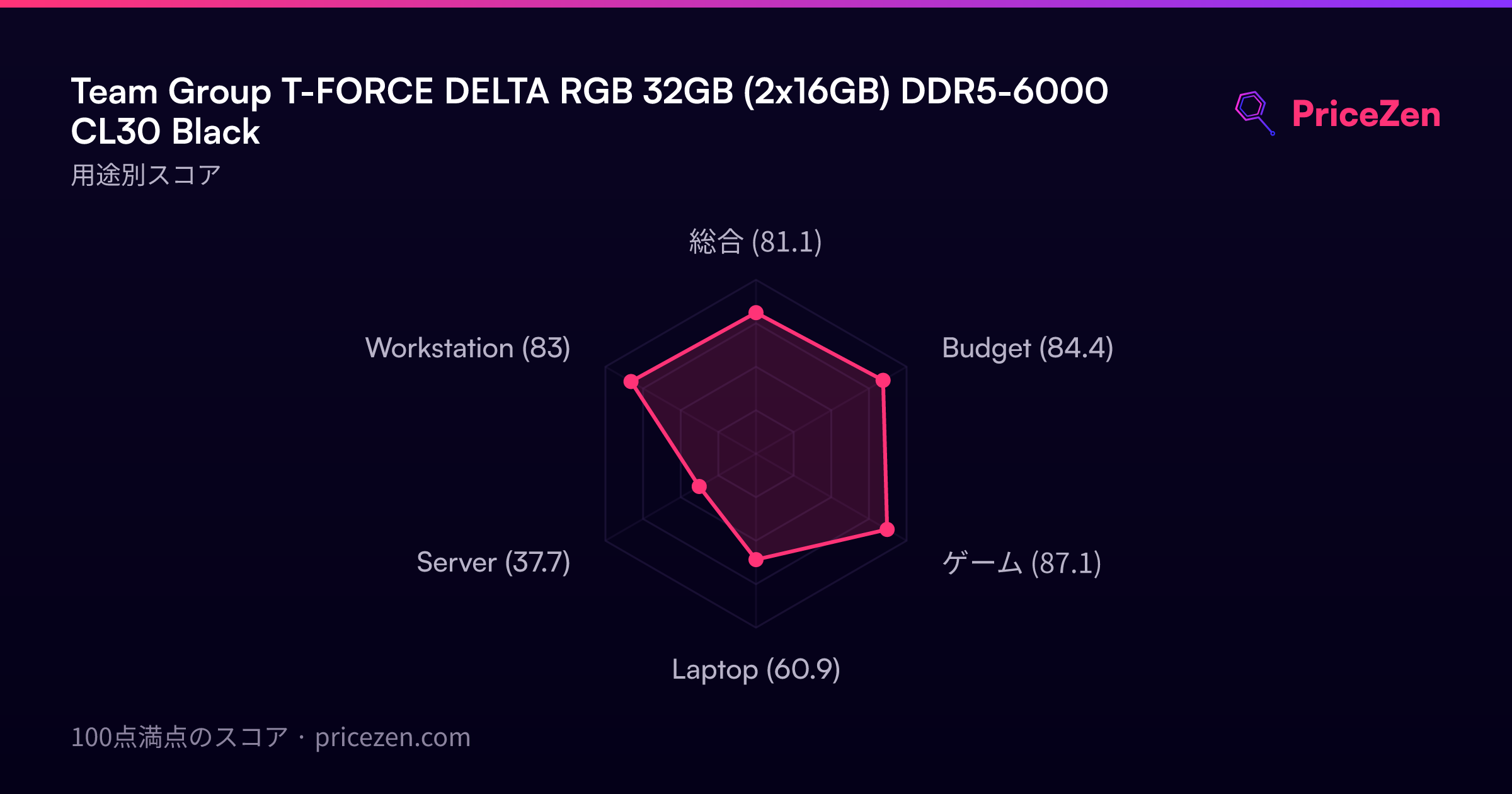
Who's this for? Gamers building a new rig around a Ryzen 7000 or Intel 12th/13th/14th gen CPU. The dual support for Intel XMP 3.0 and AMD EXPO is a big deal. You don't have to worry about buying the wrong kit for your platform. Slap it in, enable the profile in BIOS, and you're off. The 88.7 gaming score in our database backs that up. It's also a decent pick for budget workstations, though it's clearly not meant for server duty. That 38/100 server score is a polite way of saying don't put this in a rack.
What makes it interesting is the combination of that CL30 latency with the 6000 MT/s speed. For AMD's Ryzen 7000 and 9000 series, 6000 MT/s is widely considered the sweet spot for the Infinity Fabric clock. Going faster often introduces instability or forces you to decouple clocks, which can actually hurt performance. So this kit isn't just a compromise. It's arguably the smart choice for a lot of builds. The RGB is a bonus, and Team Group's lighting implementation is genuinely bright and smooth, which matters if you're building a showpiece.
But there's a catch. The price. We'll get into that later, but the affordability percentile is not great. You're paying for the brand, the RGB, and the tuned timings. Whether that's worth it depends on how much you care about those last few percentage points of performance and how your case looks through the tempered glass.
Common Questions
Q: Will this work with my AMD Ryzen 7000 or 9000 series CPU?
Yes, and it's actually one of the best choices for those platforms. The kit supports AMD EXPO profiles, and the 6000 MT/s speed is widely considered the sweet spot for Ryzen's Infinity Fabric. You'll want to enable EXPO in your BIOS to get the rated speeds. Just make sure your motherboard's BIOS is up to date, as early AM5 boards had memory compatibility issues that have since been fixed.
Q: Is 32GB enough for gaming and streaming?
For the vast majority of people, yes. 32GB gives you plenty of headroom for gaming while running Discord, a browser with dozens of tabs, and streaming software simultaneously. You'd only need more if you're doing heavy video editing, 3D rendering, or running virtual machines. For pure gaming, 16GB is still technically enough, but 32GB is the comfortable sweet spot for a new build in 2025.
Q: Does the RGB work with my motherboard's lighting software?
Team Group's RGB implementation is compatible with most major motherboard lighting ecosystems, including ASUS Aura Sync, MSI Mystic Light, Gigabyte RGB Fusion, and ASRock Polychrome. You can also use Team Group's own software if you prefer. The lighting is bright and smooth, and the 120 ultra-wide LEDs provide even coverage across the entire stick.
Q: Why is the price so different between stores?
Memory prices fluctuate constantly, and different retailers have different supply chains and margins. In the US, this kit ranges from USD 490 to USD 640 depending on the vendor. Newegg typically has the best price on the low end. In Canada, the spread is CAD 750 to CAD 880, with Memory Express usually offering the best deal. Always check multiple stores before buying, the savings can be significant.
Who Should Skip This
If you're building a budget system and every dollar counts, this kit is probably not for you. The 25th percentile affordability ranking means you're paying a premium for the RGB and the tight timings. A cheaper 6000 MT/s CL36 kit will get you 90% of the performance for noticeably less money. You won't miss the RGB if your case doesn't have a glass side panel, and you won't notice the latency difference in most games.
If you're building a workstation for heavy content creation, you should also look elsewhere. 32GB is fine for gaming and light productivity, but 4K video editing, large 3D scenes, and complex data analysis can eat through that quickly. Look at 64GB kits like the Kingston FURY Beast or Corsair VENGEANCE RGB instead. The looser timings won't matter for those workloads, but the extra capacity will. And if you're building any kind of server, this is simply the wrong tool. The 38/100 server score tells you everything you need to know. Get ECC memory from a server-focused brand instead.
Verdict
For most gamers building a new AMD system, this is one of the easiest recommendations we can make. The 6000 MT/s CL30 spec is exactly what you want for Ryzen 7000 and 9000 series CPUs. The EXPO support means it's plug and play. The RGB is a nice bonus if you're into that sort of thing. And the 32GB capacity means you won't be upgrading anytime soon. Just make sure you're paying the right price. At the low end of the vendor spread, this is a great buy. At the high end, you're overpaying for the same silicon.
For Intel builders, the calculus is a little different. Intel's 12th, 13th, and 14th gen CPUs are less sensitive to memory latency than AMD's current lineup. You could get away with a cheaper 6000 MT/s CL36 kit and never notice the difference. But if you want the headroom to overclock, the XMP 3.0 support here is solid, and some users have pushed these sticks well beyond their rated speed. Just don't expect that to be guaranteed. The rated spec is what you should plan around.
If you're building a workstation for video editing, 3D rendering, or other memory-hungry tasks, 32GB might feel tight. You'd be better served by a 64GB kit, even if it means looser timings. The capacity matters more than the latency for those workloads. And if you're building a server, well, don't. This kit scored 38/100 for server use. It's not what it's for.
Usage Scores
- 総合81.1
- Budget84.4
- ゲーム87.1
- Laptop60.9
- Server37.7
- Workstation83