G.Skill Ripjaws 16GB DDR4-2400 CL16 SODIMM

ノートPC用メモリで、手軽に増設 11月28日に確認済み
57/100 総合スコア 4.8 オーナー評価3,762件の平均
これまで1日分の価格しか確認しておらず、通常価格を判断するには足りません。
- Capacity
- 16GB
- Kit
- 1 x 16GB
- Memory
- DDR4
- Speed
- 2400 MT/s
- CAS latency
- CL16
- Form factor
- SODIMM
1店舗の価格を比較
安い順。新品・整備済み品・バンドルのオファーは分けて表示するので、同じ条件どうしで比較できます。
| 店舗 | 販売元 | カラーと状態 | 価格 | 最安との差 | 最終確認 | リンク |
|---|---|---|---|---|---|---|
| 新品1件の価格単品 | ||||||
| Amazon | マーケットプレイス出品者 | 記載なし | ¥23,790 | 最安値 | 5 日前 | 店舗へ |
 出典: PriceZen, 2026年11月23日に確認
過去7日以内に確認した価格を「現在の価格」としています。 「マーケットプレイス出品者」とは、その店舗自身ではなく、店舗上の第三者の出品者を指します。











概要
The 30-Second Version
A bulletproof DDR4-2400 laptop upgrade with nearly 3800 five-star fans, but only worth buying if your machine can't handle anything faster.
Pros & Cons
長所
- Absurdly reliable, 4.8 stars from nearly 3800 owners 96th
- Plug-and-play auto-overclocking, no BIOS headaches 69th
- Strong budget score (90.9/100), great for cheap laptop upgrades
- Wide compatibility confirmed across ASUS, Lenovo, HP, and iMac
短所
- DDR4-2400 is genuinely slow, bottom third for speed
- Single stick only, you'll need two for dual-channel
- Wild price swings across stores (USD 71 spread)
- Not ECC, not for servers or workstations
オーナーの声
The Word on the Street
- Owners love that this stick just works across a huge range of laptops, from gaming rigs like the ASUS ROG Strix to older HP machines and even 2017 iMacs.
- Multiple buyers call out the price as a standout deal compared to other 16GB SODIMMs, especially when grabbed at the lower end of the price range.
- A common theme is uncertainty about compatibility before purchase, with several owners admitting they took a gamble despite unclear online info, though it almost always paid off.
購入者の評価が時間とともにどう変化したか
独自顧客が実際にレビューを書いた時期に基づいています。発売当初の高評価が続いたかどうかがわかります。
書かれたレビュー 30件、2016/12~2026/04:満足 30件
ストア評価全3,762件:4.8★。 多くの購入者はレビューを書かずに評価だけを付けています。 グラフは書かれたレビュー30件を数えています。
各点は書かれたレビュー1件で、書かれた月に置いています。満足 = 4〜5★、普通 = 3★、不満 = 1〜2★。
実証データ
Performance
The specs are modest: 2400 MT/s, CL16-16-16-39 timings, 1.2V. Latency lands at the 69th percentile, which is solid but not exciting. Speed ranks at just the 28th percentile, meaning most laptop memory on the market right now is faster. The auto-overclocking feature (basically plug-and-play XMP for SODIMMs) is a nice touch for people who don't want to fiddle with BIOS settings. Owners consistently report smooth compatibility across ASUS ROG, Lenovo Legion, HP, and even older iMacs. One buyer noted the 2Rx8 configuration and good subtimings, which matters if you're pairing sticks for dual-channel. At 1.2V, it's power-efficient, which is exactly what you want in a laptop.
Specifications
Full Specifications
Memory
| Type | DDR4 |
| Form Factor | SODIMM |
| Total Capacity | 16384 |
| Modules | 1 |
| Per Module | 16384 |
| Pins | 260 |
Performance
| Speed | 2400 |
| CAS Latency | 16 |
| Timings | 16-16-16-39 |
| Voltage | 1.2 |
Class
| ECC | No |
| Registered | No |
| OC Profile | Auto-Overclocking |
Features
| RGB | No |
| Heat Spreader | No |
vs Competition
Against the Corsair Vengeance RGB, Kingston Fury Beast, and Crucial Pro Overclocking, this G.Skill stick trades flash for function. Those competitors target newer platforms with faster DDR4 or DDR5 speeds and tighter timings. The Ripjaws sits at the 28th percentile for speed while its affordability ranks at the 64th, so it's not even the cheapest option in its class. Where it wins is sheer reliability and compatibility breadth. If your laptop supports DDR4-3200 or higher, cross-shop the Kingston Fury Beast or Crucial Pro Overclocking first. If you're stuck at 2400 MT/s and just want something that works without drama, this G.Skill stick has thousands of happy owners backing it up.
| Spec | G.Skill Ripjaws | Micron 128GB DDR5 RDIMM | v-color 256GB DDR5 RDIMM | NEMIX RAM 1536GB DDR5 RDIMM | Silicon Power Zenith | OWC 1024GB DDR5 RDIMM |
|---|---|---|---|---|---|---|
| Capacity | 16GB | 128GB | 256GB | 1536GB | 32GB | 1024GB |
| Kit | 1 x 16GB | 1 x 128GB | 4 x 64GB | 16 x 96GB | 2 x 16GB | 8 x 128GB |
| Memory Type | DDR4 | DDR5 | DDR5 | DDR5 | DDR5 | DDR5 |
| Speed Mts | 2400 | 6400 | 6000 | 6400 | 6000 | 4800 |
| Cas Latency | CL16 | CL52 | CL34 | CL52 | CL36 | CL40 |
| Form Factor | SODIMM | RDIMM | RDIMM | RDIMM | UDIMM | RDIMM |
| Ecc | No | Yes | Yes | Yes | No | Yes |
| Compare | Compare | Compare | Compare | Compare |
| 製品 | Speed | Feature | Latency | Capacity | ユーザー評価 | Affordability |
|---|---|---|---|---|---|---|
| G.Skill Ripjaws | 28.3 | 56.5 | 68.8 | 44.8 | 96.4 | 63.9 |
| Micron 128GB DDR5 RDIMM Compare | 94.8 | 89.5 | 25.6 | 96.6 | 0 | 1.3 |
| v-color 256GB DDR5 RDIMM Compare | 87.6 | 99.9 | 77.1 | 98.4 | 16.4 | 1 |
| NEMIX RAM 1536GB DDR5 RDIMM Compare | 94.8 | 98.2 | 25.6 | 99.7 | 0 | 0.1 |
| Silicon Power Zenith Compare | 87.6 | 89.5 | 75.1 | 70.5 | 54.4 | 14.2 |
| OWC 1024GB DDR5 RDIMM Compare | 67.7 | 99.3 | 17.1 | 99.4 | 21.9 | 0.5 |
価格
Value & Pricing
At USD 125 on Amazon, this is a fair deal for 16GB of laptop DDR4. But Newegg wants USD 196 for the same stick, which is a USD 71 gap that makes no sense. Amazon is the clear pick right now. Canadian buyers face an even worse spread: CAD 201 to CAD 428 depending on where you look. If you're paying north of CAD 300, walk away and find another listing. For what it is, a basic DDR4-2400 SODIMM, the low end of these price ranges is reasonable. The high end is not.
価格履歴
詳細情報
Overview
This is a no-frills DDR4 SODIMM that does exactly one thing well: it works. The G.Skill Ripjaws F4-2400C16S-16GRS is a single 16GB stick running at 2400 MT/s with CL16 timings, and it's been around long enough to rack up nearly 3800 reviews averaging 4.8 stars. That kind of social proof is top-tier in our data, and for good reason. People buy this stick to upgrade aging laptops, and it just works.
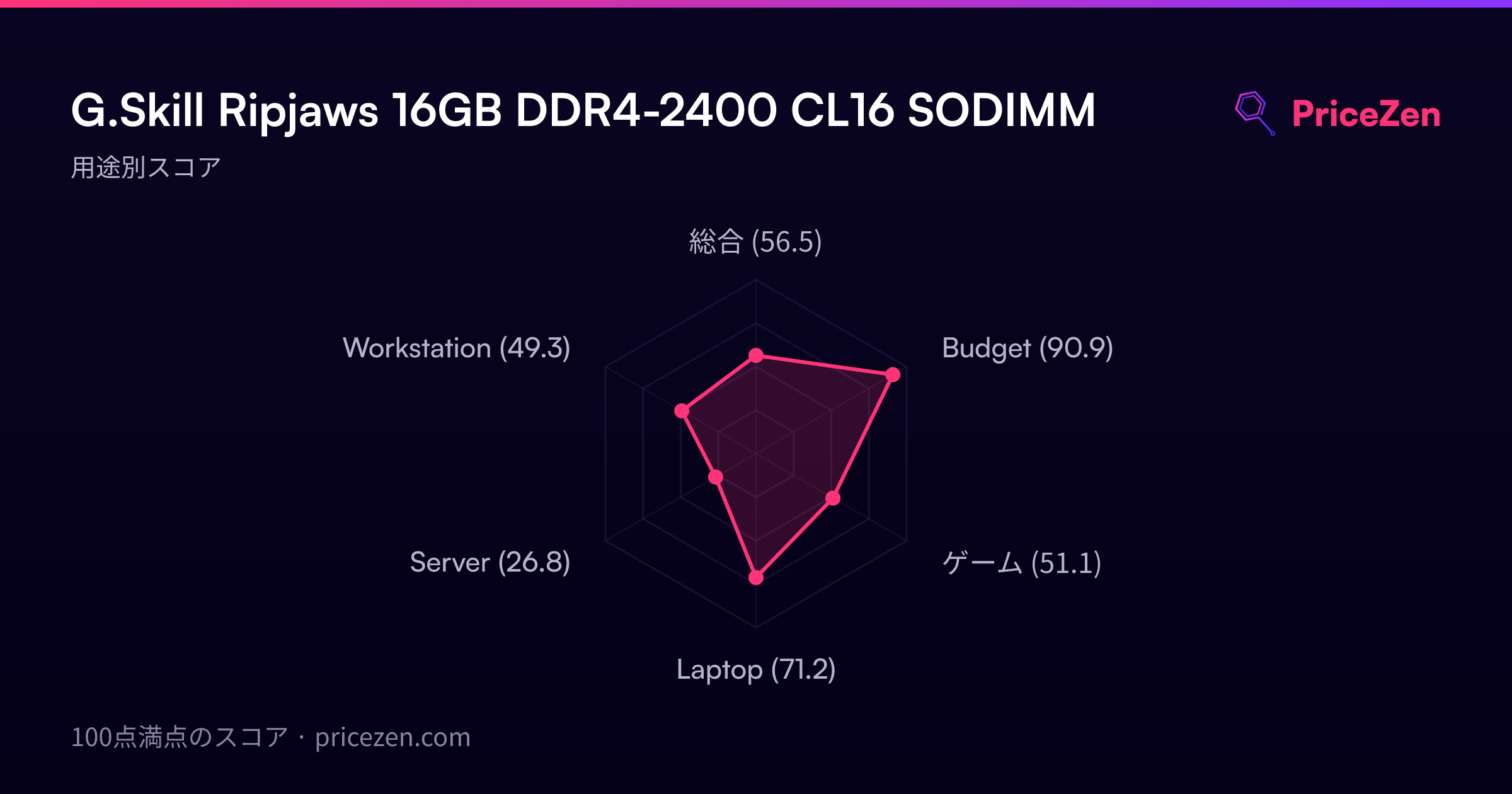
But let's be real about what this is. DDR4-2400 is slow by current standards, sitting in the bottom third for speed among laptop memory we track. This isn't enthusiast RAM. It's a reliable, affordable upgrade path for laptops that max out at DDR4-2400, and that's a perfectly valid niche. Our scoring model gives it a 90.9/100 for budget use, which tells you everything about where this stick shines.
Common Questions
Q: Will this work in my laptop if it currently has 4GB or 8GB?
Yes, as long as your laptop takes DDR4 SODIMM and supports 2400 MT/s. You can add this as a second stick or replace your existing one. Check your laptop's max supported capacity first, some older machines cap at 16GB total.
Q: Do I need to change any BIOS settings?
Nope. The auto-overclocking feature handles the timings automatically. Plug it in, boot up, and you're done. That's the whole point of this stick.
Q: Should I buy one stick or two for dual-channel?
Two identical sticks will give you dual-channel bandwidth, which helps integrated graphics and general throughput. But if your laptop only has one SODIMM slot, a single 16GB stick is your best move.
Who Should Skip This
If your laptop supports DDR4-3200 or DDR5, don't settle for 2400 MT/s. Go grab a Kingston Fury Beast or Crucial Pro Overclocking module instead and actually use your machine's bandwidth. And if you need ECC for a workstation or server build, this isn't the stick. Our data scores it just 26.8/100 for server use, which is about as clear a 'don't bother' as you'll get.
Verdict
Buy this if your laptop tops out at DDR4-2400 and you need a dependable 16GB upgrade at a fair price. Grab it from Amazon at USD 125, not Newegg at USD 196. Skip it if your machine supports faster memory, because you're leaving performance on the table. This is the Honda Civic of laptop RAM: boring, reliable, and everywhere. Sometimes that's exactly what you need.
Usage Scores
- 総合56.5
- Budget90.9
- ゲーム51.1
- Laptop71.2
- Server26.8
- Workstation49.3