Lenovo L32p-30 31.5" Raven Black 2023
The 31.5-inch IPS panel delivers sharp 4K resolution with 10-bit color covering 1.07 billion hues, making it suitable for color-sensitive work despite its modest 350-nit brightness. USB-C connectivity with a built-in hub simplifies single-cable docking, while the VESA mount adds flexibility for multi-monitor setups. This monitor is best for desktop-bound designers and office users who prioritize screen real estate and color depth over high refresh rates or portability.

現在、販売店の最新価格はありません











概要
The 30-Second Version
The Lenovo L32p-30 is a 31.5-inch 4K IPS monitor built for productivity and media, not gaming. It delivers excellent display quality and USB-C connectivity at a reasonable price, but the 60Hz refresh rate and weak speakers hold it back. If you want a big, sharp screen for work, this is a solid pick.
Pros & Cons
長所
- Sharp 4K IPS panel with excellent color 93rd
- USB-C with 75W power delivery 92nd
- Built-in USB hub for peripherals 87th
- 90th percentile display quality 84th
- Big 31.5-inch screen for multitasking
短所
- 60Hz refresh rate limits gaming
- Built-in speakers are nearly useless
- Stand has minimal adjustment
- No HDR support to speak of
- Feature set is thin for the price
オーナーの声
The Word on the Street
購入者の評価が時間とともにどう変化したか
独自顧客が実際にレビューを書いた時期に基づいています。発売当初の高評価が続いたかどうかがわかります。
満足した購入者:最近88%、2023/01~2024/09は82%
レビューが少なく、変化とは言えません。
ストア評価全161件:4.5★。 多くの購入者はレビューを書かずに評価だけを付けています。 グラフは星と投稿日のある書かれたレビュー27件を数えています。
日付が概算の月(初めて確認した日)のレビュー40件は推移に含めていません。
星のない書かれたレビュー1件は推移に含めていません。
数値を表示
| 期間 | レビュー | 満足 | 普通 | 不満 | 満足の割合 |
|---|---|---|---|---|---|
| 2023/01~2024/09 | 11 | 9 | 2 | 0 | 82% |
| 2024/10~2026/10 | 16 | 14 | 1 | 1 | 88% |
- 2025/07~2025/093件中2件が満足 · 星なし 1件
Buyers praised the display quality and connectivity, but criticized the non-adjustable stand and poor speakers. One reviewer had driver issues but praised Lenovo's support.
- Display quality and connectivity are excellent, with USB hub convenience.
- Stand lacks height adjustment, only tilts.
- Speakers sound terrible; one reviewer disappointed.
- Driver/software download issues, but Lenovo support handled complaint well.
- 2025/04~2025/063件中3件が満足
Buyers praise the 4K display quality, color accuracy, and USB-C charging. Some note the built-in speakers are mediocre.
- Excellent 4K display with vibrant colors and crisp lines for work and media.
- USB-C port charges laptop and handles video, adding convenience.
- Great value for the price, competitive with top brands.
- Built-in speakers are only okay, external speakers recommended.
- 2024/07~2024/093件中1件が満足
Buyers found the monitor functional for USB-C and 4K Blu-ray, but noted weak speakers, PowerPoint 4K issues, and lag with multiple monitors.
- USB-C and 4K Blu-ray work well.
- Speakers are weak and tinny.
- PowerPoint won't display in 4K on Mac.
- System laggy with multiple monitors.
- 2023/01~2023/035件中5件が満足
Buyers praised the monitor's image quality, build, and value, but one reported USB-C connectivity issues requiring workarounds.
- Excellent image quality, bright colors, and crisp resolution for design work.
- Solid build quality and sleek design, better than older Lenovo models.
- USB-C connection can cause disconnects; fixed by setting USB mode to 3.0 and disabling FreeSync.
- Great value for the price, especially compared to previous Lenovo T32p-20.
各列は、星と投稿日のあるレビューが10件以上になるまで四半期をまとめています。満足 = 4〜5★、普通 = 3★、不満 = 1〜2★。 期間ごとの要約は英語です。
実証データ
Performance
The L32p-30 runs at 60Hz with a 4ms response time, which puts it firmly in productivity territory. Our database ranks its performance at the 44th percentile, so it's about average for a 4K office monitor but nowhere near what you'd get from a 144Hz or 240Hz gaming display. FreeSync is here, which helps smooth out frame pacing if you're playing lighter games, but don't expect buttery motion clarity in fast shooters.
Where this panel shines is the display quality itself. The 31.5-inch IPS screen hits 350 nits, which is bright enough for most rooms but not HDR territory. Color coverage at 90% DCI-P3 and 10-bit depth means gradients look smooth and colors pop without being oversaturated. In our rankings, the display quality lands in the 90th percentile, which is genuinely impressive for this price. Text is crisp at 4K, and the pixel density on a 32-inch panel makes everything look sharp without needing display scaling tricks.
Specifications
Full Specifications
Display
| Size | 31.5" |
| Resolution | 3840x2160 (4K UHD) |
| Panel Type | IPS |
| Aspect Ratio | 16:9 |
| Curved | No |
| Screen Finish | matte |
Performance
| Refresh Rate | 60 Hz |
| Response Time | 4 |
| Adaptive Sync | FreeSync |
Color & HDR
| Brightness | 350 nits |
| Color Gamut | 90% DCI-P3 |
| Color Depth | 10-bit |
| HDR | HDR10 |
Connectivity
| HDMI Ports | 1 |
| DisplayPort | 1 |
| USB-C | 1 |
| Thunderbolt | N/A |
| Speakers | Yes |
| Headphone Jack | Yes |
Ergonomics
| Height Adjustable | No |
| Tilt | Yes |
| Swivel | No |
| Pivot | No |
| VESA Mount | 100x100 |
Features
| Webcam | No |
| Touchscreen | No |
| Power | 40 |
| Weight | 7.8 kg / 17.3 lbs |
vs Competition
Stacked against the ASUS ROG Strix XG27UCDMG, the Lenovo loses on speed but wins on size. The ASUS is a 27-inch panel built for high refresh rate gaming, while the L32p-30 gives you more inches and a lower price. If you're a gamer, the ASUS or the LG UltraGear 27GX790A-B are the obvious picks. The Samsung Odyssey G60SD and MSI MPG 271QR QD-OLED X50 are also in that gaming camp, with OLED panels that make the Lenovo's IPS look a bit flat in dark scenes.
Against the Dell UltraSharp U4025QW, the Lenovo is a budget alternative. The Dell is a 40-inch ultrawide with a much higher price tag and better color accuracy for professional work. But if you just want a big 4K screen for documents, video calls, and the occasional movie, the L32p-30 gets you 80% of the experience for a fraction of the cost. The trade-off is clear: the Lenovo is a productivity workhorse, not a performance machine.
| Spec | Lenovo L32p-30 31.5" | BenQ MOBIUZ EX381U 37.5" | Samsung Odyssey Ark 2nd Gen 55" | Gigabyte M Series M32U 31.5" | Dell UltraSharp U4320Q 27" | Acer CB342CU UM.CB2AA.004 34" |
|---|---|---|---|---|---|---|
| Screen Size | 31.5 | 37.5 | 55 | 31.5 | 27 | 34 |
| Resolution | 3840 x 2160 | 3840 x 2160 | 3840 x 2160 | 3840 x 2160 | 3840 x 2160 | 3440 x 1440 |
| Panel Type | IPS | IPS | Mini-LED | IPS | IPS | IPS |
| Refresh Rate | 60 | 144 | 165 | 144 | 60 | 75 |
| Response Time Ms | 4 | 1 | 1 | 1 | 5 | 1 |
| Adaptive Sync | FreeSync | FreeSync Premium Pro | FreeSync Premium Pro | FreeSync Premium Pro | - | FreeSync |
| Hdr | HDR10 | HDR10 | HDR10+ | HDR400 | HDR400 | HDR400 |
| Compare | Compare | Compare | Compare | Compare |
| 製品 | Color | 携帯性 | Display | Feature | Ergonomic | Performance | Connectivity | ユーザー評価 |
|---|---|---|---|---|---|---|---|---|
| Lenovo L32p-30 31.5" | 92.2 | 81.5 | 87.1 | 70.2 | 47.4 | 44.2 | 93.1 | 84 |
| BenQ MOBIUZ EX381U 37.5" Compare | 93.6 | 68.1 | 95.1 | 70.2 | 73.6 | 72.6 | 99.8 | 0 |
| Samsung Odyssey Ark 2nd Gen 55" Compare | 98.4 | 20.8 | 91.6 | 96.3 | 30.4 | 77.1 | 81.2 | 74.9 |
| Gigabyte M Series M32U 31.5" Compare | 90.1 | 63.1 | 87.1 | 85 | 73.6 | 72.6 | 87.6 | 0 |
| Dell UltraSharp U4320Q 27" Compare | 91.1 | 82.8 | 87.1 | 85 | 90.8 | 22.3 | 97 | 0 |
| Acer CB342CU UM.CB2AA.004 34" Compare | 79.1 | 63.1 | 78.9 | 70.2 | 78.7 | 65.6 | 70.3 | 74.9 |
価格
Value & Pricing
At $493 USD, the Lenovo L32p-30 is a solid deal if you prioritize screen size and resolution over speed. You're getting a 4K IPS panel with USB-C and a built-in hub, which is a combo that usually costs more. But the value proposition gets murkier when you look at alternatives. The ASUS ROG Strix XG27UCDMG and LG UltraGear 27GX790A-B are gaming-focused 4K monitors that cost more but deliver much higher refresh rates. If you don't need 4K, there are plenty of 1440p options with better ergonomics and features for less money. For pure productivity and media consumption, though, this Lenovo holds its own.
価格履歴
詳細情報
Overview
The Lenovo L32p-30 is a 31.5-inch 4K IPS monitor that sits in a weirdly comfortable spot. It's not a gaming panel, not a pro color grading rig, but a big, sharp, USB-C equipped display for people who want a lot of screen real estate without spending a fortune. At around $493 USD, it undercuts a lot of 4K 32-inch options while still delivering a 3840 x 2160 resolution, 350 nits of brightness, and 90% DCI-P3 coverage. If you're searching for a 4K monitor for work from home or a big display for multimedia, this one keeps showing up for good reason.
Lenovo pitches this as a display for immersive creation and entertainment, and honestly, that tracks. The IPS panel gives you wide viewing angles and 1.07 billion colors, which makes it a solid pick for photo editing, spreadsheets, or just having a dozen windows open at once. The USB-C port with 75W power delivery is the real star here. One cable to your laptop handles video, data, and charging, which is exactly what you want in a home office setup.
But it's not all sunshine. The 60Hz refresh rate and 4ms response time tell you this isn't built for fast-paced gaming. And the built-in speakers are, well, we'll get to that. If you're asking whether the Lenovo L32p-30 is good for gaming, the answer is a soft no for competitive play, but fine for slower titles and console gaming at 4K 60Hz.
Common Questions
Q: Is the Lenovo L32p-30 good for gaming?
It's okay for casual gaming and console play at 4K 60Hz, but the 60Hz refresh rate and 4ms response time make it a poor choice for competitive or fast-paced PC gaming.
Q: Does the Lenovo L32p-30 charge a laptop over USB-C?
Yes, the USB-C port supports DisplayPort Alt Mode and delivers up to 75W of power, which is enough to charge most ultrabooks and many work laptops.
Q: Is the Lenovo L32p-30 good for photo editing?
It's decent for photo editing thanks to its 90% DCI-P3 coverage and 10-bit color depth, but serious color-critical work would benefit from a monitor with higher color accuracy and hardware calibration.
Q: Can I mount the Lenovo L32p-30 on a monitor arm?
Yes, the L32p-30 is VESA mount compatible, so you can attach it to a monitor arm or wall mount if the included stand's limited adjustment isn't enough.
Who Should Skip This
Skip the Lenovo L32p-30 if you're a competitive gamer who needs high refresh rates, a content creator who requires HDR or hardware calibration, or anyone who plans to rely on built-in speakers. The 60Hz panel and weak audio are dealbreakers for those use cases. If you need speed, look at the ASUS ROG Strix XG27UCDMG or LG UltraGear 27GX790A-B. If you need color accuracy for professional work, the Dell UltraSharp U4025QW is a better fit, though it costs significantly more.
Verdict
Should you buy the Lenovo L32p-30? If you're looking for a large 4K monitor for work, media, and general use, and you want USB-C connectivity without spending a grand, yes. This is a monitor that nails the basics: sharp picture, good colors, and a one-cable setup that keeps your desk clean. The 31.5-inch size is a sweet spot for productivity, giving you enough room for side-by-side windows without overwhelming your desk.
But if you're a gamer, a video editor who needs HDR, or someone who cares about built-in speakers, look elsewhere. The 60Hz cap and weak audio are real compromises. For everyone else, the L32p-30 is a comfortable, capable 4K monitor that does its job without drama.
Usage Scores
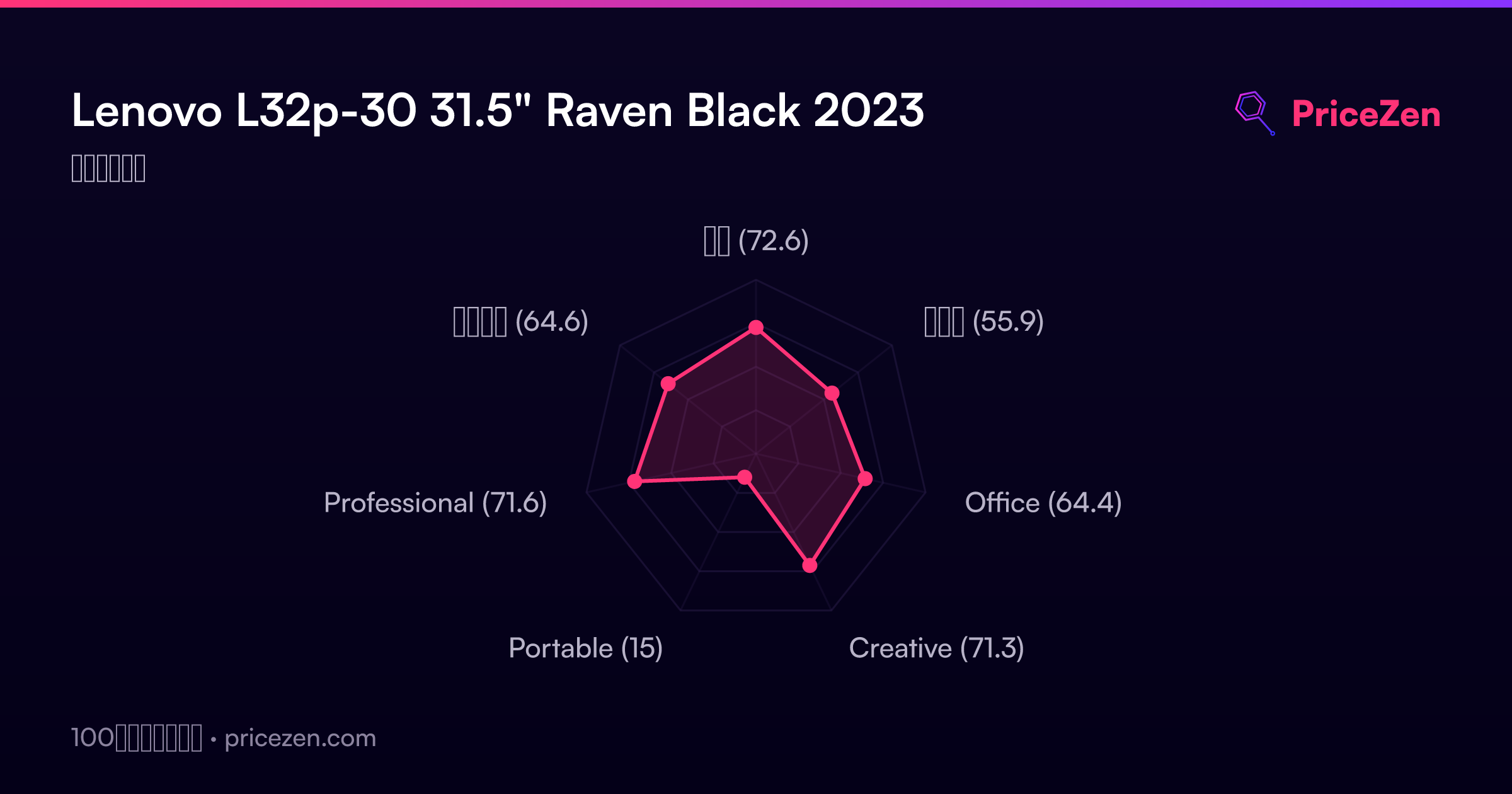
- 総合72.6
- ゲーム56
- Office64.5
- Creative71.3
- Portable15
- Professional71.6
- エンタメ64.6