MSI PRO MP225V 22" Matte Black

VAパネルで、暗い部屋でも深いコントラスト 11月29日に確認済み
52/100 総合スコア 4.4 オーナー評価102件の平均
- Screen
- 22"
- Resolution
- 1920 x 1080
- Panel
- VA
- Refresh
- 100 Hz
- Response time
- 1 ms
- Adaptive sync
- Adaptive-Sync
- HDR
- HDR10
1店舗の価格を比較
安い順。新品・整備済み品・バンドルのオファーは分けて表示するので、同じ条件どうしで比較できます。
| 店舗 | 販売元 | カラーと状態 | 価格 | 最安との差 | 最終確認 | リンク |
|---|---|---|---|---|---|---|
| 新品1件の価格単品 | ||||||
| 過去7日間は確認していないため、これらの価格は変わっている可能性があります | ||||||
| Amazon | マーケットプレイス出品者 | 記載なし | ¥20,540 | 11月3日 | 店舗へ | |
 出典: PriceZen, 2026年11月3日に確認
過去7日以内に確認した価格を「現在の価格」としています。 「マーケットプレイス出品者」とは、その店舗自身ではなく、店舗上の第三者の出品者を指します。
価格履歴
その日に確認その日は未確認、オファーは継続中
出典: PriceZen, checked 2026年11月3日




概要
The 30-Second Version
The MSI PRO MP225V is a 22-inch 1080p monitor with a 100Hz refresh rate and Adaptive-Sync, which is rare at this price. It's a solid budget pick for office work or as a second screen, but color accuracy and connectivity are limited. Shop around, because prices vary wildly from $56 to $104.
Pros & Cons
長所
- 100Hz refresh rate at a budget price 75th
- Adaptive-Sync support for smoother gameplay 70th
- VA panel with 4000:1 contrast ratio 68th
- VESA mount compatible for multi-monitor setups 68th
- Thin bezels keep the footprint small
短所
- Only HDMI and VGA, no DisplayPort
- Stand only tilts, no height adjustment
- Color accuracy is mediocre
- Some users report screen tearing in browsers
- Build quality feels cheap
オーナーの声
The Word on the Street
- Several buyers report screen tearing in browser windows and grainy picture quality, which is disappointing for a monitor marketed as smooth.
- A few owners say the monitor died within months of purchase, raising concerns about long-term reliability.
- Some users appreciate the easy plug-and-play setup, but the overall sentiment is tempered by the image quality issues.
購入者の評価が時間とともにどう変化したか
独自顧客が実際にレビューを書いた時期に基づいています。発売当初の高評価が続いたかどうかがわかります。
書かれたレビュー 31件、2025/06~2026/06:満足 27件、不満 1件、星なし 3件
ストア評価全102件:4.4★。 多くの購入者はレビューを書かずに評価だけを付けています。 グラフは書かれたレビュー31件を数えています。
- 2026/04~2026/065件中5件が満足
Buyers in Q2 2026 found this monitor easy to set up, with great picture quality, non-glare screen, and useful features like auto-on and anti-flicker. It's praised as affordable and suitable for light gaming and school work.
- Easy plug-and-play setup and auto-on feature when computer powers up.
- Great picture quality with non-glare screen and good colors.
- Budget-friendly, ideal for kids' school work and light gaming.
- Includes anti-flicker technology to reduce eye strain.
- 2026/01~2026/0314件中13件が満足 · 星なし 2件
Buyers found this budget 1080p VA monitor a good value for light gaming and office use, with positive mentions of price, weight, and performance. A few reported defects or Linux compatibility issues.
- Great value at ~$60 for 1080p/100Hz, but some had Linux/Intel GPU black screen issues at 100Hz.
- One monitor died after 4 months of light use; buyer called it a waste of money.
- Extremely lightweight, great for monitor arms and frequent repositioning.
- Buyers buying two were happy with the setup, though one noted to check cable requirements.
- 2025/07~2025/094件中4件が満足
Two reviews praise the monitor's price-quality ratio and gaming performance, while one reports severe screen tearing and poor picture quality, deeming it unusable.
- Bad screen tearing with browser windows, grainy picture, unusable as secondary monitor.
- Excellent value for money, good Hz, thin bezels, fast assembly.
- No physical buttons for brightness; requires software. Minor but noted.
- Includes extra HDMI cable, works well after 4 months of use.
各点は書かれたレビュー1件で、書かれた月に置いています。満足 = 4〜5★、普通 = 3★、不満 = 1〜2★。 期間ごとの要約は英語です。
実証データ
Performance
The 100Hz refresh rate is the star of the show here. Most budget monitors in this price range are stuck at 60Hz or 75Hz, so getting 100Hz with Adaptive-Sync is a genuine step up. Scrolling feels smoother, and casual games benefit from the extra frames. The 1ms MPRT response time is a marketing number, though. The real-world gray-to-gray response is 4ms, which is typical for a VA panel and fine for casual play, but fast-paced shooters will show some ghosting. Our database puts this monitor's overall performance at the 68th percentile, which is solid but not spectacular.
Color performance is a mixed bag. The 300 nits brightness is adequate for indoor use, and the 4000:1 contrast ratio gives blacks more depth than you'd get from a cheap IPS panel. But the color gamut coverage lands around the 60th percentile, so this isn't a monitor for photo editing or anything that needs accurate color. The 8-bit panel can technically display 16.7 million colors, but the VA panel's viewing angles mean colors shift when you're not looking straight on. For office work and YouTube, it's fine. For creative work, look elsewhere.
Specifications
Full Specifications
Display
| Size | 22" |
| Resolution | 1920x1080 (Full HD) |
| Panel Type | VA |
| Aspect Ratio | 16:9 |
| Curved | No |
| Screen Finish | matte |
Performance
| Refresh Rate | 100 Hz |
| Response Time | 1 |
| Adaptive Sync | Adaptive-Sync |
Color & HDR
| Brightness | 300 nits |
| Color Gamut | 100% CIE1976 |
| Color Depth | 8-bit |
| HDR | HDR10 |
Connectivity
| HDMI Ports | 1 |
| DisplayPort | 0 |
| USB-C | 0 |
| Speakers | No |
| Headphone Jack | Yes |
Ergonomics
| Height Adjustable | No |
| Tilt | Yes |
| Swivel | No |
| Pivot | No |
| VESA Mount | 100x100 |
Features
| Webcam | No |
| Touchscreen | No |
| PIP/PBP | No |
| Weight | 2.5 kg / 5.5 lbs |
vs Competition
Compared to the ASUS TUF Gaming VG27VQMY, the MSI is smaller, dimmer, and less feature-rich, but it's also a fraction of the price. The ASUS is a 27-inch curved panel aimed at gamers, while the MSI is a basic productivity monitor that happens to have a 100Hz refresh rate. If you're serious about gaming, the ASUS is the better pick. If you just want a cheap second monitor, the MSI wins on price alone.
The Acer Nitro XV271U M3BMIIPRX is another step up, with a 1440p resolution and higher refresh rate, but again, you're paying significantly more. The SANSUI 27 inch monitor is a closer competitor in terms of price, but it's a bigger panel with similar specs, so it comes down to whether you want more screen real estate or a smaller footprint. The Samsung Odyssey LS27DG302ENXZA is in a completely different league, with better everything, but it costs several times more. For what the MSI is, a cheap 22-inch 100Hz monitor, it holds its own against the budget competition.
| Spec | MSI PRO MP225V 22" | Acer Nitro UM.CX2AA.S01 34" | LG UltraGear 39" | BenQ PD3220U 32" | ASUS ProArt Display PA32KCX 32" | Samsung Odyssey Ark 2nd Gen 55" |
|---|---|---|---|---|---|---|
| Screen Size | 22 | 34 | 39 | 32 | 32 | 55 |
| Resolution | 1920 x 1080 | 3440 x 1440 | 3440 x 1440 | 3840 x 2160 | 7680 x 4320 | 3840 x 2160 |
| Panel Type | VA | VA | OLED | IPS | Mini-LED | Mini-LED |
| Refresh Rate | 100 | 165 | 240 | 60 | 60 | 165 |
| Response Time Ms | 1 | 1 | 0.03 | 5 | 5 | 1 |
| Adaptive Sync | Adaptive-Sync | FreeSync Premium | FreeSync Premium Pro | - | Adaptive-Sync | FreeSync Premium Pro |
| Hdr | HDR10 | HDR400 | DisplayHDR True Black 400 | HDR10 | Dolby Vision | HDR10+ |
| Compare | Compare | Compare | Compare | Compare |
| 製品 | Color | 携帯性 | Display | Feature | Ergonomic | Performance | Connectivity | ユーザー評価 |
|---|---|---|---|---|---|---|---|---|
| MSI PRO MP225V 22" | 58.5 | 67.9 | 11.7 | 70.1 | 47.1 | 67.8 | 20.3 | 75.1 |
| Acer Nitro UM.CX2AA.S01 34" Compare | 84.6 | 20.7 | 75.9 | 90.8 | 66.8 | 77 | 83.8 | 84.3 |
| LG UltraGear 39" Compare | 63.3 | 49.3 | 84 | 96.3 | 66.8 | 97.9 | 81 | 0 |
| BenQ PD3220U 32" Compare | 88.5 | 81.3 | 95.1 | 85 | 90.7 | 22.3 | 96.9 | 0 |
| ASUS ProArt Display PA32KCX 32" Compare | 99.8 | 76.5 | 100 | 85 | 90.7 | 35.7 | 96.9 | 6.9 |
| Samsung Odyssey Ark 2nd Gen 55" Compare | 98.4 | 20.7 | 91.5 | 96.3 | 30 | 77 | 81 | 75.1 |
価格
Value & Pricing
Here's where things get interesting. The MSI PRO MP225V is listed anywhere from $56 to $104 in the US, which is a $48 spread depending on where you shop. That's a huge range for a monitor this basic. The best deal we're seeing is at the low end of that range, and at $56, this monitor is a steal for a second screen or a kid's first setup. At $104, though, you're getting into territory where you can find 24-inch IPS panels with better color and more connectivity. In Canada, the spread is even wider, from CAD 98 to CAD 177. If you're paying the higher end of that, you're overpaying. Shop around before you commit.
詳細情報
Overview
The MSI PRO MP225V is a 22-inch budget monitor that sits in that sub-$100 sweet spot where you're mostly hoping for something that just works. It's a 1080p VA panel with a 100Hz refresh rate, which is honestly more than you'd expect at this price. MSI is pitching it as a do-it-all display for office work and casual gaming, and for the most part, that's a fair description. The thin bezels and VESA mount support make it a decent candidate for a multi-monitor setup if you're tight on desk space.
But let's be real about what you're getting. This is a no-frills monitor. You get one HDMI port, a VGA port, and a headphone jack. No DisplayPort, no USB hub, no speakers. The stand only tilts, so you'll need a VESA arm if you want height adjustment. At 300 nits brightness and with a 4000:1 contrast ratio, it's fine for a dim office, but don't expect it to fight off sunlight. The 100Hz refresh rate and Adaptive-Sync support are the headline features here, and they do make a difference if you're coming from a standard 60Hz office monitor.
Is the MSI PRO MP225V good for everyday productivity? For basic tasks like email, spreadsheets, and web browsing, yes. The 22-inch size keeps text reasonably sharp at 1080p, and the VA panel gives you better contrast than a typical IPS budget screen. Just don't expect it to be a color-accurate workhorse or a serious gaming display. It's a budget monitor, and it acts like one.
Common Questions
Q: Is the MSI PRO MP225V good for gaming?
It's fine for casual gaming thanks to the 100Hz refresh rate and Adaptive-Sync, but the VA panel's 4ms gray-to-gray response time means fast-paced shooters will show some ghosting.
Q: Does the MSI PRO MP225V have speakers?
No, the MP225V doesn't have built-in speakers. You'll need to use the headphone jack or external speakers.
Q: Can I mount the MSI PRO MP225V on a monitor arm?
Yes, it has a standard VESA 100x100 mount, so you can attach it to most monitor arms or wall mounts.
Q: What ports does the MSI PRO MP225V have?
It has one HDMI 1.4 port, one VGA port, and a headphone jack. There's no DisplayPort or USB hub.
Who Should Skip This
If you're a serious gamer, a content creator, or anyone who needs accurate color, the MSI PRO MP225V isn't for you. The VA panel's color accuracy is mediocre, the connectivity is limited to HDMI and VGA, and the stand only tilts. Gamers should look at something like the ASUS TUF Gaming VG27VQMY or the Acer Nitro XV271U M3BMIIPRX instead. If you need a monitor for photo or video editing, you'll want an IPS panel with better color coverage. And if you're planning to use this as your primary display for years, the reported reliability issues might make you think twice. This is a budget second monitor, not a daily driver for demanding work.
Verdict
Should you buy the MSI PRO MP225V? If you need a cheap, compact monitor for office work, web browsing, or as a second screen, and you can find it for under $70, yes. The 100Hz refresh rate is a nice bonus that makes everyday use feel more responsive, and the VESA mount support means you can stick it on an arm and forget about the flimsy stand. It's not going to blow you away, but it does the job.
If you're looking for a primary gaming monitor or something for color-sensitive work, skip it. The VA panel's color accuracy is mediocre, the connectivity is limited, and some users have reported screen tearing issues in browser windows. There are better options if you can stretch your budget by $50 or so. But for a budget second monitor, the MP225V is a reasonable pick.
Usage Scores
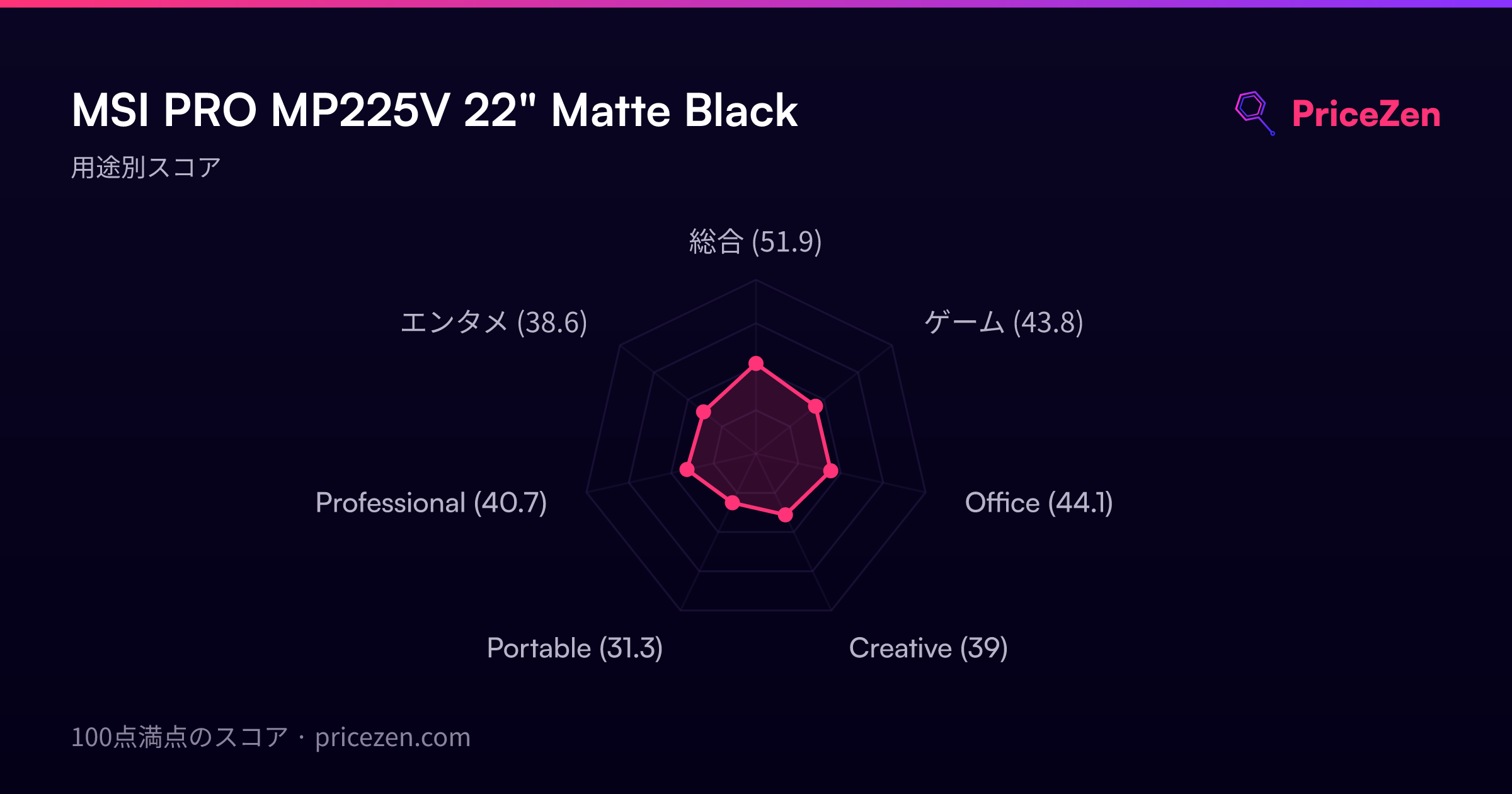
- 総合51.9
- ゲーム43.8
- Office44.1
- Creative39
- Portable31.3
- Professional40.7
- エンタメ38.6