Lenovo ThinkVision T24-40 23.8" Eclipse Black 2025
The 120Hz variable refresh rate and 99% sRGB color accuracy on its 23.8-inch IPS panel deliver smooth, color-precise visuals uncommon in office displays. TÜV Rheinland 5-star Eye Comfort certification and a fully ergonomic stand with pivot, swivel, and height adjustment prioritize all-day usability. This monitor is best for office workers and data analysts who need fluid scrolling and certified eye care during extended productivity sessions.












概要
The 30-Second Version
The Lenovo ThinkVision T24-40 is a 24 inch 1080p office monitor with a surprising 120Hz refresh rate and USB-C connectivity. Its ergonomic stand is best-in-class, with height adjust, tilt, swivel, and pivot. Prices range from USD 175 to USD 310 in the US, so shop around and grab it at the low end. It's a great work-from-home pick if you value comfort and cable simplicity over raw display quality.
Pros & Cons
長所
- 120Hz refresh rate is double the office norm and makes everything feel smoother 91st
- Ergonomics are excellent, with height adjust, tilt, swivel, and pivot all included 91st
- USB-C connectivity simplifies cable management for laptop users 89th
- 99% sRGB and BT.709 coverage is better than most office monitors 87th
- Compact 24 inch size fits easily on smaller desks
短所
- 250 nits brightness is underwhelming in bright rooms
- Display quality and color scores sit below average in our database
- Only one HDMI and one USB-C port, connectivity is limited
- Feature set is sparse compared to similarly priced competitors
- 1080p resolution feels dated if you're used to higher density panels
オーナーの声
購入者の評価が時間とともにどう変化したか
独自顧客が実際にレビューを書いた時期に基づいています。発売当初の高評価が続いたかどうかがわかります。
書かれたレビュー 32件、2025/08~2026/11:満足 31件、不満 1件
ストア評価全62件:4.8★。 グラフは書かれたレビュー32件を数えています。
各点は書かれたレビュー1件で、書かれた月に置いています。満足 = 4〜5★、普通 = 3★、不満 = 1〜2★。
実証データ
Performance
The headline spec here is the 120Hz refresh rate. That's double the standard 60Hz you get on most office monitors, and it makes a real difference in daily use. Scrolling through long documents feels smoother, moving windows around is less janky, and if you sneak in a quick game during lunch, you'll appreciate the extra frames. The 4ms response time is decent for an IPS panel, not going to win any esports awards, but perfectly fine for casual use.
The 1080p resolution on a 23.8 inch viewable screen gives you a pixel density that's comfortable for text work. It's not super sharp by modern standards, but it's also not going to strain your eyes. The 250 nit brightness is the weak spot here. In a typical office with controlled lighting, it's adequate. Near a big window on a sunny day, you'll be cranking it to max and wishing for more. The 99% sRGB and 99% BT.709 coverage is nice for an office panel, meaning colors look accurate enough for basic photo work or video calls, but this is not a monitor for serious color grading.
Specifications
Full Specifications
Display
| Size | 24" |
| Resolution | 1920x1080 (Full HD) |
| Panel Type | IPS |
| Aspect Ratio | 16:9 |
| Curved | No |
| Screen Finish | matte |
Performance
| Refresh Rate | 120 Hz |
| Response Time | 4 |
| Adaptive Sync | Adaptive-Sync |
Color & HDR
| Brightness | 250 nits |
| Color Gamut | 99% sRGB, 99% BT.709 |
| Color Depth | 8-bit |
| HDR | HDR10 |
Connectivity
| HDMI Ports | 1 |
| DisplayPort | 1 |
| USB-C | 1 |
| Thunderbolt | N/A |
| Speakers | No |
| Headphone Jack | No |
Ergonomics
| Height Adjustable | Yes |
| Tilt | Yes |
| Swivel | Yes |
| Pivot | Yes |
| VESA Mount | 100x100 |
Features
| Webcam | No |
| Touchscreen | No |
| PIP/PBP | No |
| Power | 12 |
| Weight | 3.0 kg / 6.6 lbs |
vs Competition
When you stack the T24-40 against the competition, the picture gets clearer. The MSI MAG 271QPX QD-OLED E2 and the ASUS ROG Strix XG27AQDMGR are in a completely different league, QD-OLED panels with higher resolutions and refresh rates, but they also cost significantly more and are aimed at gamers. The LG UltraGear 27G810A-B and Samsung Odyssey G7 G75F are also gaming-focused, with faster response times and bigger screens. If gaming is your priority, those are better picks.
But for office work, the T24-40 holds its own in ways those gaming monitors don't. The ergonomic stand is a standout, and the USB-C port means you can connect a laptop with a single cable for video and power. The Alienware AW2725D is another gaming monitor that trades ergonomics for raw speed. The T24-40's 120Hz refresh rate is actually a nice middle ground, faster than typical office displays but not as overkill as 240Hz gaming panels. You're trading display quality and brightness for comfort and connectivity, and for a lot of desk workers, that's the right trade.
| Spec | Lenovo ThinkVision T24-40 23.8" | LG UltraGear 39" | BenQ PD3220U 32" | Samsung Odyssey Ark 2nd Gen 55" | Gigabyte M Series M32U 31.5" | Dell UltraSharp U4320Q 27" |
|---|---|---|---|---|---|---|
| Screen Size | 24 | 39 | 32 | 55 | 31.5 | 27 |
| Resolution | 1920 x 1080 | 3440 x 1440 | 3840 x 2160 | 3840 x 2160 | 3840 x 2160 | 3840 x 2160 |
| Panel Type | IPS | OLED | IPS | Mini-LED | IPS | IPS |
| Refresh Rate | 120 | 240 | 60 | 165 | 144 | 60 |
| Response Time Ms | 4 | 0.03 | 5 | 1 | 1 | 5 |
| Adaptive Sync | Adaptive-Sync | FreeSync Premium Pro | - | FreeSync Premium Pro | FreeSync Premium Pro | - |
| Hdr | HDR10 | DisplayHDR True Black 400 | HDR10 | HDR10+ | HDR400 | HDR400 |
| Compare | Compare | Compare | Compare | Compare |
| 製品 | Color | 携帯性 | Display | Feature | User Sentiment | Ergonomic | Performance | Connectivity | ユーザー評価 |
|---|---|---|---|---|---|---|---|---|---|
| Lenovo ThinkVision T24-40 23.8" | 53.5 | 87.3 | 37.5 | 70.1 | 89 | 90.8 | 60.3 | 90.9 | 56.4 |
| LG UltraGear 39" Compare | 63.4 | 49.3 | 84.1 | 96.3 | 0 | 66.8 | 97.9 | 81 | 0 |
| BenQ PD3220U 32" Compare | 88.6 | 81.3 | 95.1 | 85 | 0 | 90.8 | 22.4 | 96.9 | 0 |
| Samsung Odyssey Ark 2nd Gen 55" Compare | 98.4 | 20.6 | 91.5 | 96.3 | 10.4 | 30 | 77.1 | 81 | 74.8 |
| Gigabyte M Series M32U 31.5" Compare | 90 | 62.8 | 87 | 85 | 0 | 73.4 | 72.6 | 87.4 | 0 |
| Dell UltraSharp U4320Q 27" Compare | 91 | 82.7 | 87 | 85 | 0 | 90.8 | 22.4 | 96.9 | 0 |
価格
Value & Pricing
Pricing for the T24-40 is all over the place depending on where you shop. In the US, we're seeing listings from USD 175 to USD 310 across six different vendors. That's a USD 135 spread for the exact same monitor, which is wild. If you're in the US, the lower end of that range makes this a genuinely good deal for what you get. At USD 310, it's a harder sell, especially when you consider what else is out there.
In Canada, the spread is even more dramatic, from CAD 250 to CAD 713 across four listings. A CAD 463 difference is the kind of thing that should make you pause before clicking buy. The best deals are at the lower end of that range, and honestly, at CAD 713 you're paying way too much for a 1080p office monitor. Shop around, check Newegg and Amazon, and don't pay a premium for what should be a budget-friendly workhorse.
価格履歴
詳細情報
Overview
The Lenovo ThinkVision T24-40 is one of those monitors that sneaks up on you. On paper it looks like a pretty standard 24 inch office display, 1080p, IPS panel, nothing that would make you stop scrolling. But then you notice the 120Hz refresh rate and the USB-C port, and suddenly this thing is a lot more interesting than the average cubicle monitor. It's aimed squarely at office workers and hybrid setups, but Lenovo threw in a few specs that make it genuinely useful beyond spreadsheets.
Our database puts this monitor's ergonomic score in the 91st percentile, which is a big deal if you spend eight hours a day staring at a screen. Height adjust, tilt, swivel, pivot, the full range of movement is here. That's the kind of flexibility you usually pay extra for, and it's baked in. The compact score is also solid at the 69th percentile, so it won't eat your entire desk. For a 24 inch panel, that's exactly what you want.
The catch is that some of the other numbers are less exciting. Display quality sits at the 39th percentile and color at the 38th, which tells you this is a workhorse, not a show pony. 250 nits of brightness is fine for an office but won't wow anyone in a bright room. Still, for the right buyer, the T24-40 hits a sweet spot between comfort, connectivity, and price that's hard to ignore.
Common Questions
Q: Is the 120Hz refresh rate worth it for office work?
Yes, if you spend a lot of time scrolling through documents or switching between windows. The higher refresh rate makes motion feel noticeably smoother compared to a standard 60Hz office monitor. It's not a gaming-grade panel, but the 4ms response time is fine for casual use, and your eyes will thank you during long work sessions.
Q: Can I connect this monitor to my laptop with just one cable?
Yes, the USB-C port supports video and power delivery, so you can connect a compatible laptop with a single cable. That means fewer cables on your desk and a cleaner setup overall. Just make sure your laptop supports USB-C video output, which most modern ultrabooks and business laptops do.
Q: How bright is this monitor, and will it work in a sunny room?
The T24-40 maxes out at 250 nits, which is adequate for typical office lighting but can feel dim in a room with lots of natural light. If your desk is near a big window, you may find yourself wishing for more brightness. For most indoor office environments, it's perfectly usable, just not dazzling.
Q: Is this monitor good for photo editing or color work?
It covers 99% of sRGB and BT.709, which is better than many office monitors and fine for basic photo editing or video calls. But with an 8-bit panel and 250 nits brightness, it's not suited for serious color grading or professional photo work. If color accuracy is critical, you'll want a monitor with higher brightness and wider color gamut coverage.
Who Should Skip This
Gamers should look elsewhere. The 4ms response time and 1080p resolution won't satisfy anyone who takes competitive gaming seriously, and the 250 nit brightness is a letdown for immersive experiences. The MSI MAG 271QPX QD-OLED E2 or the ASUS ROG Strix XG27AQDMGR are much better fits if gaming is your main use, though they cost more.
Creative professionals doing color-critical work should also pass. The color score in our database sits at the 38th percentile, which means it's below average for accurate color reproduction. If you're editing photos or video for a living, you'll want something with higher brightness, wider color gamut, and better calibration out of the box. Look at monitors with factory calibration and higher nit ratings instead.
Verdict
If you're setting up a home office or upgrading a work desk, the T24-40 is a solid pick, especially if you can find it at the lower end of the price range. The 120Hz refresh rate and USB-C connectivity are genuinely useful features that you don't always get at this size and price. The ergonomic stand is the real star here, and it's something you'll appreciate every single day.
For anyone doing color-critical work, photo editing, or gaming as a primary use, this isn't the monitor for you. The brightness and color accuracy are adequate but not impressive, and the feature set is thin. If you need a second monitor for a laptop and want something that's easy on your neck and your cable drawer, the T24-40 makes a lot of sense. Just don't overpay for it.
Usage Scores
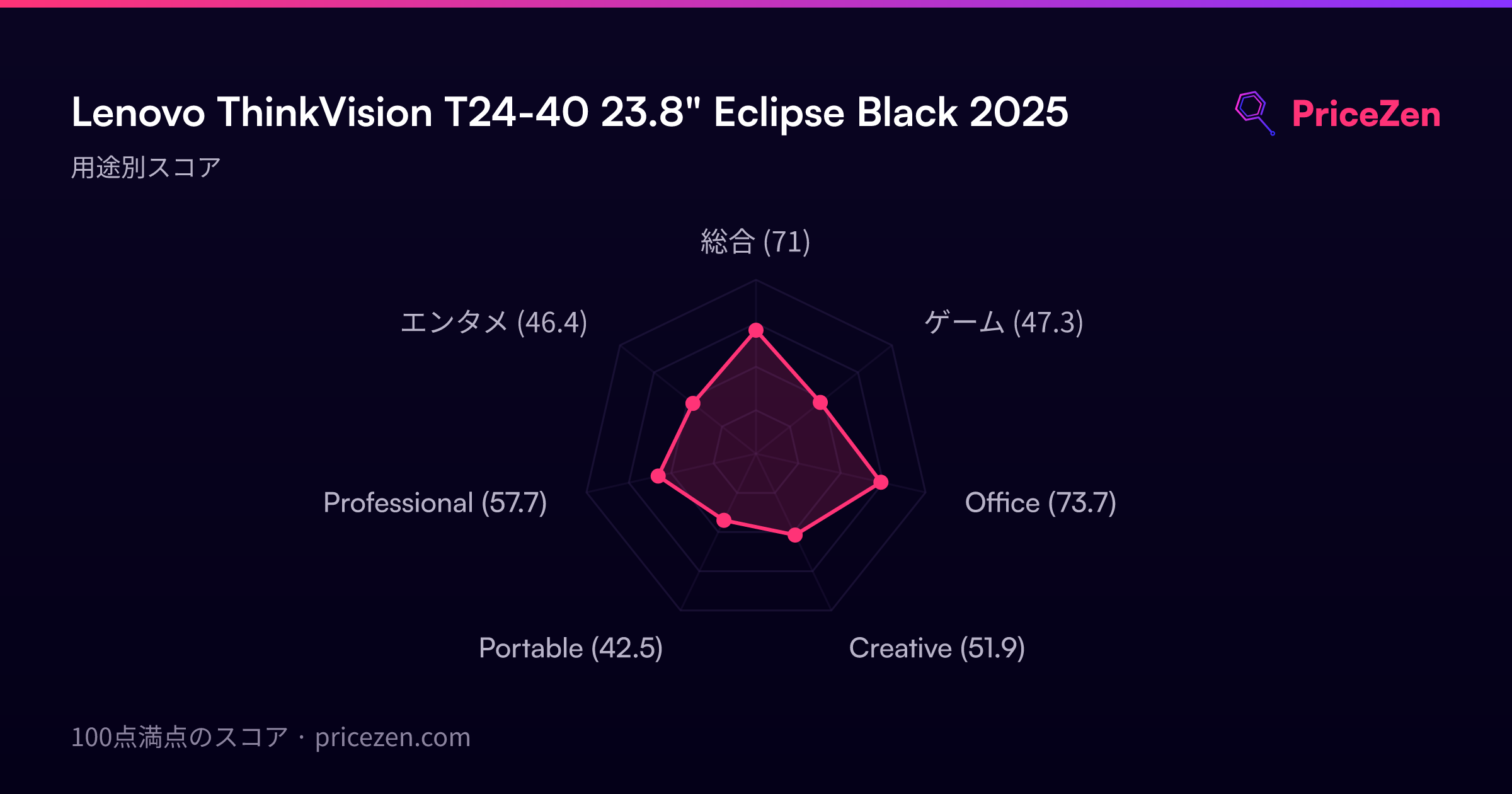
- 総合71
- ゲーム47.3
- Office73.7
- Creative51.9
- Portable42.5
- Professional57.7
- エンタメ46.4