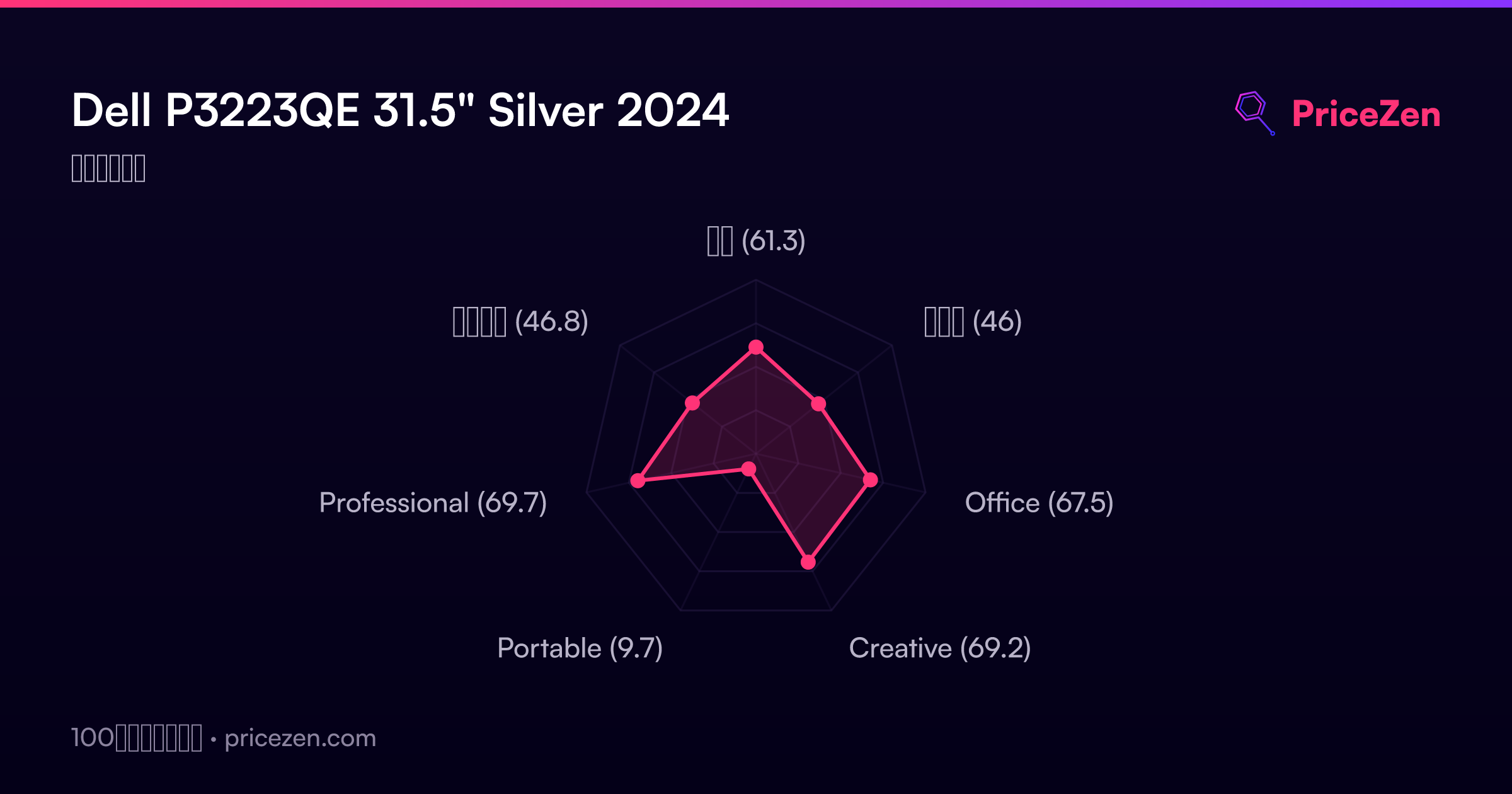
Dell P3223QE 31.5" Silver 2024
The 31.5-inch IPS panel delivers a sharp 4K UHD workspace with 99% sRGB coverage and 10-bit color, making detailed office and professional tasks clear. Its USB-C connectivity with 65W power delivery simplifies a desk setup into a single-cable docking solution, while the fully adjustable stand adds practical ergonomic flexibility. This monitor is best for office workers and business professionals who need a large, color-accurate display for productivity applications and extended screen real estate.

現在、販売店の最新価格はありません


概要
The 30-Second Version
The Dell P3223QE nails the basics with a 31.5-inch 4K IPS panel that hits the 90th percentile for display quality and 91st percentile for ergonomics. But the 60Hz refresh rate and 5ms response time land it in the 22nd percentile for performance, so it's strictly a productivity tool. At USD 499 on the low end, it's a great office monitor. Just don't expect it to game.
Pros & Cons
長所
- 31.5-inch 4K IPS panel delivers 3840 x 2160 resolution with over 8 million pixels 91st
- Ergonomics hit the 91st percentile with full height, tilt, swivel, and pivot adjustments 88th
- 99% sRGB coverage and 10-bit color depth land in the 83rd percentile for color 80th
- 350 nits brightness keeps the screen readable in bright office environments
- USB-C connectivity with DisplayPort and HDMI covers most modern setups
短所
- 60Hz refresh rate and 5ms response time sit in the 22nd percentile for performance
- Feature set is thin at the 23rd percentile with only three total inputs
- Portability score is a brutal 10.8 out of 100, this thing weighs 9900g
- No Adobe RGB or DCI-P3 coverage for serious creative color work
- Customer rating of 4.4 out of 5 from just 49 reviews is solid but not overwhelming
オーナーの声
The Word on the Street
購入者の評価が時間とともにどう変化したか
独自顧客が実際にレビューを書いた時期に基づいています。発売当初の高評価が続いたかどうかがわかります。
書かれたレビュー 8件、2024/03~2025/11:満足 8件
ストア評価全49件:4.4★。 多くの購入者はレビューを書かずに評価だけを付けています。 グラフは書かれたレビュー8件を数えています。
各点は書かれたレビュー1件で、書かれた月に置いています。満足 = 4〜5★、普通 = 3★、不満 = 1〜2★。
実証データ
Performance
Let's be honest about what this monitor is and isn't. The 60Hz refresh rate and 5ms response time put it in the 22nd percentile for performance. That's not a typo. If you're coming from a 144Hz or 240Hz panel, the difference will be immediately obvious in fast-moving content. For office work, document editing, and video calls, it's perfectly fine. For competitive gaming or high-refresh scrolling, it's a weak spot.
The display itself is where this thing shines. The 31.5-inch 4K IPS panel delivers 3840 x 2160 resolution, which means over 8 million pixels on screen. Text is razor sharp, and the 350 nits of brightness keeps things readable in most office lighting. Color coverage is 99% sRGB with 10-bit depth, landing in the 83rd percentile for color. That's well above average for a productivity monitor, though creative pros working in Adobe RGB or DCI-P3 will find it limiting. The 5ms response time is fine for movies and casual content, but it's not built for fast action.
Specifications
Full Specifications
Display
| Size | 31.5" |
| Resolution | 3840x2160 (4K UHD) |
| Panel Type | IPS |
| Aspect Ratio | 16:9 |
| Curved | No |
| Screen Finish | matte |
Performance
| Refresh Rate | 60 Hz |
| Response Time | 5 |
Color & HDR
| Brightness | 350 nits |
| Color Gamut | 99% sRGB |
| Color Depth | 10-bit |
Connectivity
| HDMI Ports | 1 |
| DisplayPort | 1 |
| USB-C | 1 |
| Speakers | No |
Ergonomics
| Height Adjustable | Yes |
| Tilt | Yes |
| Swivel | Yes |
| Pivot | Yes |
| VESA Mount | 100x100 |
Features
| Weight | 9.9 kg / 21.8 lbs |
vs Competition
Stacked against the competition, the P3223QE occupies a specific niche. The ASUS ROG Strix XG27UCDMG, MSI MAG 271QPX QD-OLED E2, LG UltraGear 27GX790A-B, Samsung Odyssey G60SD, and Gigabyte M Series OLED MO27U2 SA are all gaming-focused OLED panels with high refresh rates. Those monitors will absolutely destroy the Dell in performance, with refresh rates well above 60Hz and response times measured in fractions of a millisecond. But they're also smaller, typically 27 inches, and they cost more. The Dell's 31.5-inch size and 4K resolution give it a productivity advantage those gaming panels can't match. If you're editing documents, managing spreadsheets, or doing office work all day, the Dell's larger screen and superior ergonomics matter more than 240Hz. If you're gaming, any of those competitors will run circles around it.
| Spec | Dell P3223QE 31.5" | LG UltraGear 45GX950A-B 45" | ASUS ROG Strix XG27UCDMG 27" | MSI MAG 271QPX QD-OLED E2 27" | Gigabyte AORUS FO32U2 32" | Samsung Odyssey Neo G95NC 57" |
|---|---|---|---|---|---|---|
| Screen Size | 31.5 | 45 | 27 | 27 | 32 | 57 |
| Resolution | 3840 x 2160 | 5120 x 2160 | 3840 x 2160 | 2560 x 1440 | 3840 x 2160 | 7680 x 2160 |
| Panel Type | IPS | OLED | OLED | QD-OLED | OLED | VA |
| Refresh Rate | 60 | 330 | 240 | 240 | 240 | 240 |
| Response Time Ms | 5 | 0.029999999329447746 | 0.029999999329447746 | 0.029999999329447746 | 0.029999999329447746 | 1 |
| Adaptive Sync | - | FreeSync Premium Pro | FreeSync Premium Pro | FreeSync Premium Pro | FreeSync Premium Pro | FreeSync Premium Pro |
| Hdr | - | DisplayHDR True Black 400 | DisplayHDR True Black 400 | DisplayHDR True Black 400 | DisplayHDR True Black 400 | HDR10+ |
| Compare | Compare | Compare | Compare | Compare |
| 製品 | Color | 携帯性 | Display | Feature | Ergonomic | Performance | Connectivity | ユーザー評価 |
|---|---|---|---|---|---|---|---|---|
| Dell P3223QE 31.5" | 80.1 | 49.6 | 88.4 | 19.2 | 90.8 | 22.4 | 62.6 | 50.1 |
| LG UltraGear 45GX950A-B 45" Compare | 99.4 | 76.5 | 99.7 | 95.7 | 90.8 | 99.4 | 97 | 92.1 |
| ASUS ROG Strix XG27UCDMG 27" Compare | 96.1 | 57.5 | 97.9 | 83.7 | 90.8 | 98 | 81.3 | 98.9 |
| MSI MAG 271QPX QD-OLED E2 27" Compare | 99.1 | 57.5 | 77.3 | 83.7 | 90.8 | 98 | 81.3 | 98.9 |
| Gigabyte AORUS FO32U2 32" Compare | 79.4 | 63 | 99.1 | 83.7 | 90.8 | 98 | 87.6 | 92.1 |
| Samsung Odyssey Neo G95NC 57" Compare | 96.9 | 28 | 99.7 | 95.7 | 73.6 | 87.3 | 93.2 | 74.9 |
価格
Value & Pricing
Pricing on the P3223QE is all over the place depending on where you shop. In the US, you'll find it ranging from USD 499 to USD 650 across three listings. That's a USD 151 spread for the exact same panel. The lowest US price at USD 499 is a genuinely good deal for a 31.5-inch 4K IPS monitor with this level of ergonomic adjustability. In Europe, the spread is EUR 105, from EUR 644 to EUR 749 across four listings in Germany, Spain, France, and Italy. The best European deal sits at EUR 644. If you're paying anywhere near the top of those ranges, you're overpaying. Shop around before you commit.
価格履歴
詳細情報
Overview
The Dell P3223QE is a 31.5-inch 4K IPS panel that lands in the 90th percentile for display quality in our database. That's a big deal for a monitor aimed at office and professional work. You're getting 3840 x 2160 resolution, 350 nits of brightness, and 99% sRGB coverage, which puts it in the top tier for sharpness and color accuracy among non-OLED panels. The ergonomics are also a standout, hitting the 91st percentile thanks to full height, tilt, swivel, and pivot adjustments.
But this isn't a gaming monitor, and the numbers back that up. The 60Hz refresh rate and 5ms response time land it in the 22nd percentile for performance. That's fine for spreadsheets and video calls, but if you're chasing high frame rates, this panel will feel sluggish. The feature set is also thin, sitting at the 23rd percentile, with just one HDMI, one DisplayPort, and one USB-C input. You're paying for the panel quality and the stand, not for extras.
Common Questions
Q: Is the Dell P3223QE good for gaming?
Not really. The 60Hz refresh rate and 5ms response time put it in the 22nd percentile for performance in our database. It'll handle casual games and movies fine, but competitive gamers will notice the lack of smoothness compared to high-refresh panels.
Q: How is the color accuracy for photo and video editing?
The P3223QE covers 99% sRGB with 10-bit color depth, landing in the 83rd percentile for color. That's well above average for a productivity monitor and fine for most work. But it lacks Adobe RGB and DCI-P3 coverage, so serious creative pros may find it limiting.
Q: Can I mount this monitor on a monitor arm?
Yes. The P3223QE supports VESA 100x100 mounting. The included stand also offers full ergonomic adjustments with height, tilt, swivel, and pivot, which puts it in the 91st percentile for ergonomics in our database.
Who Should Skip This
Gamers should skip this one entirely. The 60Hz refresh rate and 5ms response time put it in the 22nd percentile for performance, which means any fast-paced game will feel choppy compared to even budget gaming monitors. Creative professionals working in Adobe RGB or DCI-P3 color spaces should also look elsewhere, since the 99% sRGB coverage won't cut it for print or broadcast work. And if you need to move your monitor around frequently, the 9900g weight and 10.8 out of 100 portability score make this a terrible choice for travel or shared workspaces. This is a desk-bound office monitor, and it's not pretending to be anything else.
Verdict
The Dell P3223QE is a purpose-built productivity monitor that knows exactly what it is. The 90th percentile display quality and 91st percentile ergonomics make it one of the best office monitors we've seen in this size class. The 31.5-inch 4K panel gives you massive screen real estate, and the stand lets you position it however you need. At USD 499 on the low end, it's a strong value for professionals who spend their days in documents and spreadsheets. Just don't expect it to do anything beyond that. The 22nd percentile performance means gamers and high-refresh users should look elsewhere. If you need a big, sharp, comfortable monitor for work, this is a solid pick. If you need speed, it's not even in the conversation.
Usage Scores
- 総合61.3
- ゲーム46
- Office67.5
- Creative69.2
- Portable9.7
- Professional69.7
- エンタメ46.8